If you're running ads and sending people to your Wix website to generate leads, then setting up conversion tracking is really important.
It will help you understand which campaigns, ads, etc are generating your leads, and it will also give your ad platform (Google, Meta, etc) the data it needs to understand what is converting and who isn't (and ultimately what kind of people it should show your ads to in order to get more conversions).
The problem is, setting up conversion tracking is weirdly hard to do.
There are a bunch of different ways to do it, and the right one largely depends on where you are trying to send the data. It can also sometimes involve writing custom code and complex configuration, which isn't ideal.
So in this article, we'll walk you through three ways to set up conversion tracking with Wix Forms. We'll also give you full instructions for each, plus some resources (code snippets, a Google Tag Manager recipe, etc) to make it easy.
Method 1: Send a GA4 event via Google Tag Manager
Good for: Sending form submission events to Google Analytics 4, for free.
This method is best if all you want to do is send a conversion event GA4 when a Wix form gets submitted. Unlike ad platforms like Google Ads, Meta Ads, etc. Google Analytics has no need to know who filled the form in, only that someone did.
Wix connects to Google Analytics natively for things like pageviews and e-commerce, but the built-in integration doesn't send a separate event when a Wix form is submitted. So the best, free way to do it is to set it up in Google Tag Manager using a Recipe (which is basically a bundle of pre-built assets you drop straight into your Google Tag Manager account). We've already built one for Wix Forms, and you can grab it for free below.
Step 1: Download the Wix Forms Conversion Tracking GTM Recipe
Start by grabbing the Wix Forms GTM recipe from this page. Inside, you'll find:
- A Custom HTML Tag that watches for submissions of your Wix Forms and pushes a
wix_form_submitted event to Google Tag Manager when a form submission successfully goes through. Because Wix offers two entirely different form systems to site owners (New Wix Forms and Old Wix Forms), the tag first figures out which one it's dealing with and then acts accordingly. The older system triggers a real browser submit event it can listen for directly, while the newer one skips that event altogether, so the tag watches for Wix's own success signal once someone clicks Submit.
- A Variable holding the ID of the submitted form, which is useful if you want to filter triggers down to specific forms later (I.e. you only want to send a conversion to GA4 when someone submits your Request A Quote form, but not your Newsletter Signup form).
- A Trigger tied to the
wix_form_submitted event which can be used fire the conversion Tags you build (a GA4 event, a Google Ads conversion, and so on).
Step 2: Import the GTM recipe into your account
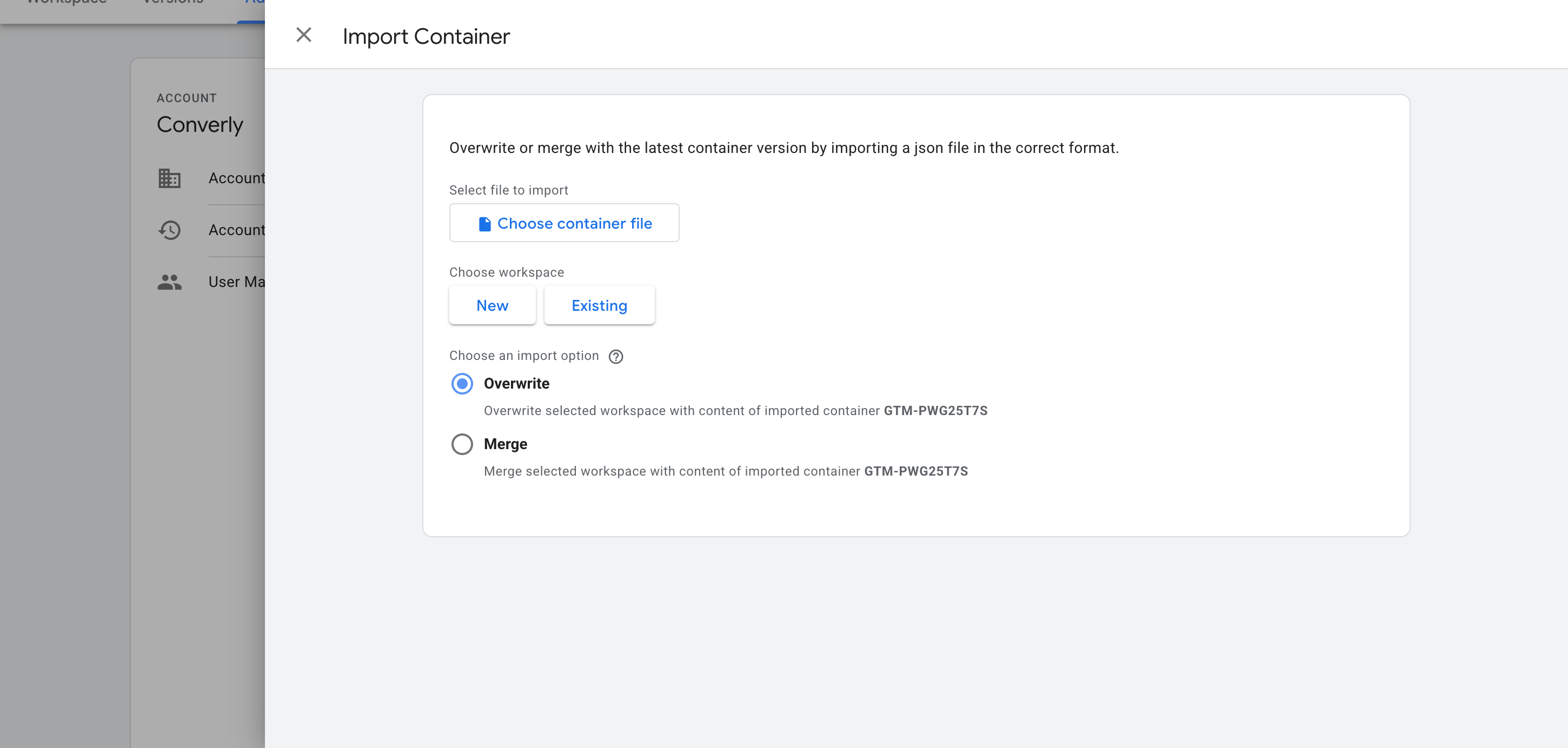
Once you've downloaded it from the page linked above, you then need to import it into your Google Tag Manager container. To do this, open your Google Tag Manager account, head to Admin, choose Import Container, select the downloaded file, and pick the Merge option (so it doesn't overwrite anything already in your container). The listener, variable and trigger are added for you automatically.
Step 3: Build a GA4 event tag
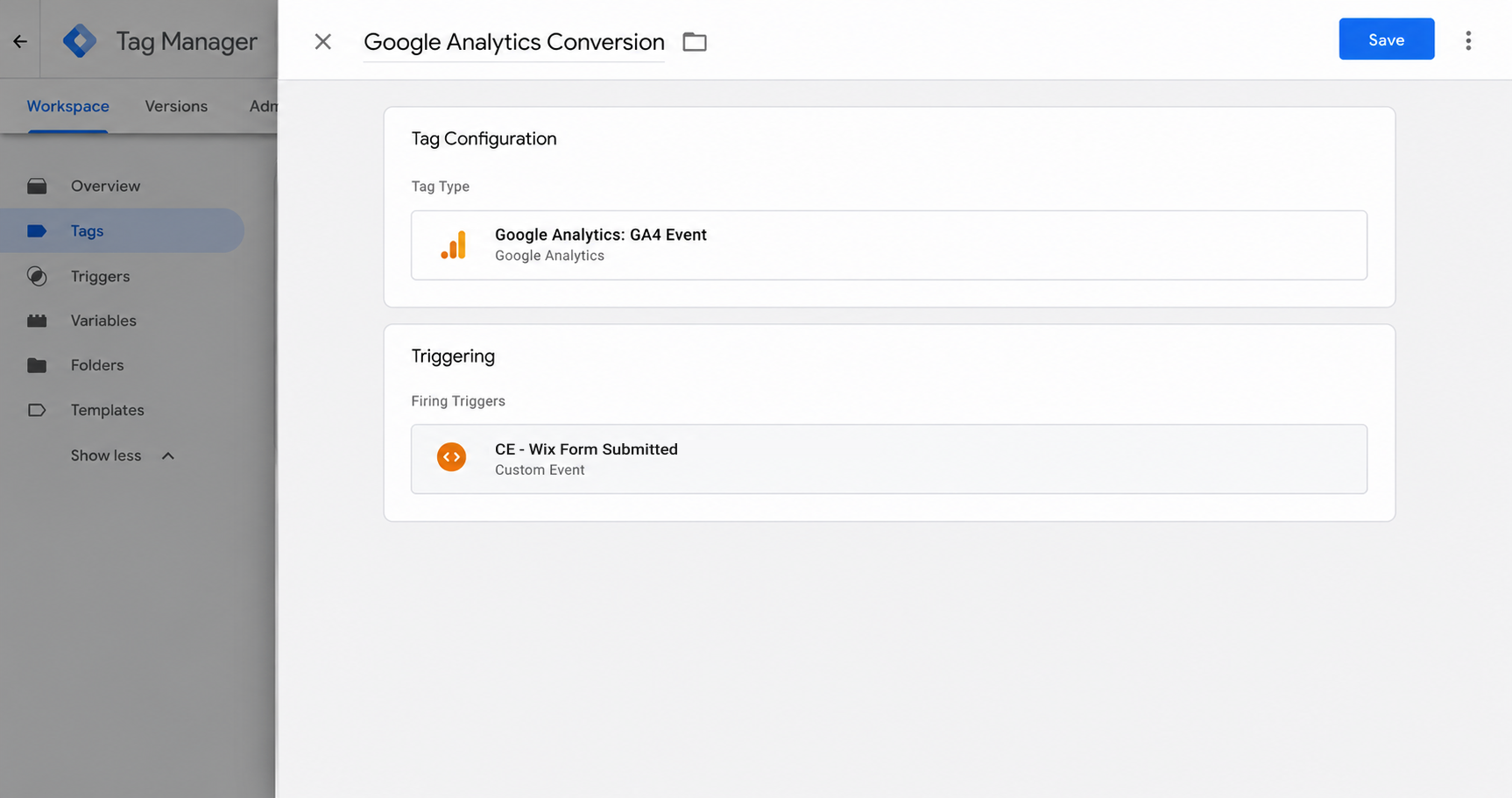
Now that the recipe is installed, you can use it as a Trigger for your conversion tags. To send a conversion to Google Analytics, create a GA4 event tag and set the Trigger to the one the recipe provides (called CE - Wix Form Submitted).
Step 4: Test it, then mark it as a Key Event in GA4
Submit a test entry on your Wix form, open GA4's Realtime report, and confirm the event shows up in the Recent Events list.
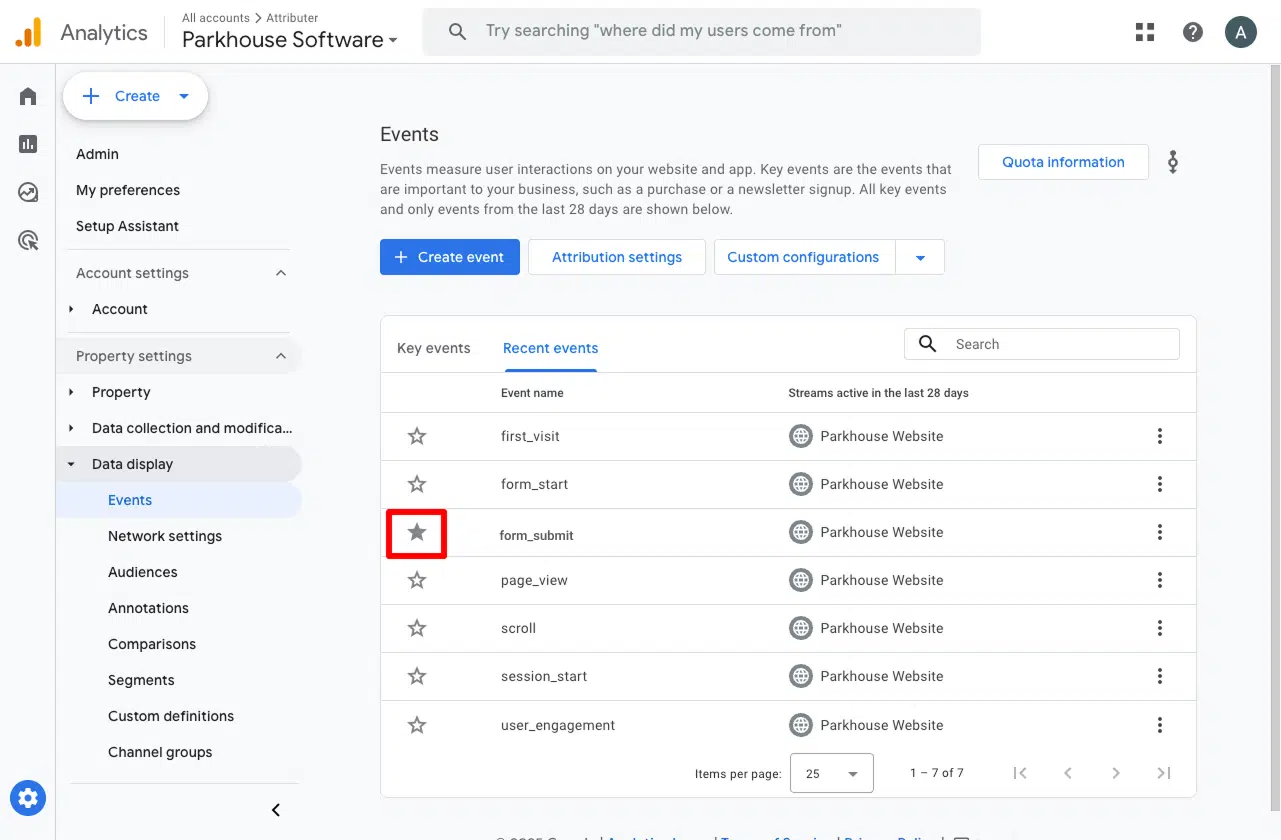
Once it's arriving, go to Admin, then Events, find the event in the list, and toggle it on as a Key Event. That's what tells GA4 to treat it as a conversion in your acquisition and funnel reports, instead of leaving it sitting there as an ordinary event.
Pros and cons
Pros:
- Doesn't cost anything. Google Tag Manager is free to use.
- Works with both of Wix's form builders (Old Wix Forms and New Wix Forms).
- Only counts a conversion when Wix confirms the form was successfully submitted. A rejected form submission (like if a required field is left blank, an email address is entered in an incorrect format, etc) never fires a conversion.
- Most of the setup work is already done for you. The listener, trigger and variable come pre-built, so it's just the GA4 event tag that you need to configure by hand (which is the simplest part of the job).
Cons:
- Still requires some setup work. The recipe removes the hardest part, but you're still on the hook for building the GA4 conversion tag and making sure it all works. And if you get stuck, there's no support to help you (Google does not provide support for Google Tag Manager).
- Every form on the site pushes an identical event. The Form ID variable only works in specific circumstances and requires some complicated setup to make it work. Practically speaking, this means a Quote Request form submission and a Contact Support form submission land as the same ‘Wix Form Submitted’ event in GA4 with no reliable way to tell them apart afterward. Fine if you have one form, less so if you have many.
- The conversion gets sent to Google Analytics through the visitor's browser, which means ad blockers and privacy-focused browsers like Safari can prevent it from ever reaching GA4. Roughly 30% of conversions get lost this way according to industry studies.
- Google Analytics is as far as it goes. Nothing here reaches Google Ads, Meta Ads, or any other destination (that's what Methods 2 and 3 are for).
Method 2: Use Google Tag Manager for Enhanced Conversions
Good for: Sending Enhanced Conversions to Google Ads.
Just counting submissions (the way Method 1 does) is fine for Google Analytics, but it won't get you far in Google Ads.
That's because Google Ads wants to match a conversion back to a real person who clicked your ad, and to do that you need to send information like their name, email, and phone with every conversion (Google calls this Enhanced Conversions).
Here's how to capture that data and send it with Google Tag Manager.
Step 1: Set up a Custom HTML Tag with the form listening code
In GTM, create a new Custom HTML Tag, paste in the snippet below, and set it to fire on the All Pages trigger, with the tag firing option set to Once per event.
<!--
Converly GTM Recipe - Wix Forms submission listener (Method 2: with PII)
This is the RICHER snippet used by the blog post's "Method 2: GTM with
Enhanced-Conversions data". It captures the lead's email, first name, last
name and phone alongside the submission event, which is what turns on
Enhanced Conversions in Google Ads and lifts Meta's Event Match Quality.
It shares its detection core with the event-only recipe snippet
(blog-snippet.html): the exact same two Wix runtimes, the exact same fire
paths, in the exact same conditions, so the two can never drift on WHEN they
fire or WHICH form fired. The only difference is that this one also reads the
field values and pushes them.
Wix has two form runtimes in the wild and they behave completely differently.
OLD Wix Forms ("Wix Forms" / Get Subscribers app):
Real <form> with input[id^="input_comp-"] fields carrying real name
attributes. Clicking Submit fires a NATIVE form-submit event, so this path
reads the field values in the capture phase (before Wix clears the form)
and pushes right away, the same way the Webflow/Framer recipes do.
NEW Wix Forms:
The Submit control is a <button type="button" data-hook="submit-button">.
It does NOT fire a native submit event, Wix intercepts the click and
submits via its own AJAX, and window.fetch is frozen so the network
response cannot be read either. So this path snapshots the field values at
the moment of the Submit-button CLICK (the form clears or the page
redirects on success, so the values are gone by the time success is
confirmed), then waits for a CONFIRMED, STRUCTURAL success signal before
firing: a Wix success marker (data-hook/class containing "success"), the
previously-filled fields clearing in place, or (only when corroborated by
a status/text message) the form being removed or concealed. A
validity-gated `pagehide` (redirect-on-submit) also confirms, but ONLY if
the form was valid at click time AND no visible Wix validation errors are
showing. Status/text alone NEVER fires: live regions also announce
in-progress states ("Submitting...", "Enviando...") in every language, so
trusting text alone would fabricate conversions on non-English sites.
Under-counting beats fabricating.
Redirect-on-submit survival: on the `pagehide` path the page is navigating
away, so a direct dataLayer push would be lost. The snippet snapshots the
PII into sessionStorage at pagehide time (after the same gates the recipe
fires on) and the post-navigation page reads that marker back and pushes,
with PII. This mirrors the production loader, which writes a pending marker
before firing and re-fires it on the next page load.
Source: ported from cdn/v1/modules/wix-forms.js (the real Converly detection
module), fire paths + PII-identification pass. No Converly internals, no API
keys. This runs standalone inside a GTM Custom HTML tag.
Detection core is identical to the live-verified event-only recipe.
Caveat: NEW-form redirect-on-submit tracking needs sessionStorage, if it is
unavailable those submissions are not tracked (the snippet never fabricates
a conversion it cannot confirm).
Last verified: 2026-07-02
-->
<!-- STEP 1 - Custom HTML tag. Create one GTM tag with this content,
firing trigger: All Pages, tag firing option: Once per event. -->
<script>
(function () {
'use strict';
if (window.__converlyWixMethod2Installed) return;
window.__converlyWixMethod2Installed = true;
// Only run in real http(s) documents. about:blank / srcdoc iframes inherit
// the parent's origin and SHARE its sessionStorage, so a copy of this script
// running inside one could consume the deferred redirect marker and fire a
// phantom conversion on a page that never had the form. (This is the same
// guard the WPForms recipe needed once it started using a sessionStorage
// marker.)
if (!/^https?:$/.test(window.location.protocol)) return;
window.dataLayer = window.dataLayer || [];
// How long, after a New-form Submit click, we wait for a success signal
// before giving up (treating it as a validation failure / no-op).
var SUCCESS_WINDOW_MS = 7000;
var DEFERRED_MARKER_KEY = '__converlyWixMethod2RedirectPending';
var DEFERRED_MARKER_TTL_MS = 60000;
// ============================================================
// 1. Sensitive-field guard
// ============================================================
// Passwords, card numbers, CVV / CVC, one-time codes, SSN and PIN are never
// lead identifiers. They must never reach the dataLayer, not their value and
// not even their field name. Checked before any value is read, against field
// type, autocomplete, name, aria-label, placeholder AND visible label text.
var SENSITIVE_AUTOCOMPLETE = {
'current-password': true, 'new-password': true, 'one-time-code': true,
'cc-number': true, 'cc-csc': true, 'cc-exp': true, 'cc-exp-month': true,
'cc-exp-year': true, 'cc-name': true, 'cc-given-name': true,
'cc-family-name': true, 'cc-additional-name': true, 'cc-type': true
};
var SENSITIVE_NAME_SUBSTRINGS = [
'password', 'passwd', 'passcode', 'cardnum', 'ccnumber', 'creditcard',
'onetimecode', 'securitycode', 'socialsecurity'
];
var SENSITIVE_NAME_TOKENS = {
otp: true, cvv: true, cvc: true, ssn: true, pwd: true, pin: true
};
function normaliseKey(value) {
return String(value || '').toLowerCase().replace(/[^a-z0-9]/g, '');
}
function isSensitiveName(name) {
if (!name) return false;
var lower = String(name).toLowerCase();
var norm = normaliseKey(lower);
for (var i = 0; i < SENSITIVE_NAME_SUBSTRINGS.length; i++) {
if (norm.indexOf(SENSITIVE_NAME_SUBSTRINGS[i]) !== -1) return true;
}
var parts = lower.split(/[^a-z0-9]+/);
for (var p = 0; p < parts.length; p++) {
if (SENSITIVE_NAME_TOKENS[parts[p]] === true) return true;
}
return false;
}
function isSensitiveField(type, autocomplete, name) {
if (type === 'password') return true;
if (autocomplete) {
var tokens = autocomplete.split(/\s+/);
for (var t = 0; t < tokens.length; t++) {
if (SENSITIVE_AUTOCOMPLETE[tokens[t]] === true) return true;
}
}
if (isSensitiveName(name)) return true;
return false;
}
function labelTextFor(el) {
try {
if (el.closest) {
var wrap = el.closest('label');
if (wrap && wrap.textContent) return wrap.textContent;
}
var doc = el.ownerDocument;
if (!doc) return '';
if (el.id && doc.getElementsByTagName) {
var labels = doc.getElementsByTagName('label');
for (var i = 0; i < labels.length; i++) {
var lf = labels[i].getAttribute && labels[i].getAttribute('for');
if (lf && lf === el.id && labels[i].textContent) return labels[i].textContent;
}
}
var lb = el.getAttribute ? (el.getAttribute('aria-labelledby') || '') : '';
if (lb && doc.getElementById) {
var ids = lb.split(/\s+/);
var txt = '';
for (var k = 0; k < ids.length; k++) {
var n = doc.getElementById(ids[k]);
if (n && n.textContent) txt += ' ' + n.textContent;
}
if (txt) return txt;
}
} catch (e) {}
return '';
}
function isSensitiveEl(el, type, name) {
var ariaLabel = el.getAttribute ? (el.getAttribute('aria-label') || '') : '';
var placeholder = el.placeholder || '';
var labelText = labelTextFor(el);
return isSensitiveField(type, (el.autocomplete || '').toLowerCase(), name) ||
isSensitiveName(ariaLabel) || isSensitiveName(placeholder) || isSensitiveName(labelText);
}
// ============================================================
// 2. Wix field-name resolution (Wix's own label lookup)
// ============================================================
// Old Wix forms give us a real `name`. New Wix forms don't, so we recover a
// usable identifier from the field-wrapper's data-hook
// ("form-field-email_9641" gives "email") or, failing that, the aria-label,
// which is what Wix renders as the visible field label. Custom New-form fields
// use a UUID wrapper hook with no semantic key and fall through to aria-label.
// Ported straight from the production module because the Wix DOM is unusual.
function wixFieldName(el) {
if (!el) return '';
if (el.name) return el.name;
try {
var wrapper = el.closest ? el.closest('[data-hook^="form-field-"]') : null;
if (wrapper && wrapper.getAttribute) {
var hook = wrapper.getAttribute('data-hook') || '';
var key = hook.replace(/^form-field-/, '');
// "email_9641" gives "email". A UUID like "2626ffad-aec9-..." has a
// non-alpha second char / hyphens, so it won't match and we fall
// through to the aria-label.
var m = key.match(/^([A-Za-z][A-Za-z0-9]*)_/);
if (m) return m[1];
}
} catch (e) {
// .closest unavailable, fall through
}
var aria = el.getAttribute ? (el.getAttribute('aria-label') || '') : '';
if (aria) return aria;
return el.id || el.placeholder || '';
}
// ============================================================
// 3. Walk the form's fields
// ============================================================
// Uses querySelectorAll rather than form.elements because New Wix forms do not
// expose form-associated controls. `root` is a <form> for old forms and can be
// a <form> or a [data-hook] container for new forms. Field identity comes from
// wixFieldName (Wix's own lookup); the visible label is the input's aria-label
// for new forms, or a real <label> for old forms (the generic fallback). Read
// timing is controlled by the caller: submit capture-phase for old forms,
// Submit-button click for new forms, both moments where the values are intact.
function walkForm(root) {
var fields = [];
if (!root || !root.querySelectorAll) return fields;
var els = root.querySelectorAll('input, textarea, select');
for (var i = 0; i < els.length; i++) {
var el = els[i];
var tag = (el.tagName || '').toLowerCase();
if (tag !== 'input' && tag !== 'textarea' && tag !== 'select') continue;
var type = (el.type || 'text').toLowerCase();
if (type === 'submit' || type === 'button' || type === 'reset' ||
type === 'image' || type === 'file' || type === 'hidden') {
continue;
}
var name = wixFieldName(el);
if (!name) continue;
// Never read a secret. isSensitiveEl checks type, autocomplete, the
// resolved name, aria-label, placeholder AND visible label text.
if (isSensitiveEl(el, type, name)) continue;
var value;
if (type === 'checkbox' || type === 'radio') {
value = el.checked ? (el.value || 'on') : '';
} else {
value = el.value || '';
}
// Wix's visible label: new forms expose it as the input's aria-label; old
// forms use a real <label>, caught by the generic labelTextFor fallback.
var label = '';
try {
var aria = el.getAttribute ? (el.getAttribute('aria-label') || '') : '';
if (aria) label = aria.trim();
} catch (e) {}
if (!label) label = (labelTextFor(el) || '').trim();
fields.push({
name: name,
type: type,
autocomplete: (el.autocomplete || '').toLowerCase(),
value: value,
label: label
});
}
return fields;
}
// ============================================================
// 4. Identify which fields are email / phone / first / last name
// ============================================================
// Layered signals, strongest wins:
// 100 explicit input type (type=email, type=tel)
// 90 autocomplete attribute
// 80 visible label text
// 50 field name / id substring
function scoreField(field) {
var scores = { email: 0, phone: 0, firstName: 0, lastName: 0, fullName: 0 };
var type = field.type, ac = field.autocomplete;
var key = normaliseKey(field.name), labelKey = normaliseKey(field.label);
if (type === 'email') scores.email = 100;
if (type === 'tel') scores.phone = 100;
if (ac === 'email') scores.email = Math.max(scores.email, 90);
if (ac === 'tel' || ac === 'tel-national' || ac === 'tel-local') scores.phone = Math.max(scores.phone, 90);
if (ac === 'given-name') scores.firstName = Math.max(scores.firstName, 90);
if (ac === 'family-name') scores.lastName = Math.max(scores.lastName, 90);
if (ac === 'name') scores.fullName = Math.max(scores.fullName, 90);
if (labelKey.indexOf('email') !== -1) scores.email = Math.max(scores.email, 80);
if (labelKey.indexOf('phone') !== -1 || labelKey.indexOf('mobile') !== -1 || labelKey === 'tel' || labelKey.indexOf('telephone') !== -1) scores.phone = Math.max(scores.phone, 80);
if (labelKey.indexOf('firstname') !== -1 || labelKey === 'first') scores.firstName = Math.max(scores.firstName, 80);
if (labelKey.indexOf('lastname') !== -1 || labelKey === 'last' || labelKey.indexOf('surname') !== -1) scores.lastName = Math.max(scores.lastName, 80);
if (scores.firstName === 0 && scores.lastName === 0 && (labelKey === 'name' || labelKey === 'fullname' || labelKey === 'yourname')) scores.fullName = Math.max(scores.fullName, 80);
if (key.indexOf('email') !== -1) scores.email = Math.max(scores.email, 50);
if (key.indexOf('phone') !== -1 || key.indexOf('mobile') !== -1 || key === 'tel' || key.indexOf('telephone') !== -1) scores.phone = Math.max(scores.phone, 50);
if (key === 'firstname' || key === 'first' || key === 'fname' || key.indexOf('firstname') !== -1 || key.indexOf('givenname') !== -1) scores.firstName = Math.max(scores.firstName, 50);
if (key === 'lastname' || key === 'last' || key === 'lname' || key === 'familyname' || key.indexOf('lastname') !== -1 || key.indexOf('surname') !== -1 || key.indexOf('familyname') !== -1) scores.lastName = Math.max(scores.lastName, 50);
if (scores.firstName === 0 && scores.lastName === 0 && (key === 'name' || key === 'fullname' || key === 'yourname')) scores.fullName = Math.max(scores.fullName, 50);
return scores;
}
function identify(fields) {
var best = { email: { value: undefined, score: 0 }, phone: { value: undefined, score: 0 }, firstName: { value: undefined, score: 0 }, lastName: { value: undefined, score: 0 }, fullName: { value: undefined, score: 0 } };
for (var i = 0; i < fields.length; i++) {
var field = fields[i];
var trimmed = String(field.value || '').trim();
if (!trimmed) continue;
var scores = scoreField(field);
for (var category in scores) {
if (scores[category] > best[category].score) best[category] = { value: trimmed, score: scores[category] };
}
}
var result = {};
if (best.email.value) result.email = best.email.value;
if (best.phone.value) result.phone = best.phone.value;
if (best.firstName.value) result.firstName = best.firstName.value;
if (best.lastName.value) result.lastName = best.lastName.value;
if (best.fullName.value && !result.firstName && !result.lastName) {
var parts = best.fullName.value.split(/\s+/);
result.firstName = parts[0];
if (parts.length > 1) result.lastName = parts.slice(1).join(' ');
}
return result;
}
// Returns the dataLayer-shaped user object { email, first_name, last_name,
// phone } (only the keys the form actually has).
function buildUser(root) {
var u = identify(walkForm(root));
var out = {};
if (u.email) out.email = u.email;
if (u.firstName) out.first_name = u.firstName;
if (u.lastName) out.last_name = u.lastName;
if (u.phone) out.phone = u.phone;
return out;
}
function pushConversion(formId, user) {
var payload = { event: 'wix_form_submitted', form_id: formId || '' };
if (user) {
if (user.email) payload.email = user.email;
if (user.first_name) payload.first_name = user.first_name;
if (user.last_name) payload.last_name = user.last_name;
if (user.phone) payload.phone = user.phone;
}
window.dataLayer.push(payload);
}
// ============================================================
// 5. Fire, reusing the EXACT detection from the event-only recipe
// so the two never drift. Only the pushed payload is richer.
// ============================================================
// ---- Form detection ----
// New Wix Forms carry data-hook markers: the form itself is
// data-hook="form-<uuid>", fields are wrapped in data-hook="form-field-...",
// and the submit control is data-hook="submit-button".
function isNewWixForm(root) {
if (!root) return false;
try {
var hook = root.getAttribute ? root.getAttribute('data-hook') : null;
if (hook && hook.indexOf('form-') === 0 && hook.indexOf('form-field-') !== 0) {
return true;
}
if (root.querySelector &&
(root.querySelector('[data-hook^="form-field-"]') ||
root.querySelector('[data-hook="submit-button"]'))) {
return true;
}
} catch (e) {
// fall through
}
return false;
}
// Old Wix Forms render inputs as Wix components: id="input_comp-...".
function isOldWixForm(formEl) {
if (!formEl || !formEl.querySelector) return false;
try {
if (formEl.querySelector('input[id^="input_comp-"]')) return true;
} catch (e) {
// fall through
}
return false;
}
// ---- OLD Wix forms: native submit (Pattern A) ----
// Capture phase so this runs before Wix's own handler can clear/detach the
// form. New forms are explicitly excluded, they have no native submit and are
// handled by the click path below.
function handleSubmit(event) {
try {
var formEl = event.target;
if (!formEl || (formEl.tagName || '').toLowerCase() !== 'form') return;
if (isNewWixForm(formEl)) return; // click path owns new forms
if (!isOldWixForm(formEl)) return;
// Values are intact here (capture phase, before Wix clears the form), so
// read the PII now and push right away.
pushConversion(formEl.id, buildUser(formEl));
} catch (e) {
// Never throw back into Wix's own form handling.
}
}
// ---- NEW Wix forms: submit-button click + confirmed success ----
// Watchers currently in flight, keyed by form root, so duplicate click events
// Wix emits for a single Submit press don't arm two watchers. A re-click on a
// watched root REFRESHES the existing watcher instead of being dropped, so a
// visitor who fails validation, fixes a field, and clicks again inside the
// window gets a fresh snapshot and a fresh verdict.
var activeWatchers = [];
function findWatcher(root) {
for (var w = 0; w < activeWatchers.length; w++) {
if (activeWatchers[w].root === root) return activeWatchers[w];
}
return null;
}
function findNewFormRoot(btn) {
var root = btn.closest ? btn.closest('form') : null;
if (root && isNewWixForm(root)) return root;
if (btn.closest) {
var alt = btn.closest('[data-hook="form-root"]') || btn.closest('[data-hook^="form-"]');
if (alt && isNewWixForm(alt)) return alt;
}
return null;
}
// Sorts a candidate node into one of two evidence tiers:
// 'structural' is a marker Wix's own runtime stamps on success (a data-hook
// or class name containing "success"), sufficient alone.
// 'status' is readable confirmation-ish text (ARIA live region or English
// thank-you wording), corroboration only, never sufficient alone (live
// regions also announce in-progress states).
// null is not evidence.
function classifySuccessNode(node) {
if (!node || node.nodeType !== 1) return null;
try {
var hook = node.getAttribute ? node.getAttribute('data-hook') : null;
if (hook && /error/i.test(hook)) return null;
if (node.getAttribute && node.getAttribute('aria-busy') === 'true') return null;
var cls = (typeof node.className === 'string' ? node.className : '') || '';
if (/error/i.test(cls)) return null;
if ((hook && /success/i.test(hook)) || /success/i.test(cls)) return 'structural';
var text = (node.textContent || '').trim();
if (!text) return null;
if (/error|required|invalid|try again|please enter|please fill/i.test(text)) return null;
var isSuccessText =
/thank|success|received|in touch|submitted|message sent|got it|appreciate|subscrib/i.test(text);
if (!isSuccessText &&
/^(submitting|sending|loading|processing|please wait|one moment)\b/i.test(text)) {
return null;
}
if (node.getAttribute && node.getAttribute('role') === 'status') return 'status';
if (isSuccessText) return 'status';
} catch (e) {
// fall through
}
return null;
}
// Wix marks failed fields with an "error" data-hook slot and/or
// aria-invalid="true" on the input. Visible ones mean the submit was rejected.
function isNodeHidden(el) {
try {
if (el.hidden) return true;
if (el.getAttribute && el.getAttribute('aria-hidden') === 'true') return true;
var view = el.ownerDocument && el.ownerDocument.defaultView;
if (view && view.getComputedStyle) {
var cs = view.getComputedStyle(el);
if (cs && (cs.display === 'none' || cs.visibility === 'hidden')) return true;
}
} catch (e) {
// fall through
}
return false;
}
// Ancestor-aware hiding check, capped at the observed container.
function isConcealed(el, stopAt) {
var node = el;
var depth = 0;
while (node && node.nodeType === 1 && depth < 12) {
if (isNodeHidden(node)) return true;
if (node === stopAt) break;
node = node.parentNode;
depth++;
}
return false;
}
function hasVisibleValidationErrors(root) {
if (!root || !root.querySelectorAll) return false;
try {
var nodes = root.querySelectorAll('[data-hook*="error"], [aria-invalid="true"]');
for (var i = 0; i < nodes.length; i++) {
var node = nodes[i];
if (isNodeHidden(node)) continue;
if (node.getAttribute && node.getAttribute('aria-invalid') === 'true') return true;
if ((node.textContent || '').trim()) return true;
}
} catch (e) {
// fall through
}
return false;
}
// ---- Deferred redirect marker (carries the PII across the navigation) ----
// Written at pagehide for redirect-on-submit forms, read back and pushed on
// the next page load. The PII is snapshotted at click time and travels inside
// the marker, so a redirect-on-submit conversion lands with the same data as
// an inline-AJAX one.
function writeDeferredMarker(formId, user) {
try {
window.sessionStorage.setItem(DEFERRED_MARKER_KEY, JSON.stringify({
t: Date.now(),
path: window.location.pathname,
formId: formId,
user: user || {}
}));
return true;
} catch (e) {
return false;
}
}
function takeDeferredMarker() {
try {
var raw = window.sessionStorage.getItem(DEFERRED_MARKER_KEY);
if (!raw) return null;
window.sessionStorage.removeItem(DEFERRED_MARKER_KEY);
var data = JSON.parse(raw);
if (!data || typeof data !== 'object') return null;
if (!data.t || Date.now() - data.t > DEFERRED_MARKER_TTL_MS) return null;
return data;
} catch (e) {
try { window.sessionStorage.removeItem(DEFERRED_MARKER_KEY); } catch (e2) {}
return null;
}
}
// Runs once at init on every page load. The previous page armed a
// redirect-on-submit Wix form, passed the same validity + no-visible-error
// gate the recipe fires on, then navigated away before the dataLayer push
// could be delivered. Re-fire it here with the PII snapshotted at click time.
// The verdict was already decided at pagehide, so there is nothing to
// re-check, this mirrors the production loader re-firing its pending marker on
// the next page load.
function processDeferredVerdict() {
var marker = takeDeferredMarker();
if (!marker) return;
pushConversion(marker.formId, marker.user);
}
// snapshot = { formId: <string>, user: <pii object snapshotted at click> }
function watchForSuccess(root, snapshot, pagehideTrusted) {
var entry = { root: root, refresh: refresh };
activeWatchers.push(entry);
var fired = false;
var timer = null;
var observer = null;
var pagehideArmed = false;
// Corroboration state: a status/text confirmation was seen this attempt.
// Text alone never fires, it only lets the weak structural signals (form
// concealed / removed) confirm.
var statusSeen = false;
// Snapshot the controls that currently hold a value, so we can detect Wix
// clearing the form on success. These values are never read for content,
// only used to test "was non-empty, now empty".
var tracked = [];
function snapshotTracked() {
tracked = [];
try {
var inputs = root.querySelectorAll('input, textarea, select');
for (var i = 0; i < inputs.length; i++) {
var el = inputs[i];
if ((el.type || '') === 'hidden') continue;
if ((el.value || '') !== '') tracked.push(el);
}
} catch (e) {
// fall through
}
}
snapshotTracked();
function armPagehide() {
if (pagehideArmed) return;
try {
window.addEventListener('pagehide', onPageHide, true);
pagehideArmed = true;
} catch (e) {
// fall through
}
}
function disarmPagehide() {
if (!pagehideArmed) return;
try { window.removeEventListener('pagehide', onPageHide, true); } catch (e) {}
pagehideArmed = false;
}
function startTimer() {
if (timer) clearTimeout(timer);
timer = setTimeout(function() {
if (!fired) cleanup(); // no success signal within window, not firing
}, SUCCESS_WINDOW_MS);
}
// A later click on the same root, Wix's duplicate click event for one press,
// or a real re-submit after the visitor corrected a failed field. The PII
// snapshot, the cleared-fields snapshot, the pagehide trust verdict, the
// corroboration state and the success window all reflect the LATEST attempt.
function refresh(nextSnapshot, nextPagehideTrusted) {
if (fired) return;
snapshot = nextSnapshot;
statusSeen = false;
snapshotTracked();
if (nextPagehideTrusted) armPagehide();
else disarmPagehide();
startTimer();
}
function cleanup() {
if (timer) { clearTimeout(timer); timer = null; }
if (observer) { try { observer.disconnect(); } catch (e) {} observer = null; }
disarmPagehide();
var idx = activeWatchers.indexOf(entry);
if (idx !== -1) activeWatchers.splice(idx, 1);
}
// AJAX-path success (structural marker, fields cleared, or status corroborating
// a concealed/removed form). The page is NOT navigating, so push directly.
function fire() {
if (fired) return;
fired = true;
pushConversion(snapshot.formId, snapshot.user);
cleanup();
}
function inputsCleared() {
if (!tracked.length) return false;
for (var i = 0; i < tracked.length; i++) {
var el = tracked[i];
if (el && el.isConnected && (el.value || '') !== '') return false;
}
return true; // every previously-filled control is now empty or gone
}
function noteEvidence(node, structuralOnly) {
if (!node || node === scope) return false;
var tier = classifySuccessNode(node);
if (tier === 'structural' && !isConcealed(node, scope)) {
fire();
return true;
}
if (!structuralOnly && tier === 'status') statusSeen = true;
return false;
}
function onMutations(muts) {
if (fired) return;
var removed = !root.isConnected;
if (!removed && inputsCleared()) { fire(); return; } // Wix reset the form
for (var i = 0; i < muts.length; i++) {
var added = muts[i].addedNodes || [];
for (var j = 0; j < added.length; j++) {
var node = added[j];
if (noteEvidence(node, false)) return;
if (node && node.nodeType === 3 && noteEvidence(muts[i].target, false)) return;
}
if (muts[i].type === 'attributes' && noteEvidence(muts[i].target, true)) return;
}
// Removal/concealment alone are too weak to fire, closing a modal or an
// SPA page swap looks the same with no submit behind it. A status/text
// message seen in the same attempt corroborates.
if (statusSeen && (removed || isConcealed(root, scope))) {
fire();
}
}
// Redirect-on-submit path: the page is navigating away, so a direct
// dataLayer push would be lost. Same gate as the recipe (pagehide was only
// armed when the form was valid at click time, plus no visible validation
// errors at unload). Instead of pushing, stash the PII snapshot in
// sessionStorage and let the next page load re-fire it.
function onPageHide() {
if (fired) return;
// A visitor who failed Wix's validation and then left the page also
// produces a pagehide, visible error indicators mean no submit happened.
if (hasVisibleValidationErrors(root)) return;
fired = true;
writeDeferredMarker(snapshot.formId, snapshot.user);
cleanup();
}
// Scope the observer to the form's container, success messages appear here
// and form removal shows up as a childList change on the parent.
var scope = root.parentNode || document.body;
try {
observer = new MutationObserver(onMutations);
observer.observe(scope, {
childList: true,
subtree: true,
attributes: true,
attributeFilter: ['style', 'class', 'hidden', 'aria-hidden'],
});
} catch (e) {
// MutationObserver unavailable, rely on pagehide + timeout only
}
if (pagehideTrusted) armPagehide();
startTimer();
}
function handleClick(event) {
try {
var target = event.target;
if (!target || !target.closest) return;
var btn = target.closest('[data-hook="submit-button"]');
if (!btn) return;
var root = findNewFormRoot(btn);
if (!root) return;
var formId = root.getAttribute ? (root.getAttribute('data-hook') || root.id || '') : (root.id || '');
// Snapshot the PII NOW. On success Wix clears the fields (that is one of
// the success signals) or the page redirects, so the values are gone by
// the time we confirm. This is the moment we read, NOT the moment we fire.
var snapshot = { formId: formId, user: buildUser(root) };
// A form invalid under native constraint validation at click time cannot
// have submitted, so a later pagehide must not confirm it. Structural
// success signals stay armed regardless, they only ever come from Wix
// itself, after an actual successful submit.
var pagehideTrusted = true;
try {
if (typeof root.checkValidity === 'function' && !root.checkValidity()) {
pagehideTrusted = false;
}
} catch (e) {
// constraint validation unavailable
}
var existing = findWatcher(root);
if (existing) {
existing.refresh(snapshot, pagehideTrusted);
return;
}
watchForSuccess(root, snapshot, pagehideTrusted);
} catch (e) {
// Never throw back into Wix's own click handling.
}
}
if (typeof document !== 'undefined' && document.addEventListener) {
document.addEventListener('submit', handleSubmit, true); // OLD forms
document.addEventListener('click', handleClick, true); // NEW forms
}
// Consume any redirect marker the previous page wrote at pagehide. Runs
// synchronously at init, NOT on DOMContentLoaded: the verdict was already
// decided at pagehide, so this reads sessionStorage only and never needs the
// rendered markup. (The WPForms recipe waits for DOMContentLoaded because it
// has to read the server's verdict out of the re-rendered page. Copying that
// wait here would leave a window in which this page's own pagehide could
// write a marker that this same page then consumed and fired.)
processDeferredVerdict();
})();
</script>
The above code does a bunch of things:
- Works out which of Wix's two form systems your site is running. Wix currently has two completely different form systems live, and many sites actually use both (depending on when the form was created). This snippet checks each form's markup to decide which detection path to use before it does anything else.
- Identifies which field is which. New Wix forms don't give their inputs a real
name (only a generated wrapper ID and an aria-label), so the snippet uses the visible field labels that Wix renders for the field to figure out which field contains the name, email, phone, etc.
- Skips sensitive fields. Passwords, card numbers, CVV fields, and similar sensitive fields are checked and dropped before the code ever stores or reads them.
- Waits for a confirmed success. Newer Wix forms send a status message while the form is being submitted and checked, but that doesn't mean it's actually successfully submitted yet. So this script waits for the actual success signal that Wix forms sends.
- Reads the visitor's details. With Old Wix forms, the values (i.e., the lead's name, email, etc.) are still present in the field when the submit event fires, so this snippet grabs them then. But New Wix Forms clears that data from the fields as soon as someone clicks the submit button (and before the submission is confirmed successful), so the snippet grabs the data from the fields when the Submit button is clicked and stores it until the confirmation message arrives.
- Sends all the data to the dataLayer. Finally, the snippet sends an event to the dataLayer with all the information it pulled out of the form (like the lead's name, email, phone, etc). If the form is set up to redirect the user to another page on submission, it survives the redirect and fires it on the new page.
This snippet has been extensively tested and addresses a number of issues that other scripts on the internet do not, including:
Issue 1: On the newer of Wix's two form systems, there's no native submit event to listen for at all. If you were building this yourself, the obvious approach is to listen for the browser's native form submit event (which is what GTM's built-in Form Submission trigger actually does). But on newer Wix forms, that event never fires. When the Submit button is clicked, it just triggers a whole bunch of Wix's own code to run and handle the form submission, and none of the browser's built-in form submission functionality is used. So a script built around the browser's native submit event would never fire, and there'd be no error to tell you why. This snippet detects which form system is being used, and on newer Wix forms, watches for Wix's own confirmed success signal instead.
Issue 2: A visible "Submitting..." message is not proof a submission actually went through. Newer Wix forms show a status message when someone clicks the Submit button. A script that treats any visible status text as proof of success would fire the conversion before Wix has confirmed anything, which would end up inflating your conversion count because some form submissions get rejected (because they missed a required field, entered their email in an incorrect format, etc.).
Issue 3: Some Wix forms redirect to a new page on success, which loses the captured data. If you tried to build this yourself with a plain dataLayer push, then all the information that was gathered with the form submission (name, email, phone, etc) would be lost as soon as the form redirects to a new page. This snippet stores what it captured just before the redirect happens and reads it back when the next page is loaded, so even if your form is set to redirect on submission, the conversion still arrives with the visitor's details intact.
As you can probably tell from reading the above, this isn't a snippet we put together just for this article. It's the same detection logic our own conversion tracking software uses to track Wix form submissions and send them to ad platforms and analytics tools. We regularly test it against a real Wix site, and it's the same logic that's been used to detect thousands of real form submissions from our customers, so you can use it with confidence.
Step 2: Create Data Layer Variables for the captured data
Before you can use the data the snippet above gives you, you need to tell Google Tag Manager to pull the lead's details out of the dataLayer (like the email, first name, last name, and phone) so they can be sent to Google Ads, Meta Ads, etc. A Data Layer Variable is what does that.
To set one up, go to the Variables section in GTM, click New under User-Defined Variables, choose Data Layer Variable as the type, and give it a name.
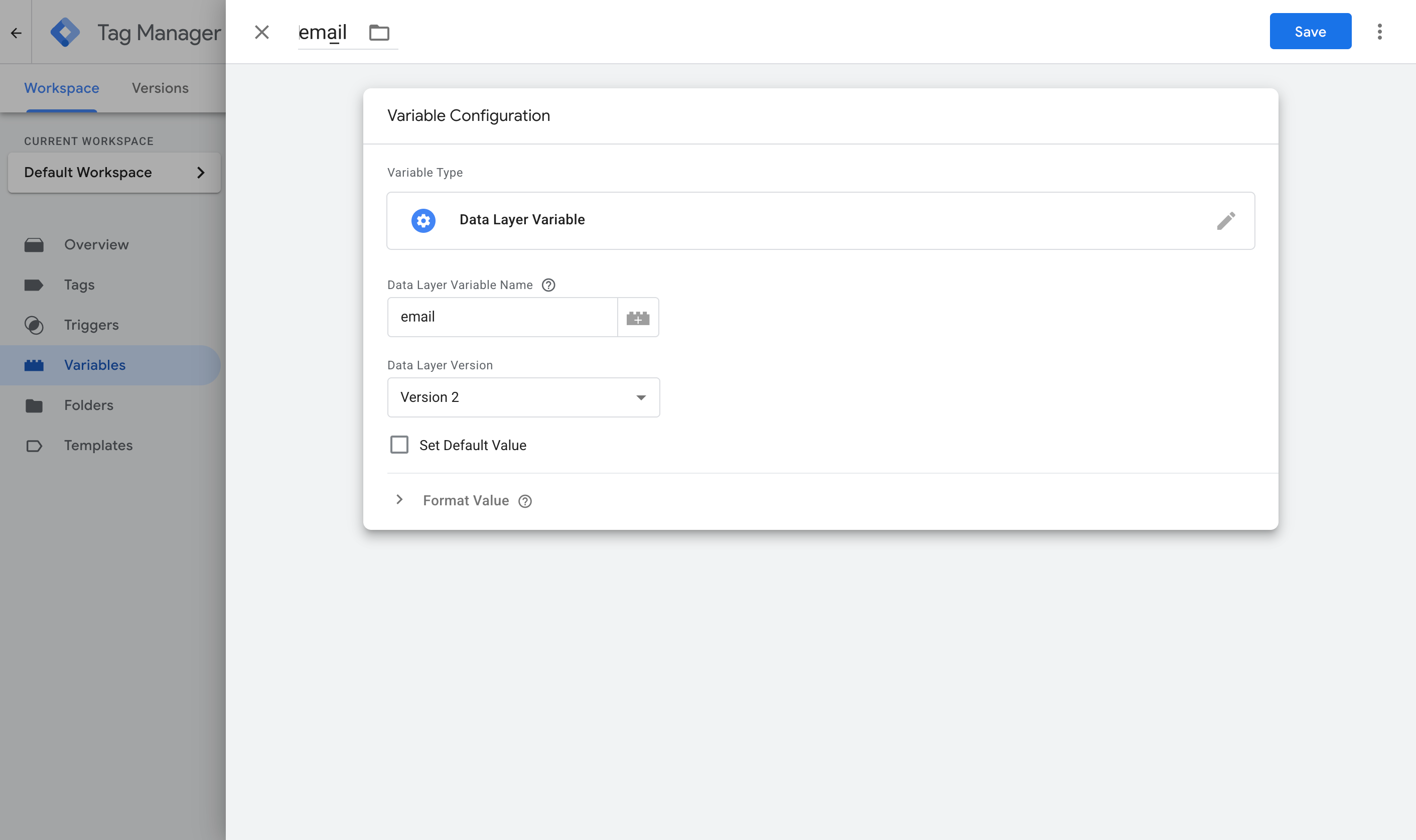
Here are the four you need.
Variable 1:
- Name: Email
- Variable Type: Data Layer Variable
- Data Layer Variable Name: email
Variable 2:
- Name: First Name
- Variable Type: Data Layer Variable
- Data Layer Variable Name: first_name
Variable 3:
- Name: Last Name
- Variable Type: Data Layer Variable
- Data Layer Variable Name: last_name
Variable 4:
- Name: Phone
- Variable Type: Data Layer Variable
- Data Layer Variable Name: phone
Step 3: Create a Custom Event trigger
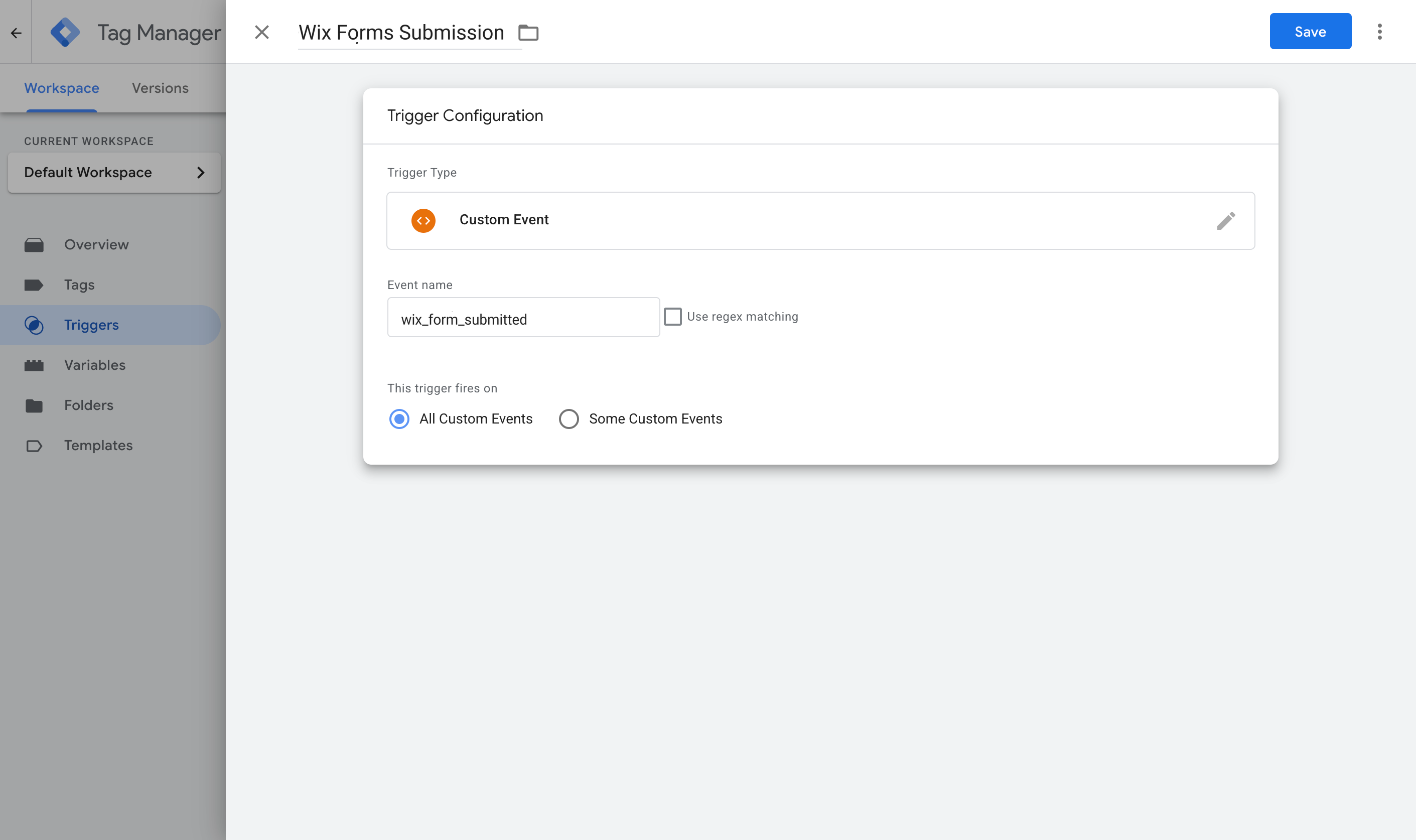
Now that you have set up the Variables to pull the data out of the dataLayer, you then need to tell Google Tag Manager when to use them. That is what a Trigger is for. It watches for the event the snippet pushes into the dataLayer when a Wix form is submitted successfully, and tells your conversion tags to fire when it arrives.
To set this up, navigate to the Triggers section, click New, choose the Custom Event type, and set the event name to wix_form_submitted (it has to match what the code pushes exactly).
Step 4: Turn on Enhanced Conversions in Google Ads
Before any of this can reach Google Ads, you actually need to tell Google Ads to accept it. To do that, head to your Google Ads account, go to Goals, then Conversions, then Settings, and turn on Enhanced Conversions.
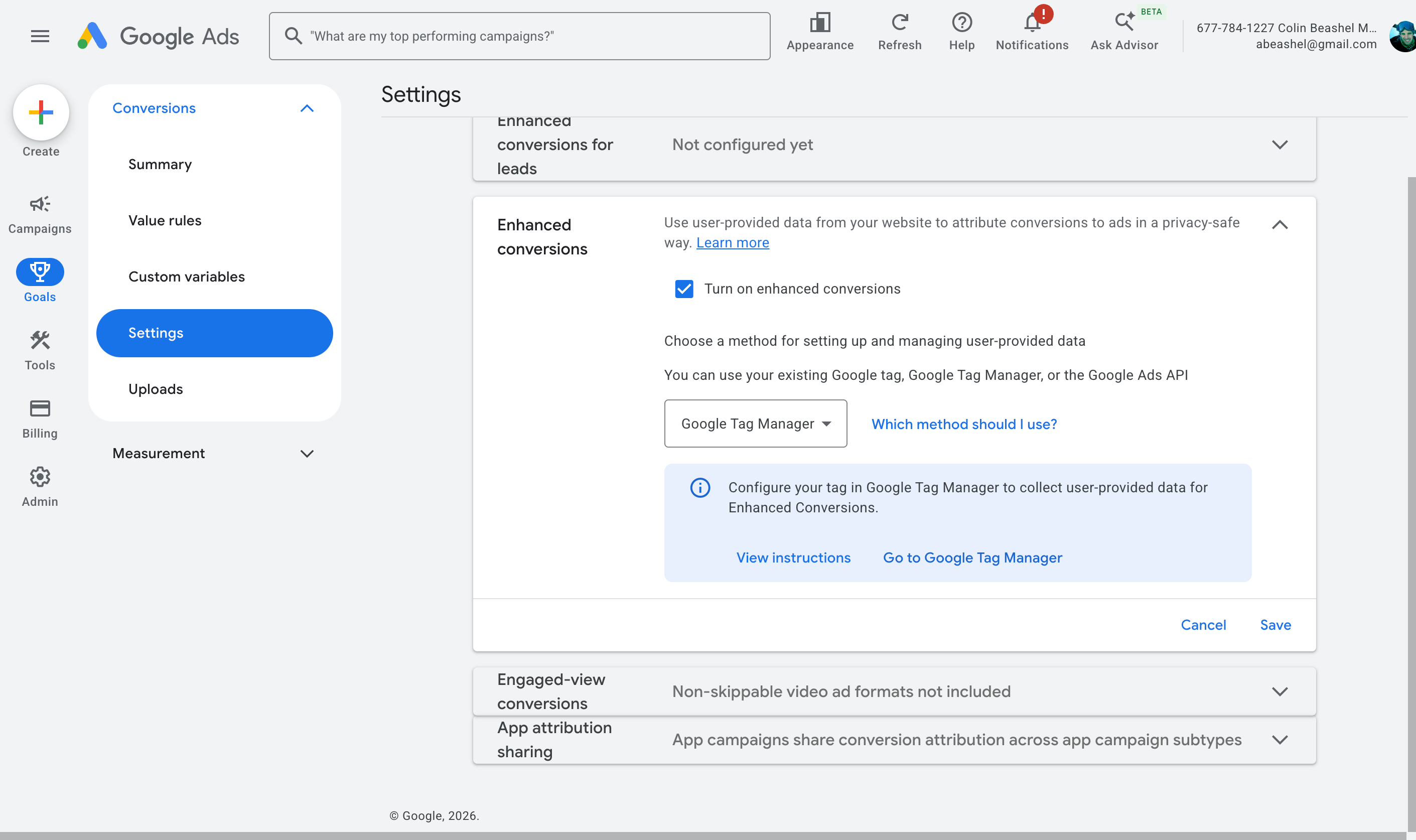
When it asks how you want to implement it, choose Google Tag Manager. This gives Google Ads permission to receive and use the customer data you are about to send.
Step 5: Create your Google Ads conversion tag and map the data
Now it's time to put the pieces together. Jump back into GTM, go to Tags, select New, choose Google Ads User Provided Data Event as the tag type, and map the variables from Step 2 to the fields it asks for.
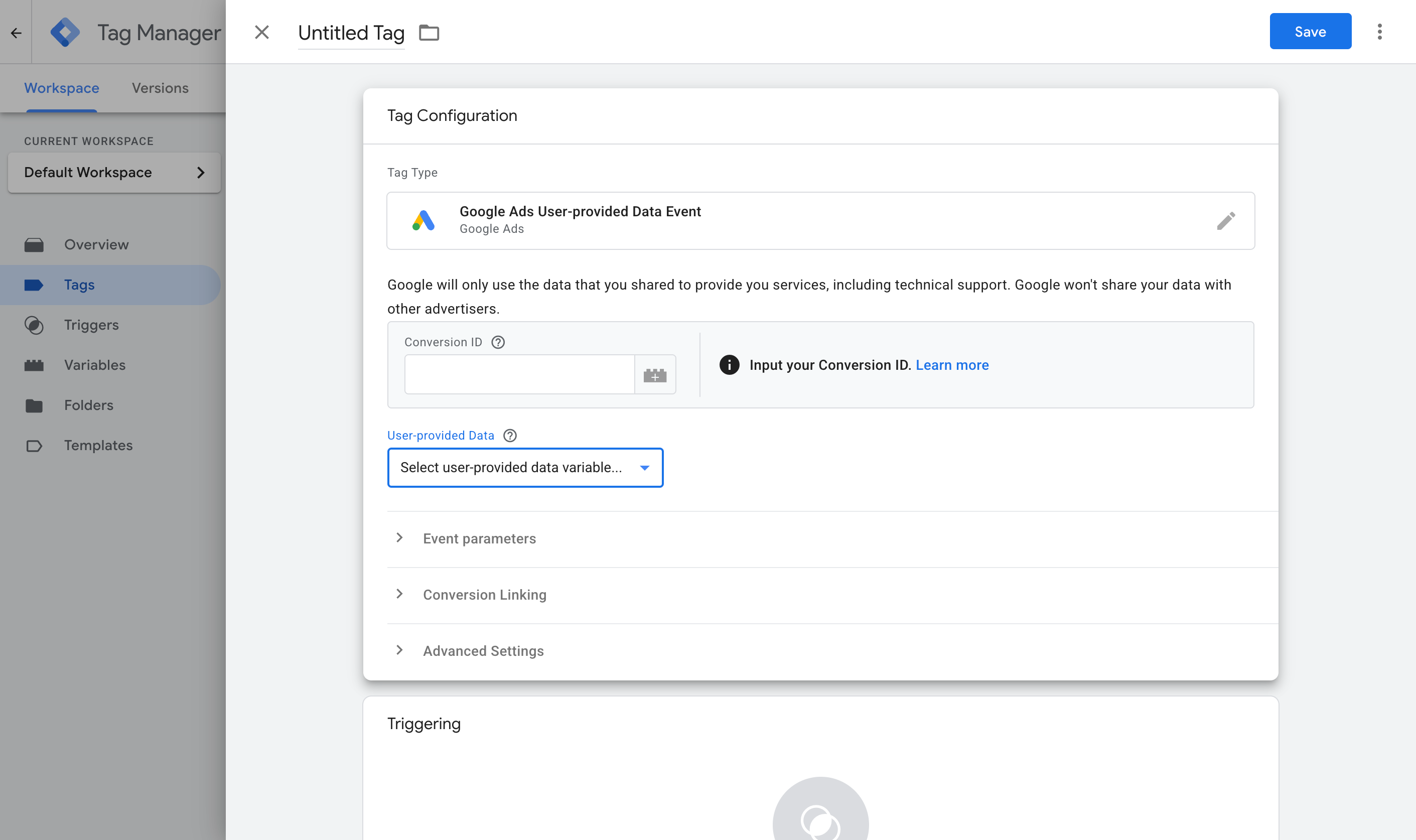
Then set it to fire on the Custom Event trigger you created in Step 3.
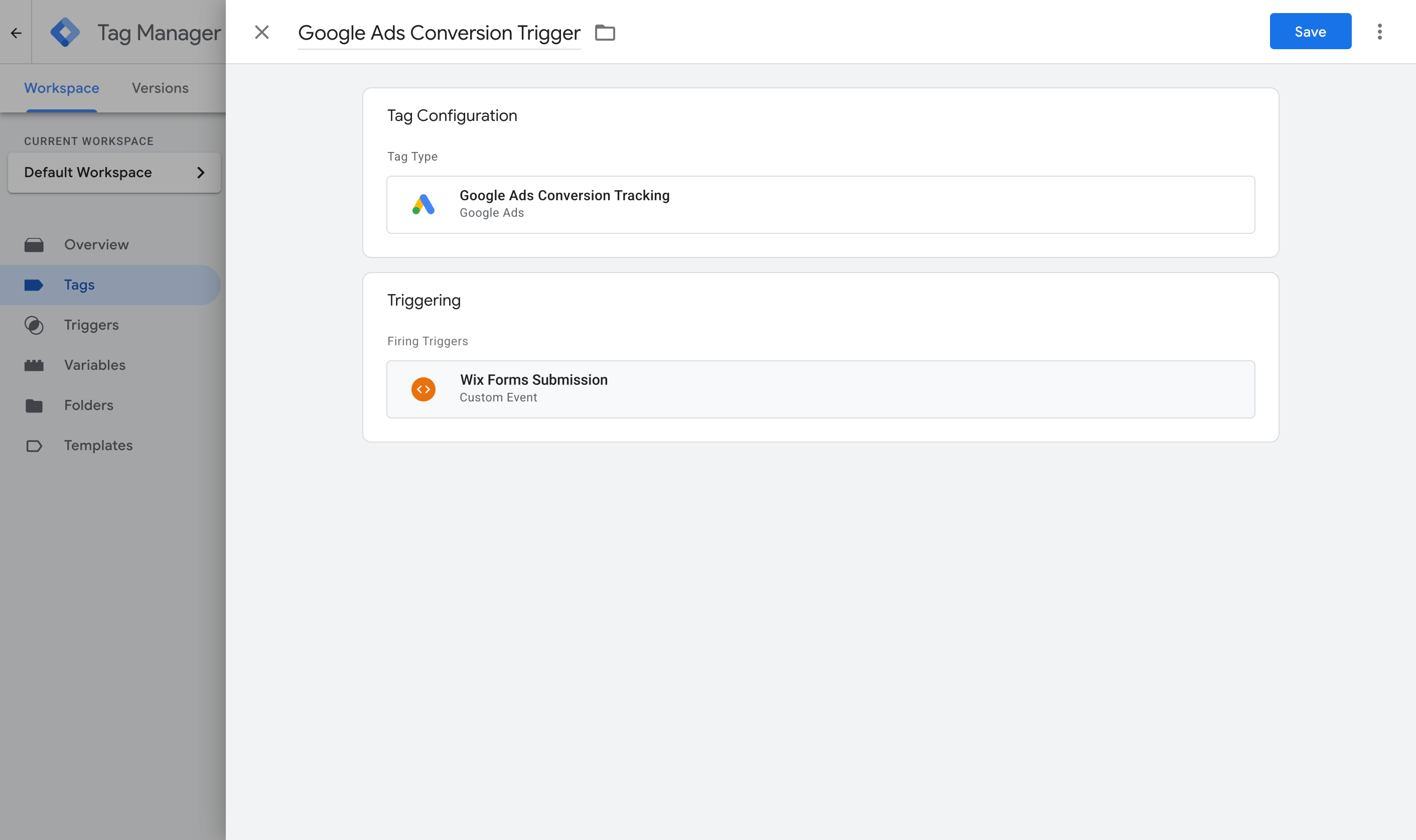
Once that's done, publish your GTM container. With some luck, you would have successfully set up a Tag to listen for Wix form submissions and send an event to the dataLayer, some Variables to pull the information out of the dataLayer, a Trigger to listen for the event, and another Tag that sends a conversion when the Trigger fires.
To check it's working, open GTM Preview mode, submit the Wix form on your site, and confirm the wix_form_submitted event arrives with the email and name filled in.
Pros and cons
Pros:
- It's free, and you may already have Google Tag Manager installed on your site, so that's a start.
- Unlike Method 1, this method captures the name, email, and phone and sends them to Google Ads (this is the minimum you need to enable Enhanced Conversions in Google Ads).
- It correctly distinguishes a genuine success from a rejected submission on both of Wix's form systems, without you having to know or check which one your site is running.
Cons:
- There are a lot of moving parts. Between the GTM tag, the Trigger, four Variables, the Google Ads settings, and the conversion Tag itself, there is plenty to get wrong. And the worst part is that if something goes wrong, there's nothing to tell you where or why. It just doesn't work, and you have to figure out why.
- It still sends the conversion through the visitor's browser, so ad blockers and privacy browsers can stop it from firing. Expect to lose 30% or more of your conversions this way.
- It still misses the data Google values most. Sending the name, email, and phone are good, but millions of people have the same name and many people have multiple email addresses (which means the one they entered into your form may not be the same one they were logged in to Google with when they clicked your ad). Ideally you want to be capturing other data like the Google Click ID, as that can tie the conversion back to the original ad click with 100% accuracy, but this method doesn't do that.
That last point is the one that pushes a lot of people to Method 3.
Method 3: Use Converly
Best for: Sending proper, server-side conversions to Google Ads, Meta Ads, ChatGPT Ads, LinkedIn Ads, and more, without having to do complicated configuration in Google Tag Manager.
Converly is a dedicated conversion tracking tool, built to send server-side conversions to Google Ads, Meta Ads, LinkedIn Ads, and more, whenever a Wix form is submitted on your site.
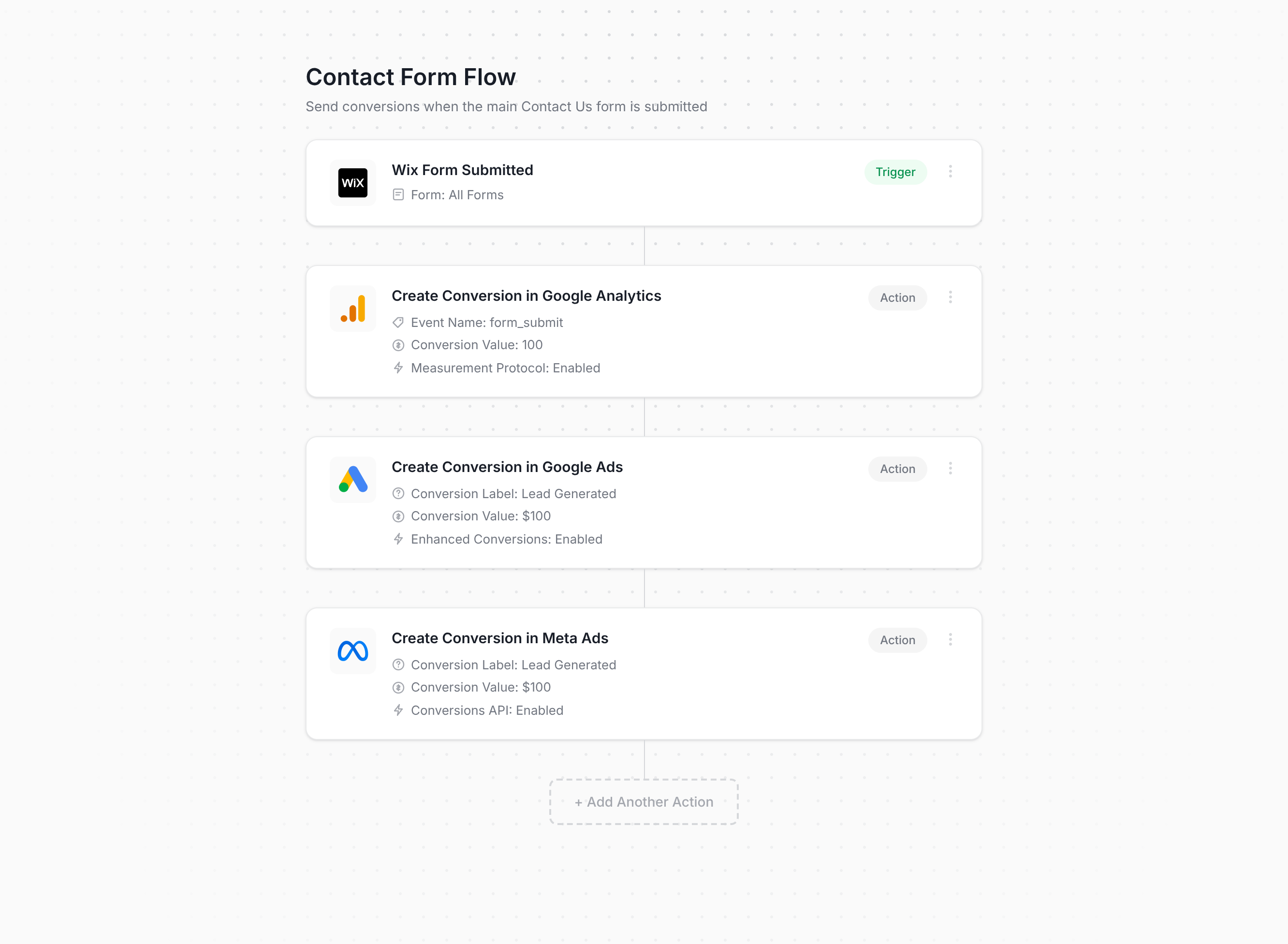
The screenshot above is basically the whole setup process. You simply choose a trigger (in this case a Wix form submission), add one or more actions (such as sending a conversion to Google Ads or Meta Ads), and you're done! There's no code to write and nothing to wire together manually in Tag Manager (and it doesn't matter which of Wix's two form systems your site happens to run because Converly detects and handles both automatically).
Once that's configured, you add the snippet of code Converly gives you to your site and it takes care of everything else. It watches for Wix form submissions, extracts the name, email, and phone, and sends them to Converly's own servers. Those servers then forward it to Google Ads, Meta Ads, and any other destination you've connected, and because the forwarding happens on Converly's servers rather than in the browser, ad blockers and privacy browsers like Safari can't interfere (which means the ad platforms get much more accurate conversion data to work with).
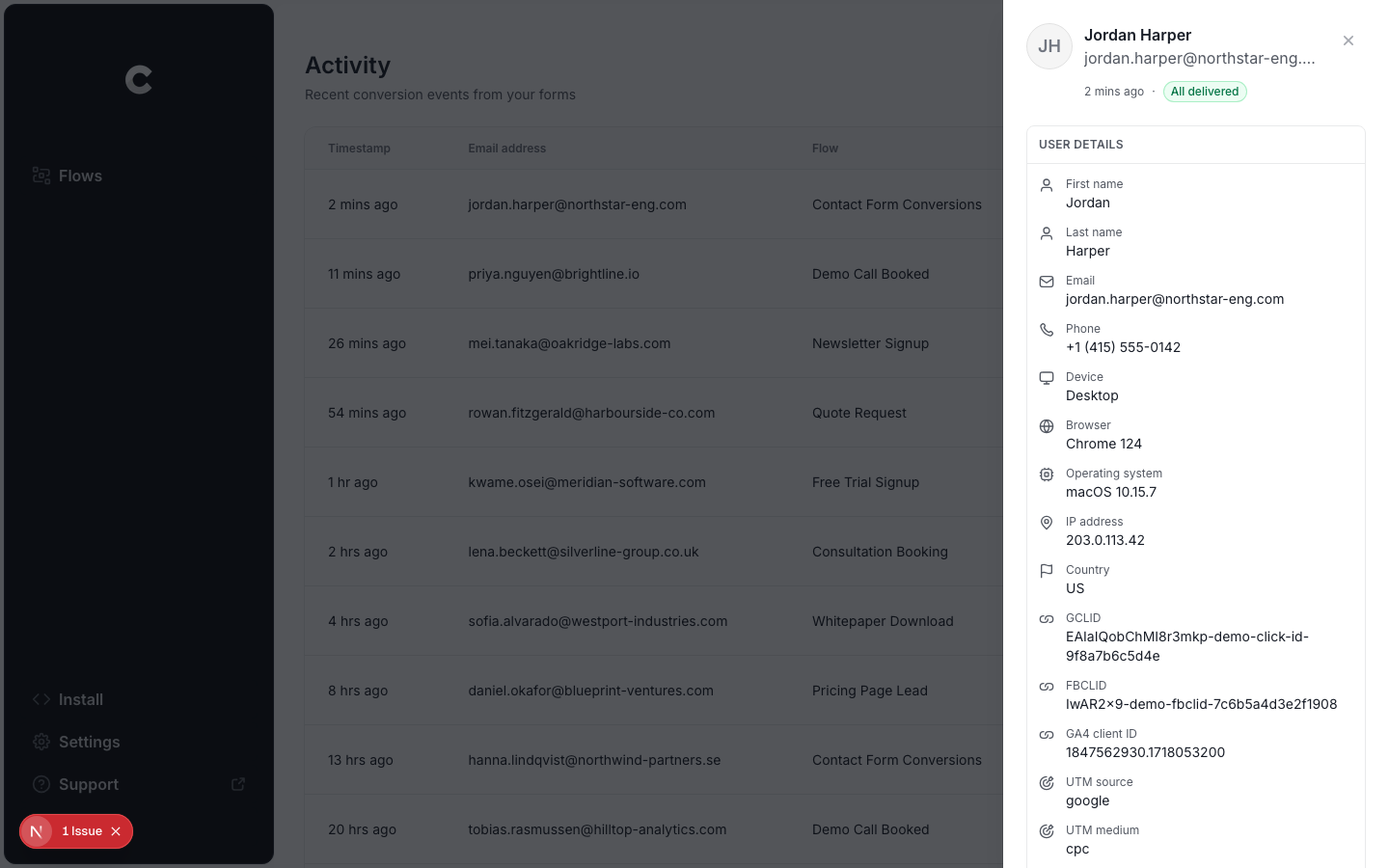
And if you're advertising on Google, Meta, ChatGPT, or similar platforms, here's the piece that actually moves the needle. On top of the name, email, and phone, Converly also captures the click IDs (i.e. GCLID, fbclid, etc), Meta's browser cookies, the visitor's IP address, and their user agent, then sends it all over with every conversion. Ad platforms weigh these signals heavily, so having all of them is what takes your match quality from mediocre to strong (Meta's Event Match Quality, for example, typically climbs from around 3 to somewhere in the 9 to 10 range).
There's also a full conversion log built in, showing every lead who submitted a Wix form, exactly what data Converly captured, what got forwarded to each platform, and whether it made it through successfully.
Pros and cons
Pros:
- Setup is genuinely quick and easy. Choose a trigger, choose your actions, done. There's no code to write or maintain, nothing complicated to configure, and no need to figure out which Wix form system your site runs.
- Sends click IDs, cookies, IP address and user agent alongside every conversion, which meaningfully lifts match quality in the ad platform (Meta's Event Match Quality typically climbs from a 3 or 4 up to a 9 or 10 with Converly, as one example).
- Sends conversions server-side, so ad blockers and privacy browsers can't block them. Expect about 30% more recorded conversions than a Google Tag Manager setup.
- Handles conditional logic, so you can choose which forms actually trigger a conversion (like firing a conversion when someone submits your Quote Request form but not when they complete your Contact Support form).
- Lets you connect Google Ads, Meta Ads, etc directly inside the platform and simply select which conversion should fire. No hunting for account IDs or conversion IDs anywhere.
- Has a dedicated MCP and CLI, so you can connect AI tools like Claude or ChatGPT and simply say ‘Setup conversion tracking in Google Ads and Meta Ads when someone submits my Wix form’ and it will do everything for you.
- Comes with a complete conversion log covering every lead who submitted a Wix form, what data was captured, whether it reached your ad platforms, and more.
- Backed by a real support team who'll help you get set up and sort out any issues. Try getting that kind of help out of Google if your GTM setup breaks.
Cons:
- It costs money once the free trial ends. Plans start at $19 a month.
What not to do
So far we have covered the three best approaches for setting up conversion tracking in Wix Forms and outlined when each one is best. But it is also useful to know which approaches to avoid, because some of the most common ways people try to track Wix form submissions as conversions are far from ideal. Here are the ones to stay away from.
Tracking thank-you page visits
This is still the most common DIY approach, mostly because Wix itself lets you configure a form to redirect visitors to a dedicated 'thank you' page after a successful submission, so it feels like the obvious thing to do. In practice it causes more problems than it solves:
It fires for people who never submitted anything. A thank-you page is just a URL, and a URL can be reached without ever touching your form. People bookmark it, land on it from their browser history or autocomplete, get sent the link by someone else, or find it in Google if it ever gets indexed. Every one of those gets counted as a conversion, even though no form was submitted.
It can double count real submissions. Refresh the thank-you page and you get a second conversion. Hit the back button and return, or revisit it later from history, and you get more. A single lead can rack up several conversions, which inflates your numbers and means Google and Meta are optimising your ads against incorrect conversion data.
You would get terrible match rates. A page visit has no idea who submitted the form, so it can't pass the name, email, phone, GCLID, fbclid, and so on that Google Ads Enhanced Conversions or Meta CAPI needs. That means that even though you are sending conversions to these ad platforms, they would largely do nothing because you're not sending the data they actually need to map the conversion back to a real person and the ad they originally clicked.
The three methods we presented above all fire on Wix's actual confirmed submission, so they stay tied to what really happened.
Relying on the default form submit event in Google Tag Manager
When people set up tracking in Google Tag Manager, the obvious thing to do is to use GTM's built-in Form Submission trigger (which listens for the browser's native form submit event).
But if your forms are built using Wix's New Forms, the browser's native form submit event doesn't fire at all because Wix uses it's own code to submit the form. So you would set the whole thing up, believe it's working, and conversion count in Google Ads would sit at zero with nothing telling you why.
You need to be listening for Wix's actual form submission success signal instead, the way Methods 1 through 3 above do.
Using GA4's automatic form tracking (Enhanced Measurement)
GA4 has a built-in Enhanced Measurement feature that claims to track form submissions automatically with no setup.
Under the hood, it works by listening for that same native browser submit event, so it has the exact same problem as GTM's default trigger above. On the newer of Wix's two form systems, where that event never fires at all, Enhanced Measurement has nothing to listen to and won't record the submission.
If you want submissions recorded reliably in GA4, use the free recipe from Method 1 above, or use Converly.
Firing the conversion on the submit button click
Some Wix conversion tracking setups fire on the Submit button click itself, usually with a click trigger in GTM on the button. On the newer of Wix's two form systems that's a genuinely tempting shortcut, because the click is the only reliable native browser event you get. But a click is not a submission.
Wix runs its own validation (and a reCAPTCHA spam check) after the visitor clicks the Submit button, so plenty of submit button clicks never turn into a real submission at all (because the visitor missed a required field or entered their email wrong, for instance). Every one of those gets counted as a conversion, and if the visitor then fixes the problem and clicks again, that gets counted a second time.
As mentioned before, you need to be using Wix's real form submission successful event and not a proxy for it (like clicks of the submit button).
So which method should I use?
Here's how the three ways to track Wix Forms conversions compare.
| Method | Best for | Sends conversions to | Data sent |
|---|
| Method 1. GA4 event built in Google Tag Manager | Sending submissions to Google Analytics (use our free GTM recipe to make it easier) | Google Analytics 4 | The submission event only |
| Method 2. Enhanced Conversions through Google Tag Manager | Sending to Google Ads (if the painful configuration doesn't put you off) | Google Ads | Name, email and phone |
| Method 3. Converly | Sending to any ad platform, with the least setup work | Google Ads, Meta Ads, LinkedIn Ads, Microsoft Ads, ChatGPT Ads, GA4 and more | Name, email and phone, plus the GCLID, the Meta click ID, IP address, user agent and more. |
Wrap up
Conversion tracking doesn't get much attention, but it's actually one of the bigger factors in how well your advertising performs.
If you take the time to set it up properly, Google and Meta's algorithms will have the data they need to learn what your ideal customer looks like and can put your ads in front of more people like them. If you set it up badly (or skip it completely), you'll keep paying to show ads to people who were never going to convert.
In fact, both platforms have actually published figures on how much difference this makes. Google says businesses that move to proper server-side conversion tracking see their conversions climb by around 19% on average, while Meta reports a 23% increase from making the same switch.
With Converly, you get all the benefits of server-side tracking but without any of the hard parts. You simply choose your trigger (someone submitting a Wix form), pick which platforms you want to send the conversions to, and you're done (and hooking up an AI tool like Claude or ChatGPT makes it even easier. You just connect it, ask it to 'set up Wix Forms conversion tracking', and it takes care of everything for you through our MCP or CLI).
Converly is free to start with (you don't even need to enter a credit card to start the trial), and most people have it fully running in well under 10 minutes. Start your 14-day free trial today.