If you're running ads and sending people to your Squarespace website to fill out a form and get in touch, then you need to set up conversion tracking.
Not only does it mean you can see which campaigns, ads and keywords are actually producing leads, it gives the ad platforms (Google, Meta, etc) the data they need to learn who converts and who doesn't, so they can show your ads to more of the right people.
The problem is that Squarespace forms are harder to track than they look.
So in this article, we'll walk you through three ways to set up conversion tracking for Squarespace forms, with full instructions and some resources (a code snippet, a Google Tag Manager recipe, etc) to make each one easier.
Method 1: Send a GA4 event via Google Tag Manager
Good for: Sending form submission events to Google Analytics 4, for free.
If all you need to do is send a conversion event to Google Analytics whenever someone submits a form on your Squarespace site, this is the method to use. Google Analytics doesn't need to know who filled in the form (unlike Google Ads or Meta Ads), only that somebody did.
Squarespace does have a built-in Google Analytics connection, but it's built around page views and store purchases. It doesn't send an event when someone submits one of your forms, so on its own it can't tell you how many leads you're getting. The free way to fill that gap is Google Tag Manager.
The catch is that Google Tag Manager's built-in form submission trigger fires every time someone clicks the Submit button, regardless of whether that submission was successful or not. So you'll end up counting spam submissions, submissions that never actually happened (because they were rejected), and you may even double count successful ones (because if a lead clicks Submit but hasn't filled in a required field, a conversion is counted. And when they fix the mistake and click submit again, a second conversion is counted).
What you need to do instead is write some custom code that waits for Squarespace to confirm the submission was successful and then pushes an event into the dataLayer (and then you need to build your Triggers and Tags in GTM from that).
Sound like a lot? Don't worry, because we've packaged it all into a free Google Tag Manager recipe you can download and use. Here's how it works:
Step 1: Download the Squarespace Forms Conversion Tracking GTM Recipe
Start by grabbing the Squarespace Forms GTM recipe from this page. Inside, you'll find:
- A Custom HTML Tag that waits for Squarespace to confirm a form submission was successful (either by showing the thank you message, or by sending the visitor to your thank you page) and then pushes a
squarespace_form_submitted event into Google Tag Manager.
- Two Variables holding the ID and the name of the form that was submitted, which are handy if you want to fire different tags for different forms (i.e. you want to send a conversion when someone submits your Request A Quote form, but not your Job Application form).
- A Trigger tied to the
squarespace_form_submitted event, which you use to fire whatever conversion tags you build (a GA4 event, a Google Ads conversion, and so on).
Step 2: Import the GTM recipe into your account
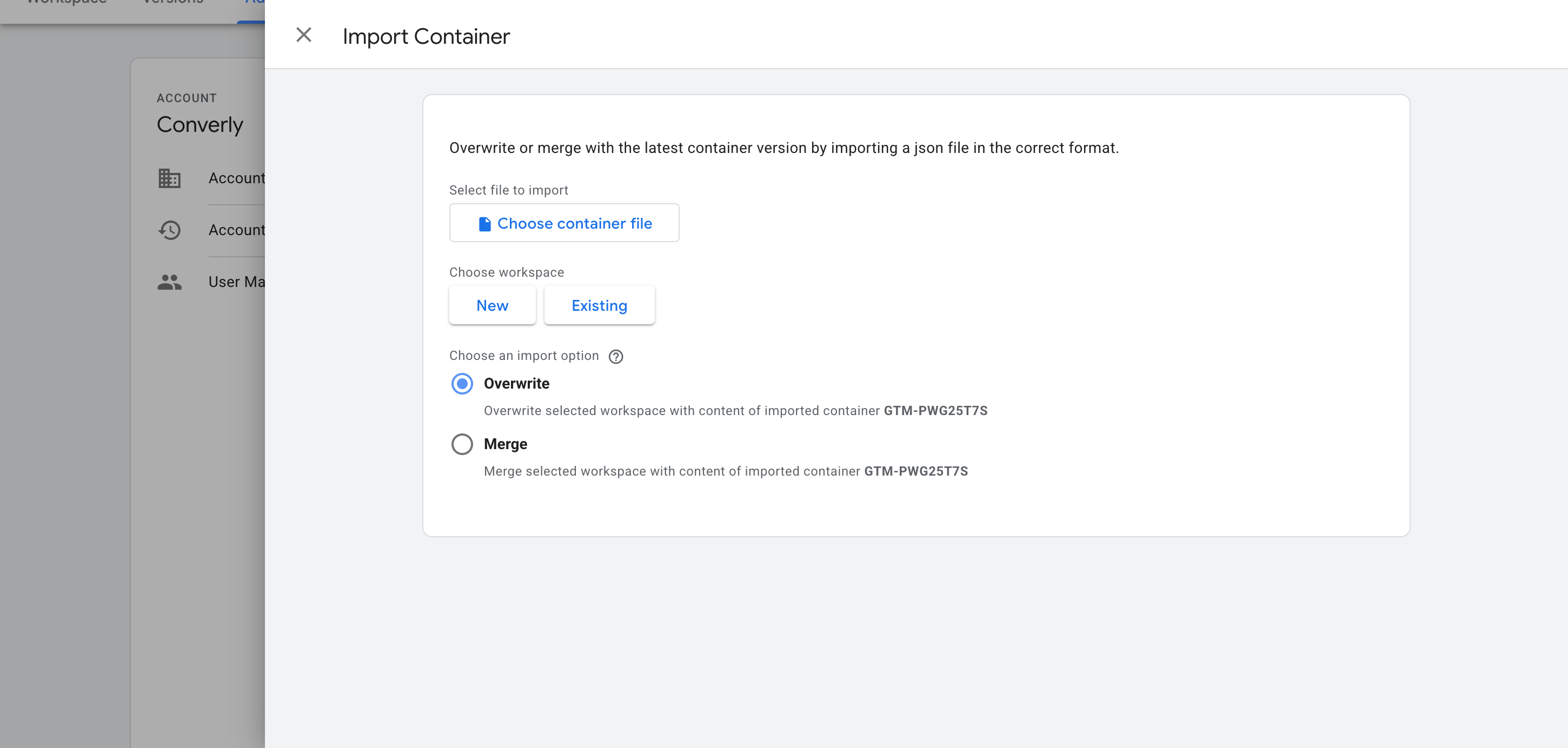
Once you've downloaded the file, the next job is getting it into your Google Tag Manager account. Open Google Tag Manager, go to Admin, choose Import Container, select the file, and pick the Merge option so nothing already in your container gets overwritten. The listener, both variables and the trigger are all created for you.
Step 3: Build a GA4 event tag
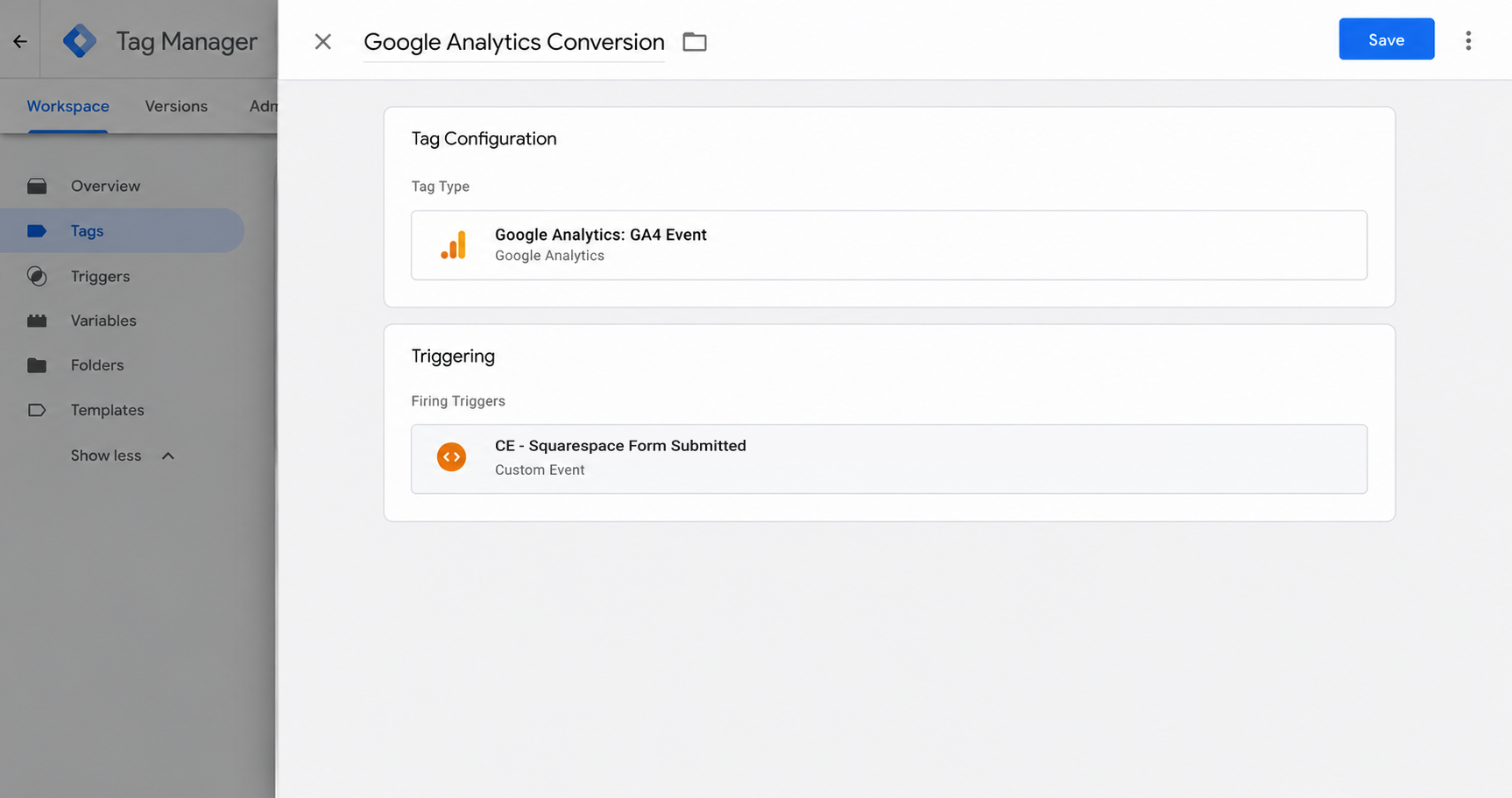
The recipe gives you the trigger, but you still need to build a Tag that sends the event to GA4. To set that up, create a GA4 event tag and set its firing trigger to the one the recipe gives you (called CE - Squarespace Form Submitted).
Step 4: Test it, then mark it as a Key Event in GA4
With everything wired up, the last job is proving it works. Submit a test entry on one of your Squarespace forms, open GA4's Realtime report, and check the event turns up in the Recent Events list.
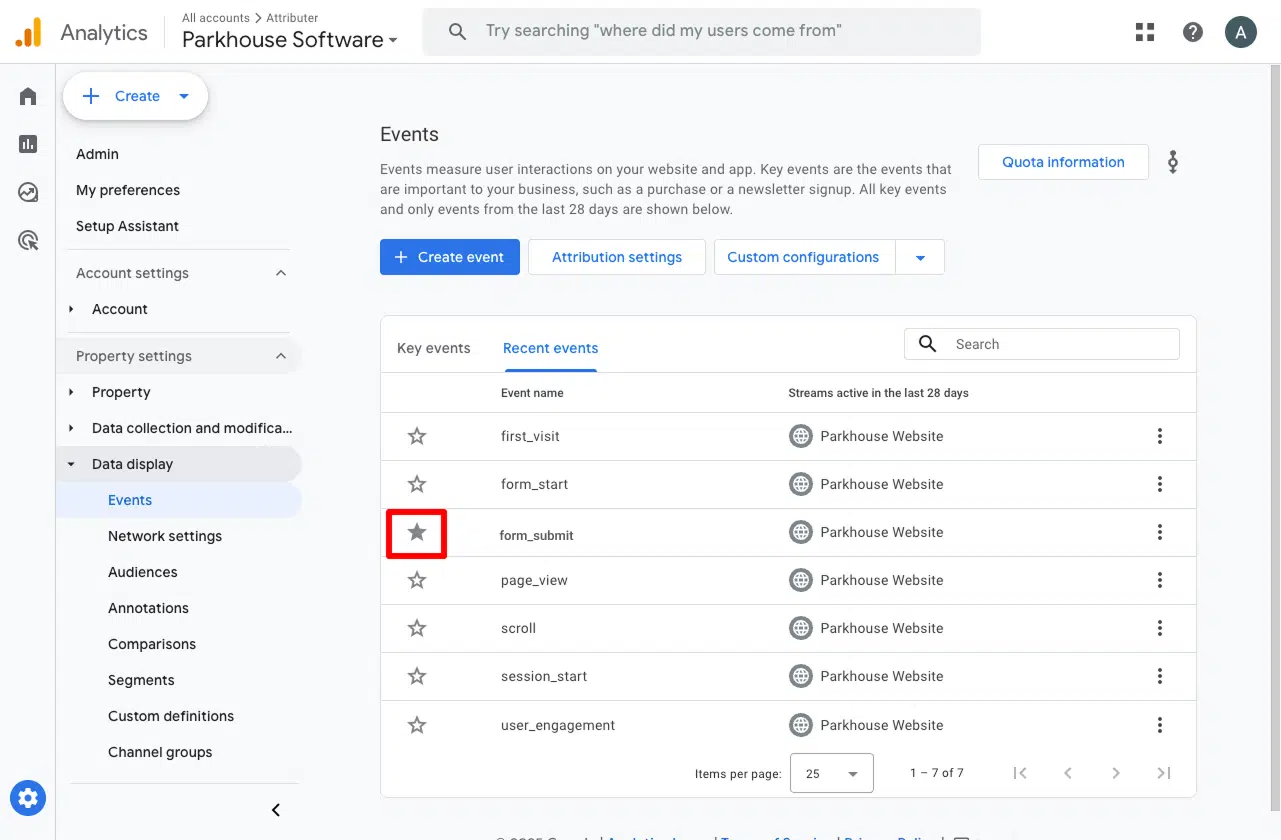
Once it's there, go to Admin, then Events, find the event in the list, and toggle it on as a Key Event. This is the step people forget, and it's what tells GA4 to treat the event as a conversion in your acquisition and funnel reports.
Pros and cons
Pros:
- It's free. Google Tag Manager costs nothing and neither does the recipe.
- It only fires on successful form submissions. So if someone mistypes their email address or misses a required field, the conversion doesn't fire when Squarespace rejects the submission.
- It works regardless of how you have your form set up and whether your form shows a thank you message or sends visitors to a separate thank you page.
Cons:
- There's still setup work. The recipe takes care of the hardest part (detecting successful form submissions), but building the GA4 tag and checking it all works is on you. And if you get stuck, there's nobody to ask (Google doesn't provide support for Google Tag Manager).
- You need to be on Squarespace's Core plan or higher (from $23 a month, billed annually) to add Google Tag Manager to your site at all. The Basic plan doesn't include Code Injection.
- Every Squarespace form on your site pushes the same event. The recipe does pass along the form's ID and name, but unless you build a separate trigger for each form, a submission of your Contact Support or Job Application form sends the same event to GA4 as a submission of your Quote Request form (with no way to tell them apart in your reports).
- The event is sent to Google Analytics from the visitor's browser, so ad blockers and privacy-focused browsers like Safari can stop it from ever reaching GA4. You can expect to lose roughly 30% of conversions (according to industry studies).
- It stops at Google Analytics. Nothing here reaches Google Ads, Meta Ads, or any other ad platform (that's what Methods 2 and 3 are for).
Method 2: Use Google Tag Manager for Enhanced Conversions
Good for: Sending Enhanced Conversions to Google Ads.
Counting form submissions (the way Method 1 does) is enough for Google Analytics, but it won't get you very far in Google Ads.
That's because Google Ads only counts a conversion if it can match it back to the real person who clicked your ad, and to do that it needs details like their name, email and phone number sent along with the conversion.
The good news is that Squarespace forms are built into your page, so a script running on your site can read the lead's name, email, phone, etc from the form. The tricky part is timing. Squarespace replaces the form with its thank you message as soon as the entry is accepted, so by the time you know the submission worked, the details are gone.
Fortunately, the code snippet below gets around that problem. Here's how to set it up:
Step 1: Set up a Custom HTML Tag with the form listening code
In GTM, create a new Custom HTML Tag, paste in the snippet below, and set it to fire on the All Pages trigger.
<!--
Converly GTM Recipe: Squarespace Forms submission listener (Method 2, with PII)
This is the richer snippet for the blog post's "Method 2: GTM with
Enhanced Conversions data". It pushes the same event, form_id and
form_name as the event-only recipe (blog-snippet.html), plus the lead's
email, first_name, last_name and phone, which is what turns on Enhanced
Conversions in Google Ads and lifts Meta's Event Match Quality.
It REPLACES the recipe's listener tag; don't install both. They share one
install guard, so if both are on a page only the first to load runs.
It shares its detection core with the event-only recipe line for line: a
click on Submit is never counted, only Squarespace's own confirmation
(the success message or "submitted" state, or the save request answering
success for that form, re-checked as the page leaves for redirect forms).
A Newsletter block posts to the same address, so a save only counts when
no other form's submit could own it, including one still waiting behind
a slow reCAPTCHA. A filled hidden anti-spam field means a bot and is
never counted. Each form counts once per page view.
What it reads: the fields are read once, as each attempt is submitted
(Squarespace swaps the form for its thank-you message on success, so they
cannot be read later). Only four values are kept: the email field, the
Name field's first and last name inputs, and the phone field, turned into
international format (+61412345678) using the country picker next to it.
Messages, subjects, checkboxes, dropdowns and hidden fields are never
pushed, and password, card and one-time-code fields are skipped before
their value is read. The values are pushed only when that attempt is
confirmed; a refused or unconfirmed attempt never pushes them.
Ported from Converly's production Squarespace module (detection plus its
field-reading pass). Live-checked on 15 October 2026 in Chromium on a real
Squarespace 7.1 site: an inline-message form, a redirect form, and a form
with a phone field sharing its page with other forms and a Newsletter
block (idle, refused email, corrected, accepted and double click each).
Every confirmed submission pushed the email, first and last name it was
submitted with (and +61412345678 for 0412 345 678 on the phone form), and
nothing else the visitor typed.
-->
<!-- STEP 1 — Custom HTML tag. Create one GTM tag with this content,
firing trigger: All Pages, tag firing option: Once per event. -->
<script>
(function () {
'use strict';
// Install once, even if GTM injects this tag more than once on the page.
if (window.__converlyRecipeSquarespaceForms) return;
window.__converlyRecipeSquarespaceForms = true;
window.dataLayer = window.dataLayer || [];
// Ported from Converly's production module (cdn/v1/modules/
// squarespace-forms.js, measured against a live Squarespace 7.1 site in
// October 2026), with the production module's field-reading pass on top.
//
// Method 2: the same detection as the event-only recipe, plus the lead's
// email, first name, last name and phone for Enhanced Conversions. It
// REPLACES the recipe's listener tag; don't install both. They share one
// install guard, so if both are on a page only the first to load runs.
// The fields are read once, as each new attempt is submitted (Squarespace
// swaps the form for its thank-you message on success), kept only as the
// four values above, and pushed only when that attempt is confirmed. A
// rejected or unconfirmed attempt never pushes them.
//
// What Squarespace does:
// - The Form block renders a React form in the page (no iframe):
// .sqs-block-form ... form.react-form-contents[novalidate]. It mounts
// after DOMContentLoaded, so submits are caught on document.
// - There is no check in the browser. Every submit posts
// /api/form/FormSubmissionKey then /api/form/SaveFormSubmission, and the
// server decides: 204 on success, 400 for a field error, 401 for a failed
// reCAPTCHA. A submit is never a conversion on its own.
// - On success it marks the form (react-form-contents--submitted), shows a
// .form-submission-text message and gives the button the class
// "success". A form set to redirect leaves for its page about 1.3
// seconds after the 204, before that message renders in Chromium.
// - The Newsletter block posts to the same SaveFormSubmission address, and
// that request carries no form identity, so a save only counts for a
// form that provably owns it.
//
// It fires once per form, on the first confirmed success for an attempt:
// 1. a success marker that was not there when the attempt started, or
// 2. the SaveFormSubmission request answering 2xx (read from the
// browser's resource timing, where it exposes responseStatus), when
// no other form's submit could own that save, or
// 3. as the page leaves (a redirect form), either of the above.
// It never fires on a 400 or 401, on a filled anti-spam field, or when it
// cannot tell which form a save belongs to.
var EVENT_NAME = 'squarespace_form_submitted';
var BLOCK_SELECTOR = '.sqs-block-form, [data-sqsp-block="form"], [data-definition-name="website.components.form"]';
var SAVE_PATH = '/api/form/SaveFormSubmission';
// Long enough for a visitor to solve a reCAPTCHA picture challenge.
var WATCH_MS = 180000;
function now() {
try {
if (window.performance && typeof window.performance.now === 'function') return window.performance.now();
} catch (e) {}
return 0;
}
function hasToken(el, token) {
if (!el || !el.getAttribute) return false;
var cls = el.getAttribute('class') || '';
return (' ' + cls + ' ').indexOf(' ' + token + ' ') !== -1;
}
function isConnected(el) {
try {
if (typeof el.isConnected === 'boolean') return el.isConnected;
return !!(el.ownerDocument && el.ownerDocument.documentElement.contains(el));
} catch (e) {
return false;
}
}
// ---- Which forms are Squarespace forms ----
function blockFor(formEl) {
try {
return (formEl && formEl.closest) ? formEl.closest(BLOCK_SELECTOR) : null;
} catch (e) {
return null;
}
}
function isSquarespaceForm(formEl) {
if (!formEl || (formEl.tagName || '').toLowerCase() !== 'form') return false;
return !!blockFor(formEl);
}
// The block's own form definition (the site owner's settings, not the
// visitor's answers): { formId, formName, ... }.
function formIdentity(block) {
var id = { formId: '', formName: '' };
try {
var script = block && block.querySelector('script.sqs-form-block-context');
if (!script) return id;
var parsed = JSON.parse(script.textContent || '{}');
if (parsed && typeof parsed.formId === 'string') id.formId = parsed.formId;
if (parsed && typeof parsed.formName === 'string') id.formName = parsed.formName;
} catch (e) {}
return id;
}
// ---- Sensitive-field skip ----
// Passwords, card numbers, one-time codes, SSN and PIN are never lead
// identifiers. This runs before any value is read, on the field type, its
// autocomplete hint, its name, its id and every label surface.
var SENSITIVE_AUTOCOMPLETE = {
'current-password': true, 'new-password': true, 'one-time-code': true,
'cc-number': true, 'cc-csc': true, 'cc-exp': true, 'cc-exp-month': true,
'cc-exp-year': true, 'cc-name': true, 'cc-given-name': true,
'cc-family-name': true, 'cc-additional-name': true, 'cc-type': true,
};
var SENSITIVE_NAME_SUBSTRINGS = [
'password', 'passwd', 'passcode', 'cardnum', 'ccnumber', 'creditcard',
'onetimecode', 'securitycode', 'socialsecurity',
];
var SENSITIVE_NAME_TOKENS = {
otp: true, cvv: true, cvc: true, ssn: true, pwd: true, pin: true,
};
function isSensitiveName(name) {
if (!name) return false;
// Split camelCase first, so otpCode, cardCvv and userPin are read as
// "otp code", "card cvv" and "user pin".
var lower = String(name).replace(/([a-z0-9])([A-Z])/g, '$1 $2').toLowerCase();
var norm = lower.replace(/[^a-z0-9]/g, '');
for (var i = 0; i < SENSITIVE_NAME_SUBSTRINGS.length; i++) {
if (norm.indexOf(SENSITIVE_NAME_SUBSTRINGS[i]) !== -1) return true;
}
var parts = lower.split(/[^a-z0-9]+/);
for (var p = 0; p < parts.length; p++) {
if (SENSITIVE_NAME_TOKENS[parts[p]] === true) return true;
}
return false;
}
function isSensitiveField(type, autocomplete, name) {
if (type === 'password') return true;
if (autocomplete) {
var tokens = autocomplete.split(/\s+/);
for (var t = 0; t < tokens.length; t++) {
if (SENSITIVE_AUTOCOMPLETE[tokens[t]] === true) return true;
}
}
if (isSensitiveName(name)) return true;
return false;
}
// Every visible label surface: the wrapping <label>, each <label for="id">,
// and aria-labelledby. ALL of them are vetted by the sensitive-field skip,
// so a benign <label for> cannot mask a sensitive aria-labelledby. The
// first one names the field. Returns [] on any failure.
function labelTextsFor(el) {
var out = [];
try {
if (el.closest) {
var wrap = el.closest('label');
if (wrap && wrap.textContent) out.push(wrap.textContent);
}
var doc = el.ownerDocument;
if (!doc) return out;
if (el.id && doc.getElementsByTagName) {
var labels = doc.getElementsByTagName('label');
for (var i = 0; i < labels.length; i++) {
var lf = labels[i].getAttribute && labels[i].getAttribute('for');
if (lf && lf === el.id && labels[i].textContent) out.push(labels[i].textContent);
}
}
var lb = el.getAttribute ? (el.getAttribute('aria-labelledby') || '') : '';
if (lb && doc.getElementById) {
var ids = lb.split(/\s+/);
var txt = '';
for (var k = 0; k < ids.length; k++) {
var n = ids[k] && doc.getElementById(ids[k]);
if (n && n.textContent) txt += ' ' + n.textContent;
}
if (txt) out.push(txt);
}
} catch (e) {
// DOM API unsupported — no label text available
}
return out;
}
function readFormContext(block) {
var ctx = { formId: '', formName: '', successRedirect: '', defaultPhoneCountry: '', fields: [] };
try {
var script = block && block.querySelector('script.sqs-form-block-context');
if (!script) return ctx;
var parsed = JSON.parse(script.textContent || '{}');
if (!parsed || typeof parsed !== 'object') return ctx;
if (typeof parsed.formId === 'string') ctx.formId = parsed.formId;
if (typeof parsed.formName === 'string') ctx.formName = parsed.formName;
if (typeof parsed.successRedirect === 'string') ctx.successRedirect = parsed.successRedirect;
var fmt = parsed.formFieldFormats && parsed.formFieldFormats.initialPhoneFormat;
if (fmt && typeof fmt.country === 'string') ctx.defaultPhoneCountry = fmt.country.toUpperCase();
if (Object.prototype.toString.call(parsed.formFields) === '[object Array]') {
for (var i = 0; i < parsed.formFields.length; i++) {
var f = parsed.formFields[i];
if (f && typeof f.id === 'string' && f.id) {
ctx.fields.push({
id: f.id,
type: typeof f.type === 'string' ? f.type.toLowerCase() : '',
title: typeof f.title === 'string' ? f.title : '',
});
}
}
}
} catch (e) {
// Malformed JSON — fall back to the DOM alone
}
return ctx;
}
// Field id pattern (measured): <type>-<yui id|uuid>[-fname|-lname]-field.
// Matched on whole id segments, so a definition id that is a prefix of
// another field's id ("yui_12" vs "yui_123") never claims the wrong field.
function contextFieldFor(el, ctx) {
var id = el.id || '';
if (!id) return null;
for (var i = 0; i < ctx.fields.length; i++) {
var fid = ctx.fields[i].id;
if (id.indexOf('-' + fid + '-') !== -1 || id.indexOf(fid + '-') === 0) {
return ctx.fields[i];
}
}
return null;
}
function sqTypeFromId(id) {
var m = /^([a-z]+)-/.exec(id || '');
return m ? m[1] : '';
}
// ---- Phone: national digits -> international ----
// Measured: the number input holds a masked NATIONAL number
// ("0770 0900123 ") and the country lives elsewhere: a sibling
// span.form-input-prefix showing the dial code ("+44") when the form
// shows a country picker, else only the form's default country
// (formFieldFormats.initialPhoneFormat.country). Without a country,
// a national number can never match on Google or Meta, so build
// "+<dial code><national digits minus the trunk 0>" when the dial code
// is known, and leave the value alone when it is not.
var DIAL_CODES = {
AU: '61', NZ: '64', GB: '44', US: '1', CA: '1', IE: '353', ZA: '27',
SG: '65', IN: '91', DE: '49', FR: '33', NL: '31', ES: '34', IT: '39',
BE: '32', CH: '41', AT: '43', SE: '46', NO: '47', DK: '45', FI: '358',
PT: '351', PL: '48', JP: '81', HK: '852', MY: '60', PH: '63', AE: '971',
MX: '52', BR: '55'
};
function phoneItemFor(el) {
var node = el.parentNode;
while (node && node.nodeType === 1) {
if (node.classList && node.classList.contains('form-item')) return node;
node = node.parentNode;
}
return null;
}
function dialCodeFor(el, ctx) {
var item = phoneItemFor(el);
if (item) {
var prefix = item.querySelector('.form-input-prefix');
var m = prefix && /^\s*\+(\d{1,4})\s*$/.exec(prefix.textContent || '');
if (m) return m[1];
var select = item.querySelector('select[id$="-country-code-field"]');
if (select && select.value) return DIAL_CODES[String(select.value).toUpperCase()] || '';
}
return (ctx && DIAL_CODES[ctx.defaultPhoneCountry]) || '';
}
// Returns the number to send, or '' to send no phone at all: a junk or
// incomplete entry is worse than none, because it still counts as user
// data while never matching anyone.
function internationalPhone(el, raw, ctx) {
var trimmed = String(raw || '').trim();
var digits = trimmed.replace(/\D/g, '');
if (!digits) return '';
var full;
if (trimmed.charAt(0) === '+') {
full = digits; // typed internationally
} else if (digits.indexOf('00') === 0) {
full = digits.slice(2); // 00 international prefix
} else {
var cc = dialCodeFor(el, ctx);
if (!cc) return digits.length >= 7 ? trimmed : '';
if (cc === '1') {
// NANP: exactly 10 national digits, which never start with 1, so
// an 11-digit entry starting with 1 already carries the code.
if (digits.length === 11 && digits.charAt(0) === '1') digits = digits.slice(1);
if (digits.length !== 10) return '';
full = cc + digits;
} else {
// Italy keeps its leading 0 after the country code; everywhere
// else the national trunk 0 is dropped (07700 900123 -> +44 7700900123).
var national = cc === '39' ? digits : digits.replace(/^0/, '');
if (national.length < 7) return '';
full = cc + national;
}
}
// E.164: no leading zero, at most 15 digits; under 8 is never a real
// international number.
return /^[1-9]\d{7,14}$/.test(full) ? '+' + full : '';
}
// The honeypot is a text input inside an aria-hidden wrapper (measured
// id "message-field", tabindex -1, autocomplete new-password). Anything
// a visitor cannot see or reach is not their data.
function isHoneypot(el, formEl) {
if (el.id === 'message-field') return true;
try {
var hidden = el.closest && el.closest('[aria-hidden="true"]');
if (hidden && formEl.contains(hidden)) return true;
} catch (e) {}
return false;
}
function walkForm(formEl, ctx) {
var fields = [];
if (!formEl || !formEl.elements) return fields;
ctx = ctx || readFormContext(blockFor(formEl));
for (var i = 0; i < formEl.elements.length; i++) {
var el = formEl.elements[i];
var tag = (el.tagName || '').toLowerCase();
if (tag !== 'input' && tag !== 'textarea' && tag !== 'select') continue;
var type = tag === 'input' ? (el.type || 'text').toLowerCase() : tag;
if (type === 'submit' || type === 'button' || type === 'reset' ||
type === 'image' || type === 'file' || type === 'hidden') {
continue;
}
if (isHoneypot(el, formEl)) continue;
var cf = contextFieldFor(el, ctx);
var labelTexts = labelTextsFor(el);
var sqType = (cf && cf.type) || sqTypeFromId(el.id);
var name = el.name || (cf && cf.title) || labelTexts[0] || el.id || '';
name = String(name).replace(/\s+/g, ' ').replace(/\(required\)\s*$/i, '').trim();
if (!name) continue;
var autocomplete = (el.getAttribute && el.getAttribute('autocomplete') || '').toLowerCase();
var ariaLabel = el.getAttribute ? (el.getAttribute('aria-label') || '') : '';
var placeholder = el.getAttribute ? (el.getAttribute('placeholder') || '') : '';
// Vet the name, the id AND every label surface independently, before
// the value is read.
if (isSensitiveField(type, autocomplete, name)) continue;
var surfaces = [el.name, el.id, ariaLabel, placeholder, cf && cf.title].concat(labelTexts);
var sensitive = false;
for (var si = 0; si < surfaces.length; si++) {
if (isSensitiveName(surfaces[si])) { sensitive = true; break; }
}
if (sensitive) continue;
var value;
if (type === 'checkbox' || type === 'radio') {
if (!el.checked) continue;
value = el.value || 'on';
} else {
value = el.value || '';
if (sqType === 'phone' && tag === 'input' && value) {
value = internationalPhone(el, value, ctx);
if (!value) continue;
}
}
fields.push({
name: name,
type: type,
sqType: sqType,
autocomplete: autocomplete,
value: value,
});
}
return fields;
}
// ---- PII identification ----
function normalizeKey(s) {
return (s || '').toLowerCase().replace(/[^a-z0-9]/g, '');
}
// A value the visitor PICKS (checkbox, radio, dropdown) is never their
// email/phone/name, whatever the field is called.
function isPiiIneligible(field) {
var t = field.type;
return t === 'checkbox' || t === 'radio' || t === 'select' ||
t === 'select-one' || t === 'select-multiple';
}
function scoreField(field) {
var scores = { email: 0, phone: 0, firstName: 0, lastName: 0, fullName: 0 };
if (isPiiIneligible(field)) return scores;
var type = field.type;
var ac = field.autocomplete;
var sq = field.sqType;
var key = normalizeKey(field.name);
if (type === 'email') scores.email = 100;
if (type === 'tel') scores.phone = 100;
if (sq === 'email') scores.email = Math.max(scores.email, 95);
if (sq === 'phone') scores.phone = Math.max(scores.phone, 95);
if (ac === 'email') scores.email = Math.max(scores.email, 90);
if (ac === 'tel' || ac === 'tel-national' || ac === 'tel-local') {
scores.phone = Math.max(scores.phone, 90);
}
if (ac === 'given-name') scores.firstName = Math.max(scores.firstName, 90);
if (ac === 'family-name') scores.lastName = Math.max(scores.lastName, 90);
if (ac === 'name') scores.fullName = Math.max(scores.fullName, 90);
// Squarespace's Name field renders as two inputs named fname / lname.
if (key === 'fname') scores.firstName = Math.max(scores.firstName, 90);
if (key === 'lname') scores.lastName = Math.max(scores.lastName, 90);
if (key.indexOf('email') !== -1) scores.email = Math.max(scores.email, 50);
if (key.indexOf('phone') !== -1 || key.indexOf('mobile') !== -1 ||
key === 'tel' || key.indexOf('telephone') !== -1) {
scores.phone = Math.max(scores.phone, 50);
}
if (key === 'firstname' || key === 'first' || key === 'givenname' ||
key.indexOf('firstname') !== -1 || key.indexOf('givenname') !== -1) {
scores.firstName = Math.max(scores.firstName, 50);
}
if (key === 'lastname' || key === 'last' || key === 'familyname' ||
key.indexOf('lastname') !== -1 || key.indexOf('surname') !== -1 ||
key.indexOf('familyname') !== -1) {
scores.lastName = Math.max(scores.lastName, 50);
}
if (scores.firstName === 0 && scores.lastName === 0 &&
(key === 'name' || key === 'fullname' || key === 'yourname')) {
scores.fullName = Math.max(scores.fullName, 50);
}
return scores;
}
function identify(fields) {
var best = {
email: { value: undefined, score: 0 },
phone: { value: undefined, score: 0 },
firstName: { value: undefined, score: 0 },
lastName: { value: undefined, score: 0 },
fullName: { value: undefined, score: 0 },
};
for (var i = 0; i < fields.length; i++) {
var field = fields[i];
var trimmed = (field.value || '').toString().trim();
if (!trimmed) continue;
var scores = scoreField(field);
for (var category in scores) {
if (scores[category] > best[category].score) {
best[category] = { value: trimmed, score: scores[category] };
}
}
}
var result = {};
// Weak (name-only) matches must look like what they claim to be.
if (best.email.value &&
(best.email.score >= 90 || best.email.value.indexOf('@') !== -1)) {
result.email = best.email.value;
}
if (best.phone.value &&
(best.phone.score >= 90 || (best.phone.value.match(/\d/g) || []).length >= 4)) {
result.phone = best.phone.value;
}
if (best.firstName.value) result.firstName = best.firstName.value;
if (best.lastName.value) result.lastName = best.lastName.value;
if (best.fullName.value && !result.firstName && !result.lastName) {
var parts = best.fullName.value.split(/\s+/);
result.firstName = parts[0];
if (parts.length > 1) result.lastName = parts.slice(1).join(' ');
}
return result;
}
// The four values pushed with the event, read from the form as it is
// submitted. Nothing else the visitor typed is kept.
function captureUser(formEl, block) {
try {
return identify(walkForm(formEl, readFormContext(block)));
} catch (e) {
return {};
}
}
// The honeypot is a text input visitors cannot see or reach (measured id
// "message-field", inside an aria-hidden wrapper). Squarespace answers a
// filled one with a 204 and its thank-you message, so a filled honeypot
// means a bot. Only whether it is empty is checked.
function honeypotFilled(formEl) {
try {
var hp = formEl.querySelector('#message-field');
if (!hp) return false;
var wrap = hp.closest && hp.closest('[aria-hidden="true"]');
if (!wrap || !formEl.contains(wrap)) return false;
return hp.value !== '';
} catch (e) {
return false;
}
}
function submitButtonOf(formEl) {
try { return formEl.querySelector('button[type="submit"]'); } catch (e) { return null; }
}
// ---- Which form a save request belongs to ----
var seenSaves = []; // SaveFormSubmission resource entries seen so far
var claimed = []; // entries already credited to a form
var submitLog = []; // every form submit on the page, with its time
function pageOrigin() {
try {
var l = window.location;
return l.origin || (l.protocol + '//' + l.host);
} catch (e) {
return '';
}
}
// The save request's address is checked for its origin and path only.
function isSaveEntry(e) {
var n = (e && e.name) || '';
var origin = pageOrigin();
if (!origin || n.indexOf(origin + '/') !== 0) return false;
return n.slice(origin.length).split(/[?#]/)[0] === SAVE_PATH;
}
function prune() {
// An attempt is watched for WATCH_MS, and submits up to WATCH_MS before
// it still count when deciding who owns a save.
var cutoff = now() - 2 * WATCH_MS;
var i;
for (i = submitLog.length - 1; i >= 0; i--) if (submitLog[i].at < cutoff) submitLog.splice(i, 1);
for (i = seenSaves.length - 1; i >= 0; i--) if (seenSaves[i].startTime < cutoff) seenSaves.splice(i, 1);
if (seenSaves.length > 100) seenSaves.splice(0, seenSaves.length - 100);
if (claimed.length > 100) claimed.splice(0, claimed.length - 100);
}
function allSaveEntries() {
var all = seenSaves.slice();
try {
if (window.performance && typeof window.performance.getEntriesByType === 'function') {
var buffered = window.performance.getEntriesByType('resource');
for (var b = 0; b < buffered.length; b++) if (all.indexOf(buffered[b]) === -1) all.push(buffered[b]);
}
} catch (err) {}
var out = [];
for (var i = 0; i < all.length; i++) if (isSaveEntry(all[i])) out.push(all[i]);
return out;
}
function saveEntriesSince(since) {
var all = allSaveEntries();
var out = [];
for (var i = 0; i < all.length; i++) {
if (all[i].startTime >= since && claimed.indexOf(all[i]) === -1) out.push(all[i]);
}
out.sort(function (x, y) { return x.startTime - y.startTime; });
return out;
}
// A save's owner is ambiguous when another form (a Newsletter block
// included) was submitted during this attempt. It is also ambiguous when
// another form was submitted earlier in the watch window and may still be
// waiting for its save, because a slow reCAPTCHA can hold that save back
// until after this attempt starts. Each submit gets at most one save, so
// fewer saves than submits before this attempt means one is outstanding.
function saveOwnershipAmbiguous(formEl, since, until) {
var other = false;
var first = null;
var submits = 0;
for (var i = 0; i < submitLog.length; i++) {
var s = submitLog[i];
if (s.at > until || s.at < since - WATCH_MS) continue;
if (s.at >= since) {
if (s.form !== formEl) return true;
continue;
}
if (s.form !== formEl) other = true;
submits++;
if (first === null || s.at < first) first = s.at;
}
if (!other) return false;
var saves = allSaveEntries();
var answered = 0;
for (var j = 0; j < saves.length; j++) {
if (saves[j].startTime >= first && saves[j].startTime < since) answered++;
}
return answered < submits;
}
function statusOf(entry) {
var s = entry && entry.responseStatus;
return (typeof s === 'number' && s > 0) ? s : null;
}
// ---- One watcher per form ----
var watchers = [];
var firedForms = [];
function findWatcher(formEl) {
for (var i = 0; i < watchers.length; i++) if (watchers[i].form === formEl) return watchers[i];
return null;
}
function removeWatcher(w) {
for (var i = 0; i < watchers.length; i++) if (watchers[i] === w) { watchers.splice(i, 1); return; }
}
function dropStaleWatchers(formEl, block) {
for (var i = watchers.length - 1; i >= 0; i--) {
var w = watchers[i];
if (w.form === formEl) continue;
if (!isConnected(w.form) || (block && w.block === block)) w.cleanup();
}
}
function createWatcher(formEl, block) {
var scope = (formEl.closest && formEl.closest('.form-wrapper')) || block;
function markers() {
var text = false;
try { text = !!(scope && scope.querySelector('.form-submission-text')); } catch (e) {}
return {
submitted: hasToken(formEl, 'react-form-contents--submitted'),
button: hasToken(submitButtonOf(formEl), 'success'),
text: text
};
}
var w = {
form: formEl,
block: block,
identity: formIdentity(block),
armed: false,
submitAt: 0,
answered: true,
done: false,
timer: null,
observer: null,
pagehideArmed: false,
staleError: false,
user: {},
had: markers()
};
function redirectConfigured() {
try { return !!(formEl.getAttribute && formEl.getAttribute('data-success-redirect')); } catch (e) { return false; }
}
function cleanup() {
w.done = true;
w.user = {};
if (w.timer) { try { clearTimeout(w.timer); } catch (e) {} w.timer = null; }
if (w.observer) { try { w.observer.disconnect(); } catch (e) {} w.observer = null; }
if (w.pagehideArmed) {
try { window.removeEventListener('pagehide', onPageHide, true); } catch (e) {}
w.pagehideArmed = false;
}
removeWatcher(w);
}
// The push comes first. The form is marked done only once the push went
// through, so a dataLayer that throws (a broken wrapper) loses nothing,
// and the next confirmation tries again.
function fire() {
if (w.done) return false;
var user = w.user || {};
var payload = { event: EVENT_NAME, form_id: w.identity.formId };
if (w.identity.formName) payload.form_name = w.identity.formName;
if (user.email) payload.email = user.email;
if (user.firstName) payload.first_name = user.firstName;
if (user.lastName) payload.last_name = user.lastName;
if (user.phone) payload.phone = user.phone;
try {
window.dataLayer = window.dataLayer || [];
window.dataLayer.push(payload);
} catch (e) {
return false;
}
cleanup();
firedForms.push(formEl);
return true;
}
function domConfirmsSuccess() {
var m = markers();
return (m.submitted && !w.had.submitted) || (m.button && !w.had.button) || (m.text && !w.had.text);
}
function check() {
if (w.done || !w.armed) return;
if (!isConnected(formEl)) { cleanup(); return; }
if (domConfirmsSuccess()) { fire(); return; }
if (w.answered) return;
// A fresh error state on the button is Squarespace refusing this
// attempt; one left over from an earlier attempt is not.
var errorShowing = hasToken(submitButtonOf(formEl), 'error');
if (!errorShowing) w.staleError = false;
else if (!w.staleError) w.answered = true;
}
// A failure in any callback stays inside this listener and never
// reaches Squarespace's page.
function onPageHide() {
try { pageHideCheck(); } catch (e) {}
}
function pageHideCheck() {
if (w.done || !w.armed) return;
if (!isConnected(formEl)) { cleanup(); return; }
if (domConfirmsSuccess()) { fire(); return; }
if (saveOwnershipAmbiguous(formEl, w.submitAt, now())) { cleanup(); return; }
var entries = saveEntriesSince(w.submitAt);
var last = entries[entries.length - 1];
var status = statusOf(last);
if (status !== null && status >= 200 && status < 300) {
if (fire()) claimed.push(last);
else cleanup();
return;
}
cleanup();
}
w.refresh = function (submitAt) {
// A new attempt replaces the old one once the old one was answered
// (or its save has been seen); a double submit keeps the first.
if (!w.armed || w.answered || saveEntriesSince(w.submitAt).length > 0) {
w.submitAt = submitAt;
w.answered = false;
w.user = captureUser(formEl, block);
w.staleError = hasToken(submitButtonOf(formEl), 'error');
}
w.armed = true;
if (w.timer) { try { clearTimeout(w.timer); } catch (e) {} }
try { w.timer = setTimeout(cleanup, WATCH_MS); } catch (e) {}
if (!w.pagehideArmed && redirectConfigured()) {
try {
window.addEventListener('pagehide', onPageHide, true);
w.pagehideArmed = true;
} catch (e) {}
}
};
w.check = check;
w.fire = fire;
w.cleanup = cleanup;
w.alive = function () { return isConnected(formEl); };
w.markAnswered = function () { w.answered = true; };
try {
if (typeof MutationObserver !== 'undefined' && block) {
w.observer = new MutationObserver(function () {
try { check(); } catch (e) {}
});
w.observer.observe(block, { childList: true, subtree: true, attributes: true, attributeFilter: ['class'] });
}
} catch (e) {}
watchers.push(w);
return w;
}
// ---- The save request's verdict, from resource timing ----
function onResourceEntries(list) {
var entries;
try { entries = list.getEntries(); } catch (e) { return; }
for (var i = 0; i < entries.length; i++) {
var e = entries[i];
if (!e || !isSaveEntry(e)) continue;
if (seenSaves.indexOf(e) === -1) { seenSaves.push(e); prune(); }
var status = statusOf(e);
if (status === null || claimed.indexOf(e) !== -1) continue;
var candidates = [];
for (var j = 0; j < watchers.length; j++) {
var w = watchers[j];
if (!w.done && w.armed && !w.answered && w.alive() && e.startTime >= w.submitAt) candidates.push(w);
}
if (candidates.length !== 1) continue;
var c = candidates[0];
if (saveOwnershipAmbiguous(c.form, c.submitAt, e.startTime)) continue;
if (status >= 200 && status < 300) {
if (c.fire()) claimed.push(e);
} else {
c.markAnswered();
}
}
}
// ---- Submits ----
function handleSubmit(event) {
try {
var formEl = event.target;
if (!formEl || (formEl.tagName || '').toLowerCase() !== 'form') return;
submitLog.push({ form: formEl, at: now() });
prune();
if (!isSquarespaceForm(formEl)) return;
var block = blockFor(formEl);
dropStaleWatchers(formEl, block);
// Squarespace allows one success per page view.
if (firedForms.indexOf(formEl) !== -1) return;
if (hasToken(formEl, 'react-form-contents--submitted')) return;
if (honeypotFilled(formEl)) {
var old = findWatcher(formEl);
if (old) old.cleanup();
return;
}
var w = findWatcher(formEl) || createWatcher(formEl, block);
w.refresh(now());
} catch (e) {
// Never throw back into Squarespace's own form handling.
}
}
document.addEventListener('submit', handleSubmit, true);
try {
if (typeof PerformanceObserver !== 'undefined') {
new PerformanceObserver(function (list) {
try { onResourceEntries(list); } catch (e) {}
}).observe({ type: 'resource' });
}
} catch (e) {}
})();
</script>
<!-- STEP 2 — Data Layer Variables. Create one for each value you want to use:
Name: DLV - Squarespace Form Name | Data Layer Variable Name: form_name
Name: DLV - Email | Data Layer Variable Name: email
Name: DLV - First Name | Data Layer Variable Name: first_name
Name: DLV - Last Name | Data Layer Variable Name: last_name
Name: DLV - Phone | Data Layer Variable Name: phone
(form_id, the form's Squarespace ID, is pushed too if you want it.
A value the form doesn't ask for comes through empty.) -->
<!-- STEP 3 — Trigger. Create one Custom Event trigger:
Name: Squarespace Form Submission
Event name: squarespace_form_submitted (does not match regex) -->
<!-- STEP 4 — attach the trigger from Step 3 to your destination tag (Google
Ads Enhanced Conversions, Meta Pixel, etc.) and map the Data Layer
Variables from Step 2 into that tag's user-data / customer-data fields.
That mapping is destination-specific and isn't included in this recipe. -->
The above code does a bunch of things:
- Detects when a Squarespace form is submitted. When someone clicks Submit, the snippet checks the form is one of Squarespace's Form blocks rather than a Newsletter block or some other form on the page. It also makes a note of every form submitted on the page and when, which it uses later to work out which form a save belongs to.
- Ignores spam bots. Squarespace forms include a hidden field that real visitors can't see or reach, so only a bot fills it in. If it has anything in it, the snippet ignores that submission completely.
- Reads the visitor's details straight away. Because Squarespace swaps the form for its thank you message once the entry is accepted, the snippet reads the fields when Submit is clicked. It captures four things (the email, first name, last name and phone) and holds on to them until Squarespace confirms the entry.
- Skips sensitive fields. Passwords, card numbers, one-time codes and anything labelled like a CVV or PIN are checked and dropped before the snippet ever looks at what's in them.
- Puts the phone number in international format. Squarespace stores the number the way the visitor typed it (like 0412 345 678), so the snippet uses the country picker next to the field to turn it into +61412345678. If it can't work out the country, it leaves the phone out rather than guessing.
- Waits for Squarespace to confirm the entry was saved. Clicking Submit doesn't mean the form submission actually went through, so the snippet waits for the thank you message, or for Squarespace to redirect the user to another page (like a thank you page).
- Sends all the data to the dataLayer. Finally, it pushes a
squarespace_form_submitted event into the dataLayer with the lead's email, first name, last name and phone (if your form asks for them) as well as the Form ID and Name.
This snippet has been extensively tested and deals with a number of issues that other scripts on the internet don't, including:
Issue 1: Squarespace accepts or rejects the entry on its servers, not in the browser. Most scripts fire when someone clicks the Submit button. But if a visitor misses a required field or types their email address wrong then Squarespace rejects the submission, and when they fix it and click submit again, you've got two conversions for one lead. This snippet only fires once Squarespace confirms the submission was successful, so one lead = one conversion event.
Issue 2: Newsletter signups look exactly like form submissions. Squarespace's Newsletter block saves to the same place as your contact and quote forms. A script that just watches for a successful save would report every newsletter signup as a lead, and you'd be left wondering why Google Ads is reporting 10 conversions and you are only seeing 5.
Issue 3: The lead's details disappear when the form succeeds. Squarespace replaces the form with its thank you message as soon as the form is submitted, so a script that waits for Squarespace to confirm it was successful and then tries to get the data from the fields would find nothing. The conversion would still be sent to Google Ads, but without the name or email it likely wouldn't be matched to anyone (and therefore it wouldn't be counted). This snippet reads the details when the Submit button is clicked, stores them, and then only sends them once the entry is confirmed.
Issue 4: Phone numbers arrive in local format. A number like 0412 345 678 means nothing to Google or Meta without its country code, so it never matches anyone, even though it looks like you sent a phone number. This snippet adds the country code from the form's country picker before the number gets sent anywhere.
As you can probably tell from the above, this isn't a snippet we threw together for this article. It's the same logic our own conversion tracking software (Converly) uses to detect Squarespace form submissions, and it's been used to detect and send thousands of conversions for our customers.
Step 2: Create Data Layer Variables for the captured data
The snippet sends the lead's details into the dataLayer, but Google Tag Manager won't use them until you tell it how to pull each one out. That's what a Data Layer Variable does. You'll create one each for the email, first name, last name and phone.
To do this, go to the Variables section in GTM, click New under User-Defined Variables, choose Data Layer Variable as the type, and give it a name.
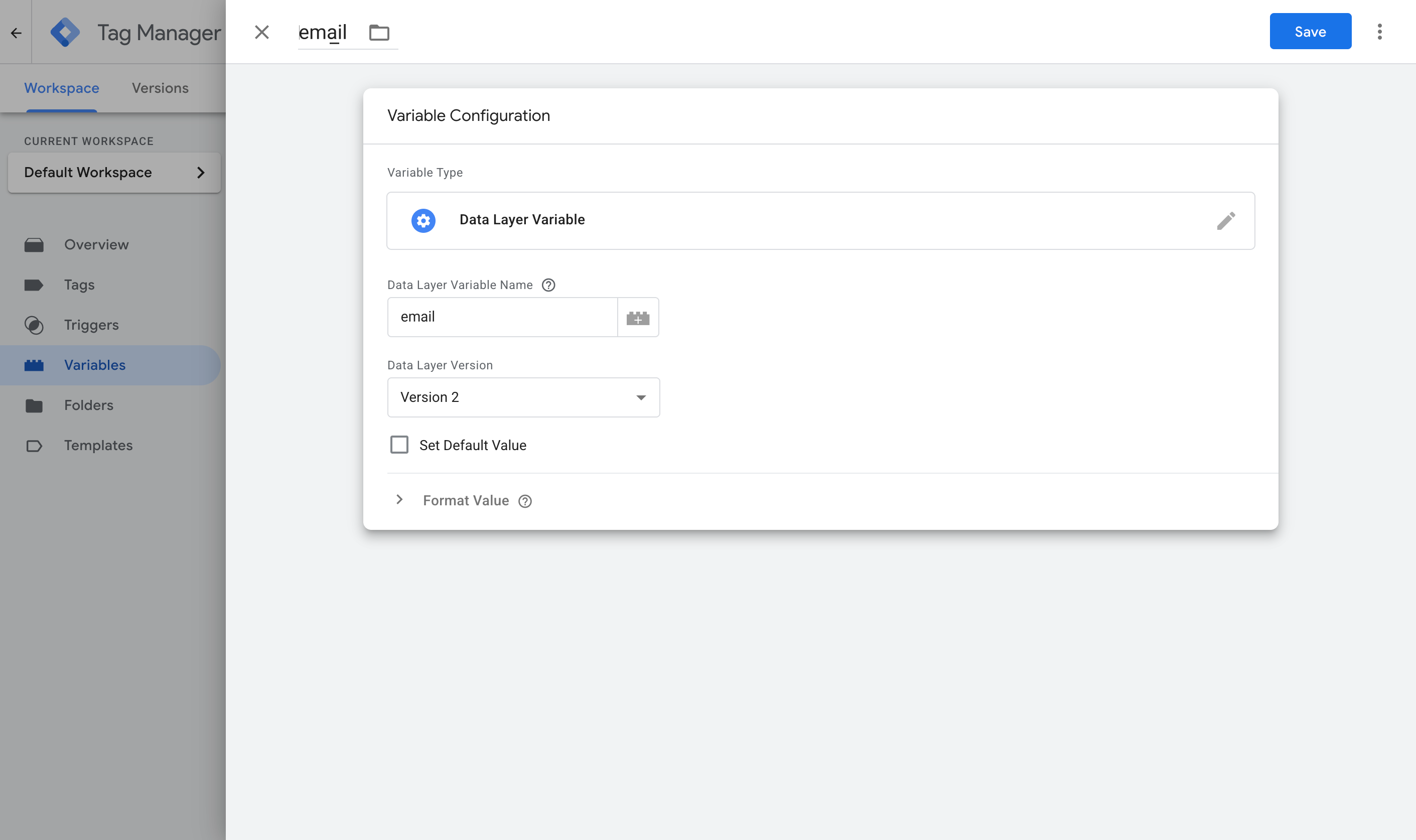
Here are the four you need.
Variable 1:
- Name: Email
- Variable Type: Data Layer Variable
- Data Layer Variable Name: email
Variable 2:
- Name: First Name
- Variable Type: Data Layer Variable
- Data Layer Variable Name: first_name
Variable 3:
- Name: Last Name
- Variable Type: Data Layer Variable
- Data Layer Variable Name: last_name
Variable 4:
- Name: Phone
- Variable Type: Data Layer Variable
- Data Layer Variable Name: phone
Step 3: Create a Custom Event trigger
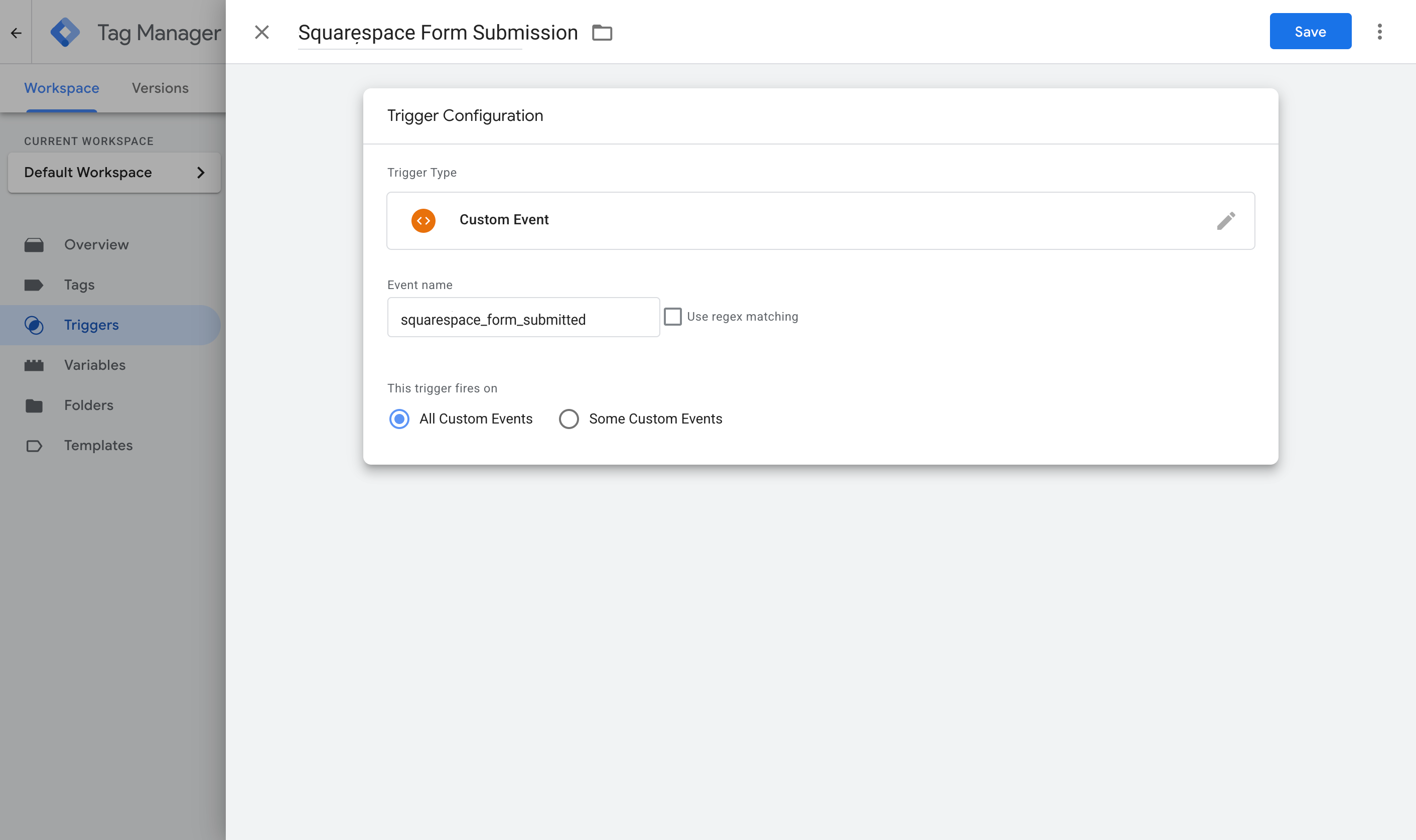
With the lead's details going into the dataLayer and variables set up to pull them out, the next step is telling Google Tag Manager when to use them. That's what a Trigger is for. It watches for the event the snippet sends into the dataLayer (called squarespace_form_submitted), and tells your conversion tags to fire when it arrives.
To set it up, go to the Triggers section, click New, choose the Custom Event type, name it Squarespace Form Submission, and set the event name to squarespace_form_submitted (it has to match what the code pushes exactly).
Step 4: Turn on Enhanced Conversions in Google Ads
Before any of this data can reach Google Ads, Google Ads has to agree to accept it. To set that up, head to your Google Ads account, go to Goals, then Conversions, then Settings, and turn on Enhanced Conversions.
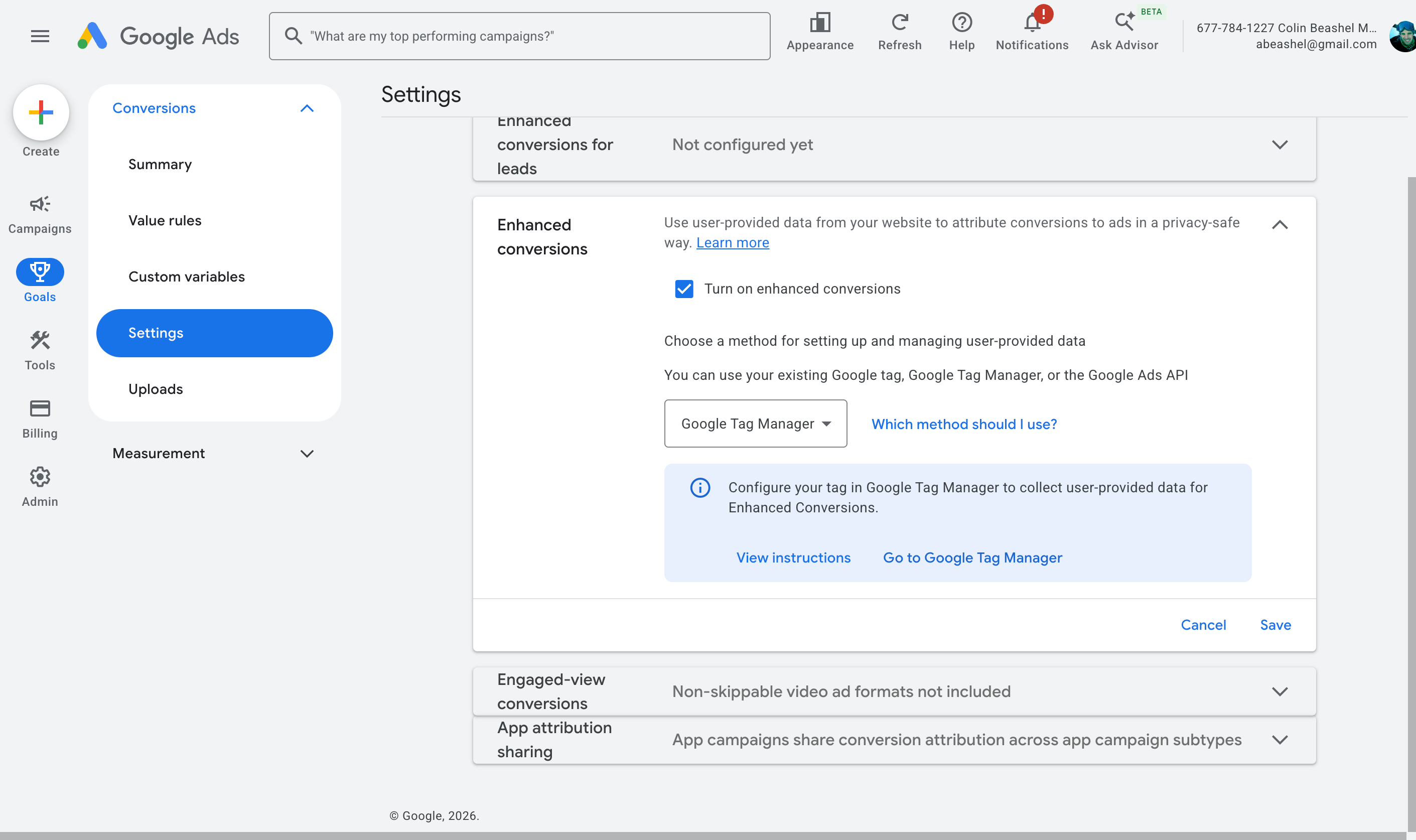
When it asks how you want to implement it, choose Google Tag Manager. That gives Google Ads permission to receive and use the customer data you're about to send.
Step 5: Create your Google Ads conversion tag and map the data
The final step is to create a Google Ads conversion tag in your account. This is what actually sends the conversion to Google Ads. It fires on the Trigger you created in Step 3 and passes through the data from the Variables you set up in Step 2.
To build it, jump back into GTM, go to Tags, select New, choose Google Ads User Provided Data Event as the tag type, and map the variables from Step 2 to the fields it asks for.
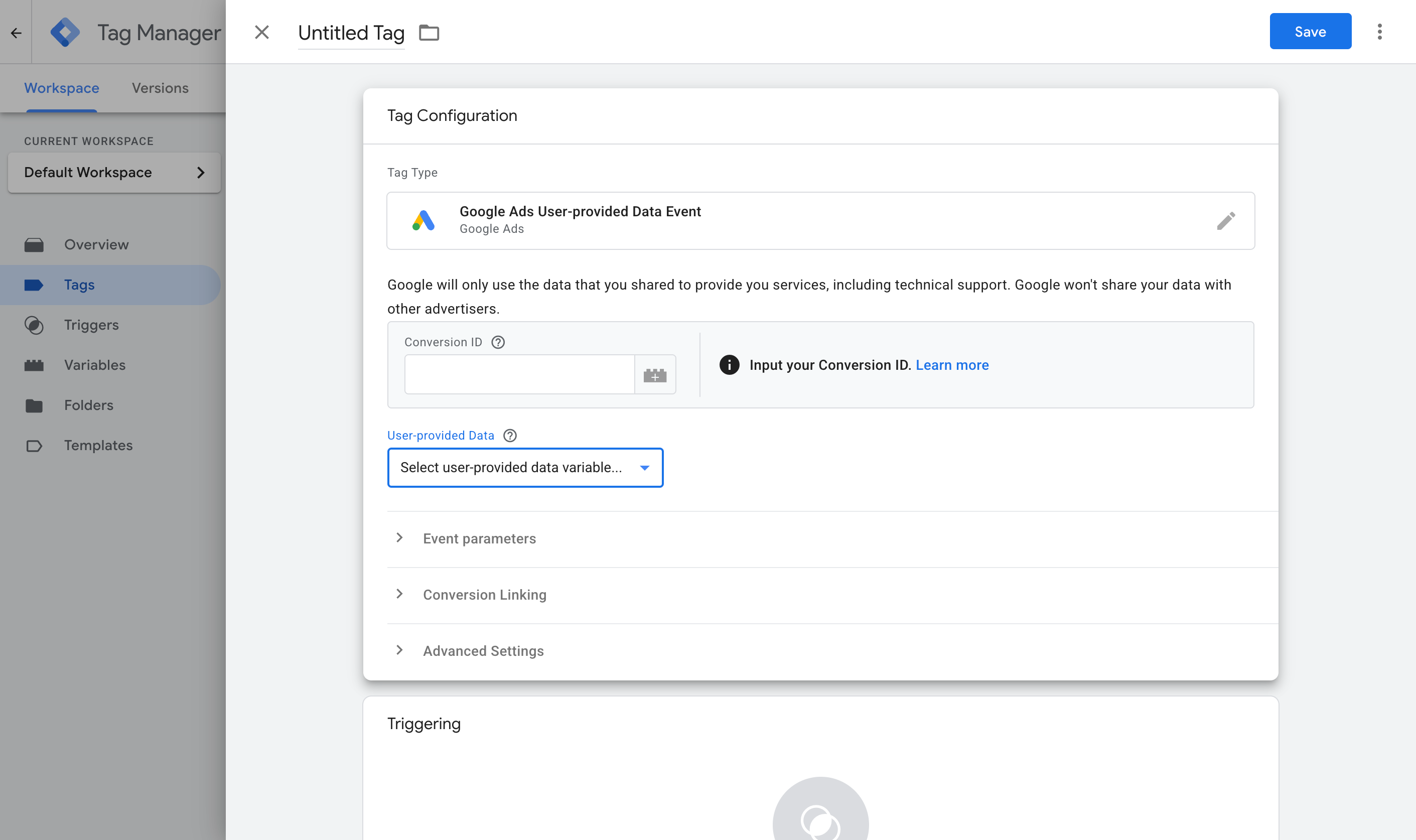
Then set it to fire on the Custom Event trigger you created in Step 3.
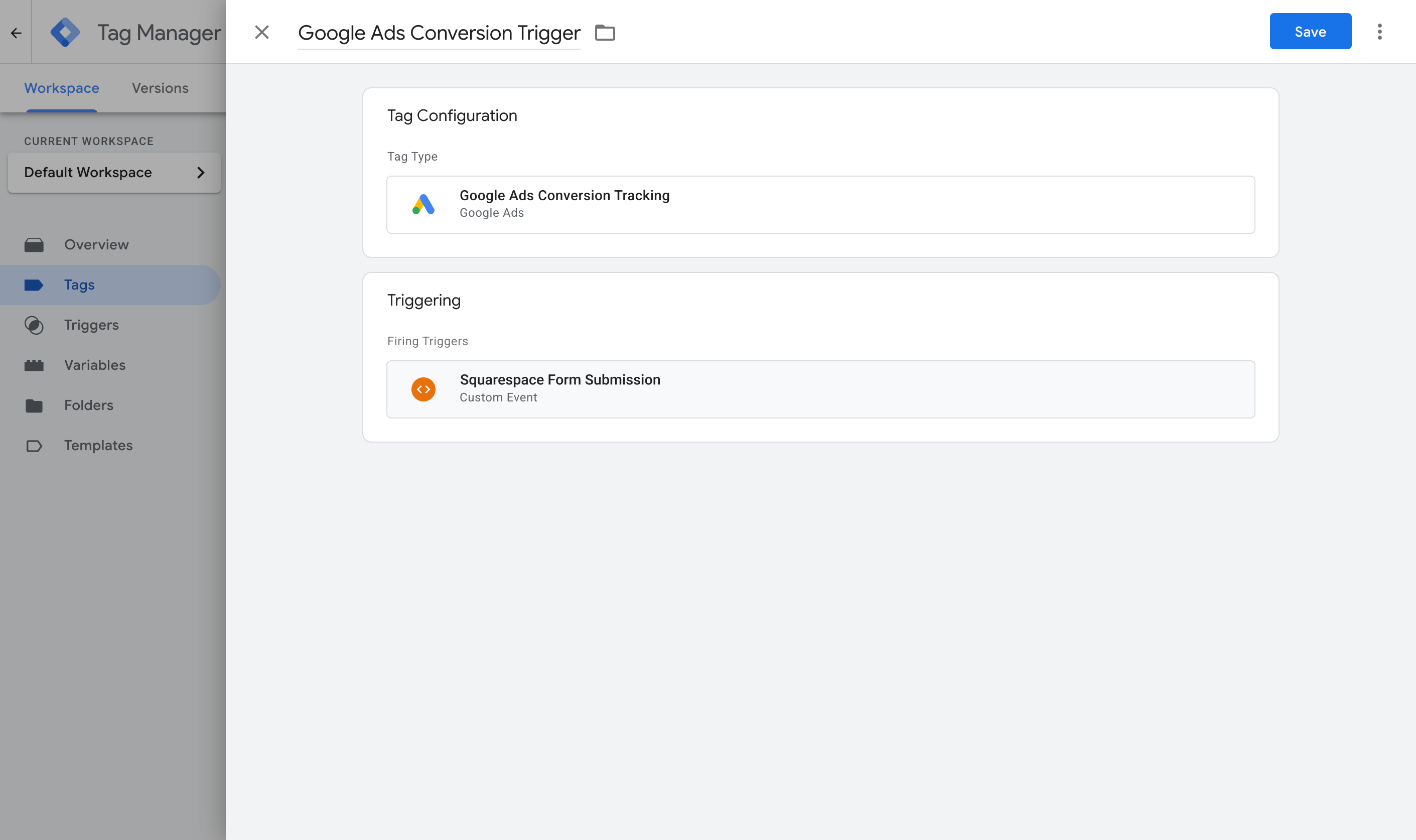
Once that's done, publish your GTM container.
With all of this complete, you should now have a Tag that listens for Squarespace form submissions and sends an event to the dataLayer, some Variables that pull the lead's details out of it, a Trigger that watches for the event, and another Tag that sends the conversion to Google Ads when the Trigger fires.
To check it's working, open GTM Preview mode, submit a form on your Squarespace site, and confirm the squarespace_form_submitted event arrives with the email and name filled in.
Pros and cons
Pros:
- It's free, and you may already have Google Tag Manager installed on your site, so that's a start.
- Unlike Method 1, it captures the name, email and phone and sends them to Google Ads (the minimum you need for Enhanced Conversions).
- It only fires once Squarespace has accepted the form submission, and it gets the lead's details out before Squarespace clears the form.
Cons:
- There are a lot of moving parts. Between the Custom HTML tag, four Variables, the Trigger, the Google Ads settings and the conversion Tag itself, there's plenty to get wrong. And when something does go wrong, nothing tells you where or why. It just doesn't work, and it's up to you to figure out what happened (Google doesn't provide support for Tag Manager, so you're on your own).
- Like Method 1, it needs Squarespace's Core plan or higher (from $23 a month, billed annually), because that's the cheapest plan with Code Injection.
- The conversion is still sent from the visitor's browser, so ad blockers and privacy browsers can stop it from firing. Expect to lose 30% or more of your conversions this way.
- It still misses the data Google Ads needs most in order to match a conversion back to the original ad click. The name, email and phone are useful, but millions of people share the same name, and plenty of people have more than one email address (so the one they typed into your form may not be the one they were logged in to Google with when they clicked your ad). The only thing that ties a conversion back to the original ad click with 100% accuracy is the Google Click ID, and this method doesn't capture it.
That last point is what pushes a lot of people to Method 3.
Method 3: Use Converly
Best for: Sending proper, server-side conversions to Google Ads, Meta Ads, ChatGPT Ads, LinkedIn Ads, and more, without having to do complicated configuration in Google Tag Manager.
Converly is a dedicated conversion tracking tool. Whenever someone submits a Squarespace form on your website, it sends a server-side conversion to Google Ads, Meta Ads, LinkedIn Ads and any other platform you use.
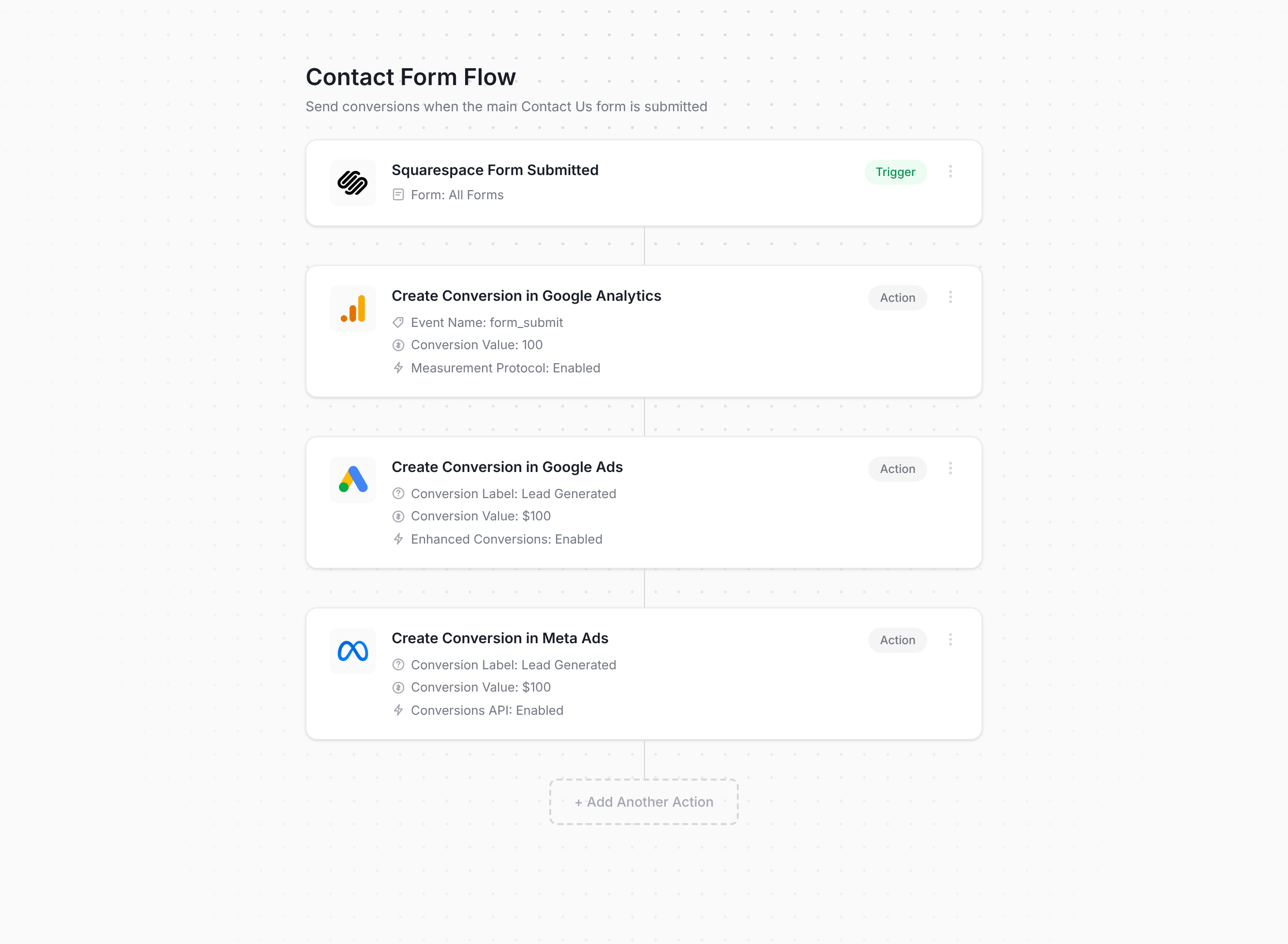
That screenshot is pretty much the entire setup. You simply pick a trigger (like someone submitting a Squarespace form), add one or more actions (like sending a conversion to Google Ads or Meta Ads), and that's it!
After that, you paste the snippet Converly gives you into your site (Squarespace's Code Injection setting is the easiest place for it) and it handles everything else. It detects successful Squarespace form submissions, pulls out the name, email and phone, and passes them to Converly's servers. Converly then forwards them on to Google Ads, Meta Ads and whichever other destinations you've connected from our servers (because it's sent from Converly's servers and not the visitor's browser, ad blockers and privacy-centric browsers like Safari can't block it).
And on top of sending the name, email and phone, Converly also picks up the click IDs (i.e. GCLID, fbclid, etc), the browser cookies the ad platforms set, the visitor's IP address and their user agent, and sends all of it with every conversion. That extra data is what makes it possible for ad platforms to match the conversion back to a real person and the original ad they clicked with near 100% accuracy (Meta's Event Match Quality score, for example, typically climbs from around 3 to somewhere between 9 and 10).
Pros and cons
Pros:
- Setup really is quick and easy. You simply choose a trigger, choose your actions, and you're finished. There's no code to write or look after, nothing complicated to configure, and no need to handle the quirks of Squarespace's form builder yourself.
- Sends click IDs, cookies, IP address and user agent with every conversion, which gives your match quality in the ad platforms a real lift (with Converly, Meta's Event Match Quality score usually goes from a 3 or 4 up to a 9 or 10, for example).
- Sends conversions server-side, so ad blockers and privacy browsers can't stop them. You can expect around 30% more recorded conversions than a Google Tag Manager setup gives you.
- Supports conditional logic, so you choose which forms actually count as a conversion (like sending a conversion when someone submits your Quote Request form, but not your Contact Support form).
- Lets you connect Google Ads, Meta Ads, etc directly inside Converly and then just pick which conversion should fire. No hunting around for account IDs or conversion IDs.
- Comes with its own MCP and CLI, so you can connect an AI tool like Claude or ChatGPT, ask it to ‘Set up conversion tracking in Google Ads and Meta Ads when someone submits my Squarespace form’, and it does the whole job for you.
- Includes a full conversion log covering every lead who submitted a Squarespace form, what data was captured, whether it made it to your ad platforms, and more.
- Backed by a real support team who'll help you get set up and sort out any problems. Good luck getting that kind of help from Google when your GTM setup breaks.
Cons:
- It costs money after the free trial ends. Plans start at $19 a month.
What not to do
So far we've covered the three best ways to set up conversion tracking for Squarespace forms, and when each one makes sense. But it's just as useful to know which approaches to avoid, because several of the most common ways people try to track Squarespace forms don't work very well. Here are the ones to stay away from:
Tracking thank-you page visits
This is still the most popular DIY approach. Squarespace lets you send people to a page of your choosing (like a thank you page) after they submit a form, so it seems like the easiest way to do it. In practice it creates more problems than it solves:
It counts people who never submitted anything. A thank-you page is just another page on your site, so people can reach it without ever filling in your form. They might bookmark it (especially if it has useful information on it), get sent there by their browser history or autocomplete, be forwarded the link by a colleague, or find it in Google if it ever gets indexed. Each of those visits is recorded as a conversion, even though nobody submitted a form.
It can count the same lead more than once. If someone refreshes the thank-you page, that's a second conversion. If they leave, then hit the back button and end up on it again, that's another one. A single lead can be counted several times, which inflates your numbers and has Google and Meta optimising your ads against conversion data that isn't real.
You'd get terrible match rates. Your thank you page doesn't contain the form, so it can't pass on the name, email, phone, GCLID, fbclid, etc. that ad platforms need to match everything up. So even though the conversions reach those platforms, many of them aren't counted, because they're missing the data needed to link them back to a real person and the original ad they clicked.
Relying on the default form submit event in Google Tag Manager
When people set up tracking in Google Tag Manager, the natural first move is to use GTM's built-in Form Submission trigger, which listens for the browser's native form submit event.
With Squarespace, that event fires too early. It's sent when the visitor clicks the Submit button, before Squarespace's servers have decided whether to accept the entry or not. So a visitor who mistypes their email address, gets rejected, fixes it and submits again is counted twice (because they clicked 'Submit' twice). Spam leads are also counted because they technically click the Submit button (even though Squarespace rejects the form submission and you never see them).
What you need to do is listen for the things that happen when Squarespace confirms the form submission was successful (i.e. showing the thank you message), which is what Methods 1 through 3 above all do.
Using GA4's automatic form tracking (Enhanced Measurement)
GA4 has a built-in Enhanced Measurement feature that promises to track form submissions automatically, with no setup required.
The trouble is that it relies on the same browser submit event as GTM's default trigger, so it runs into the same problems. It records a conversion as soon as the Submit button is clicked, regardless of whether it's actually successful or not.
If you want Squarespace submissions in GA4 reliably, use the free recipe from Method 1 above, or use Converly.
So which method should I use?
Here's how the three ways to track Squarespace forms compare:
| Method | Best for | Sends conversions to | Data sent |
|---|
| Method 1. GA4 event built in Google Tag Manager | Sending submissions to Google Analytics (use our free GTM recipe to make it easier) | Google Analytics 4 | The submission event only |
| Method 2. Enhanced Conversions through Google Tag Manager | Sending to Google Ads, if fiddly configuration doesn't put you off | Google Ads | Name, email and phone |
| Method 3. Converly | Sending to any ad platform, with the least setup work | Google Ads, Meta Ads, LinkedIn Ads, ChatGPT Ads, GA4 and more | Name, email and phone, plus the GCLID, the Meta click ID, IP address and user agent |
Wrap up
Conversion tracking doesn't usually get much attention, but it's one of the biggest factors in how well your advertising actually performs.
When you take the time to set it up properly, the ad platforms' algorithms get the data they need to understand what your ideal customer looks like, and they can show your ads to more people like them.
Google and Meta have even put numbers on how much difference this makes. According to Google, businesses that switch to proper server-side conversion tracking see their conversions rise by around 19% on average, and Meta reports a 23% lift from the same change.
Converly gives you all the benefits of server-side tracking without any of the hard parts. You just pick your trigger (someone submitting a Squarespace form), choose which platforms the conversions should go to, and you're done (and it's even easier if you use an AI tool like Claude or ChatGPT. Just install the Converly plugin, ask it to 'set up Squarespace conversion tracking', and it can set it all up, install the code and test it works for you).
It's free to get started (there's no credit card needed for the trial), and most people are fully up and running in under 10 minutes. Start your 14-day free trial today.