


Track Squarespace Form Submissions in Google Tag Manager with this Free GTM Recipe
A free, tested Google Tag Manager recipe that spots Squarespace form submissions once Squarespace has saved them and hands you a trigger for sending conversions to Google Ads, Google Analytics and more.

Plenty of marketers use Google Tag Manager to send a conversion to Google Ads, Google Analytics, etc whenever a visitor fills in a form on their Squarespace website.
The trouble is, Squarespace forms are hard to track. The form doesn't check anything in the browser, so every click of submit gets sent off to Squarespace's servers in the background, and only the server decides whether the entry is accepted, rejected for a bad email address, or blocked by reCAPTCHA. Google Tag Manager's built-in Form Submission trigger can't see any of that, which means it either misses the conversion or counts the failed attempts too. To get it right you'd need custom code that watches for Squarespace's thank you message (or the redirect to your thank you page), works out which form on the page actually saved, sends an event to the dataLayer, and then a trigger built on top of it.
If you're not a developer or a Google Tag Manager expert, that's a lot to take on.
Thankfully, there's a much simpler option.
Just import this Squarespace Forms Conversion Tracking Recipe into your Google Tag Manager account and you'll have all you need to get basic conversion tracking up and running.
What Is a Google Tag Manager Recipe and What's in It?
A recipe is a ready-made set of Google Tag Manager assets (a tag, a trigger and two variables) that you bring into your account in a single import, rather than building every piece by hand. Every recipe we've made, and how each one works, is in the GTM recipe library.
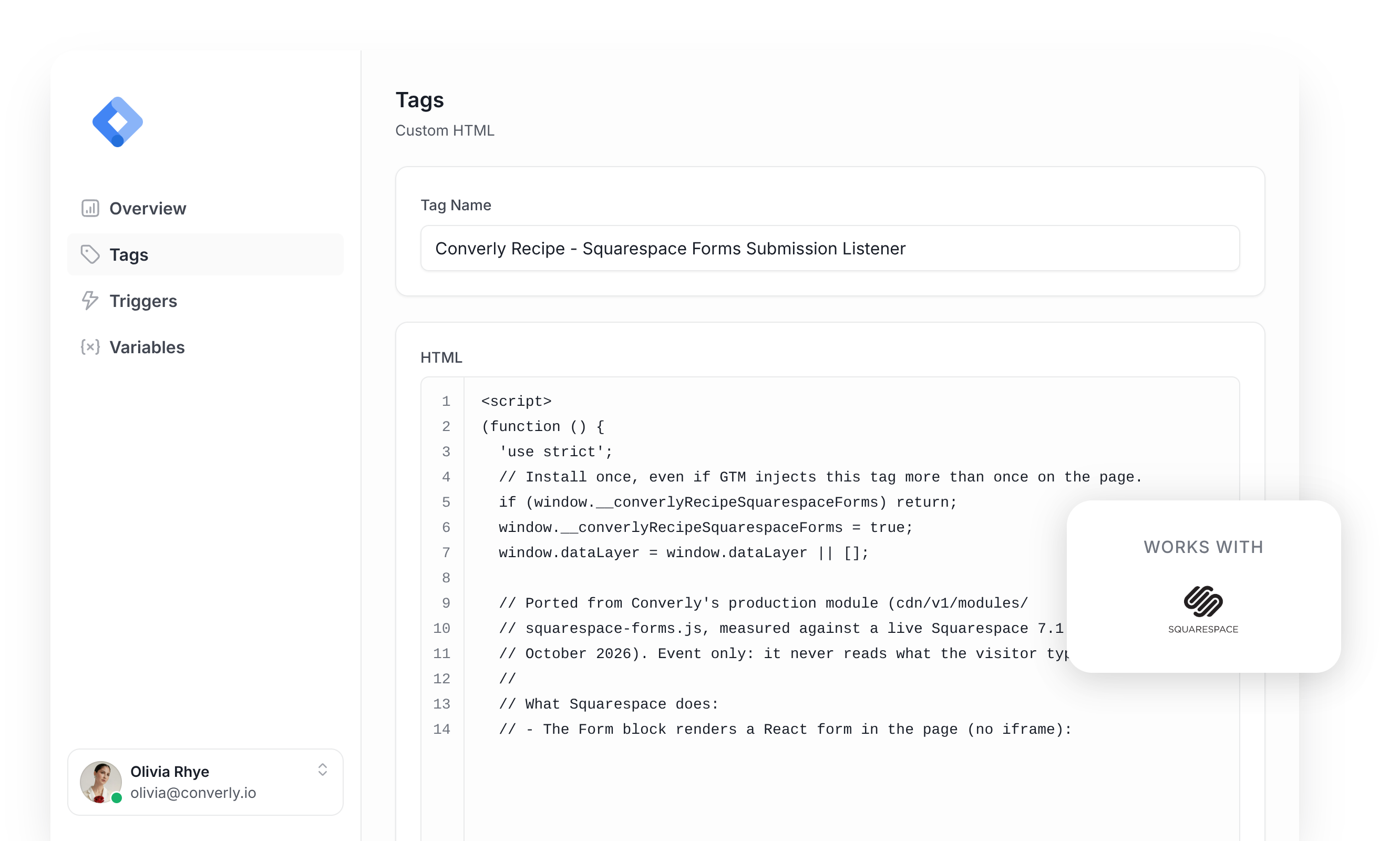
This recipe spots Squarespace form submissions that Squarespace has saved, passes a 'Form Submitted' event to Google Tag Manager, and gives you a Trigger for sending conversions to Google Analytics, Google Ads and more. It comes in four parts and nothing in it is hidden, so below you can see exactly what each piece holds before you import a thing.
Custom HTML Tag
Waits for Squarespace to confirm that a form entry was saved (by showing the form's thank you message, or by redirecting the visitor to your thank you page) and then pushes a 'squarespace_form_submitted' event to the dataLayer. It fires on All Pages, once per event, and this is the code inside it.
(function () {
  'use strict';
  // Install once, even if GTM injects this tag more than once on the page.
  if (window.__converlyRecipeSquarespaceForms) return;
  window.__converlyRecipeSquarespaceForms = true;
  window.dataLayer = window.dataLayer || [];

  // Ported from Converly's production module (cdn/v1/modules/
  // squarespace-forms.js, measured against a live Squarespace 7.1 site in
  // October 2026). Event only: it never reads what the visitor typed.
  //
  // What Squarespace does:
  // - The Form block renders a React form in the page (no iframe):
  //   .sqs-block-form ... form.react-form-contents[novalidate]. It mounts
  //   after DOMContentLoaded, so submits are caught on document.
  // - There is no check in the browser. Every submit posts
  //   /api/form/FormSubmissionKey then /api/form/SaveFormSubmission, and the
  //   server decides: 204 on success, 400 for a field error, 401 for a failed
  //   reCAPTCHA. A submit is never a conversion on its own.
  // - On success it marks the form (react-form-contents--submitted), shows a
  //   .form-submission-text message and gives the button the class
  //   "success". A form set to redirect leaves for its page about 1.3
  //   seconds after the 204, before that message renders in Chromium.
  // - The Newsletter block posts to the same SaveFormSubmission address, and
  //   that request carries no form identity, so a save only counts for a
  //   form that provably owns it.
  //
  // It fires once per form, on the first confirmed success for an attempt:
  //   1. a success marker that was not there when the attempt started, or
  //   2. the SaveFormSubmission request answering 2xx (read from the
  //      browser's resource timing, where it exposes responseStatus), when
  //      no other form's submit could own that save, or
  //   3. as the page leaves (a redirect form), either of the above.
  // It never fires on a 400 or 401, on a filled anti-spam field, or when it
  // cannot tell which form a save belongs to.

  var EVENT_NAME = 'squarespace_form_submitted';
  var BLOCK_SELECTOR = '.sqs-block-form, [data-sqsp-block="form"], [data-definition-name="website.components.form"]';
  var SAVE_PATH = '/api/form/SaveFormSubmission';
  // Long enough for a visitor to solve a reCAPTCHA picture challenge.
  var WATCH_MS = 180000;

  function now() {
    try {
      if (window.performance && typeof window.performance.now === 'function') return window.performance.now();
    } catch (e) {}
    return 0;
  }

  function hasToken(el, token) {
    if (!el || !el.getAttribute) return false;
    var cls = el.getAttribute('class') || '';
    return (' ' + cls + ' ').indexOf(' ' + token + ' ') !== -1;
  }

  function isConnected(el) {
    try {
      if (typeof el.isConnected === 'boolean') return el.isConnected;
      return !!(el.ownerDocument && el.ownerDocument.documentElement.contains(el));
    } catch (e) {
      return false;
    }
  }

  // ---- Which forms are Squarespace forms ----

  function blockFor(formEl) {
    try {
      return (formEl && formEl.closest) ? formEl.closest(BLOCK_SELECTOR) : null;
    } catch (e) {
      return null;
    }
  }

  function isSquarespaceForm(formEl) {
    if (!formEl || (formEl.tagName || '').toLowerCase() !== 'form') return false;
    return !!blockFor(formEl);
  }

  // The block's own form definition (the site owner's settings, not the
  // visitor's answers): { formId, formName, ... }.
  function formIdentity(block) {
    var id = { formId: '', formName: '' };
    try {
      var script = block && block.querySelector('script.sqs-form-block-context');
      if (!script) return id;
      var parsed = JSON.parse(script.textContent || '{}');
      if (parsed && typeof parsed.formId === 'string') id.formId = parsed.formId;
      if (parsed && typeof parsed.formName === 'string') id.formName = parsed.formName;
    } catch (e) {}
    return id;
  }

  // The honeypot is a text input visitors cannot see or reach (measured id
  // "message-field", inside an aria-hidden wrapper). Squarespace answers a
  // filled one with a 204 and its thank-you message, so a filled honeypot
  // means a bot. Only whether it is empty is checked.
  function honeypotFilled(formEl) {
    try {
      var hp = formEl.querySelector('#message-field');
      if (!hp) return false;
      var wrap = hp.closest && hp.closest('[aria-hidden="true"]');
      if (!wrap || !formEl.contains(wrap)) return false;
      return hp.value !== '';
    } catch (e) {
      return false;
    }
  }

  function submitButtonOf(formEl) {
    try { return formEl.querySelector('button[type="submit"]'); } catch (e) { return null; }
  }

  // ---- Which form a save request belongs to ----

  var seenSaves = [];   // SaveFormSubmission resource entries seen so far
  var claimed = [];     // entries already credited to a form
  var submitLog = [];   // every form submit on the page, with its time

  function pageOrigin() {
    try {
      var l = window.location;
      return l.origin || (l.protocol + '//' + l.host);
    } catch (e) {
      return '';
    }
  }

  // The save request's address is checked for its origin and path only.
  function isSaveEntry(e) {
    var n = (e && e.name) || '';
    var origin = pageOrigin();
    if (!origin || n.indexOf(origin + '/') !== 0) return false;
    return n.slice(origin.length).split(/[?#]/)[0] === SAVE_PATH;
  }

  function prune() {
    // An attempt is watched for WATCH_MS, and submits up to WATCH_MS before
    // it still count when deciding who owns a save.
    var cutoff = now() - 2 * WATCH_MS;
    var i;
    for (i = submitLog.length - 1; i >= 0; i--) if (submitLog[i].at < cutoff) submitLog.splice(i, 1);
    for (i = seenSaves.length - 1; i >= 0; i--) if (seenSaves[i].startTime < cutoff) seenSaves.splice(i, 1);
    if (seenSaves.length > 100) seenSaves.splice(0, seenSaves.length - 100);
    if (claimed.length > 100) claimed.splice(0, claimed.length - 100);
  }

  function allSaveEntries() {
    var all = seenSaves.slice();
    try {
      if (window.performance && typeof window.performance.getEntriesByType === 'function') {
        var buffered = window.performance.getEntriesByType('resource');
        for (var b = 0; b < buffered.length; b++) if (all.indexOf(buffered[b]) === -1) all.push(buffered[b]);
      }
    } catch (err) {}
    var out = [];
    for (var i = 0; i < all.length; i++) if (isSaveEntry(all[i])) out.push(all[i]);
    return out;
  }

  function saveEntriesSince(since) {
    var all = allSaveEntries();
    var out = [];
    for (var i = 0; i < all.length; i++) {
      if (all[i].startTime >= since && claimed.indexOf(all[i]) === -1) out.push(all[i]);
    }
    out.sort(function (x, y) { return x.startTime - y.startTime; });
    return out;
  }

  // A save's owner is ambiguous when another form (a Newsletter block
  // included) was submitted during this attempt. It is also ambiguous when
  // another form was submitted earlier in the watch window and may still be
  // waiting for its save, because a slow reCAPTCHA can hold that save back
  // until after this attempt starts. Each submit gets at most one save, so
  // fewer saves than submits before this attempt means one is outstanding.
  function saveOwnershipAmbiguous(formEl, since, until) {
    var other = false;
    var first = null;
    var submits = 0;
    for (var i = 0; i < submitLog.length; i++) {
      var s = submitLog[i];
      if (s.at > until || s.at < since - WATCH_MS) continue;
      if (s.at >= since) {
        if (s.form !== formEl) return true;
        continue;
      }
      if (s.form !== formEl) other = true;
      submits++;
      if (first === null || s.at < first) first = s.at;
    }
    if (!other) return false;
    var saves = allSaveEntries();
    var answered = 0;
    for (var j = 0; j < saves.length; j++) {
      if (saves[j].startTime >= first && saves[j].startTime < since) answered++;
    }
    return answered < submits;
  }

  function statusOf(entry) {
    var s = entry && entry.responseStatus;
    return (typeof s === 'number' && s > 0) ? s : null;
  }

  // ---- One watcher per form ----

  var watchers = [];
  var firedForms = [];

  function findWatcher(formEl) {
    for (var i = 0; i < watchers.length; i++) if (watchers[i].form === formEl) return watchers[i];
    return null;
  }

  function removeWatcher(w) {
    for (var i = 0; i < watchers.length; i++) if (watchers[i] === w) { watchers.splice(i, 1); return; }
  }

  function dropStaleWatchers(formEl, block) {
    for (var i = watchers.length - 1; i >= 0; i--) {
      var w = watchers[i];
      if (w.form === formEl) continue;
      if (!isConnected(w.form) || (block && w.block === block)) w.cleanup();
    }
  }

  function createWatcher(formEl, block) {
    var scope = (formEl.closest && formEl.closest('.form-wrapper')) || block;
    function markers() {
      var text = false;
      try { text = !!(scope && scope.querySelector('.form-submission-text')); } catch (e) {}
      return {
        submitted: hasToken(formEl, 'react-form-contents--submitted'),
        button: hasToken(submitButtonOf(formEl), 'success'),
        text: text
      };
    }
    var w = {
      form: formEl,
      block: block,
      identity: formIdentity(block),
      armed: false,
      submitAt: 0,
      answered: true,
      done: false,
      timer: null,
      observer: null,
      pagehideArmed: false,
      staleError: false,
      had: markers()
    };

    function redirectConfigured() {
      try { return !!(formEl.getAttribute && formEl.getAttribute('data-success-redirect')); } catch (e) { return false; }
    }

    function cleanup() {
      w.done = true;
      if (w.timer) { try { clearTimeout(w.timer); } catch (e) {} w.timer = null; }
      if (w.observer) { try { w.observer.disconnect(); } catch (e) {} w.observer = null; }
      if (w.pagehideArmed) {
        try { window.removeEventListener('pagehide', onPageHide, true); } catch (e) {}
        w.pagehideArmed = false;
      }
      removeWatcher(w);
    }

    // The push comes first. The form is marked done only once the push went
    // through, so a dataLayer that throws (a broken wrapper) loses nothing,
    // and the next confirmation tries again.
    function fire() {
      if (w.done) return false;
      var payload = { event: EVENT_NAME, form_id: w.identity.formId };
      if (w.identity.formName) payload.form_name = w.identity.formName;
      try {
        window.dataLayer = window.dataLayer || [];
        window.dataLayer.push(payload);
      } catch (e) {
        return false;
      }
      cleanup();
      firedForms.push(formEl);
      return true;
    }

    function domConfirmsSuccess() {
      var m = markers();
      return (m.submitted && !w.had.submitted) || (m.button && !w.had.button) || (m.text && !w.had.text);
    }

    function check() {
      if (w.done || !w.armed) return;
      if (!isConnected(formEl)) { cleanup(); return; }
      if (domConfirmsSuccess()) { fire(); return; }
      if (w.answered) return;
      // A fresh error state on the button is Squarespace refusing this
      // attempt; one left over from an earlier attempt is not.
      var errorShowing = hasToken(submitButtonOf(formEl), 'error');
      if (!errorShowing) w.staleError = false;
      else if (!w.staleError) w.answered = true;
    }

    // A failure in any callback stays inside this listener and never
    // reaches Squarespace's page.
    function onPageHide() {
      try { pageHideCheck(); } catch (e) {}
    }

    function pageHideCheck() {
      if (w.done || !w.armed) return;
      if (!isConnected(formEl)) { cleanup(); return; }
      if (domConfirmsSuccess()) { fire(); return; }
      if (saveOwnershipAmbiguous(formEl, w.submitAt, now())) { cleanup(); return; }
      var entries = saveEntriesSince(w.submitAt);
      var last = entries[entries.length - 1];
      var status = statusOf(last);
      if (status !== null && status >= 200 && status < 300) {
        if (fire()) claimed.push(last);
        else cleanup();
        return;
      }
      cleanup();
    }

    w.refresh = function (submitAt) {
      // A new attempt replaces the old one once the old one was answered
      // (or its save has been seen); a double submit keeps the first.
      if (!w.armed || w.answered || saveEntriesSince(w.submitAt).length > 0) {
        w.submitAt = submitAt;
        w.answered = false;
        w.staleError = hasToken(submitButtonOf(formEl), 'error');
      }
      w.armed = true;
      if (w.timer) { try { clearTimeout(w.timer); } catch (e) {} }
      try { w.timer = setTimeout(cleanup, WATCH_MS); } catch (e) {}
      if (!w.pagehideArmed && redirectConfigured()) {
        try {
          window.addEventListener('pagehide', onPageHide, true);
          w.pagehideArmed = true;
        } catch (e) {}
      }
    };
    w.check = check;
    w.fire = fire;
    w.cleanup = cleanup;
    w.alive = function () { return isConnected(formEl); };
    w.markAnswered = function () { w.answered = true; };

    try {
      if (typeof MutationObserver !== 'undefined' && block) {
        w.observer = new MutationObserver(function () {
          try { check(); } catch (e) {}
        });
        w.observer.observe(block, { childList: true, subtree: true, attributes: true, attributeFilter: ['class'] });
      }
    } catch (e) {}
    watchers.push(w);
    return w;
  }

  // ---- The save request's verdict, from resource timing ----

  function onResourceEntries(list) {
    var entries;
    try { entries = list.getEntries(); } catch (e) { return; }
    for (var i = 0; i < entries.length; i++) {
      var e = entries[i];
      if (!e || !isSaveEntry(e)) continue;
      if (seenSaves.indexOf(e) === -1) { seenSaves.push(e); prune(); }
      var status = statusOf(e);
      if (status === null || claimed.indexOf(e) !== -1) continue;
      var candidates = [];
      for (var j = 0; j < watchers.length; j++) {
        var w = watchers[j];
        if (!w.done && w.armed && !w.answered && w.alive() && e.startTime >= w.submitAt) candidates.push(w);
      }
      if (candidates.length !== 1) continue;
      var c = candidates[0];
      if (saveOwnershipAmbiguous(c.form, c.submitAt, e.startTime)) continue;
      if (status >= 200 && status < 300) {
        if (c.fire()) claimed.push(e);
      } else {
        c.markAnswered();
      }
    }
  }

  // ---- Submits ----

  function handleSubmit(event) {
    try {
      var formEl = event.target;
      if (!formEl || (formEl.tagName || '').toLowerCase() !== 'form') return;
      submitLog.push({ form: formEl, at: now() });
      prune();
      if (!isSquarespaceForm(formEl)) return;
      var block = blockFor(formEl);
      dropStaleWatchers(formEl, block);
      // Squarespace allows one success per page view.
      if (firedForms.indexOf(formEl) !== -1) return;
      if (hasToken(formEl, 'react-form-contents--submitted')) return;
      if (honeypotFilled(formEl)) {
        var old = findWatcher(formEl);
        if (old) old.cleanup();
        return;
      }
      var w = findWatcher(formEl) || createWatcher(formEl, block);
      w.refresh(now());
    } catch (e) {
      // Never throw back into Squarespace's own form handling.
    }
  }

  document.addEventListener('submit', handleSubmit, true);
  try {
    if (typeof PerformanceObserver !== 'undefined') {
      new PerformanceObserver(function (list) {
        try { onResourceEntries(list); } catch (e) {}
      }).observe({ type: 'resource' });
    }
  } catch (e) {}
})();Variables
Hold the ID and the name of the Squarespace form that was submitted, so you can reference them in any tag you build. These are their exact settings.
Name
DLV - Squarespace Form ID
Variable Type
Data Layer Variable
Data Layer Variable Name
form_id
Name
DLV - Squarespace Form Name
Variable Type
Data Layer Variable
Data Layer Variable Name
form_name
Trigger
Fires whenever the 'squarespace_form_submitted' event comes through. Pick it as the trigger for any of your conversion tags. These are its exact settings.
Name
CE - Squarespace Form Submitted
Trigger Type
Custom Event
Event Name
squarespace_form_submitted
Download This Recipe
This single file is the whole recipe. Import it into Google Tag Manager and the listener tag, its trigger and the two form variables walked through on this page arrive already set up.
Built from Converly's own Squarespace Forms detection code
Why It's the Best Recipe Out There
It's based on the same detection code that runs inside our own conversion tracking product, Converly, reworked to run in Google Tag Manager.
How to Use the Squarespace Forms GTM Recipe
Install the Recipe
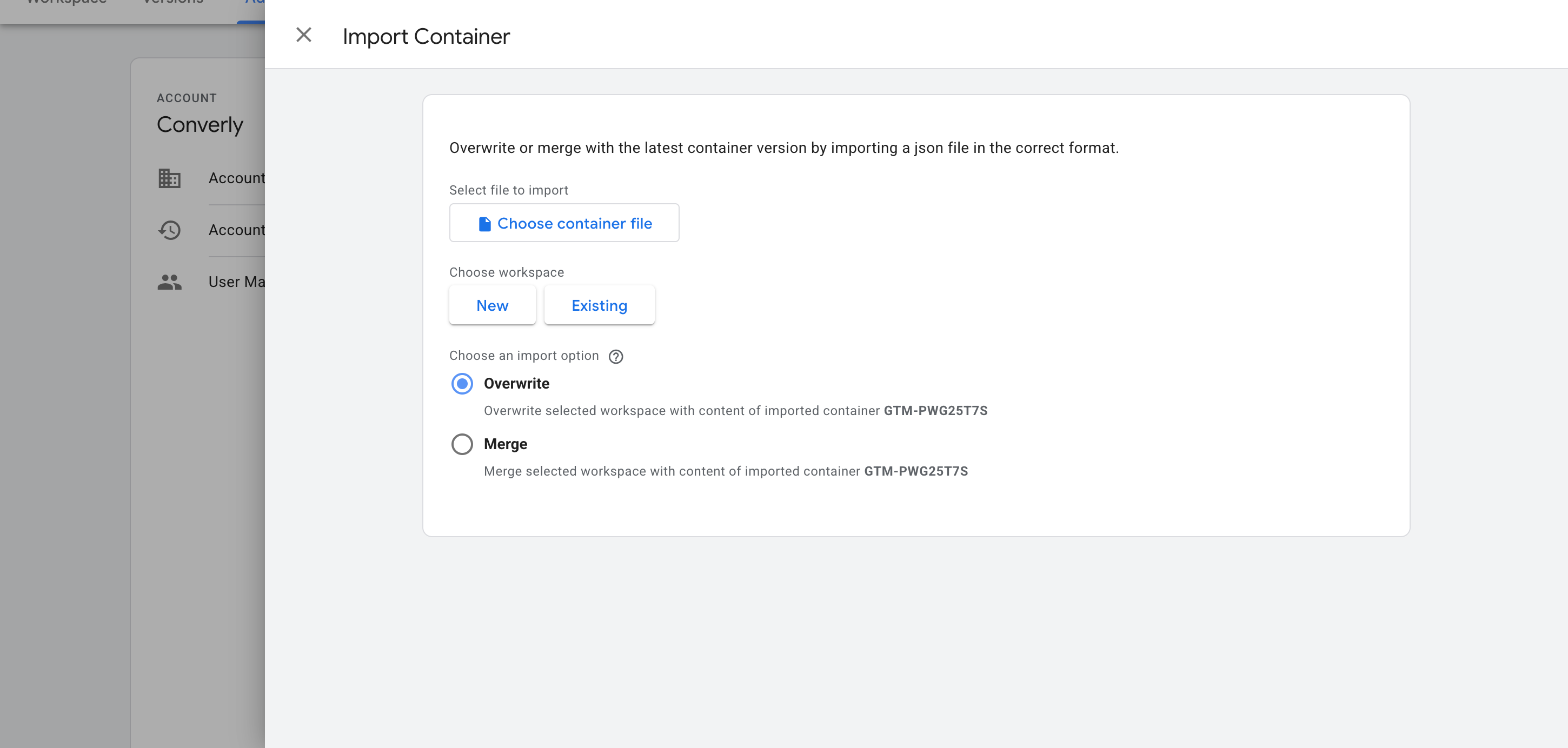
First, get the file from the download box above. Then, inside Google Tag Manager, open Admin and click Import Container. Select the file, pick the Merge option (it leaves everything already in your workspace alone), and confirm. Your container now has the listener, both variables and the trigger.
Configure Your Tags
Once it's in, the recipe's Trigger is ready to drive whatever conversion tags you like. Two of the most common setups are below.
Example 1: Google Analytics
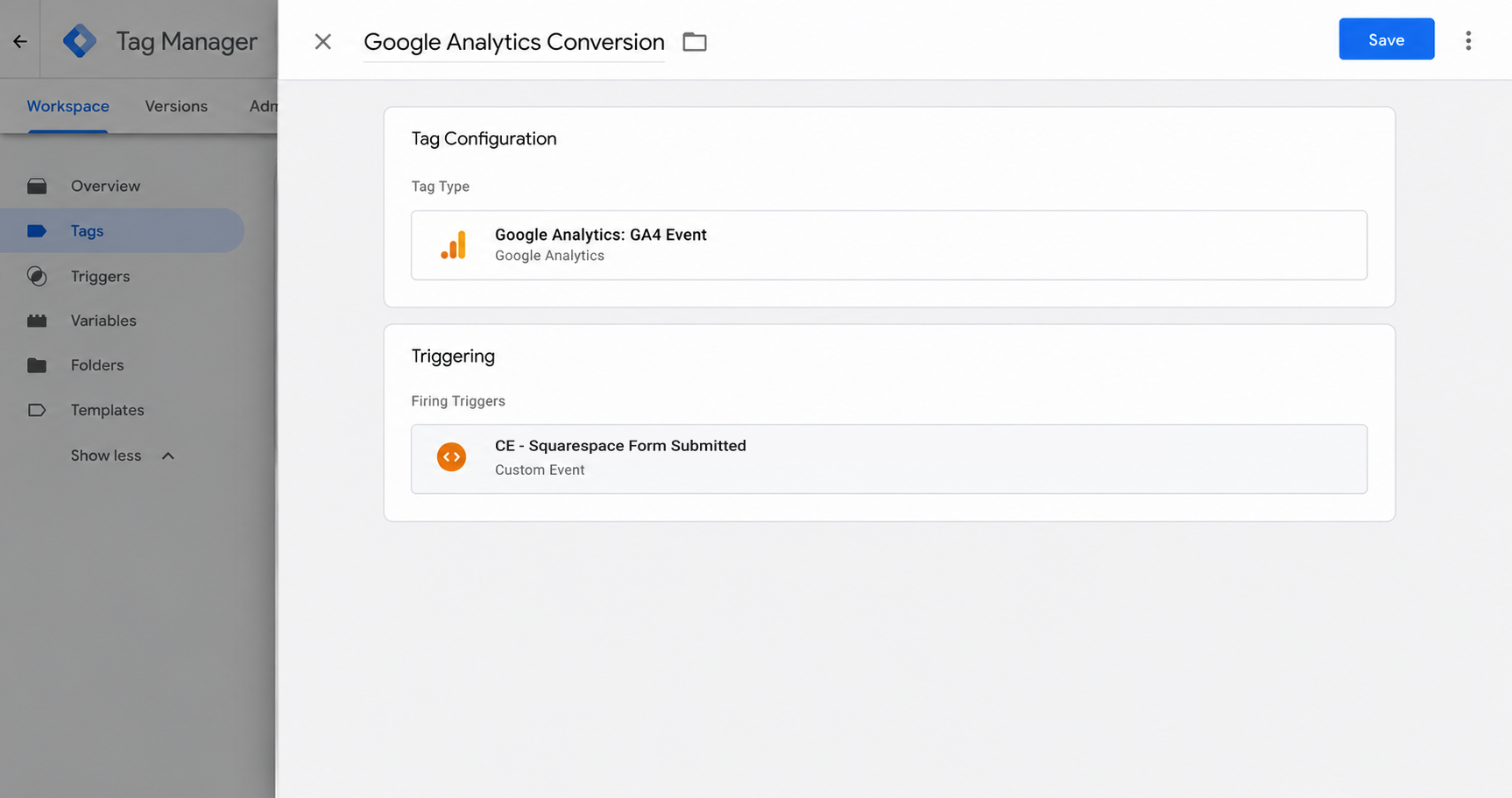
Make a new GA4 event tag, and under Triggering select CE - Squarespace Form Submitted, the trigger that came with the recipe. Google Analytics will then log an event each time Squarespace saves a form entry.
Example 2: Google Ads
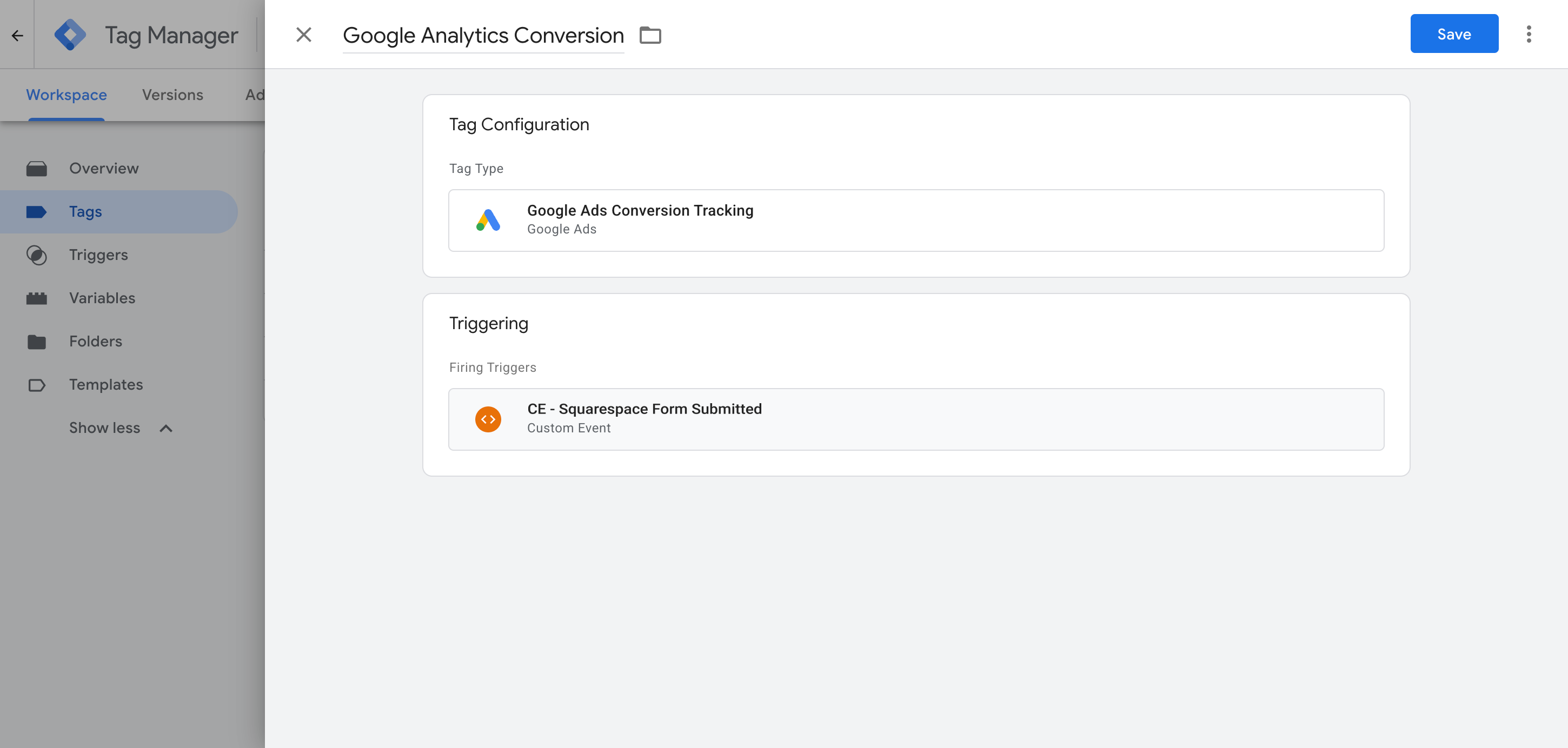
Open your Google Ads conversion tag (or create one) and attach CE - Squarespace Form Submitted as its trigger. Each form entry Squarespace accepts is then recorded in Google Ads as a conversion.
What This Enables You to Do (and What It Doesn't)
Whenever a visitor's entry is accepted and stored by Squarespace, the recipe drops an event into Google Tag Manager. Hang your Google Ads, Google Analytics or other conversion tags off that event and they'll fire at the right moment.
What it does
Sends an Event to GTM
Spots Squarespace form submissions once they're saved and pushes an event called 'squarespace_form_submitted' into your dataLayer for you.
Tells You Which Form Fired
Picks up the ID and name of the Squarespace form that was submitted and sends them along with the event, so a site with more than one form can fire a different tag for each.
Creates a Trigger in GTM
Adds a 'Trigger' to Google Tag Manager that you can use to fire any of your conversion tags.
What it doesn't do
Send the conversion server-side
It all runs in the visitor's browser, so ad blockers can stop the Google tag from loading and browser privacy rules can cut tracking down to as little as a day.
No Click IDs or Identifiers
It doesn't collect the Google click ID, Facebook click ID, Meta pixel cookies, IP address or user agent, which ad platforms depend on for Enhanced Conversions (Google) or a strong Event Match Quality score (Meta).
No Personal Details
The script just fires an event. It never reads the lead's name, email or phone number, which Google and Meta both need to match a conversion to a real person.
No Logging or Notifications
Tag Assistant will show you it works on the day you set it up, but unless you recheck it every week there's no way to know if it stops working.
No Lightbox or Newsletter Forms
It tracks the standard Squarespace Form block on a 7.1 site. Forms that open in a lightbox pop up, Newsletter blocks, older Squarespace 7.0 forms, and checkout or member sign up forms aren't counted.
The Proper Way to Send Conversions to Google Ads, Meta Ads & More
If Google Analytics is the only place you send conversions, this recipe will do the job, since GA doesn't accept personal information or IP addresses anyway. But for a strong Event Match Quality (EMQ) score in Meta, or Enhanced Conversions in Google, the conversion has to go server-side with the lead's name and email attached. That's exactly what Converly does.
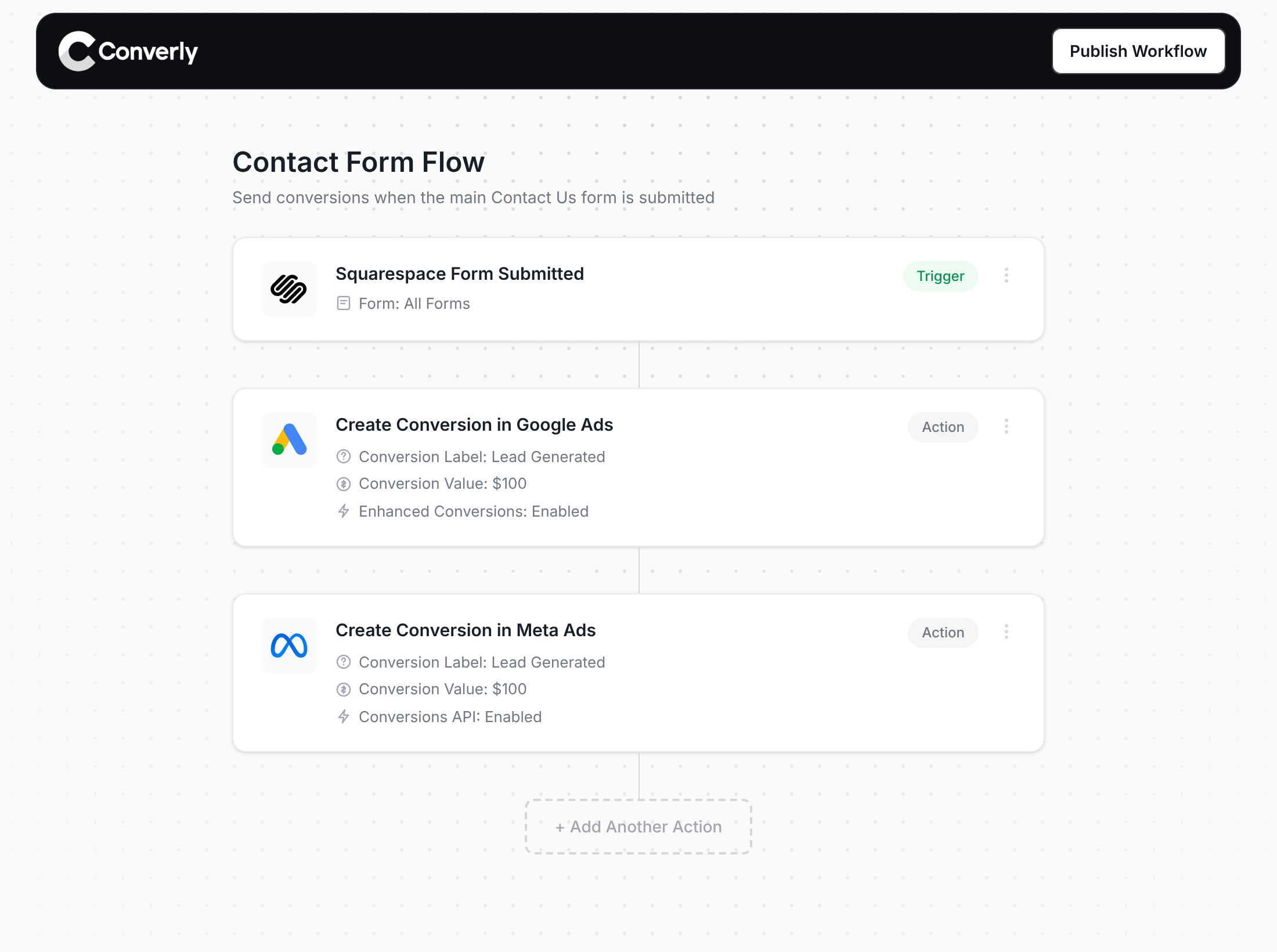
Here's why Converly is the best way to get conversions into Google Ads, Meta Ads, Microsoft Ads, LinkedIn Ads, etc.
Easy to set up
Converly replaces custom code with a drag-and-drop Conversion Flow builder. You choose what starts the flow (say, a Squarespace form submission) and where the conversion should go (say, Google Ads), and that's the setup done.
Sends Data Server-Side
Conversions leave from Converly's servers and go directly to Google, Meta, ChatGPT and the other platforms, never through the visitor's browser. Ad blockers and browser privacy limits simply don't come into it.
Sends More Data
Every conversion goes out with the lead's name, email and phone number, plus the Google and Facebook click IDs, IP address and user agent. With that data, Google Ads can run Enhanced Conversions and Meta will typically score your Event Match Quality (EMQ) at 9 or 10.
Full Conversion Log & Email Notifications
A log shows each conversion, the details captured with it, what was passed to every platform and whether each one accepted it. And if something stops working, an email lets you know straight away.
Supports Multiple Tools & Destinations
One account covers 100+ form, scheduling and chat tools and 20+ destinations, among them Google Ads, Meta, ChatGPT, LinkedIn, Microsoft and TikTok. When you switch tools or try a new ad platform, it's a few clicks rather than a new project.
Provides Free Support
You get a team with 20 years of conversion tracking and analytics behind it, happy to help whenever you're stuck. With Google Tag Manager, you're on your own.
Start Your Free Trial
Start a 14-day free trial and track your conversions the proper way. No code, no complicated configuration.
About the author
Aaron is the founder of Converly. With over 15 years of experience in digital marketing and SaaS, he's passionate about helping businesses track and optimise their ad conversions.