




Google Tag Manager is a common way to send conversions to Google Ads, Google Analytics and Meta when someone submits a Gravity Forms form on your website.
The problem is, it's hard to set up. Gravity Forms often submits without reloading the page, and when it does reload or redirect, the confirmation happens somewhere else. Either way, Google Tag Manager's built-in form submission trigger can't reliably tell a successful submission from a failed one, so you end up writing custom code to detect it.
This free template does that part for you. Add it from Google's Community Template Gallery, create one trigger, and every successful submission sends a gravity_form_submitted event you can fire your conversion tags on.
How to Use the Template
Follow these steps to install the template and set up Google Tag Manager to send conversions to Google Ads, Meta Ads, Google Analytics and more whenever a Gravity Forms form is submitted.
Install It
Add the template from Google's Community Template Gallery, then set it to fire on every page. Takes about two minutes.
- 1
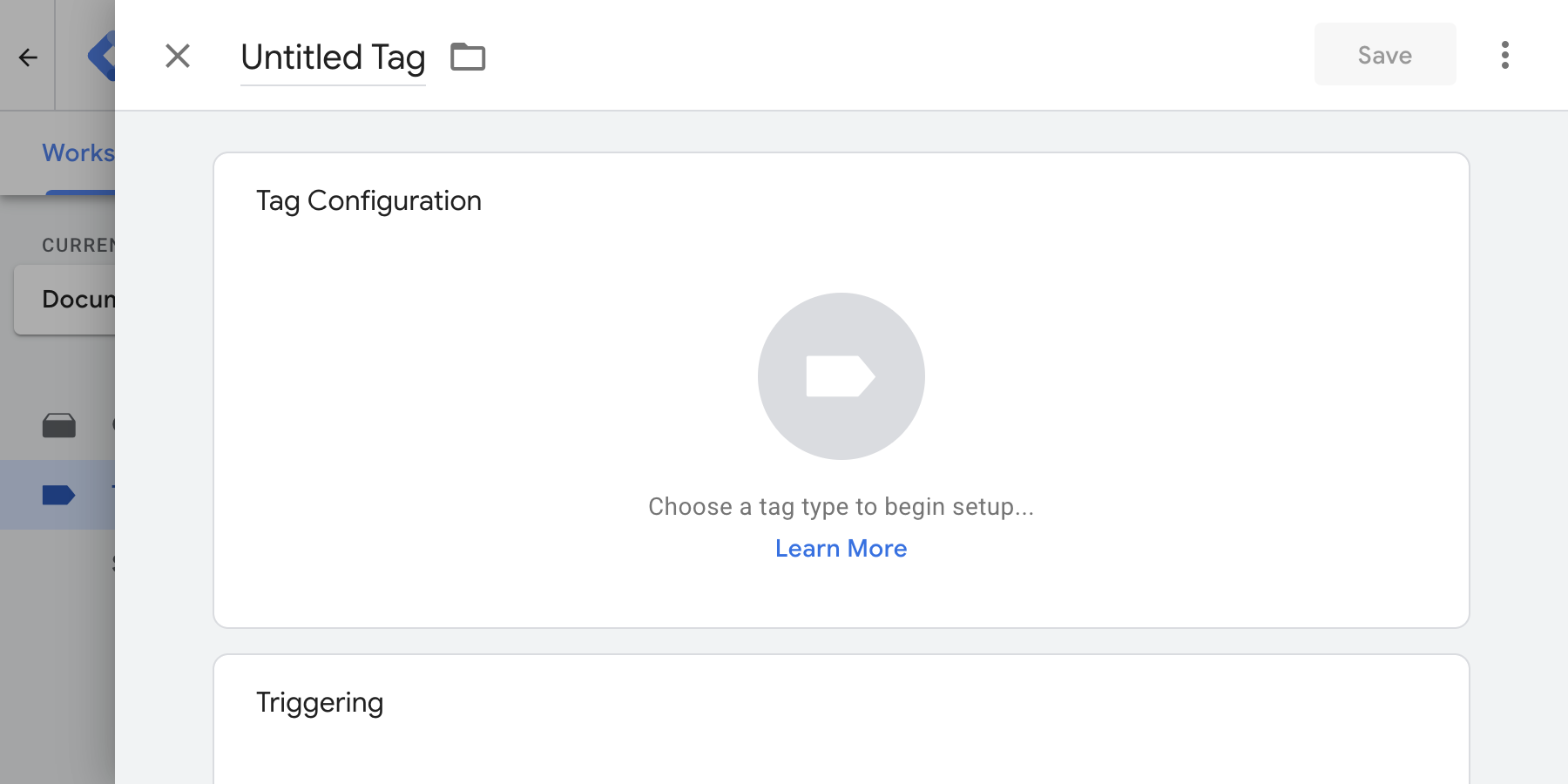
In Google Tag Manager, go to Tags, click New, then click Tag Configuration.
- 2
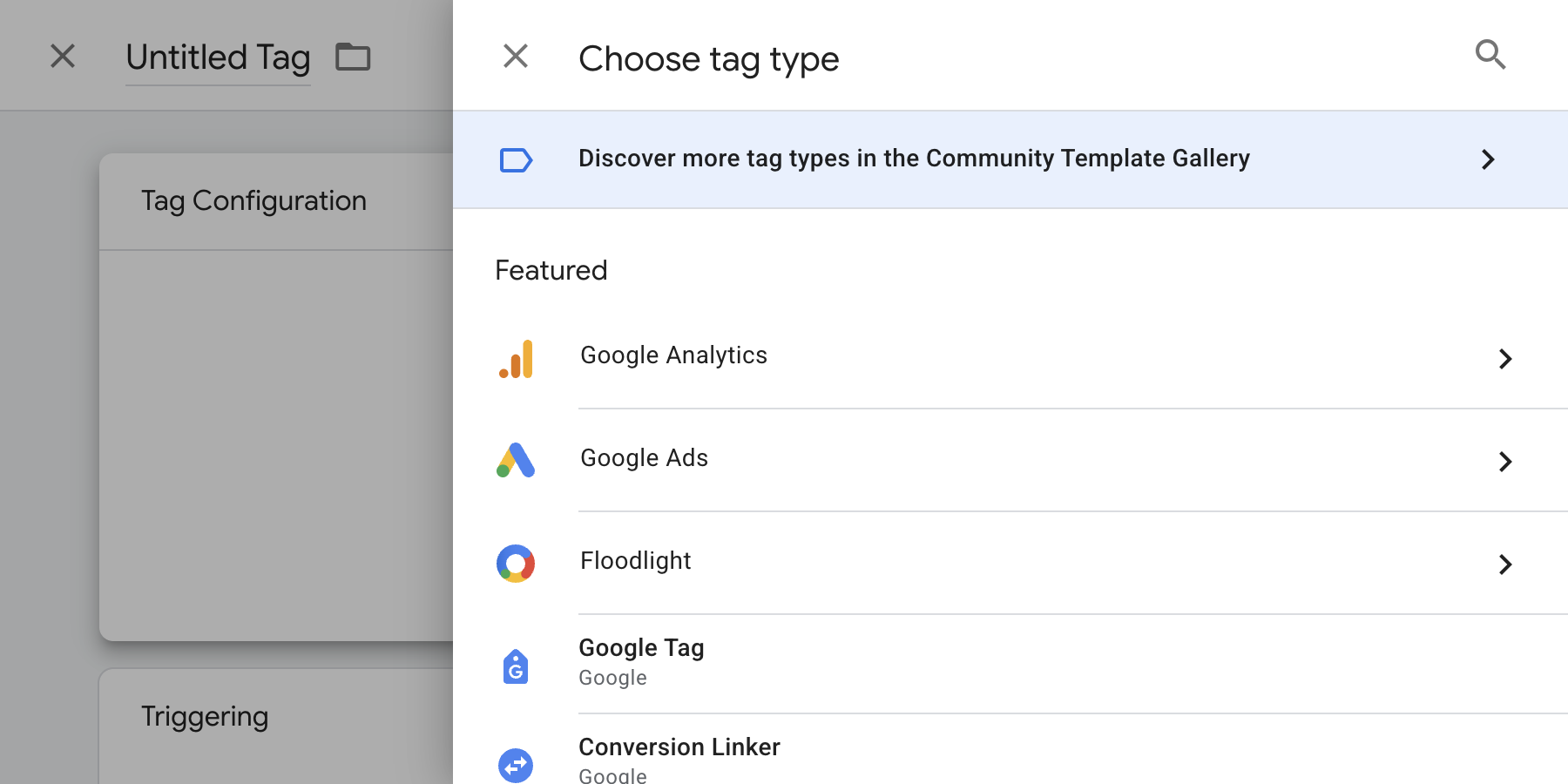
Choose Discover more tag types in the Community Template Gallery and search for "Gravity Forms".
- 3
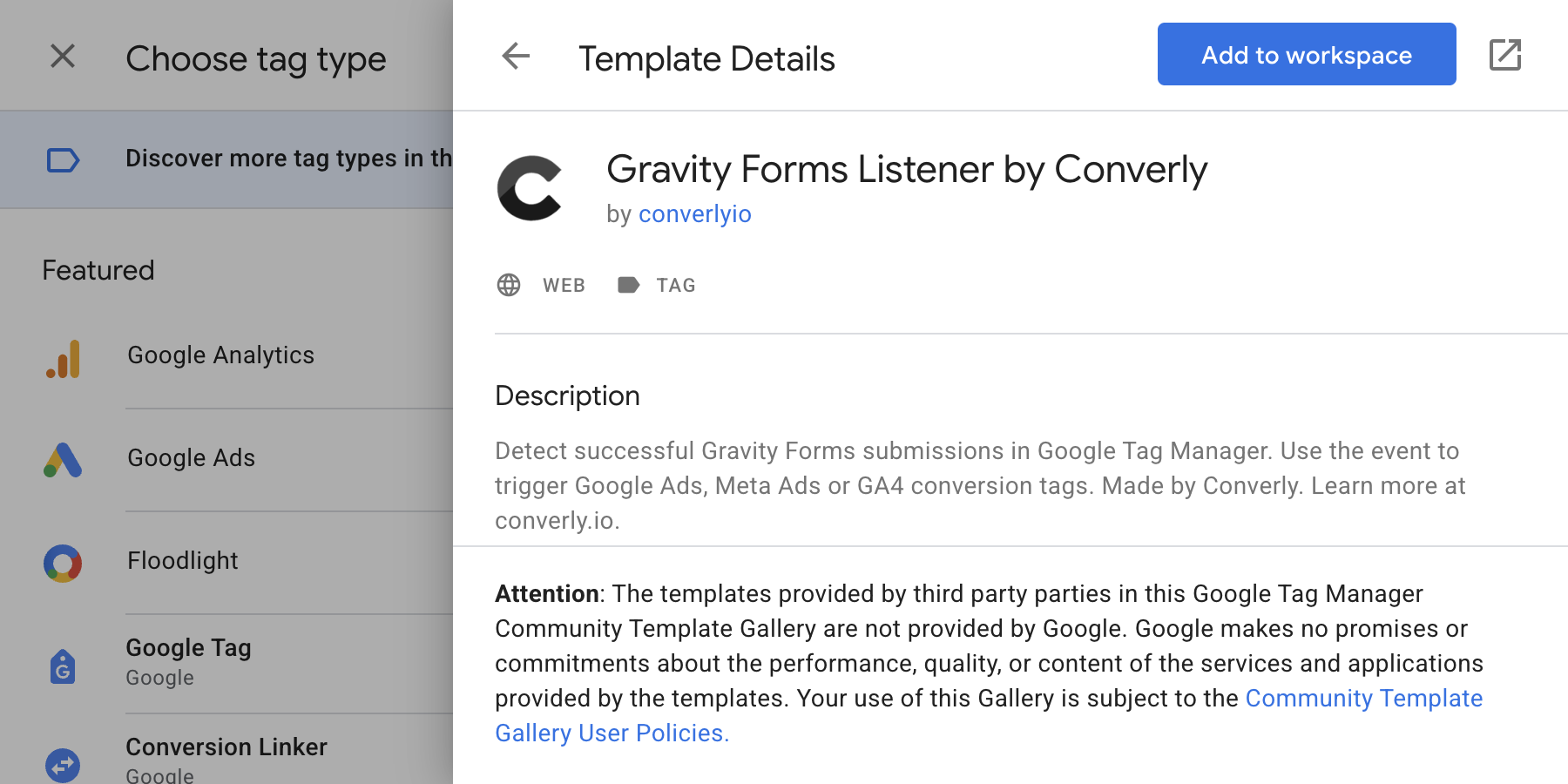
Pick Gravity Forms Listener by Converly, click Add to workspace, then Add.
- 4
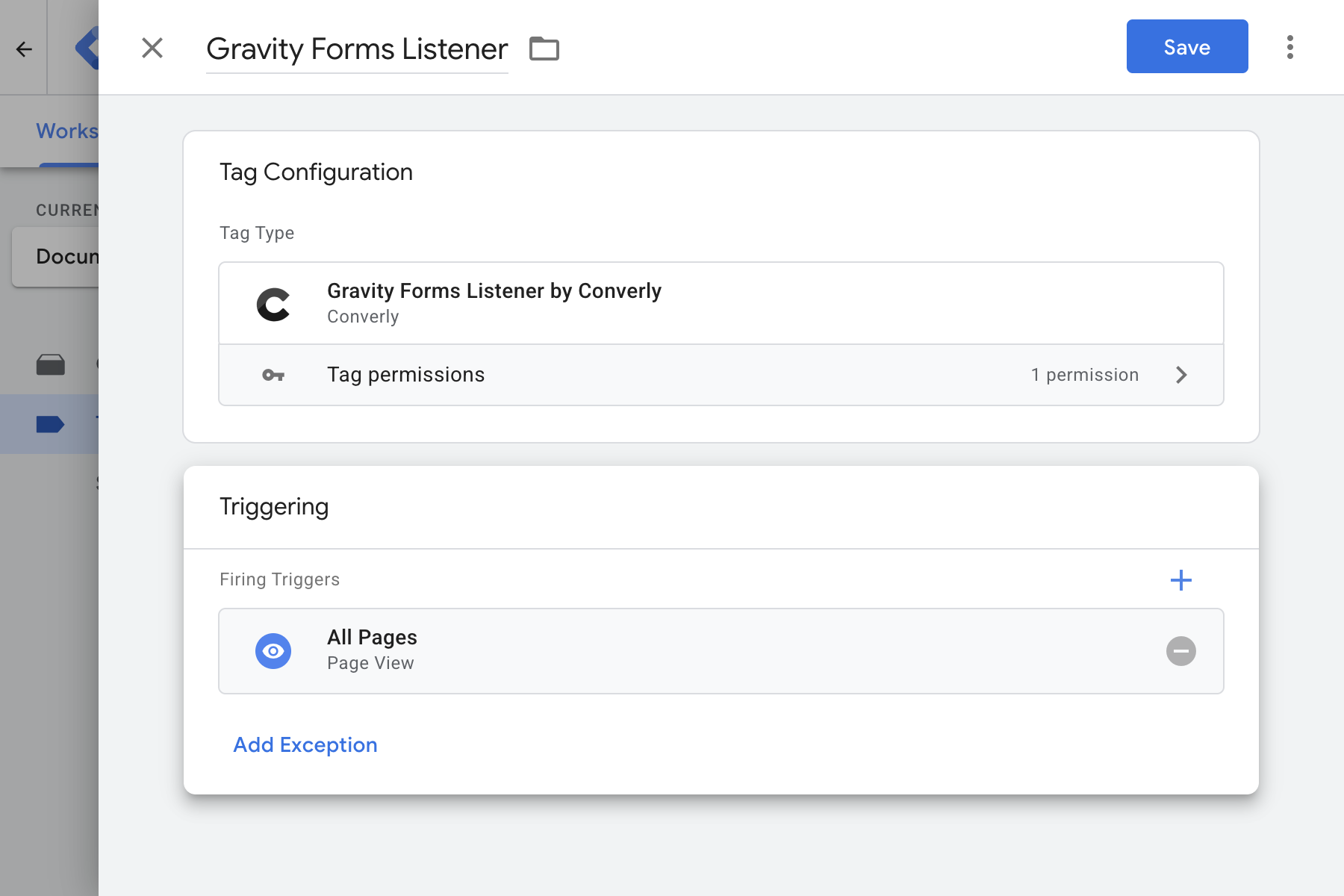
There's nothing to configure. Under Triggering, choose All Pages, name the tag and click Save.
Create the Trigger
The tag you installed in step 1 listens for Gravity Forms submissions. Each time one succeeds, it fires a gravity_form_submitted event into Google Tag Manager. On its own, that event doesn't send anything to your ad platforms or analytics tools.
To do that, you need a trigger that fires whenever the event is received. In step 3 you'll attach your conversion tags to this trigger, so the chain goes: form submitted → event fired → trigger fires → conversion tags send.
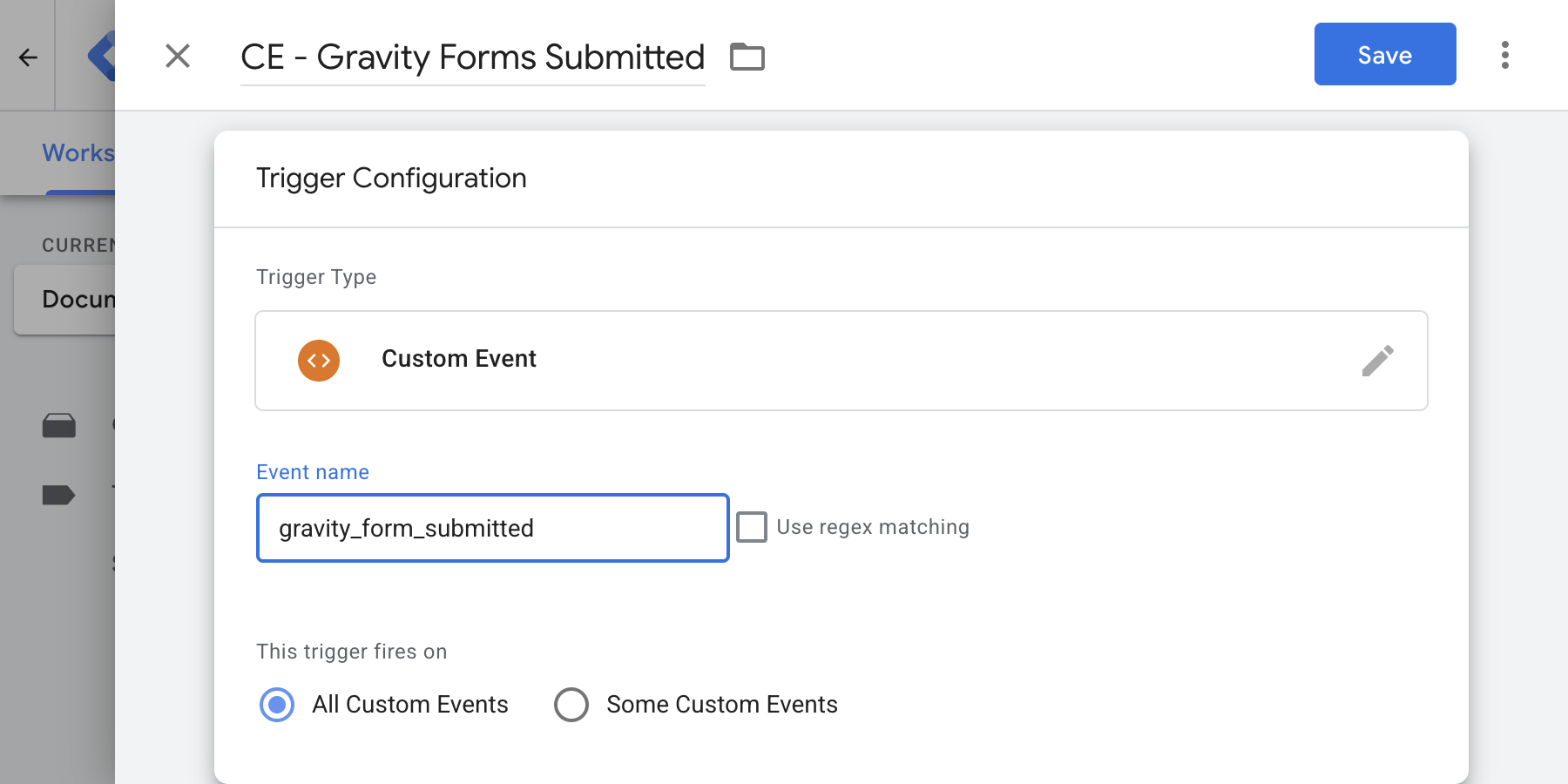
Google doesn't let templates include triggers, so you create this one yourself. Go to Triggers, click New and copy these exact settings. Leave it on All Custom Events to catch every form on your site.
Exact Settings
- Trigger Type
- Custom Event
- Event Name
- gravity_form_submitted
- Name It
- CE - Gravity Forms Submitted
Connect Your Tags
Now use the trigger to fire your conversion tags. Here are the three most common.
Example 1: Google Analytics
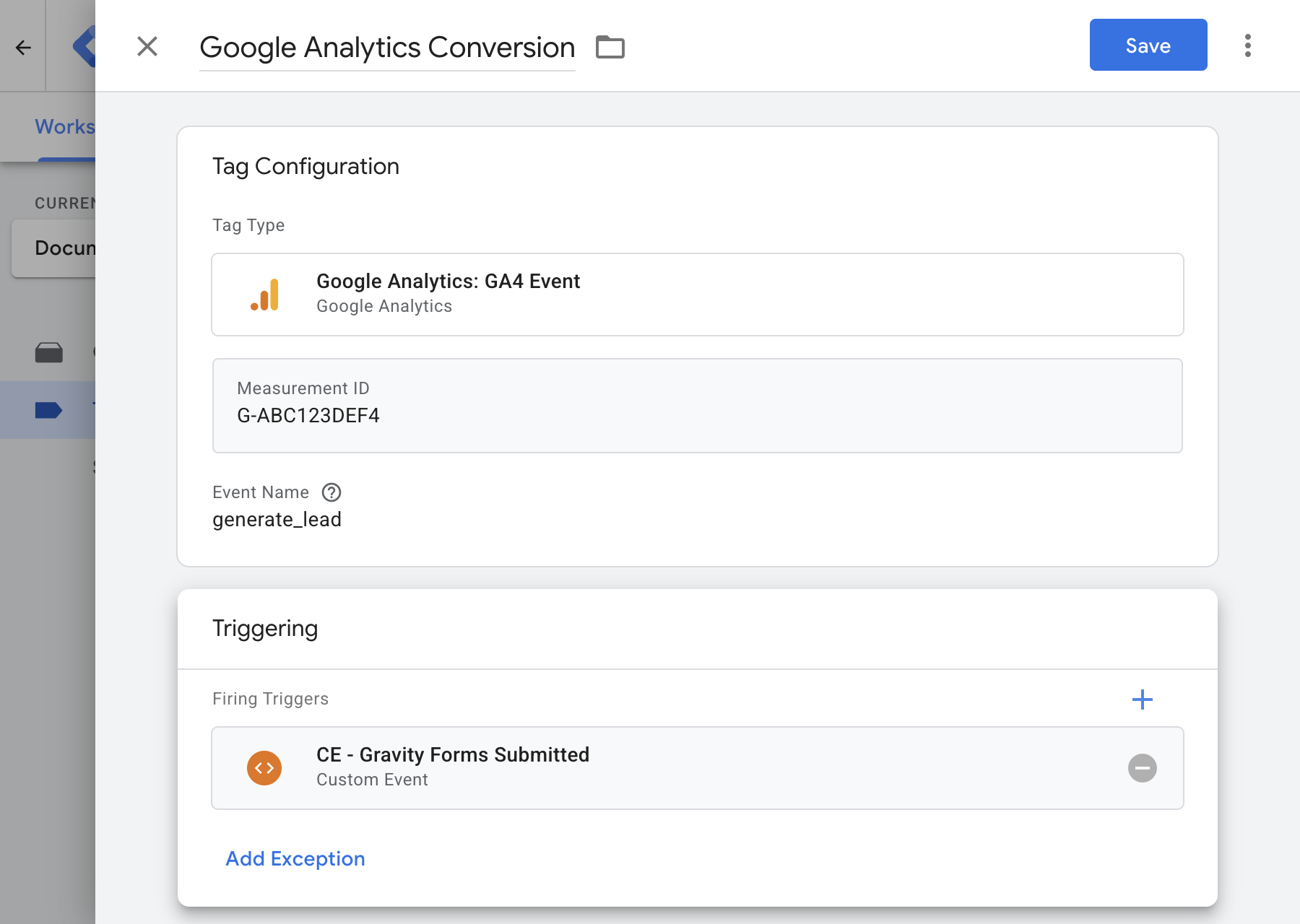
Create a new tag and choose Google Analytics: GA4 Event. Enter your Measurement ID, set the event name to generate_lead and choose CE - Gravity Forms Submitted as the firing trigger. Every Gravity Forms submission now sends an event to Google Analytics.
Example 2: Google Ads
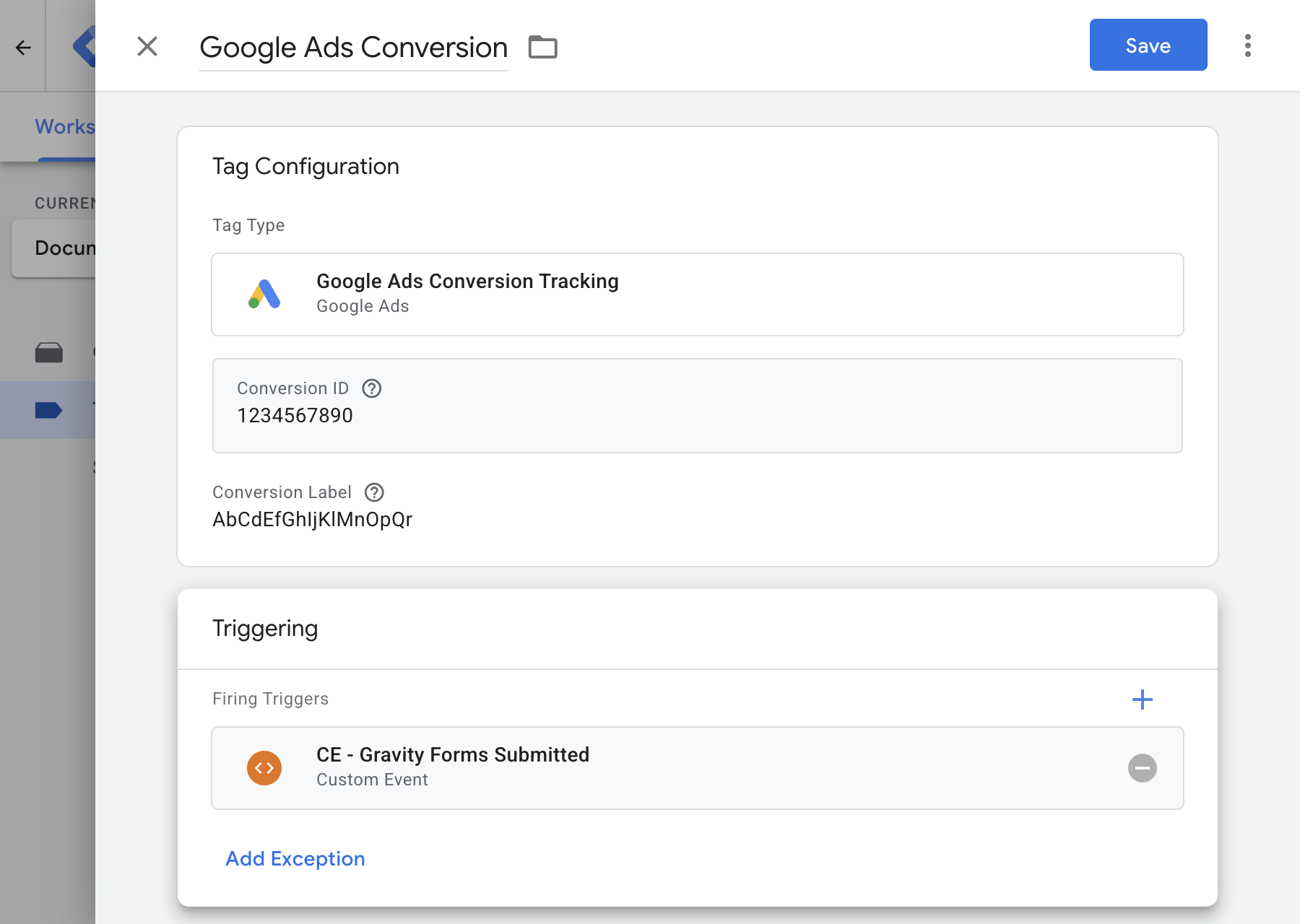
Create a new tag and choose Google Ads Conversion Tracking. Paste in the Conversion ID and Conversion Label from your Google Ads conversion action, then choose CE - Gravity Forms Submitted as the firing trigger.
Example 3: Meta Ads
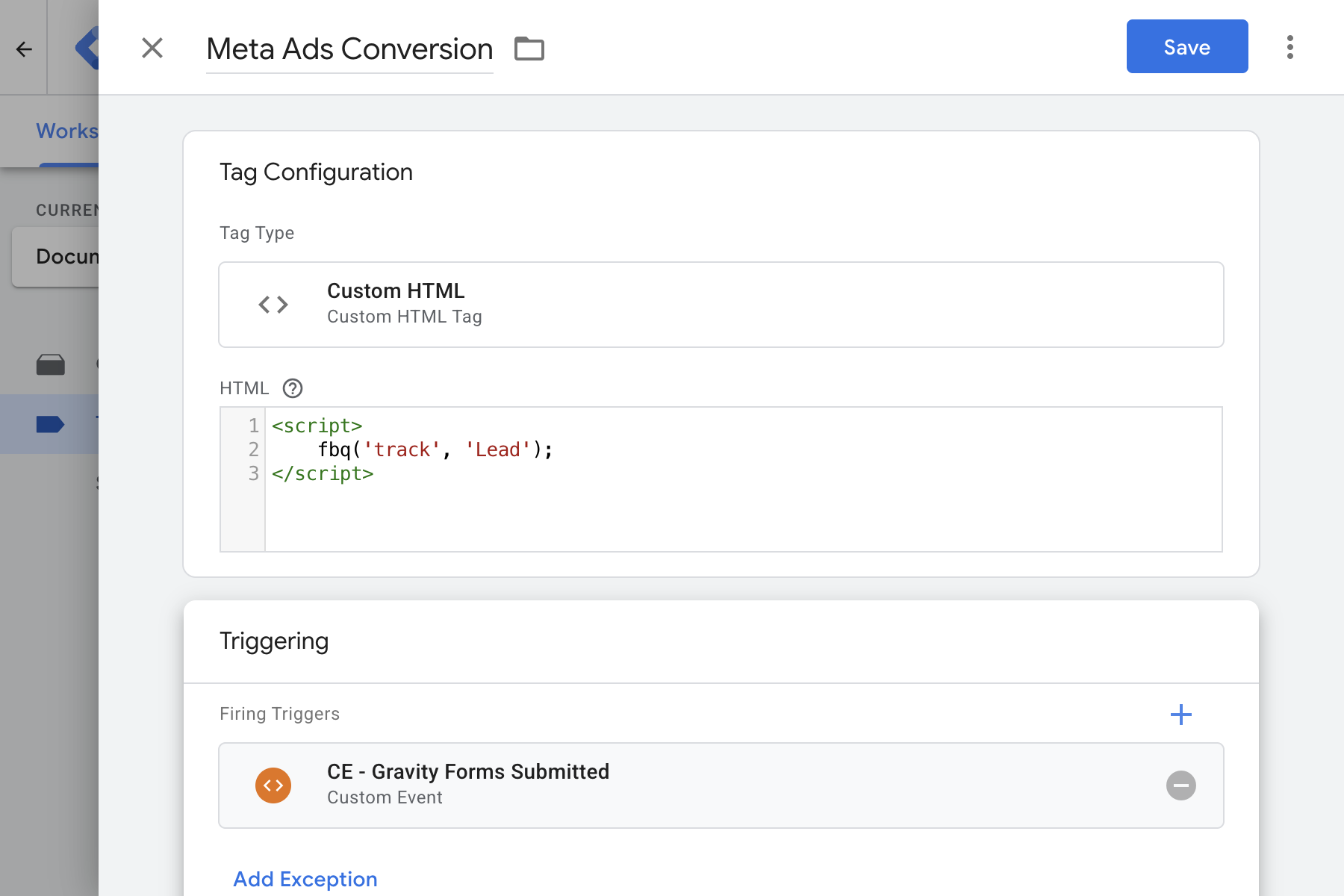
Add a Meta Pixel tag (from the template gallery or as Custom HTML) that tracks the standard Lead event, and choose CE - Gravity Forms Submitted as the firing trigger. Meta Ads will count each submission as a lead.
Test in Preview Mode
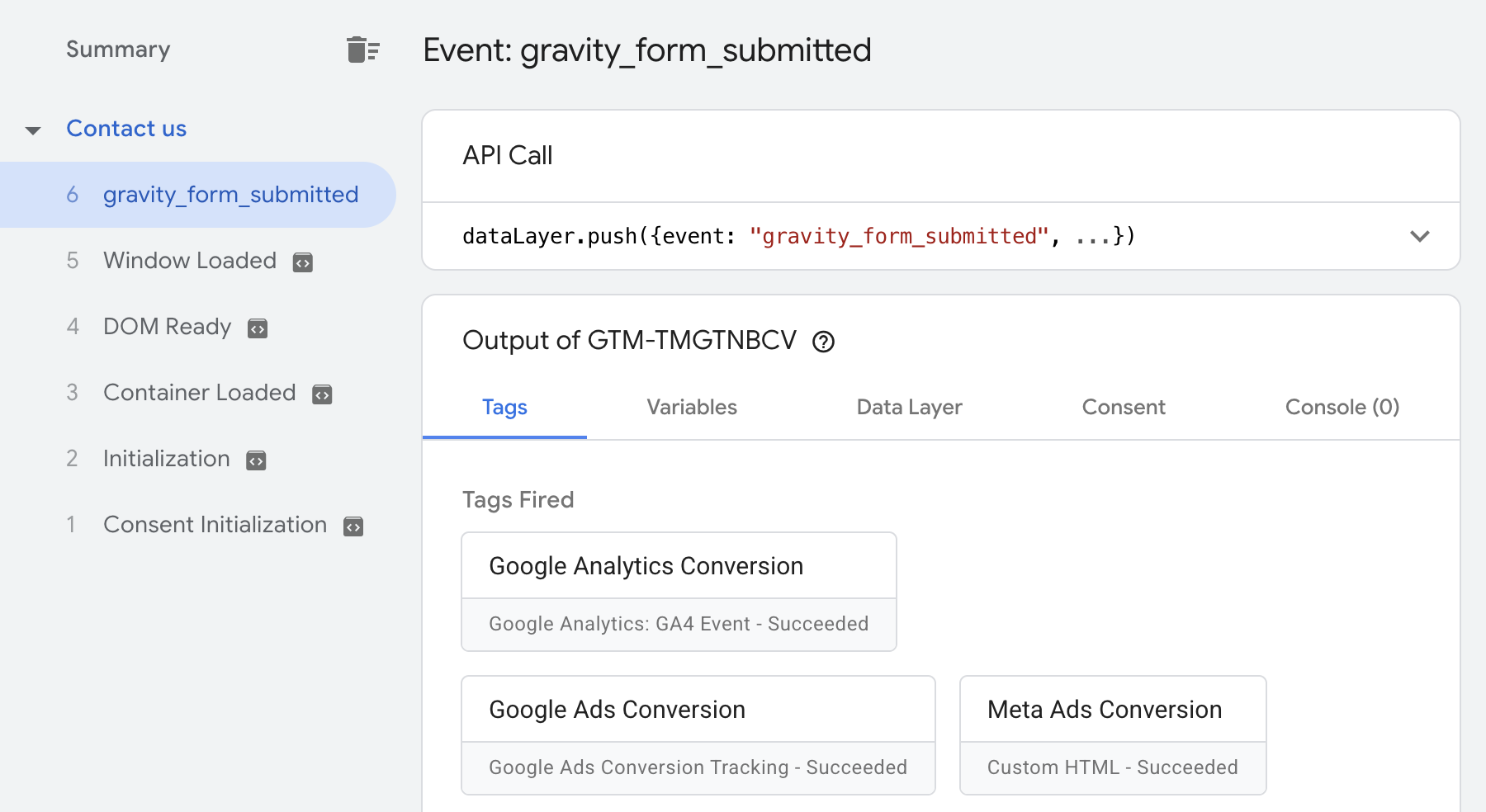
Click Preview in Google Tag Manager, open a page with your form and submit a test entry. In Tag Assistant you should see three things.
- A
gravity_form_submittedevent in the timeline on the left, once per submission. - Your conversion tags under Tags Fired when you click that event.
- The form's ID under
form_idin the Data Layer tab.
When it all looks right, click Submit to publish your container.
What It Sends
Each successful submission pushes this to your dataLayer.
window.dataLayer.push({
  "event": "gravity_form_submitted",
  "form_id": "3"
});| Key | Type | What It Is |
|---|---|---|
event | string | Always gravity_form_submitted. Use it as the event name in your Custom Event trigger. |
form_id | string | The ID of the Gravity Form that was submitted, as shown in WordPress under Forms. |
Permissions & Privacy
Why Does Google Tag Manager Show a Warning?
Google lists every permission a template uses on its gallery page. Any template that loads a script gets a red warning next to "Injects scripts", including ours. It's the only permission this template has, and here's why it's there.
Injects scripts
https://gtm-templates.converly.io/gravity-forms-listener.jsLoads Converly's detection script. Restricted to this one address, so nothing else can be loaded.
Why That Warning Is a Good Sign
- It loads one script, from one place. The permission is locked to
gtm-templates.converly.io, so the template can't load anything from anywhere else. - It collects no personal data. The script watches for a successful submission and pushes one event. Nothing your visitors type is read, stored or sent to Converly.
- It's why the template keeps itself up to date. Templates that bundle all their code are frozen at the version you installed. Ours loads the detection code from Converly's servers, so when Gravity Forms changes, the fix reaches your site without you doing anything.
Compatibility
Tested on real Gravity Forms setups. Last tested 9 Oct 2026.
| Setup | Status | Note |
|---|---|---|
| Confirmation message | Works | Fires once, as the message appears. |
| Confirmation page | Works | Fires once, before the visitor lands on the page. |
| Redirect to another page on your site | Works | Fires once, before the browser moves on. |
| Redirect to another website | Works | Fires once, even though the visitor leaves your site. |
| AJAX turned on or off | Works | Works either way, and your saved form settings stay exactly as they are. |
| Multi-page forms | Works | Fires once, on the final page. Moving between pages doesn't count. |
| Save and Continue | Works | Saving a form to finish later doesn't count as a submission. |
| Conditional fields | Works | Fires whether conditional fields are shown, hidden or required. |
| File uploads | Works | Fires once the upload succeeds, and stays quiet when a required file is missing. |
| Forms in a popup | Works | Fires the same way when a form that's already on the page opens in a popup. |
| Two forms on one page | Works | Each form fires with its own form_id. |
| Rejected submissions | Works | Nothing fires until the visitor fixes the errors and submits successfully. |
| Spam caught by the honeypot | Works | Spam is never counted as a conversion. |
| Double clicks and repeat submissions | Works | Each real submission fires exactly once. |
| Slow server replies | Works | Waits for Gravity Forms to confirm, even when the reply takes several seconds. |
| Visitors leaving mid-submission | Works | Nothing fires if the visitor leaves before Gravity Forms confirms. |
| Installed alongside our GTM recipe | Works | Still fires once, so you won't double count. |
Tested with Gravity Forms 3.0.3, Chrome.
Troubleshooting & FAQ
Open Preview mode and check the listener tag fired on the first page view. If it didn't, its trigger is probably set to the event instead of All Pages.
If the tag fired but no event appears after you submit, check the form submitted successfully. A submission that fails validation fires nothing, by design.
Ad blockers and privacy extensions can also stop GTM loading. Test in a clean browser window with extensions turned off.
Preview mode uses your unpublished workspace. Click Submit in Google Tag Manager to publish the container.
If it still fails, a caching plugin may be serving an old copy of the page. Clear the cache and try again.
A cookie consent banner can also block GTM until the visitor accepts, so visitors who don't accept won't be tracked.
Your saved form settings stay exactly as they are. The one thing the template does is ask Gravity Forms to send the final submission using its own AJAX method, so it can confirm the submission was accepted before any redirect happens.
Moving between pages and Save and Continue work exactly as you set them up.
No. The script is small, loads asynchronously after the page and only does work when a form is on the page.
The template runs in your web container, where it detects the submission. You can forward the event to a server container through your GA4 tag, but the template itself can't be installed in a server container.
The template is easier to keep running, because fixes to the detection reach your site automatically. The recipe gives you the tag, trigger and variable in one import and keeps all the code inside your container, but it stays at the version you downloaded until you import a new one.
| This Template | The Recipe | |
|---|---|---|
| How you add it | From Google's template gallery | Import a JSON file into your container |
| What you get | The tag. You create the trigger | Tag, trigger and variable, ready-made |
| Where the code lives | Loads from Converly's servers | Custom HTML inside your container |
| Updates | Automatic | Re-import a new version yourself |
Changelog
| Version | Date | Changes |
|---|---|---|
| v1.0.0 | 9 Oct 2026 | First release in the Community Template Gallery. |
Fixes to the detection script reach your site automatically and are listed here too.
 Converly