


Track Ninja Forms Submissions in Google Tag Manager with this Free GTM Recipe
A free, tested Google Tag Manager recipe that captures Ninja Forms submissions and turns them into a trigger you can use to fire conversions to Google Ads, Google Analytics and more.

Google Tag Manager is a common way to send conversions to Google Ads, Google Analytics, etc when someone submits a Ninja Forms form on your website.
The problem is, it's quite difficult to set up. Ninja Forms uses AJAX to save form submissions, which means Google Tag Manager's built-in form submission trigger doesn't work, so you're left having to write custom code to detect the form submission, send an event to the dataLayer, and build a trigger on top of that.
And unless you're a developer or very experienced with Google Tag Manager, you're going to struggle.
Fortunately though, there is a simple solution.
You can simply install this Ninja Forms Conversion Tracking Recipe in your Google Tag Manager account and you'll have everything you need to get basic conversion tracking set up.
What Is a Google Tag Manager Recipe and What's in It?
A recipe is a pre-built bundle of Google Tag Manager assets (a tag, a trigger and a variable) that you import in one go instead of building each piece yourself. You can see all our recipes and how they work in the GTM recipe library.
This recipe detects successful Ninja Forms submissions, sends a 'Form Submitted' event to Google Tag Manager, and gives you a Trigger you can use to send conversions to Google Analytics, Google Ads, etc. There are three parts to it, and nothing inside is hidden. Here's exactly what each piece contains, so you can see what you're importing before you import it.
Custom HTML Tag
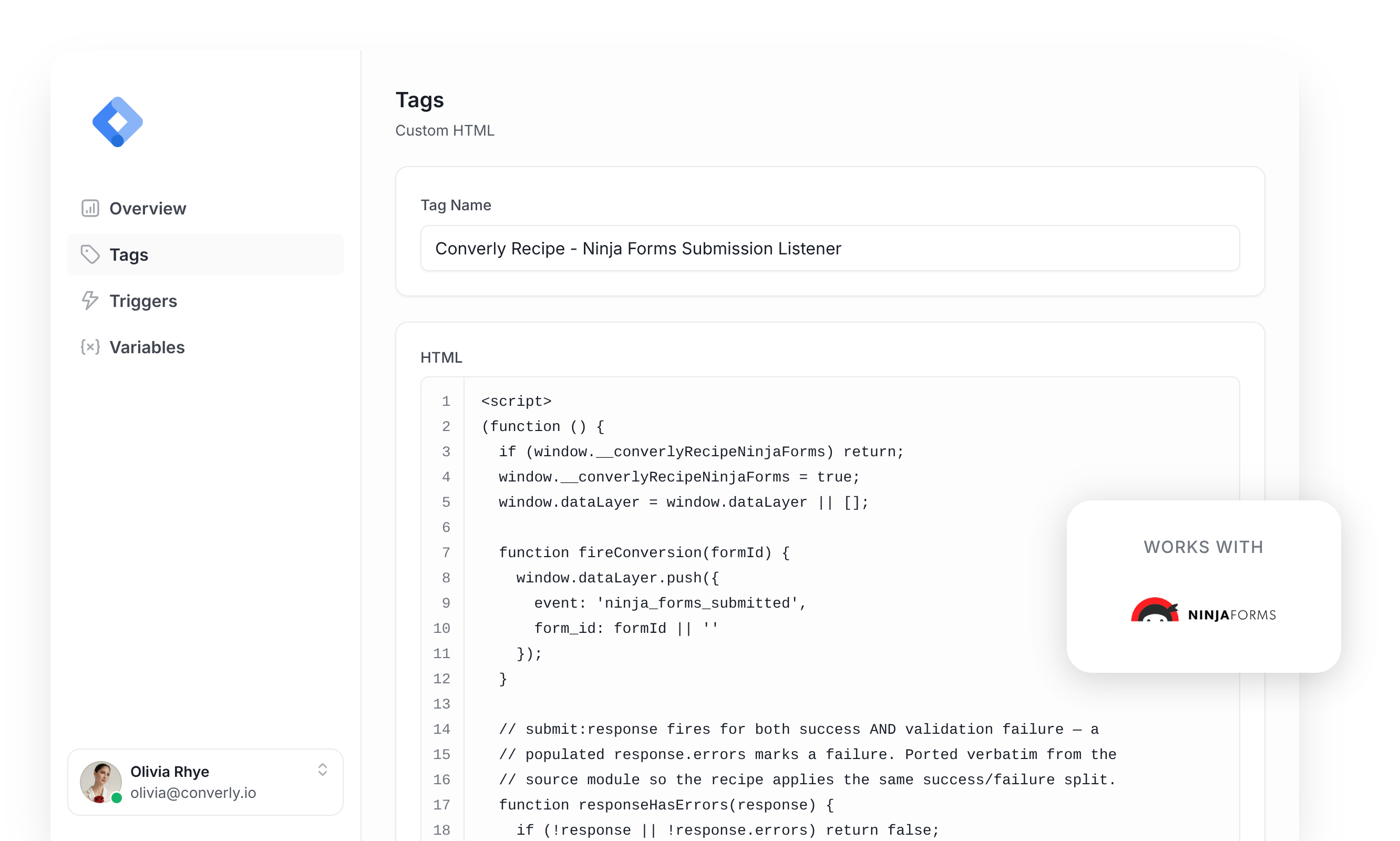
Listens for successful Ninja Forms submissions and pushes a 'ninja_forms_submitted' event to the dataLayer. It fires on All Pages, once per event, and this is the code inside it.
(function () {
  if (window.__converlyRecipeNinjaForms) return;
  window.__converlyRecipeNinjaForms = true;
  window.dataLayer = window.dataLayer || [];

  function fireConversion(formId) {
    window.dataLayer.push({
      event: 'ninja_forms_submitted',
      form_id: formId || ''
    });
  }

  // submit:response fires for both success AND validation failure — a
  // populated response.errors marks a failure. Ported verbatim from the
  // source module so the recipe applies the same success/failure split.
  function responseHasErrors(response) {
    if (!response || !response.errors) return false;
    var errors = response.errors;
    if (typeof errors.length === 'number') return errors.length > 0;
    if (typeof errors !== 'object') return !!errors;
    for (var key in errors) {
      if (!Object.prototype.hasOwnProperty.call(errors, key)) continue;
      var group = errors[key];
      if (!group) continue;
      if (typeof group.length === 'number') {
        if (group.length > 0) return true;
      } else if (typeof group === 'object') {
        for (var sub in group) {
          if (Object.prototype.hasOwnProperty.call(group, sub)) return true;
        }
      } else {
        return true;
      }
    }
    return false;
  }

  function handleSubmitResponse(response) {
    if (responseHasErrors(response)) return;
    var formId = (response && response.data && response.data.form_id) ? response.data.form_id : '';
    fireConversion(formId);
  }

  // Fire path 1 — nfRadio (Ninja Forms' own global), fallback to
  // Backbone.Radio directly if nfRadio isn't reachable.
  var radioHooked = false;

  function hookNfRadio() {
    if (radioHooked) return true;

    if (typeof nfRadio !== 'undefined' && nfRadio.channel) {
      try {
        nfRadio.channel('forms').on('submit:response', handleSubmitResponse);
        radioHooked = true;
        return true;
      } catch (e) {
        // fall through to Backbone.Radio attempt
      }
    }

    if (typeof Backbone !== 'undefined' && Backbone.Radio) {
      try {
        Backbone.Radio.channel('forms').on('submit:response', handleSubmitResponse);
        radioHooked = true;
        return true;
      } catch (e) {
        // fall through to MutationObserver fallback
      }
    }

    return false;
  }

  // Fire path 2 — MutationObserver fallback. Watches each
  // .nf-form-cont container for the .nf-response-msg success element
  // Ninja Forms renders after a successful submission. Used only when
  // neither radio channel is reachable.
  var observerStarted = false;

  function startMutationObserver() {
    if (observerStarted) return;
    if (typeof MutationObserver === 'undefined') return;

    var containers = document.querySelectorAll('.nf-form-cont');
    if (containers.length === 0) return;

    observerStarted = true;

    for (var c = 0; c < containers.length; c++) {
      (function (container) {
        var observer = new MutationObserver(function (mutations) {
          for (var m = 0; m < mutations.length; m++) {
            var addedNodes = mutations[m].addedNodes;
            for (var n = 0; n < addedNodes.length; n++) {
              var node = addedNodes[n];
              if (!node || node.nodeType !== 1) continue;

              var isResponseMsg = false;
              if (node.classList && node.classList.contains('nf-response-msg')) {
                isResponseMsg = true;
              } else if (node.querySelector) {
                isResponseMsg = !!node.querySelector('.nf-response-msg');
              }

              if (isResponseMsg) fireConversion('');
            }
          }
        });

        observer.observe(container, { childList: true, subtree: true });
      })(containers[c]);
    }
  }

  var hooked = hookNfRadio();
  if (!hooked) {
    document.addEventListener('DOMContentLoaded', function () {
      var retryHooked = hookNfRadio();
      if (!retryHooked) startMutationObserver();
    });
    window.addEventListener('load', function () {
      if (!radioHooked) hookNfRadio();
      if (!observerStarted && !radioHooked) startMutationObserver();
    });
  }
})();Variable
Captures the ID of the form that was submitted, ready to reference in any tag. These are its exact settings.
Name
DLV - Ninja Forms Form ID
Variable Type
Data Layer Variable
Data Layer Variable Name
form_id
Trigger
Fires when the 'ninja_forms_submitted' event is received. Use it as the trigger for any conversion tag. These are its exact settings.
Name
CE - Ninja Forms Submitted
Trigger Type
Custom Event
Event Name
ninja_forms_submitted
Download This Recipe
Get the ready-to-import file and upload it into Google Tag Manager. Everything shown above (the tag, the variable and the trigger) comes pre-built inside.
Built from Converly's own Ninja Forms detection code
Why It's the Best Recipe Out There
It is built from the same detection code we use in our own conversion tracking product, Converly, just adapted to run inside Google Tag Manager.
How to Use the Ninja Forms GTM Recipe
Install the Recipe
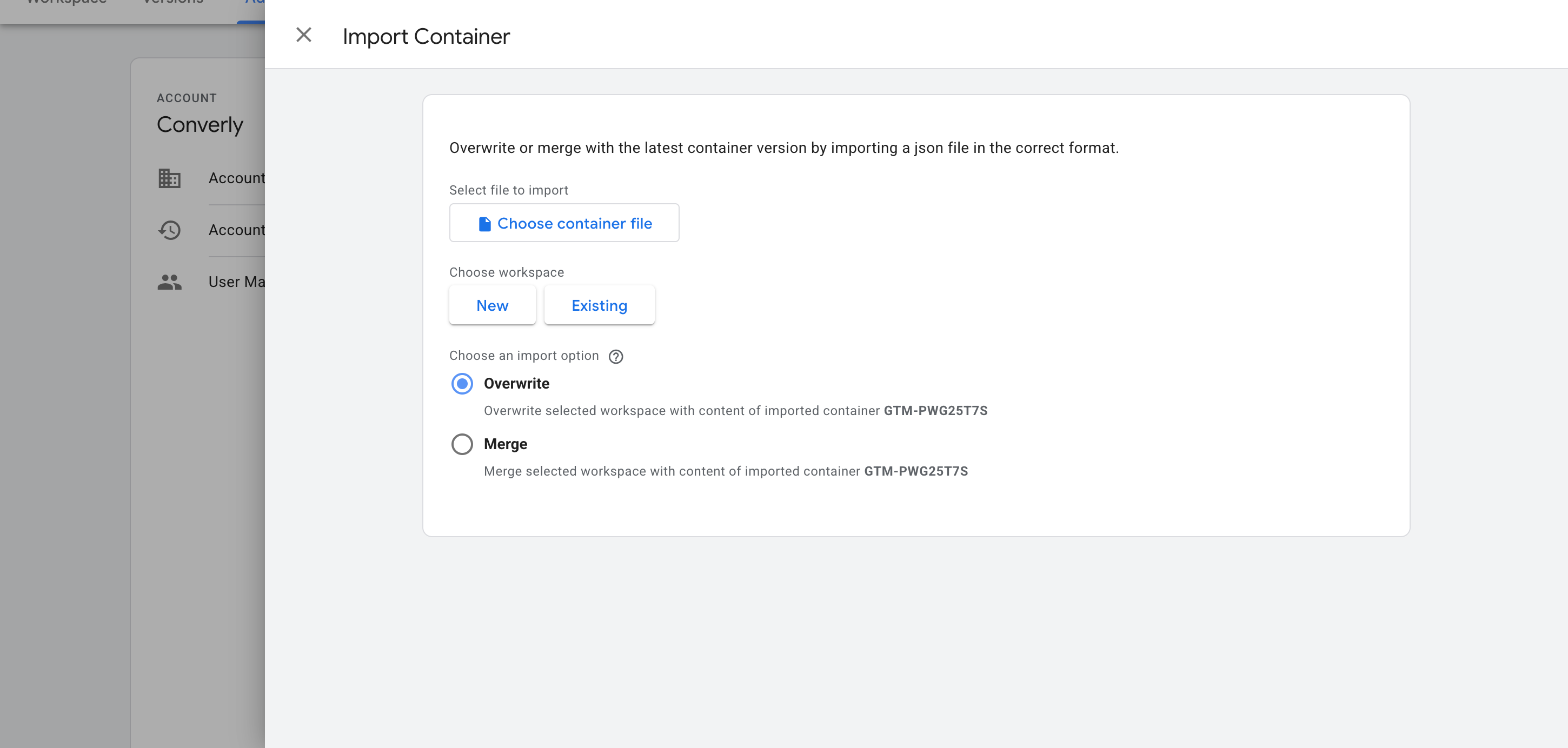
Download the recipe using the form above, then import it into your Google Tag Manager container. In GTM, head to Admin, choose Import Container, select the downloaded file, and pick the Merge option so it doesn't overwrite anything already in your container. The listener, variable and trigger are added for you automatically.
Configure Your Tags
Now that the recipe is installed, you can use it as a Trigger for your conversion tags. Here are two common examples.
Example 1: Google Analytics
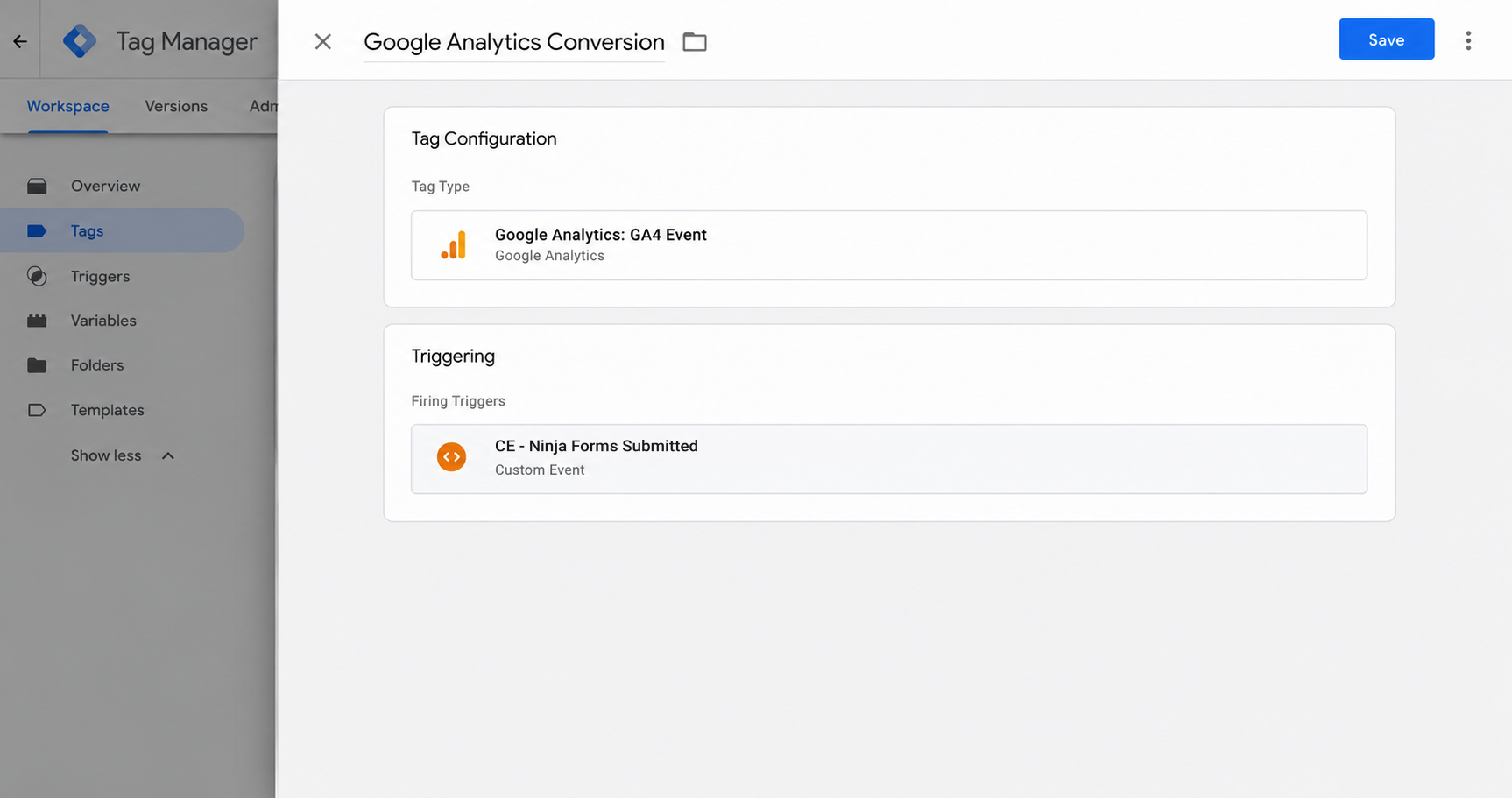
Create a GA4 event tag and set the recipe's trigger (called CE - Ninja Forms Submitted) as its firing trigger. Every Ninja Forms submission now sends an event to Google Analytics.
Example 2: Google Ads
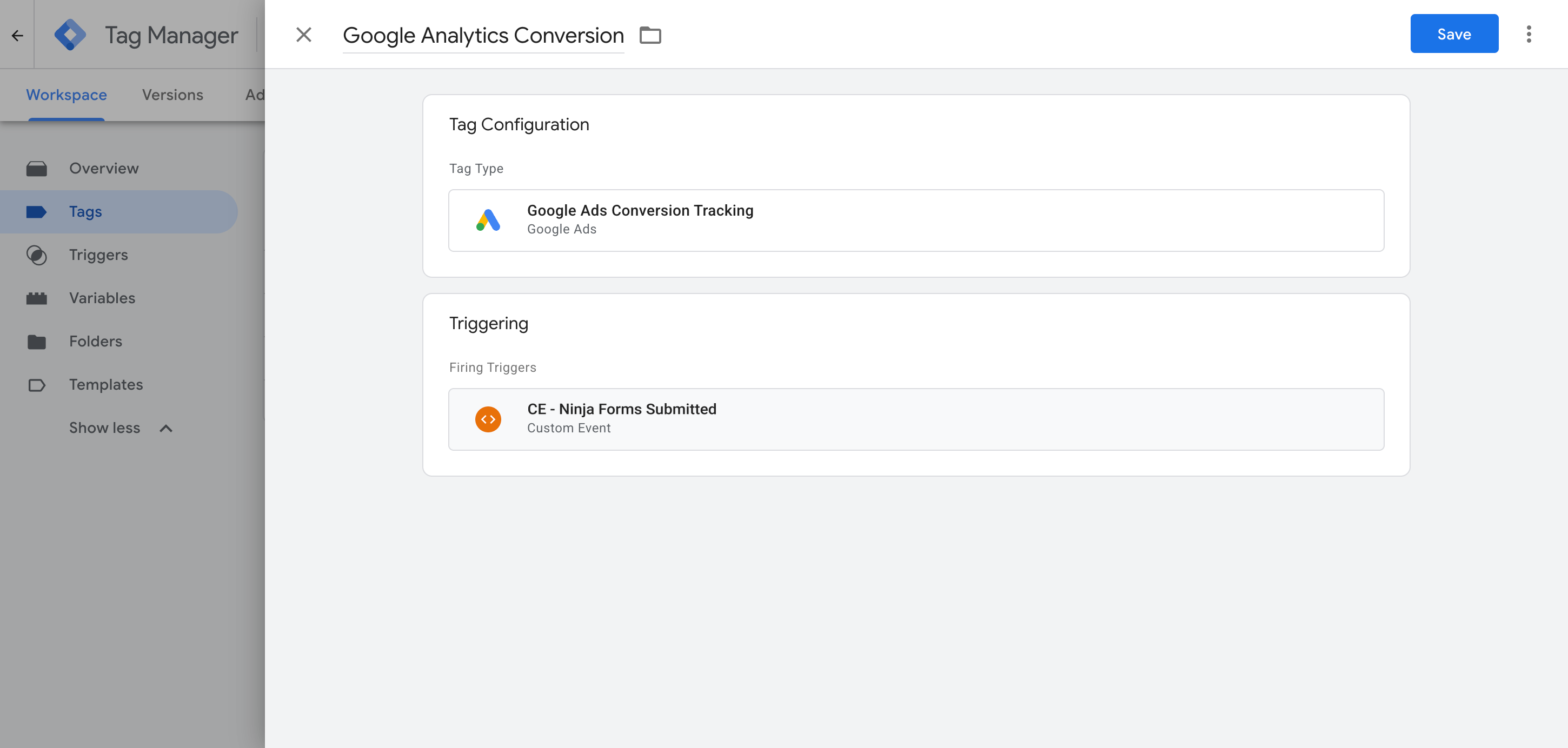
Add your Google Ads conversion tag and set it to fire on the Trigger this recipe gives you (called CE - Ninja Forms Submitted). This will send conversions to Google Ads whenever someone successfully submits a Ninja Form on your site.
What This Enables You to Do (and What It Doesn't)
This recipe fires an event in Google Tag Manager whenever a successful Ninja Forms submission is detected. You can use that as a trigger to send conversions to Google Ads, Google Analytics and other tags.
What it does
Sends an Event to GTM
Detects successful Ninja Forms submissions and pushes an event called 'ninja_forms_submitted' into your dataLayer automatically.
Tells You Which Form Fired
Captures the ID of the form that was submitted, so a site with several forms can fire different tags for different forms.
Creates a Trigger in GTM
Gives you a 'Trigger' in Google Tag Manager which you can use as the trigger for any of your conversion tags.
What it doesn't do
Doesn't send the conversion server-side
Everything happens in the visitor's browser, so ad blockers can stop the tag from loading, and browser privacy restrictions can limit tracking to as little as a day.
No Click IDs or Identifiers
It does not capture the Google click ID, Facebook click ID, Meta pixel cookies, IP address or user agent, which ad platforms need for Enhanced Conversions (Google) or a proper Event Match Quality score (Meta).
No Personal Details
The script only fires an event. It does not capture the lead's name, email or phone number, which Google Ads, Meta Ads, etc require for enhanced conversions and a high match score.
No Logging or Notifications
You can test it with Tag Assistant on install, but unless you check every week you have no way of knowing if it breaks (until 2 weeks later when you see 0 conversions in your reports).
The Proper Way to Send Conversions to Google Ads, Meta Ads & More
This recipe is fine if you only send events to Google Analytics, which does not accept personal information or IP addresses. But to get a good Event Match Quality (EMQ) score in Meta, or use Enhanced Conversions in Google, you need to send the data server-side, together with the lead's name and email. That is what Converly does.
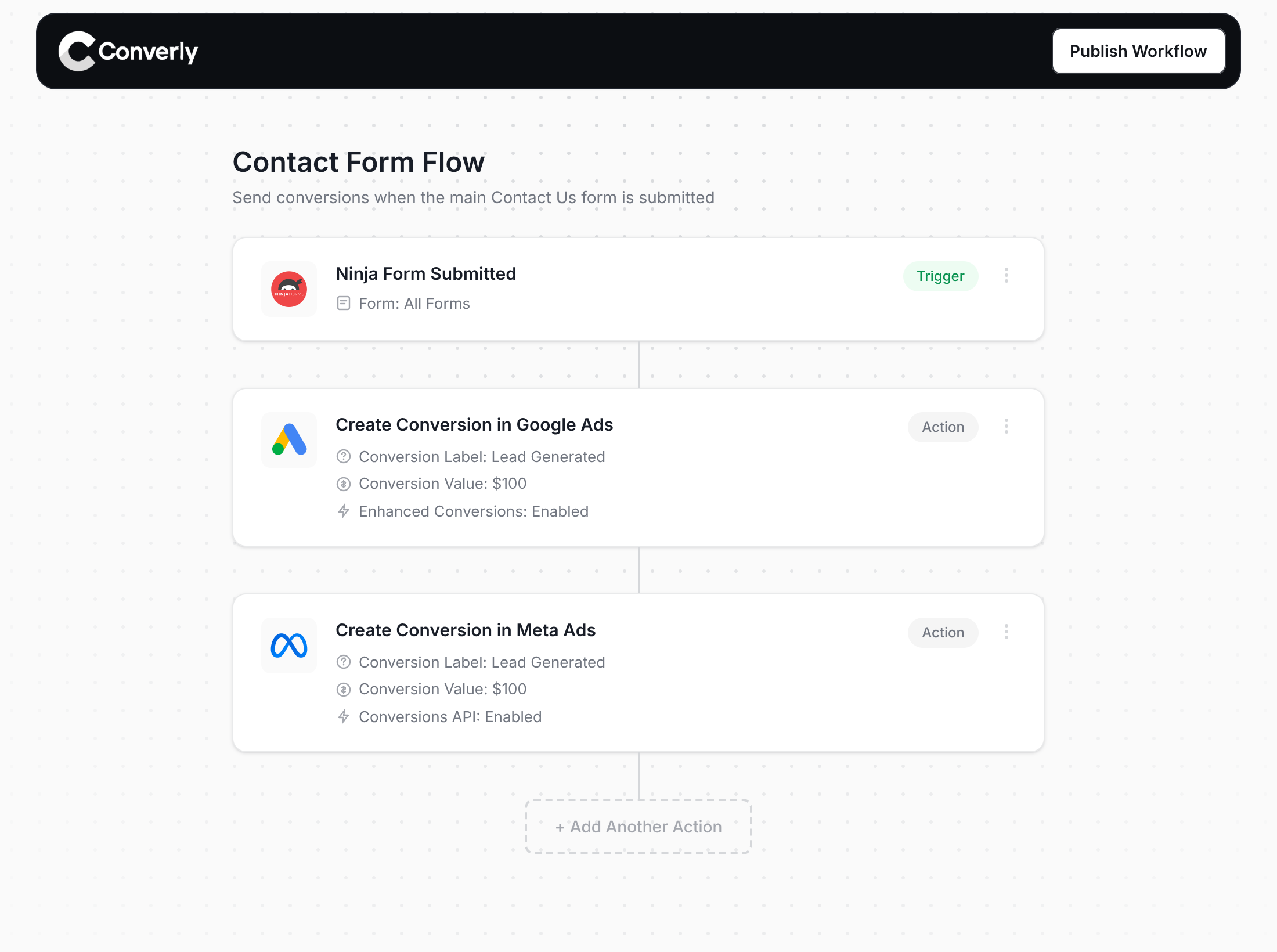
Here's why Converly is the best way to send conversions to Google Ads, Meta Ads, Microsoft Ads, LinkedIn Ads, etc.
Easy to set up
Converly gives you a simple drag-and-drop builder you can use to build a Conversion Flow. Simply select a trigger (like a Ninja form being submitted) and then select your actions (like sending a conversion to Google Ads). No custom code, no complex configuration.
Sends Data Server-Side
Converly sends conversions directly from its servers to Google, Meta, ChatGPT, etc., so ad blockers and privacy restrictions can't get in the way.
Sends More Data
Converly captures the lead's name, email, and phone, plus the Google and Facebook click IDs, IP address, and user agent, and sends them with every conversion. That enables Enhanced Conversions in Google Ads, or gives you an Event Match Quality (EMQ) score of 9 or 10 in Meta.
Full Conversion Log & Email Notifications
See every conversion, what was captured, what was sent to each platform and whether it was received. Get email alerts so tracking can't break without you knowing.
Supports Multiple Tools & Destinations
Detects submissions across 100+ form, scheduling and chat tools and sends to 20+ destinations including Google Ads, Meta, ChatGPT, LinkedIn, Microsoft and TikTok. So if you ever add a new tool or start advertising on a new platform, it's just a few clicks.
Provides Free Support
Our team has 20 years of experience in conversion tracking and analytics and is here to help whenever you need it. With Google Tag Manager, you're on your own.
Start Your Free Trial
Start a 14-day free trial and track your conversions the proper way. No code, no complicated configuration.
About the author
Aaron is the founder of Converly. With over 15 years of experience in digital marketing and SaaS, he's passionate about helping businesses track and optimise their ad conversions.