


Track Mailchimp Signup Forms in Google Tag Manager with this Free GTM Recipe
A free, tested Google Tag Manager recipe that picks up every signup Mailchimp confirms on your embedded form and turns it into a trigger for sending conversions to Google Ads, Google Analytics and more.

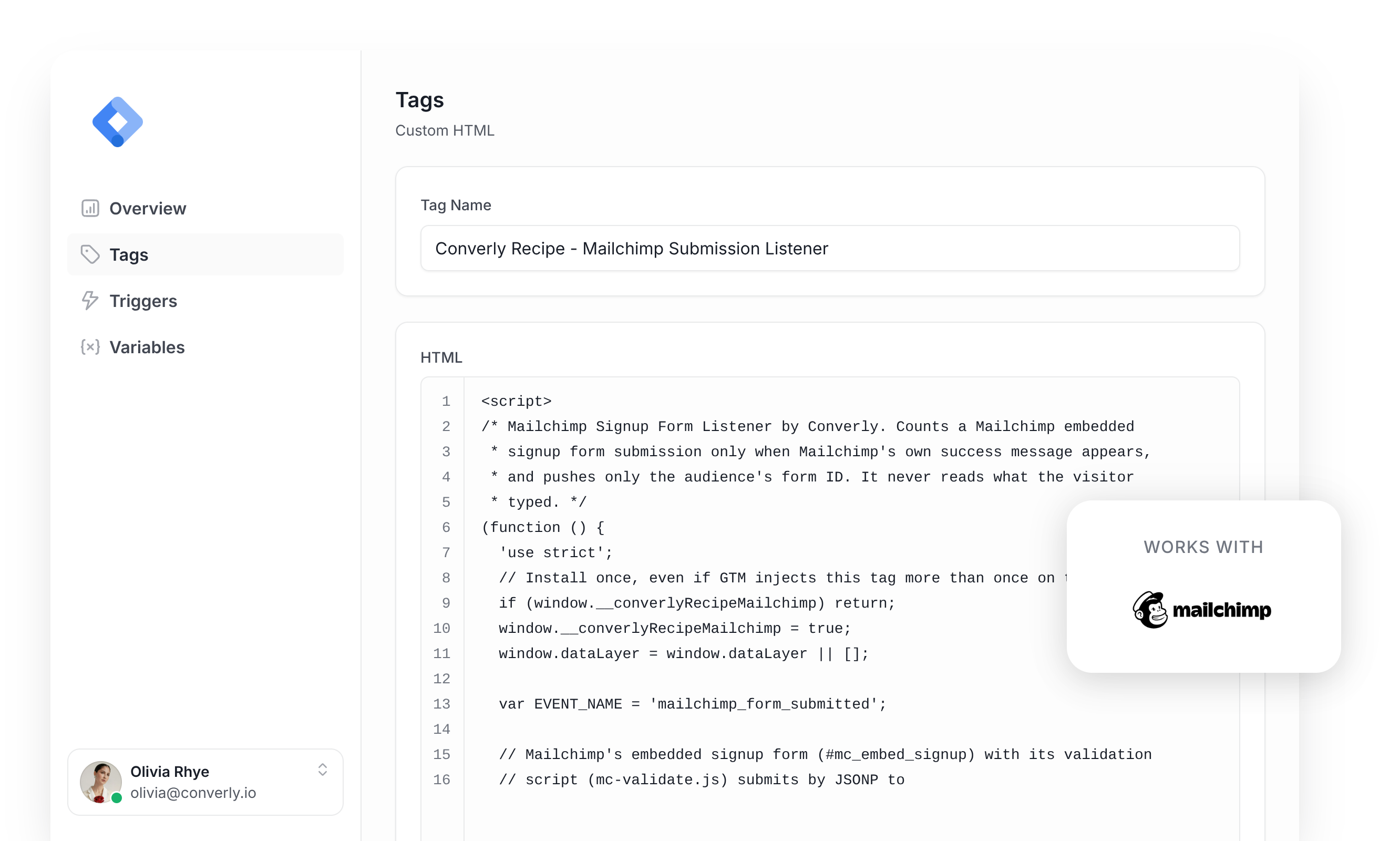
A lot of marketers lean on Google Tag Manager to pass a conversion to Google Ads, Google Analytics, etc every time a visitor signs up through the Mailchimp form embedded on their website.
The snag is that Mailchimp signups are awkward to track. When someone clicks Subscribe on Mailchimp's embedded form, Mailchimp's own script cancels the normal submit, checks the fields, and quietly sends the signup to Mailchimp in the background. The page never reloads, so Google Tag Manager's built-in Form Submission trigger either misses it or fires on every click of the button, including the ones Mailchimp turns away because the address looks fake or has been tried too many times. Getting it right means writing custom code that waits for Mailchimp's own 'Thank you for subscribing!' message, ignores every refusal, sends an event to the dataLayer, and then building a trigger on top of that.
For anyone who isn't a developer or a Google Tag Manager regular, that's a tall order.
Happily, there's a far easier route.
Import this Mailchimp Conversion Tracking Recipe into your Google Tag Manager account and you'll have everything basic conversion tracking calls for.
What Is a Google Tag Manager Recipe and What's in It?
Think of a recipe as a starter kit for Google Tag Manager. It holds a tag, a trigger and a variable that are already wired together, and one import puts all three in your account so there's nothing to build by hand. Our full set of recipes, with an explanation of each, sits in the GTM recipe library.
This recipe watches for Mailchimp signups that Mailchimp has confirmed, hands a 'Form Submitted' event to Google Tag Manager, and gives you a Trigger for sending conversions to Google Analytics, Google Ads and more. It has three parts and none of it is hidden, so you can look through exactly what each piece holds before you import anything.
Custom HTML Tag
Waits for Mailchimp to show its own thank you message in the form's success box and then pushes a 'mailchimp_form_submitted' event to the dataLayer. It fires on All Pages, once per event, and this is the code inside it.
/* Mailchimp Form Listener by Converly. Pushes only event and form metadata. */
(function() {
  'use strict';

  window.dataLayer = window.dataLayer || [];
  var sink = {
    siteKey: 'gtm-pack-mailchimp-event-only',
    advertisingAllowed: function () { return true; },
    onSubmission: function (payload) {
      var context = payload.submissionContext || {};
      var push = { event: 'mailchimp_form_submitted', form_id: context.form_id || null };
      window.dataLayer.push(push);
    }
  };

  var INSTALL_KEY = '__converlyRecipeMailchimp';
  var PENDING_KEY = '__converlyRecipe_mailchimp_pending_v2';
  var WATCH_MS = 60000;
  var RETURN_MS = 120000;
  var MERGE_FIELDS = { EMAIL: 'email', FNAME: 'firstName', LNAME: 'lastName', PHONE: 'phone' };
  var attempts = [];
  var landingWait = null;

  var SENSITIVE_AUTOCOMPLETE = {
    'current-password': true, 'new-password': true, 'one-time-code': true,
    'cc-number': true, 'cc-csc': true, 'cc-exp': true, 'cc-exp-month': true,
    'cc-exp-year': true, 'cc-name': true, 'cc-given-name': true,
    'cc-family-name': true, 'cc-additional-name': true, 'cc-type': true,
  };

  var SENSITIVE_NAME_SUBSTRINGS = [
    'password', 'passwd', 'passcode', 'cardnum', 'ccnumber', 'creditcard',
    'onetimecode', 'securitycode', 'socialsecurity',
  ];
  var SENSITIVE_NAME_TOKENS = {
    otp: true, cvv: true, cvc: true, ssn: true, pwd: true, pin: true,
  };

  function isSensitiveName(name) {
    if (!name) return false;
    var lower = String(name).toLowerCase();
    var norm = lower.replace(/[^a-z0-9]/g, '');
    for (var i = 0; i < SENSITIVE_NAME_SUBSTRINGS.length; i++) {
      if (norm.indexOf(SENSITIVE_NAME_SUBSTRINGS[i]) !== -1) return true;
    }
    var parts = lower.split(/[^a-z0-9]+/);
    for (var p = 0; p < parts.length; p++) {
      if (SENSITIVE_NAME_TOKENS[parts[p]] === true) return true;
    }
    return false;
  }

  function isSensitiveField(type, autocomplete, name) {
    if (type === 'password') return true;

    if (autocomplete) {
      var tokens = autocomplete.split(/\s+/);
      for (var t = 0; t < tokens.length; t++) {
        if (SENSITIVE_AUTOCOMPLETE[tokens[t]] === true) return true;
      }
    }
    if (isSensitiveName(name)) return true;
    return false;
  }

  function labelTextFor(el) {
    try {
      if (el.closest) {
        var wrap = el.closest('label');
        if (wrap && wrap.textContent) return wrap.textContent;
      }
      var doc = el.ownerDocument;
      if (!doc) return '';
      if (el.id && doc.getElementsByTagName) {
        var labels = doc.getElementsByTagName('label');
        for (var i = 0; i < labels.length; i++) {
          var lf = labels[i].getAttribute && labels[i].getAttribute('for');
          if (lf && lf === el.id && labels[i].textContent) {
            return labels[i].textContent;
          }
        }
      }
      var lb = el.getAttribute ? (el.getAttribute('aria-labelledby') || '') : '';
      if (lb && doc.getElementById) {
        var ids = lb.split(/\s+/);
        var txt = '';
        for (var k = 0; k < ids.length; k++) {
          var n = doc.getElementById(ids[k]);
          if (n && n.textContent) txt += ' ' + n.textContent;
        }
        if (txt) return txt;
      }
    } catch (e) {

    }
    return '';
  }

  function consentAllows() {
    try {
      var c = sink;
      return !(c && typeof c.advertisingAllowed === 'function' && c.advertisingAllowed() === false);
    } catch (e) { return true; }
  }

  function loaderReady() {
    return sink && typeof sink.onSubmission === 'function';
  }

  function removePending() {
    try { window.sessionStorage.removeItem(PENDING_KEY); } catch (e) {}
  }

  function isMailchimpForm(form) {
    if (!form || form.tagName !== 'FORM') return false;
    try {
      var url = new URL(form.getAttribute('action') || '', document.baseURI);
      return url.protocol === 'https:' && /\.list-manage\.com$/i.test(url.hostname) &&
        url.pathname === '/subscribe/post' && !url.username && !url.password;
    } catch (e) { return false; }
  }

  function hasValidationScript() {
    var scripts = document.querySelectorAll('script[src]');
    for (var i = 0; i < scripts.length; i++) {
      try {
        var url = new URL(scripts[i].getAttribute('src'), document.baseURI);
        if ((url.protocol === 'https:' || url.protocol === 'http:') && url.hostname === 's3.amazonaws.com' &&
            url.pathname === '/downloads.mailchimp.com/js/mc-validate.js') return true;
      } catch (e) {}
    }

    return typeof window.mc_validate === 'function' || typeof window.mce_success_cb === 'function';
  }

  function ownBoxes(form) {
    var wrapper = form.closest('#mc_embed_signup') || form;
    var forms = wrapper.tagName === 'FORM' ? [wrapper] : wrapper.querySelectorAll('form');
    var success = wrapper.querySelectorAll('[id="mce-success-response"]');
    var error = wrapper.querySelectorAll('[id="mce-error-response"]');
    if (forms.length !== 1 || forms[0] !== form || success.length !== 1 || error.length !== 1) return null;
    return { wrapper: wrapper, success: success[0], error: error[0] };
  }

  function shown(el) {
    if (!el || !el.isConnected) return false;
    try {
      for (var node = el; node && node.nodeType === 1; node = node.parentElement) {
        var style = window.getComputedStyle(node);
        if (node.hidden || style.display === 'none' || style.visibility === 'hidden' ||
            style.visibility === 'collapse') return false;
      }
      return true;
    } catch (e) { return false; }
  }

  function hasSensitiveLabel(el) {
    if (isSensitiveName(labelTextFor(el))) return true;

    var labels = el.labels || [];
    for (var i = 0; i < labels.length; i++) {
      if (isSensitiveName(labels[i].textContent)) return true;
    }

    var root = el.getRootNode ? el.getRootNode() : document;
    var ids = (el.getAttribute('aria-labelledby') || '').split(/\s+/);
    for (var j = 0; j < ids.length; j++) {
      var label = root.getElementById && root.getElementById(ids[j]);
      if (label && isSensitiveName(label.textContent)) return true;
    }
    return false;
  }

  function audienceId(form) {
    var id = new URL(form.getAttribute('action'), document.baseURI).searchParams.get('id') || '';
    return /^[A-Za-z0-9]{1,32}$/.test(id) ? id : '';
  }

  function snapshot(form) { return { userData: {}, formFieldsSeen: [], audienceId: audienceId(form) }; }

  function stop(attempt, preservePending) {
    if (!attempt || attempt.closed) return;
    attempt.closed = true;
    if (attempt.observer) attempt.observer.disconnect();
    clearTimeout(attempt.timer);
    clearInterval(attempt.sweep);
    attempt.form.removeAttribute('data-converly-recipe-processing');
    if (attempt.plain && !preservePending) removePending();
    attempt.payload = null;
    var index = attempts.indexOf(attempt);
    if (index !== -1) attempts.splice(index, 1);
  }

  function send(payload, page) {
    if (!consentAllows() || !loaderReady()) { removePending(); return; }
    try {
      sink.onSubmission({
        trigger: 'mailchimp-forms', pageUrl: page,
        userData: payload.userData, formFieldsSeen: payload.formFieldsSeen, submissionContext: { form_id: payload.audienceId }
      });
    } catch (e) {

    }
  }

  function freshInlineError(record, form) {
    var target = record.target.nodeType === 1 ? record.target : record.target.parentElement;
    var candidates = [];
    if (target && target.closest) candidates.push(target.closest('.mce_inline_error'));
    for (var i = 0; record.addedNodes && i < record.addedNodes.length; i++) {
      var node = record.addedNodes[i];
      if (node.nodeType !== 1) continue;
      if (node.matches('.mce_inline_error')) candidates.push(node);
      var children = node.querySelectorAll('.mce_inline_error');
      for (var j = 0; j < children.length; j++) candidates.push(children[j]);
    }
    for (var c = 0; c < candidates.length; c++) {
      var error = candidates[c];
      if (error && form.contains(error) && shown(error) && error.textContent.trim()) return true;
    }
    return false;
  }

  function check(attempt, records) {
    if (attempt.closed) return;
    var boxes = ownBoxes(attempt.form);
    if (!consentAllows() || !attempt.form.isConnected || Date.now() - attempt.at >= WATCH_MS ||
        !boxes || boxes.success !== attempt.boxes.success || boxes.error !== attempt.boxes.error) {
      stop(attempt); return;
    }
    var errorTouched = false, successHidden = false, errorHidden = false;
    for (var i = 0; i < records.length; i++) {
      var record = records[i], target = record.target;
      if (freshInlineError(record, attempt.form)) { stop(attempt); return; }
      if (target === boxes.error || boxes.error.contains(target)) errorTouched = true;
      if ((record.type === 'childList' || record.type === 'characterData') &&
          (target === boxes.success || boxes.success.contains(target))) attempt.rewritten = true;
      if (record.type === 'attributes' && record.attributeName === 'style') {
        if (target === boxes.success) successHidden = !shown(boxes.success);
        if (target === boxes.error) errorHidden = !shown(boxes.error);
      }
    }
    if (errorTouched && shown(boxes.error)) { consumeAnswer(attempt); return; }

    if (successHidden && errorHidden) { consumeAnswer(attempt); return; }
    if (!attempt.rewritten || !shown(boxes.success) || !boxes.success.textContent.trim()) return;
    var payload = attempt.payload, page = attempt.page;
    stop(attempt);
    send(payload, page);
  }

  function consumeAnswer(attempt) {
    attempt.rewritten = false;
    attempt.outstanding--;
    if (attempt.outstanding === 0) stop(attempt);
  }

  function writePending(attempt) {
    if (!consentAllows()) { removePending(); return false; }
    var siteKey = sink && sink.siteKey;
    if (typeof siteKey !== 'string' || !siteKey || siteKey.length > 256) return false;
    try {
      window.sessionStorage.setItem(PENDING_KEY, JSON.stringify({
        v: 1, siteKey: siteKey, origin: window.location.origin,
        path: attempt.page, created: attempt.at, payload: attempt.payload
      }));
      return true;
    } catch (e) { removePending(); return false; }
  }

  function handleSubmit(event) {
    var form = event.target;
    if (event.isTrusted !== true || !isMailchimpForm(form)) return;
    cancelLanding();
    if (!consentAllows()) { cancelAll(); removePending(); return; }
    if (!loaderReady() || !form.isConnected) return;
    for (var i = 0; i < attempts.length; i++) {
      if (attempts[i].form === form) {
        attempts[i].outstanding++; // Double click keeps the first snapshot.
        return;
      }
    }
    var classic = hasValidationScript(), boxes = ownBoxes(form);
    if (classic && (!boxes || typeof MutationObserver !== 'function')) return;
    if (!classic) {

      var base = document.querySelector('base[target]');
      var target = form.getAttribute('target') || (base && base.getAttribute('target')) || '_self';
      if (target.toLowerCase() !== '_self' || form.method.toLowerCase() !== 'post') return;
      if (event.submitter && (event.submitter.hasAttribute('formaction') || event.submitter.hasAttribute('formtarget') ||
          event.submitter.hasAttribute('formmethod'))) return;

      for (var p = attempts.length - 1; p >= 0; p--) if (attempts[p].plain) stop(attempts[p]);
    }
    var payload = snapshot(form);
    if (!payload) return;
    var attempt = { form: form, boxes: boxes, plain: !classic, payload: payload,
      at: Date.now(), page: window.location.pathname, outstanding: 1, rewritten: false, closed: false };
    attempts.push(attempt);
    form.setAttribute('data-converly-recipe-processing', 'true');
    if (classic) {
      attempt.observer = new MutationObserver(function(records) { check(attempt, records); });
      attempt.observer.observe(boxes.wrapper, { subtree: true, childList: true, characterData: true, attributes: true });
    } else if (!writePending(attempt)) { stop(attempt); return; }
    attempt.timer = setTimeout(function() { stop(attempt); }, classic ? WATCH_MS : RETURN_MS);
    attempt.sweep = setInterval(function() {
      if (!consentAllows() || !form.isConnected) stop(attempt);
    }, 250);
  }

  function validRecord(record) {
    var c = sink;
    if (!record || record.v !== 1 || !c || typeof c.siteKey !== 'string' || !c.siteKey ||
        record.siteKey !== c.siteKey || record.origin !== window.location.origin ||
        typeof record.created !== 'number' || !isFinite(record.created) ||
        Date.now() - record.created < 0 || Date.now() - record.created >= RETURN_MS ||
        typeof record.path !== 'string' || !/^\/(?!\/)/.test(record.path) ||
        record.path.length > 2048 || /[?#\r\n]/.test(record.path)) return false;
    var payload = record.payload;
    if (!payload || !payload.userData || typeof payload.userData !== 'object' || Array.isArray(payload.userData) ||
        !Array.isArray(payload.formFieldsSeen) || payload.formFieldsSeen.length > 4) return false;
    var dataKeys = Object.keys(payload.userData);
    for (var i = 0; i < dataKeys.length; i++) {
      var key = dataKeys[i], value = payload.userData[key];
      if (['email', 'firstName', 'lastName', 'phone'].indexOf(key) === -1 ||
          typeof value !== 'string' || value.length > 512) return false;
    }
    for (var f = 0; f < payload.formFieldsSeen.length; f++) {
      var field = payload.formFieldsSeen[f];
      if (!field || !Object.prototype.hasOwnProperty.call(MERGE_FIELDS, field.name) ||
          !/^(text|email|tel)$/.test(field.type) || Object.keys(field).sort().join(',') !== 'name,type') return false;
    }
    return typeof payload.audienceId === 'string' && /^(?:[A-Za-z0-9]{1,32})?$/.test(payload.audienceId) && Object.keys(payload).sort().join(',') === 'audienceId,formFieldsSeen,userData';
  }

  function clearLandingWait() {
    if (!landingWait) return;
    clearInterval(landingWait.sweep);
    window.removeEventListener('load', onLandingLoad);
    window.removeEventListener('pagehide', cancelLanding, true);
    landingWait = null;
  }

  function cancelLanding() {
    if (!landingWait) return;
    clearLandingWait();
    removePending();
  }

  function onLandingLoad() {
    clearLandingWait();
    processLanding(true);
  }

  function processLanding(afterLoad) {

    if (!consentAllows()) { cancelLanding(); removePending(); return; }
    if (landingWait) return;
    var raw, navigation, nav;
    try {
      raw = window.sessionStorage.getItem(PENDING_KEY);
      navigation = raw && window.performance.getEntriesByType('navigation');
      nav = navigation && navigation[0];
      if (raw && !nav && !afterLoad && document.readyState !== 'complete') {
        landingWait = { sweep: setInterval(function() {
          if (!consentAllows()) cancelLanding();
        }, 250) };
        window.addEventListener('load', onLandingLoad);
        window.addEventListener('pagehide', cancelLanding, true);
        return;
      }
    } catch (e) { removePending(); return; }
    var marked = false;
    try {
      var url = new URL(window.location.href);
      marked = url.searchParams.getAll('converly').length === 1 && url.searchParams.get('converly') === 'mailchimp';
      if (url.searchParams.getAll('converly').indexOf('mailchimp') !== -1) {
        url.searchParams.delete('converly');
        window.history.replaceState(window.history.state, '', url.pathname + url.search + url.hash);
      }
    } catch (e) { return; }
    try {

      window.sessionStorage.removeItem(PENDING_KEY);
      if (!raw) return;
      if (!marked) {
        ;
        return;
      }
      if (raw.length > 10000) return;
      if (!nav || nav.type !== 'navigate') return;
      var record = JSON.parse(raw);
      if (!validRecord(record) || !loaderReady()) return;
      send(record.payload, record.path);
    } catch (e) { removePending(); }
  }

  function cancelAll() {
    while (attempts.length) stop(attempts[0]);
  }

  function onPageHide() {
    var allowed = consentAllows();
    while (attempts.length) stop(attempts[0], allowed && attempts[0].plain);
    if (!allowed) removePending();
  }

  function onPageShow(event) {
    if (event.persisted) { cancelLanding(); cancelAll(); removePending(); }
  }

  function onAbandon(event) {
    for (var i = attempts.length - 1; i >= 0; i--) {
      var attempt = attempts[i];
      if (!attempt.plain) continue;
      if ((event.type === 'input' || event.type === 'change') && attempt.form.contains(event.target)) stop(attempt);
      else if (event.type === 'click' && event.target.closest && event.target.closest('a[href]')) stop(attempt);
    }
  }

  if (window[INSTALL_KEY]) return;
  window[INSTALL_KEY] = true;
  processLanding();
  document.addEventListener('submit', handleSubmit, true);
  document.addEventListener('input', onAbandon, true);
  document.addEventListener('change', onAbandon, true);
  document.addEventListener('click', onAbandon, true);
  window.addEventListener('pagehide', onPageHide, true);
  window.addEventListener('pageshow', onPageShow, true);
})();Variable
Holds the ID of the Mailchimp audience the visitor signed up to, so you can reference it in any tag you build. These are its exact settings.
Name
DLV - Mailchimp Form ID
Variable Type
Data Layer Variable
Data Layer Variable Name
form_id
Trigger
Fires each time the 'mailchimp_form_submitted' event shows up. Choose it as the trigger for any of your conversion tags. These are its exact settings.
Name
CE - Mailchimp Form Submitted
Trigger Type
Custom Event
Event Name
mailchimp_form_submitted
Download This Recipe
No copying code by hand. This one JSON file carries the listener, the audience variable and the trigger exactly as shown above, so a single import is all it takes.
Built and tested by the Converly team against a real Mailchimp audience
Why It's the Best Recipe Out There
It was written by the team behind our own conversion tracking product, Converly, from Mailchimp's own form script, and measured against a real Mailchimp audience before we shipped it.
How to Use the Mailchimp GTM Recipe
Install the Recipe
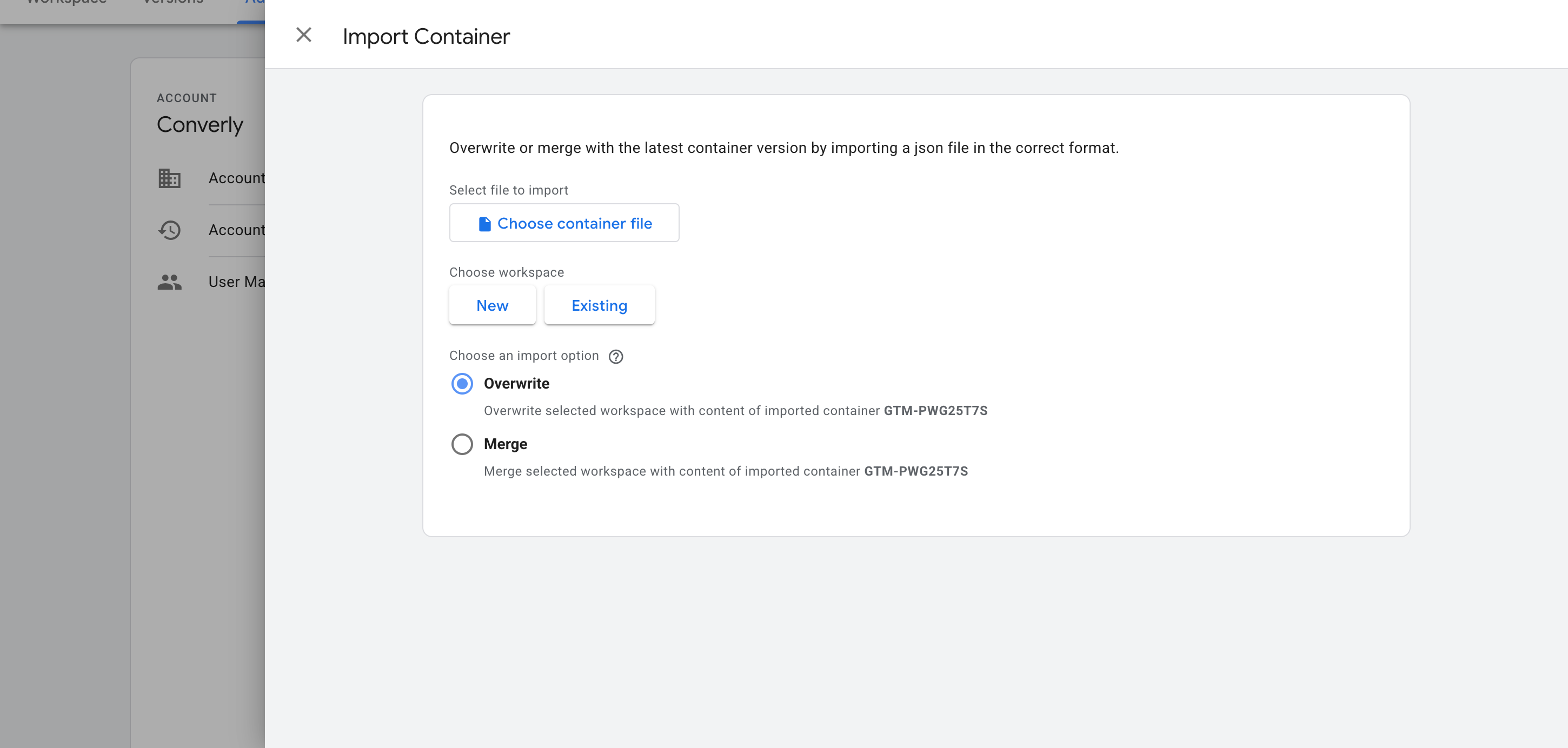
First, use the form above to download the recipe file. Then, inside Google Tag Manager, open Admin and choose Import Container. Pick the file, set the import option to Merge (that way your existing tags, triggers and variables stay exactly as they are) and confirm. GTM adds the listener, the variable and the trigger to your workspace in one step. If you use Mailchimp's plain (unstyled) embed rather than the Classic one, also set the audience's return link in Mailchimp to a page on your own site with ?converly=mailchimp on the end, so the recipe can tell a real signup from a visit.
Configure Your Tags
Your conversion tags can now fire on the recipe's Trigger. Below are the two setups people ask us about most.
Example 1: Google Analytics
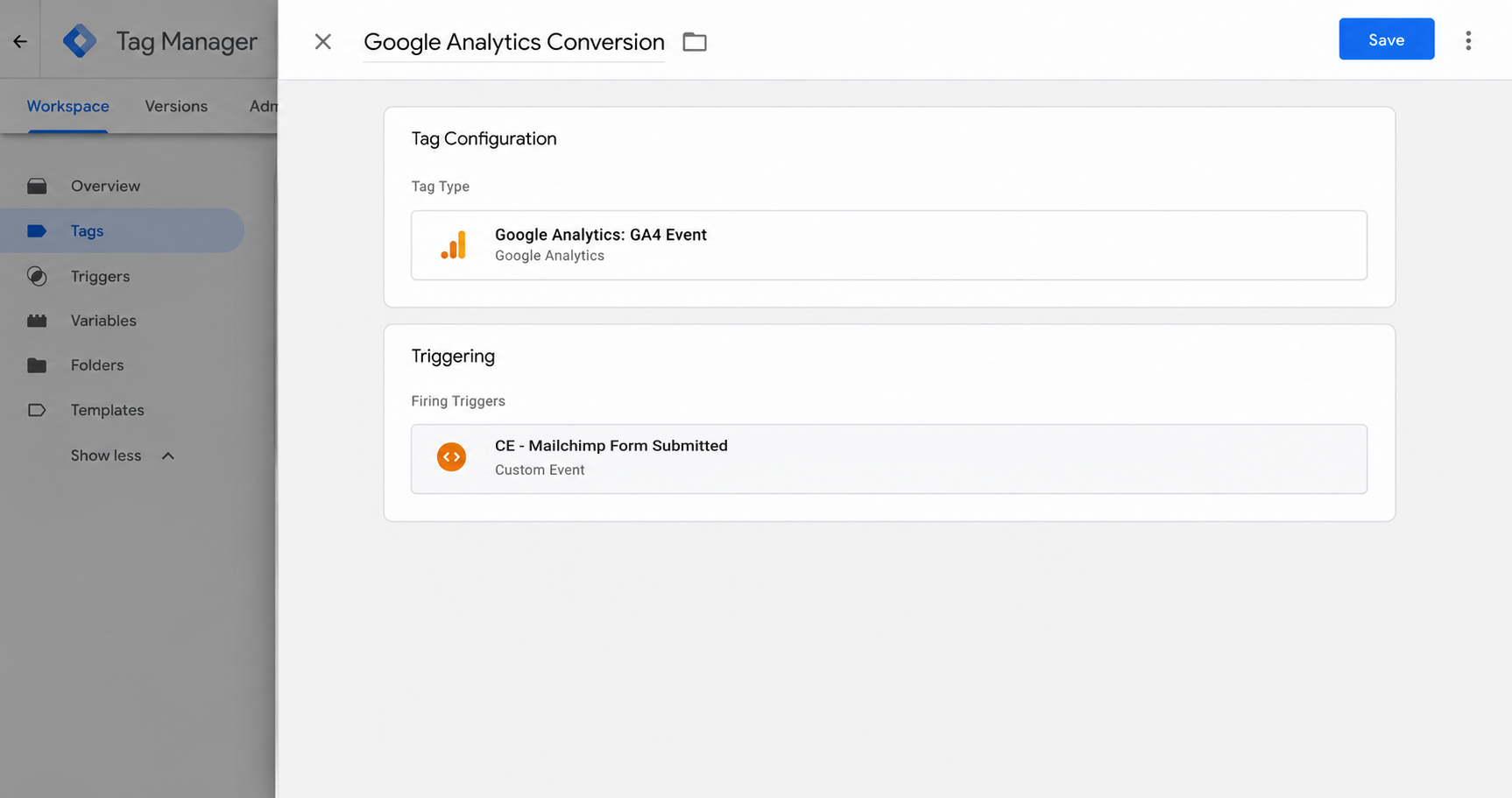
Add a new GA4 event tag, give it an event name like newsletter_signup, and under Triggering select the recipe's trigger (called CE - Mailchimp Form Submitted). Google Analytics will then log an event for each signup Mailchimp confirms.
Example 2: Google Ads
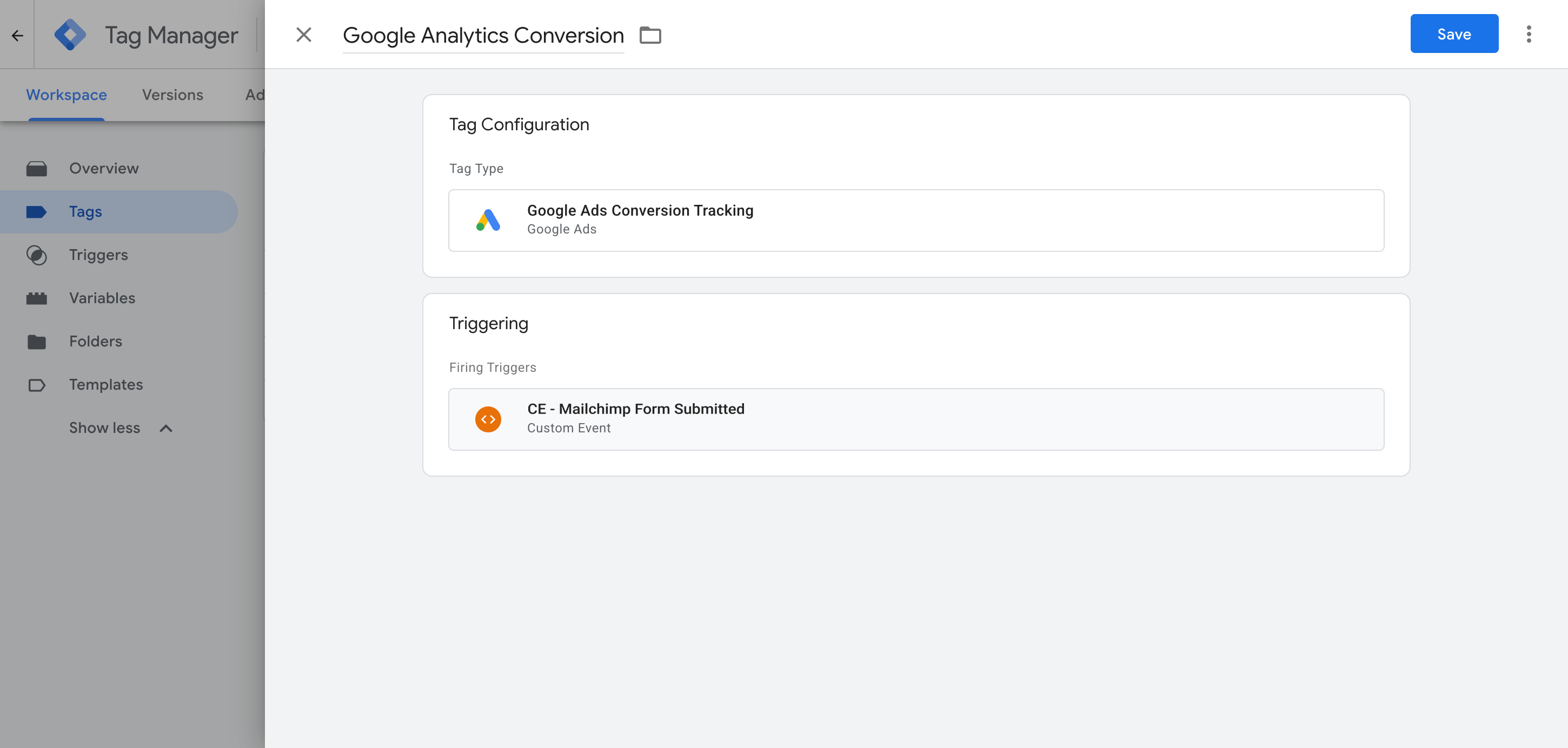
Open a Google Ads conversion tag, paste in your conversion ID and label, and attach the recipe's trigger (called CE - Mailchimp Form Submitted) under Triggering. Each signup Mailchimp confirms now counts as a conversion in your campaigns.
What This Enables You to Do (and What It Doesn't)
Put simply, every new subscriber Mailchimp signs off on becomes an event in Google Tag Manager, ready to set off whichever Google Ads, Google Analytics or other conversion tags you attach to it.
What it does
Sends an Event to GTM
Spots confirmed Mailchimp signups and pushes an event called 'mailchimp_form_submitted' into your dataLayer for you.
Tells You Which Audience Fired
Picks up the ID of the Mailchimp audience the visitor joined and sends it along with the 'mailchimp_form_submitted' event, so a site with signup forms for more than one audience can fire different tags for each.
Creates a Trigger in GTM
Puts a 'Trigger' into Google Tag Manager that you can use as the trigger for any of your conversion tags.
What it doesn't do
Send the conversion server-side
It all runs in the visitor's browser, so it only works when the browser allows it. Ad blockers can stop the Google tag from loading (so nothing the visitor does is tracked), and browser privacy rules can cap tracking at a single day (so a visitor who clicks your ad on Monday and signs up on Thursday can't be tied back to that click).
No Click IDs or Identifiers
It doesn't collect the Google click ID, Facebook click ID, Meta pixel cookies, IP address or user agent, which ad platforms depend on for Enhanced Conversions (Google) or a healthy Event Match Quality score (Meta).
No Personal Details
The script just fires an event. It doesn't pass on the subscriber's name, email or phone number, which Google and Meta both need to match the conversion to a real person and the ad they clicked.
No Logging or Notifications
Tag Assistant will show you it works on the day you set it up, but unless you check again every week, it can stop working without you noticing (you'll simply see 0 conversions in your ad platforms).
No Pop-ups or Hosted Pages
It tracks Mailchimp's embedded forms on your own site: the Classic embed out of the box, and the plain embed once its return link points back to your site. Mailchimp's pop-up forms, hosted signup pages and signups finished on Mailchimp's separate captcha page aren't covered.
The Proper Way to Send Conversions to Google Ads, Meta Ads & More
Sending signups to Google Analytics alone? Then this recipe is all you need, as GA won't accept personal information or IP addresses in any case. Ad platforms are a different story. Meta rewards a high Event Match Quality (EMQ) score and Google offers Enhanced Conversions, and both depend on the subscriber's name and email reaching them server-side along with the conversion. Converly is built to do exactly that.
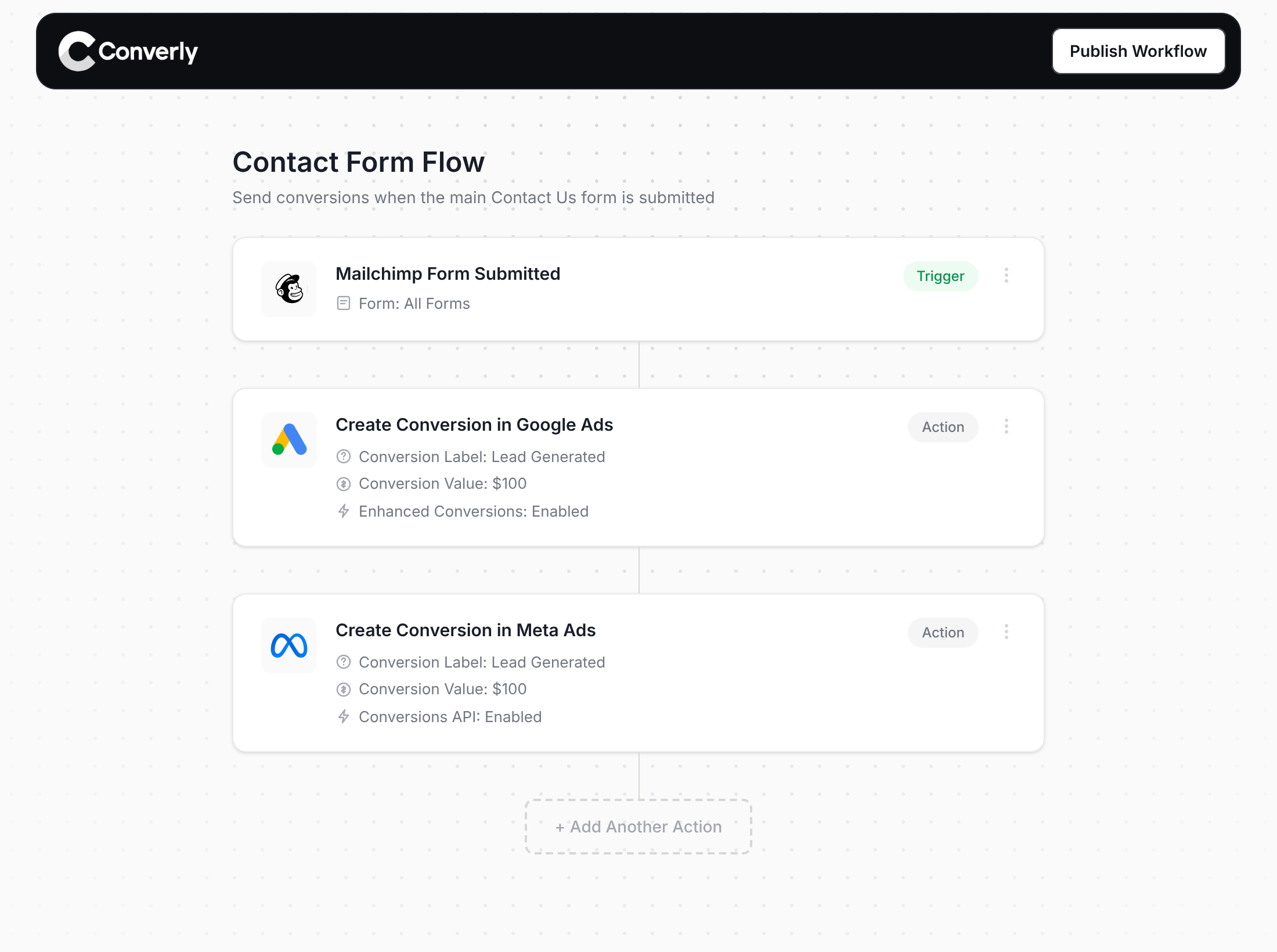
Here's why Converly is the best way to send conversions to Google Ads, Meta Ads, Microsoft Ads, LinkedIn Ads, etc.
Easy to set up
Converly's drag-and-drop builder lets you assemble a Conversion Flow in a couple of minutes. You start with a trigger (a new Mailchimp signup, say) and add the actions you want (a Google Ads conversion, a Meta lead event). No scripts, no tags, no settings to puzzle over.
Sends Data Server-Side
Conversions leave from Converly's servers and go directly to Google, Meta, ChatGPT and the rest, instead of depending on whatever the visitor's browser lets through. Ad blockers and privacy rules stop being a problem, and your numbers get a lot closer to the truth.
Sends More Data
Each conversion carries the subscriber's name, email and phone, plus the Google and Facebook click IDs, IP address and user agent. With all of that on board, Enhanced Conversions switches on in Google Ads and your Meta Event Match Quality (EMQ) score climbs to 9 or 10.
Full Conversion Log & Email Notifications
A log shows you every conversion, what was captured, what went to each platform and whether it landed. If something stops working, an email tells you straight away rather than leaving you to discover it weeks later.
Supports Multiple Tools & Destinations
One account handles submissions from 100+ form, scheduling and chat tools and delivers them to 20+ destinations, among them Google Ads, Meta, ChatGPT, LinkedIn, Microsoft and TikTok. Bringing on another tool or ad platform is a few clicks, not a new project.
Provides Free Support
Stuck? Our team has spent 20 years in conversion tracking and analytics, and helping you costs nothing. Google Tag Manager doesn't come with anyone to call.
Start Your Free Trial
Start a 14-day free trial and track your conversions the proper way. No code, no complicated configuration.
About the author
Aaron is the founder of Converly. With over 15 years of experience in digital marketing and SaaS, he's passionate about helping businesses track and optimise their ad conversions.