


Track Kit Email Signups in Google Tag Manager with this Free GTM Recipe
A free, tested Google Tag Manager recipe that detects successful Kit email signups and gives you a Trigger in GTM you can use to fire conversions to Google Analytics, Google Ads, etc.

Trying to use Google Tag Manager to send a conversion to Google Analytics, Meta Ads, etc whenever a visitor joins your list through a Kit form embedded on your website?
The problem is that Kit forms are tricky to track. When someone clicks Subscribe, Kit's own script takes over the submit and sends the signup off in the background, so Google Tag Manager's built-in Form Submission trigger doesn't work.
To set it up properly, you would need to write custom code to detect a successful Kit form submission, send an event to the dataLayer, and then build Triggers, Tags and Variables in GTM on top of it. Unless you write code for a living or spend your days inside Google Tag Manager, that's a lot to take on.
Luckily, there's a much simpler option.
Import this Kit Conversion Tracking Recipe into your Google Tag Manager account and you'll have everything you need for basic conversion tracking.
What Is a Google Tag Manager Recipe and What's in It?
A recipe is essentially a set of Google Tag Manager assets (a tag, a trigger and a variable). You import the recipe into your GTM account and it gives you everything you need to set up conversion tracking for Kit forms, without having to write and test all the custom code yourself.
This recipe detects successful Kit email signups, passes a 'Form Submitted' event to Google Tag Manager, and gives you a Trigger for sending conversions to Google Analytics, Google Ads, etc.
Custom HTML Tag
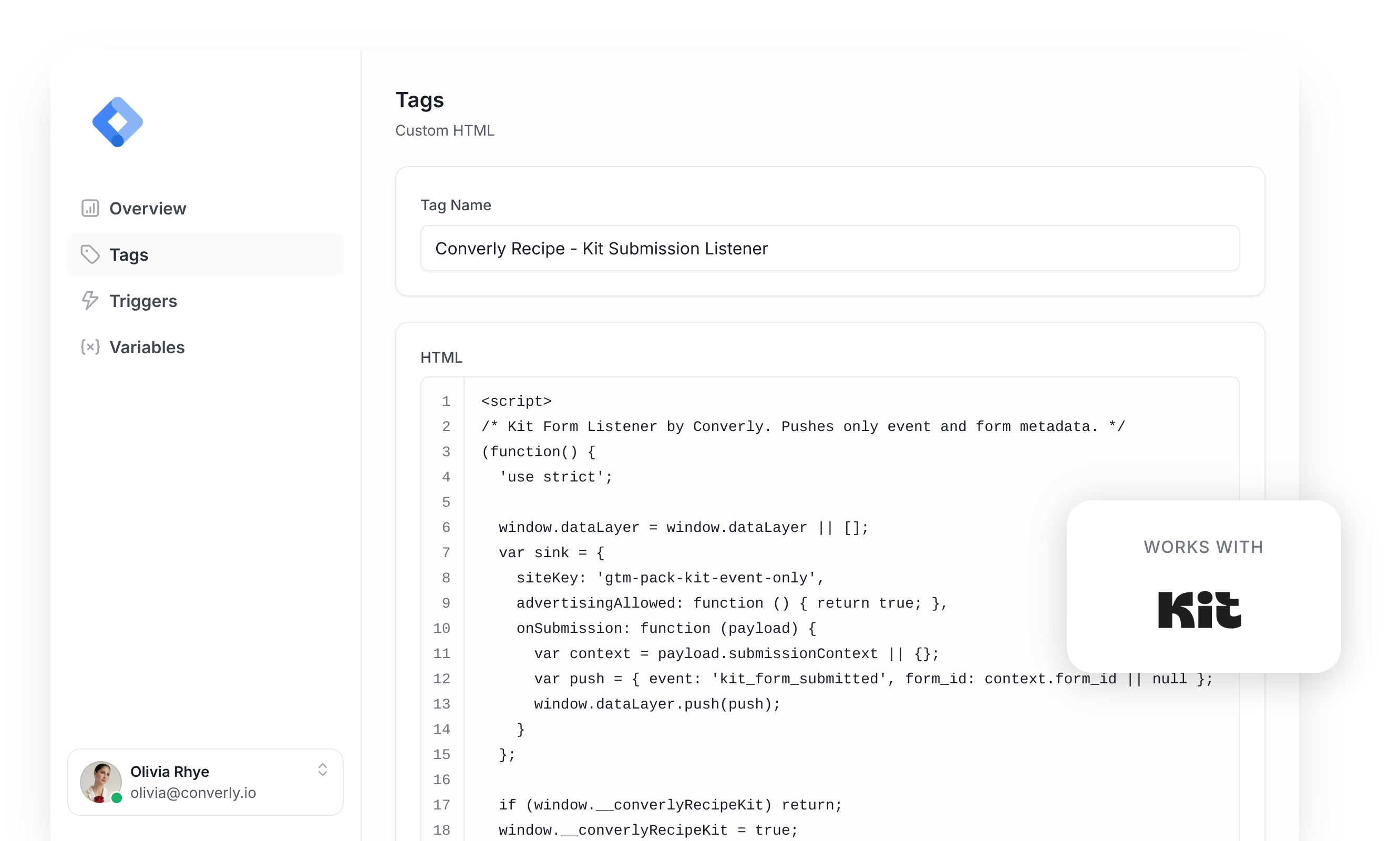
Listens for successful Kit email signups and then pushes a 'kit_form_submitted' event to the dataLayer. It fires on All Pages, once per event, and this is the code inside it:
/* Kit Form Listener by Converly. Pushes only event and form metadata. */
(function() {
  'use strict';

  window.dataLayer = window.dataLayer || [];
  var sink = {
    siteKey: 'gtm-pack-kit-event-only',
    advertisingAllowed: function () { return true; },
    onSubmission: function (payload) {
      var context = payload.submissionContext || {};
      var push = { event: 'kit_form_submitted', form_id: context.form_id || null };
      window.dataLayer.push(push);
    }
  };

  if (window.__converlyRecipeKit) return;
  window.__converlyRecipeKit = true;

  var pending = [];
  var consumed = new WeakSet();
  var PREFIX = '[Converly:kit-forms]';

  function warn() { ; }

  function consentAllows() {
    try {
      var c = sink;
      return !(c && typeof c.advertisingAllowed === 'function' && c.advertisingAllowed() === false);
    } catch (e) { return true; }
  }

  function ready() {
    return sink && typeof sink.onSubmission === 'function';
  }

  var SENSITIVE_AUTOCOMPLETE = {
    'current-password': true, 'new-password': true, 'one-time-code': true,
    'cc-number': true, 'cc-csc': true, 'cc-exp': true, 'cc-exp-month': true,
    'cc-exp-year': true, 'cc-name': true, 'cc-given-name': true,
    'cc-family-name': true, 'cc-additional-name': true, 'cc-type': true,
  };
  var SENSITIVE_NAME_SUBSTRINGS = [
    'password', 'passwd', 'passcode', 'cardnum', 'ccnumber', 'creditcard',
    'onetimecode', 'securitycode', 'socialsecurity',
  ];
  var SENSITIVE_NAME_TOKENS = {
    otp: true, cvv: true, cvc: true, ssn: true, pwd: true, pin: true,
  };

  function isSensitiveName(name) {
    if (!name) return false;
    var lower = String(name).toLowerCase();
    var norm = lower.replace(/[^a-z0-9]/g, '');
    for (var i = 0; i < SENSITIVE_NAME_SUBSTRINGS.length; i++) {
      if (norm.indexOf(SENSITIVE_NAME_SUBSTRINGS[i]) !== -1) return true;
    }
    var parts = lower.split(/[^a-z0-9]+/);
    for (var p = 0; p < parts.length; p++) {
      if (SENSITIVE_NAME_TOKENS[parts[p]] === true) return true;
    }
    return false;
  }

  function isSensitiveField(type, autocomplete, name) {
    if (type === 'password') return true;
    var tokens = autocomplete.split(/\s+/);
    for (var t = 0; t < tokens.length; t++) {
      if (SENSITIVE_AUTOCOMPLETE[tokens[t]] === true) return true;
    }
    return isSensitiveName(name);
  }

  function labelTextFor(el, form) {
    var text = '';
    var wrap = el.closest ? el.closest('label') : null;
    if (wrap) text += ' ' + wrap.textContent;
    var labels = document.getElementsByTagName('label');
    for (var i = 0; i < labels.length; i++) {
      var owner = labels[i].closest ? labels[i].closest('form') : null;
      if (el.id && labels[i].getAttribute('for') === el.id && (!owner || owner === form)) {
        text += ' ' + labels[i].textContent;
      }
    }
    var ids = (el.getAttribute('aria-labelledby') || '').split(/\s+/);
    for (var j = 0; j < ids.length; j++) {
      if (!ids[j]) continue;
      var nodes = form.querySelectorAll('[id]');
      var found = false;
      for (var k = 0; k < nodes.length; k++) {
        if (nodes[k].id === ids[j]) { text += ' ' + nodes[k].textContent; found = true; }
      }
      if (!found) {
        var node = document.getElementById(ids[j]);
        var nodeForm = node && node.closest ? node.closest('form') : null;
        if (node && (!nodeForm || nodeForm === form)) text += ' ' + node.textContent;
      }
    }
    return text;
  }

  function safeControl(el, form) {
    var type = (el.type || 'text').toLowerCase();
    return !isSensitiveField(type, (el.getAttribute('autocomplete') || '').toLowerCase(), el.name) &&
      !isSensitiveName(el.id) && !isSensitiveName(el.getAttribute('aria-label')) &&
      !isSensitiveName(el.getAttribute('placeholder')) && !isSensitiveName(labelTextFor(el, form));
  }

  function visible(el) {
    for (var node = el; node && node.nodeType === 1; node = node.parentElement) {
      var style = window.getComputedStyle(node);
      if (node.hidden || style.display === 'none' || style.visibility === 'hidden') return false;
    }
    return true;
  }

  function eligible(el, types) {
    return el.tagName === 'INPUT' && types.indexOf((el.type || 'text').toLowerCase()) !== -1 && !el.disabled && visible(el);
  }

  function bounded(value) {
    if (typeof value !== 'string') return '';
    value = value.trim();
    return value.length <= 200 ? value : '';
  }

  function emailValue(value) {
    value = bounded(value);
    return /^[^\s@]+@[^\s@]+\.[^\s@]+$/.test(value) ? value : '';
  }

  function phoneValue(value) {
    value = bounded(value);
    return /^[+\d\s().-]{6,30}$/.test(value) ? value : '';
  }

  function sources(form, name) {
    var result = [];
    for (var i = 0; i < form.elements.length; i++) {
      if (form.elements[i].name === name) result.push(form.elements[i]);
    }
    return result;
  }

  function snapshot(form) {
    var data = {};
    var seen = [];
    var emailControls = sources(form, 'email_address');
    var emailControl = emailControls.length === 1 ? emailControls[0] : null;
    var emailSafe = !!(emailControl && eligible(emailControl, ['email', 'text']) && safeControl(emailControl, form));
    var submittedEmail = emailSafe ? emailValue(emailControl.value) : '';
    for (var i = 0; i < form.elements.length; i++) {
      var el = form.elements[i];
      var type = (el.type || 'text').toLowerCase();
      if (!/^(INPUT|TEXTAREA|SELECT)$/.test(el.tagName) ||
          /^(hidden|submit|button|reset|image|file)$/.test(type) || !visible(el) || !safeControl(el, form)) continue;
      var name = el.name || el.id || '';
      if (name) seen.push({ name: name, type: type });
    }
    var keys = ['fields[first_name]', 'fields[last_name]', 'fields[phone]', 'fields[phone_number]'];
    return { userData: data, formFieldsSeen: seen, emailControl: emailControl,
      emailSafe: emailSafe, submittedEmail: submittedEmail };
  }

  function identity(form) {
    if (!form || form.tagName !== 'FORM' || form.ownerDocument !== document ||
        !document.documentElement.contains(form)) return null;
    var id = form.getAttribute('data-sv-form') || '';
    var uid = form.getAttribute('data-uid') || '';
    if (!id || id.length > 15 || /[^0-9]/.test(id) ||
        !uid || uid.length > 64 || /[^a-zA-Z0-9]/.test(uid)) return null;
    var action = form.getAttribute('action') || '';

    if (action !== 'https://app.kit.com/forms/' + id + '/subscriptions' &&
        action !== 'https://app.convertkit.com/forms/' + id + '/subscriptions') return null;
    return { id: id, uid: uid, action: action };
  }

  function recordFor(form) {
    for (var i = 0; i < pending.length; i++) if (pending[i].form === form) return pending[i];
    return null;
  }

  function discard(record) {
    if (!record) return;
    var index = pending.indexOf(record);
    if (index !== -1) pending.splice(index, 1);
    record.snapshot = null;
    record.form = null;
  }

  function clearPending() {
    while (pending.length) discard(pending[0]);
  }

  function handleSubmit(event) {
    var form = event.target;
    var old = recordFor(form);
    try {
      if (event.isTrusted !== true) return;
      var key = identity(form);
      if (!key || !consentAllows() || !ready()) { discard(old); return; }
      if (consumed.has(form) || form.getAttribute('data-converly-recipe-processing')) return;
      if (old && Date.now() - old.armedAt < 500 && old.id === key.id &&
          old.uid === key.uid && old.action === key.action) return;
      discard(old);
      pending.push({ form: form, id: key.id, uid: key.uid, action: key.action,
        pageUrl: window.location.pathname, armedAt: Date.now(), snapshot: snapshot(form) });
    } catch (e) { discard(old); warn(); }
  }

  function emailStillSafe(record) {
    var snap = record.snapshot;
    if (!snap.emailSafe) return false;
    var current = sources(record.form, 'email_address');
    if (current.length > 1 || (current.length === 1 && current[0] !== snap.emailControl)) return false;

    if (document.documentElement.contains(snap.emailControl)) {
      return current.length === 1 && eligible(snap.emailControl, ['email', 'text']) && safeControl(snap.emailControl, record.form);
    }
    return current.length === 0;
  }

  function handleComplete(event) {
    var record = recordFor(event.target);
    if (!record) return;
    try {
      if (!consentAllows() || !ready()) { discard(record); return; }
      var key = identity(event.target);
      if (!key || key.id !== record.id || key.uid !== record.uid || key.action !== record.action) {
        discard(record); return;
      }
      var detail = event.detail;
      if (!detail || typeof detail !== 'object' || Array.isArray(detail) ||
          typeof detail.uid !== 'string' || detail.uid !== record.uid) return;
      var snap = record.snapshot;
      var email = emailStillSafe(record) ? emailValue(detail.email_address) : '';
      if (email && snap.submittedEmail && email.toLowerCase() !== snap.submittedEmail.toLowerCase()) {
        discard(record); return;
      }
      if (!consentAllows() || !ready()) { discard(record); return; }
      if (email) snap.userData.email = email;
      var form = record.form;
      var payload = { trigger: 'kit-forms', pageUrl: record.pageUrl, userData: snap.userData,
        formFieldsSeen: snap.formFieldsSeen, submissionContext: { form_id: record.id } };
      consumed.add(form);
      discard(record);
      form.setAttribute('data-converly-recipe-processing', 'true');
      setTimeout(function() { form.removeAttribute('data-converly-recipe-processing'); }, 2000);
      sink.onSubmission(payload);
    } catch (e) { discard(record); warn(); }
  }

  document.addEventListener('submit', handleSubmit, true);
  document.addEventListener('ckjs:submission:complete', handleComplete, true);
  window.addEventListener('pagehide', clearPending);
  if (typeof MutationObserver !== 'undefined') {
    new MutationObserver(function() {
      for (var i = pending.length - 1; i >= 0; i--) {
        if (!document.documentElement.contains(pending[i].form)) discard(pending[i]);
      }
    }).observe(document.documentElement, { childList: true, subtree: true });
  }

})();Variable
Stores the ID of the Kit form the visitor signed up through, so you can use it in any tag. These are its exact settings:
Name
DLV - Kit Form ID
Variable Type
Data Layer Variable
Data Layer Variable Name
form_id
Trigger
Fires whenever the 'kit_form_submitted' event comes through. You can use it as the trigger for any of your conversion tags in GTM (GA4 event, Google Ads conversion, Meta Ads conversion, etc). These are its exact settings:
Name
CE - Kit Form Submitted
Trigger Type
Custom Event
Event Name
kit_form_submitted
Download This Recipe
One JSON file you upload into your account. It includes a Kit form submission listener, a variable that holds the form ID, and a trigger you can use to fire your conversion tags.
Built and tested by the Converly team against a real Kit form
Why It's the Best Recipe Out There
It was built by the team behind Converly, a dedicated conversion tracking tool. It was tested by hand against a live Kit form before we released it, and it's derived from the same code we use in our own product (which has been used to detect thousands of form submissions).
How to Use the Kit GTM Recipe
Install the Recipe
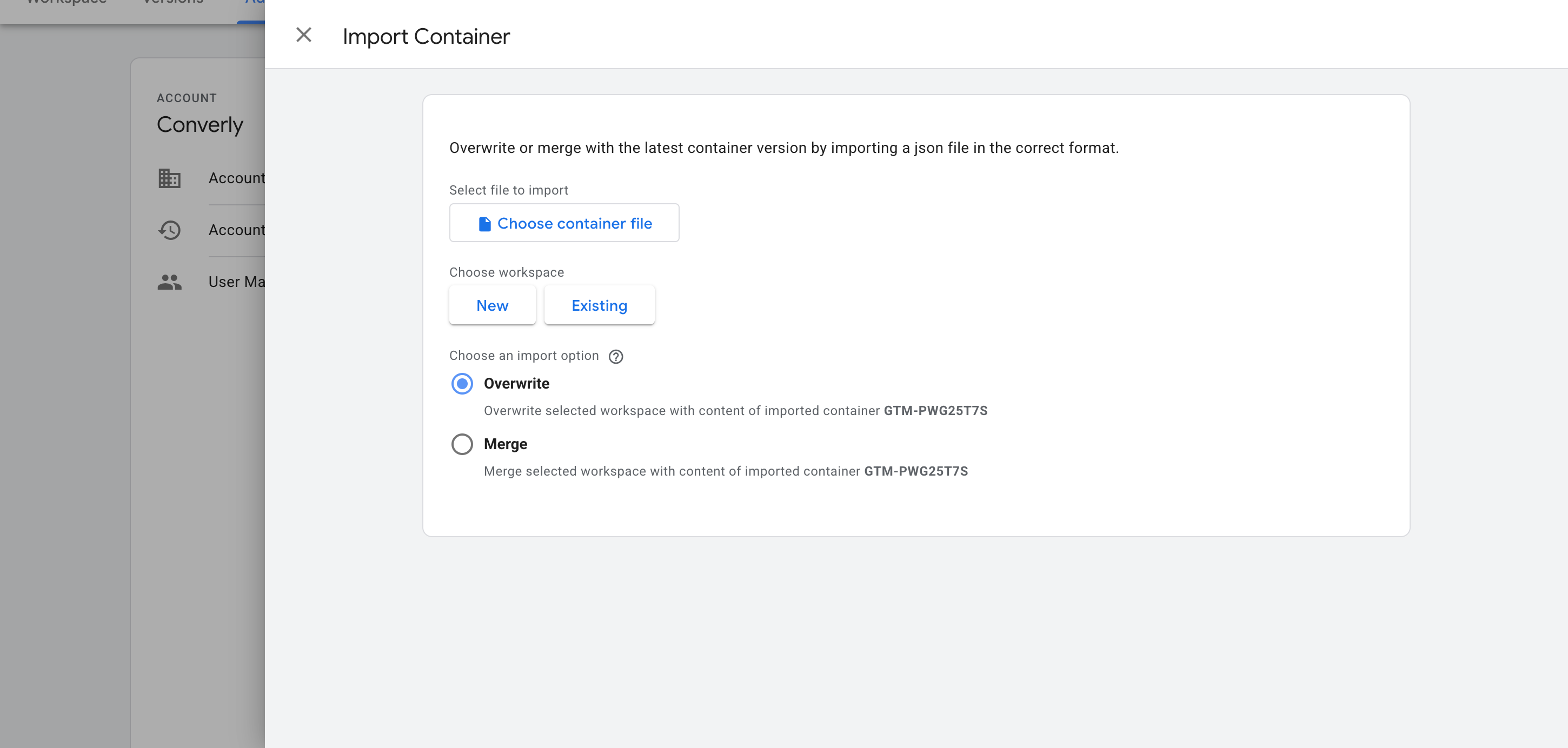
Download the recipe by completing the form above. Then in Google Tag Manager, go to Admin and select Import Container. Choose the downloaded file, set the import option to Merge so nothing already in your container gets overwritten, and confirm. GTM adds the listener, the variable and the trigger into your workspace for you.
Configure Your Tags
With the recipe in place, any of your conversion tags can fire on its Trigger. Here are instructions for two of the most common conversion destinations:
Example 1: Google Analytics
Create a GA4 event tag, name the event something like newsletter_signup, and under Triggering choose the recipe's trigger (called CE - Kit Form Submitted). Every new email signup will then be sent as an event to Google Analytics.

Example 2: Google Ads
Set up a Google Ads conversion tag, enter your conversion ID and label, and select the recipe's trigger (called CE - Kit Form Submitted) under Triggering. This will then send each new email signup to Google Ads as a conversion.

What This Enables You to Do (and What It Doesn't)
This recipe will ultimately give you a Trigger in Google Tag Manager that you can use to fire your conversions to various destinations. But it does have a couple of shortcomings (mainly to do with Google Tag Manager rather than the recipe).
What it does
Sends an Event to GTM
Detects successful Kit email signups and pushes an event called 'kit_form_submitted' into your dataLayer automatically.
Tells You Which Form Fired
Grabs the ID of the Kit form the visitor subscribed through and sends it with the 'kit_form_submitted' event, so a site with several Kit forms (a newsletter box and a lead magnet, say) can fire different tags for each.
Creates a Trigger in GTM
Adds a 'Trigger' to Google Tag Manager that you can use to fire your conversion tags to Google Analytics, Google Ads, etc.
What it doesn't do
Send the conversion server-side
Everything happens inside the visitor's browser, so it can only work as well as that browser allows. Ad blockers can stop the Google tag loading altogether (so the signup is never tracked), and browser privacy rules can limit tracking to as little as a week (so if someone clicks your ad on Monday and subscribes the following Tuesday, the conversion can't be linked back to the ad because the cookie that held the link was deleted).
No Click IDs or Identifiers
It doesn't pick up the Google click ID, Facebook click ID, Meta pixel cookies, IP address or user agent, which ad platforms rely on for Enhanced Conversions (Google) or a strong Event Match Quality score (Meta).
No Personal Details
The script only fires an event. It never passes on the subscriber's name or email, which Google and Meta both need to match the conversion back to a real person and the ad they clicked.
No Logging or Notifications
You can test it using Preview mode in GTM, but unless you keep checking every week, it can break without you knowing (all you'll see is 0 conversions in your ad platforms).
No Hosted Landing Pages
It tracks Kit forms embedded on your own site, where your GTM container is installed. Kit's hosted landing pages aren't covered, and if Kit sends a visitor away to a separate spam check page without coming back to complete the signup, that signup is missed.
The Proper Way to Send Conversions to Google Ads, Meta Ads & More
Only need to send conversions to Google Analytics? You won't need anything beyond this recipe, because GA refuses personal information and IP addresses in the first place. But ad platforms are different. They need you to send the subscriber's name and email, as well as technical details like the Click ID, IP address, etc. in order to be able to match the conversion back to a real person and the original ad they clicked. If they can't make this match, then the conversion doesn't get counted and it never shows up in your reports.
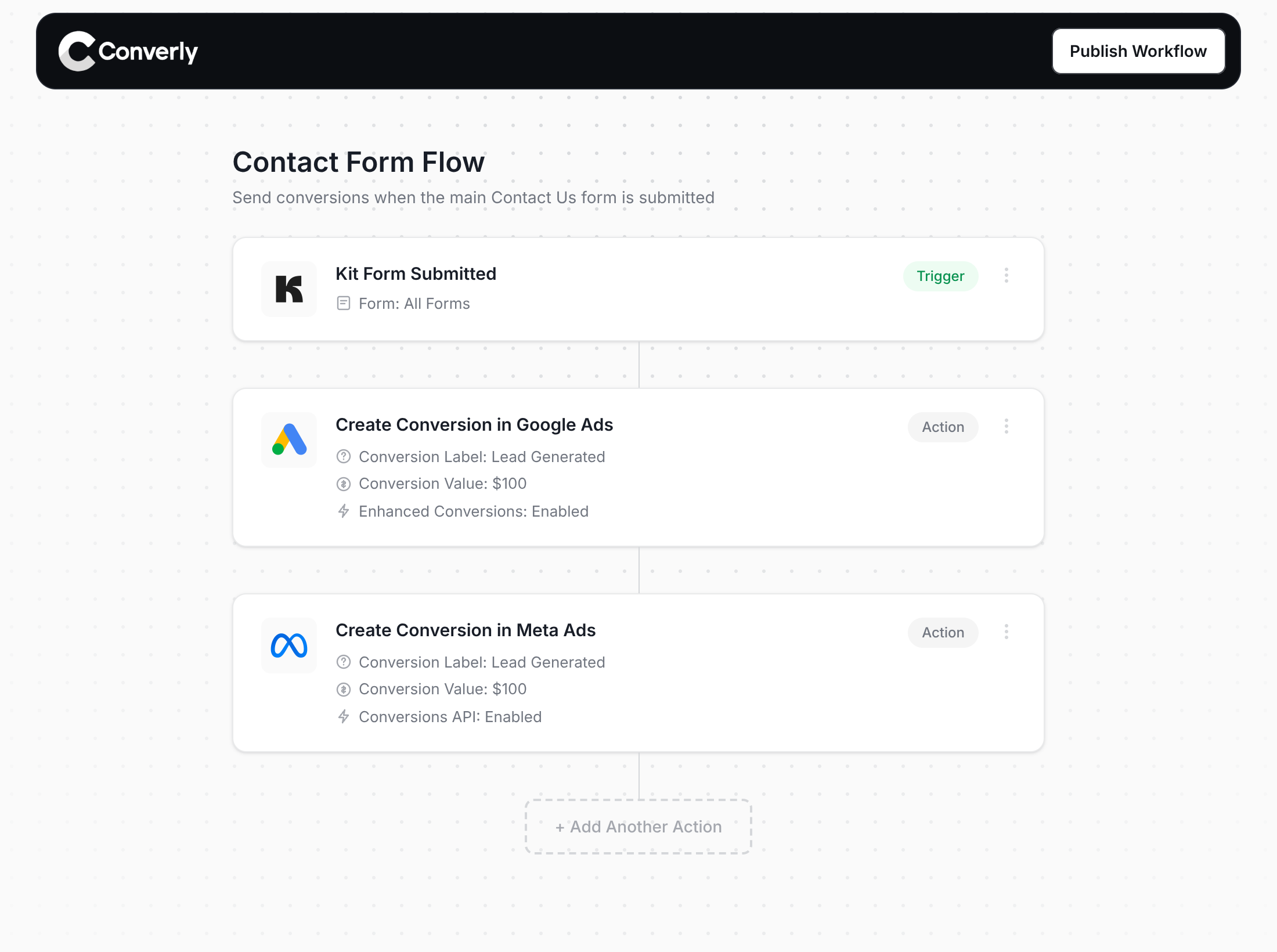
Here's why Converly is the best way to send conversions to Google Ads, Meta Ads, Microsoft Ads, LinkedIn Ads, etc.
Easy to set up
With Converly's drag-and-drop builder you can put together a Conversion Flow in a few minutes. Pick a trigger (a new Kit signup, for example) and add the actions you need (a Google Ads conversion, a Meta lead event). There are no scripts to write, no tags to build and no settings to decode.
Sends Data Server-Side
Conversions are sent to the ad platform's servers (Google, Meta, ChatGPT, etc). This means that ad blockers and privacy settings in browsers no longer get in the way, and your reporting gets much closer to reality.
Sends More Data
Every conversion includes the subscriber's name, email and phone, along with the Google and Facebook click IDs, IP address and user agent. That's enough to turn on Enhanced Conversions in Google Ads and push your Meta Event Match Quality (EMQ) score up to 9 or 10.
Full Conversion Log & Email Notifications
You get a log of every conversion, showing what was captured, what went to each platform and whether it arrived. If anything breaks, you get an email right away instead of finding out weeks down the track.
Supports Multiple Tools & Destinations
Converly can detect submissions from 100+ forms, scheduling, and chat tools and send them to 20+ destinations, including Google Ads, Meta, ChatGPT, LinkedIn, Microsoft, and TikTok. So regardless of where you want to send conversions, it's easy with Converly.
Provides Free Support
Need a hand setting it up? Our team has 20 years of conversion tracking and analytics experience, and we offer free support to customers. Google provides no support for Tag Manager, so you are on your own.
Start Your Free Trial
Start a 14-day free trial and track your conversions the proper way. No code, no complicated configuration.
About the author
Aaron is the founder of Converly. With over 15 years of experience in digital marketing and SaaS, he's passionate about helping businesses track and optimise their ad conversions.