


Track Squarespace form submissions as conversions in ChatGPT Ads
Learn how to send server-side conversions to ChatGPT Ads every time a visitor fills out a form on your Squarespace website. No code required!
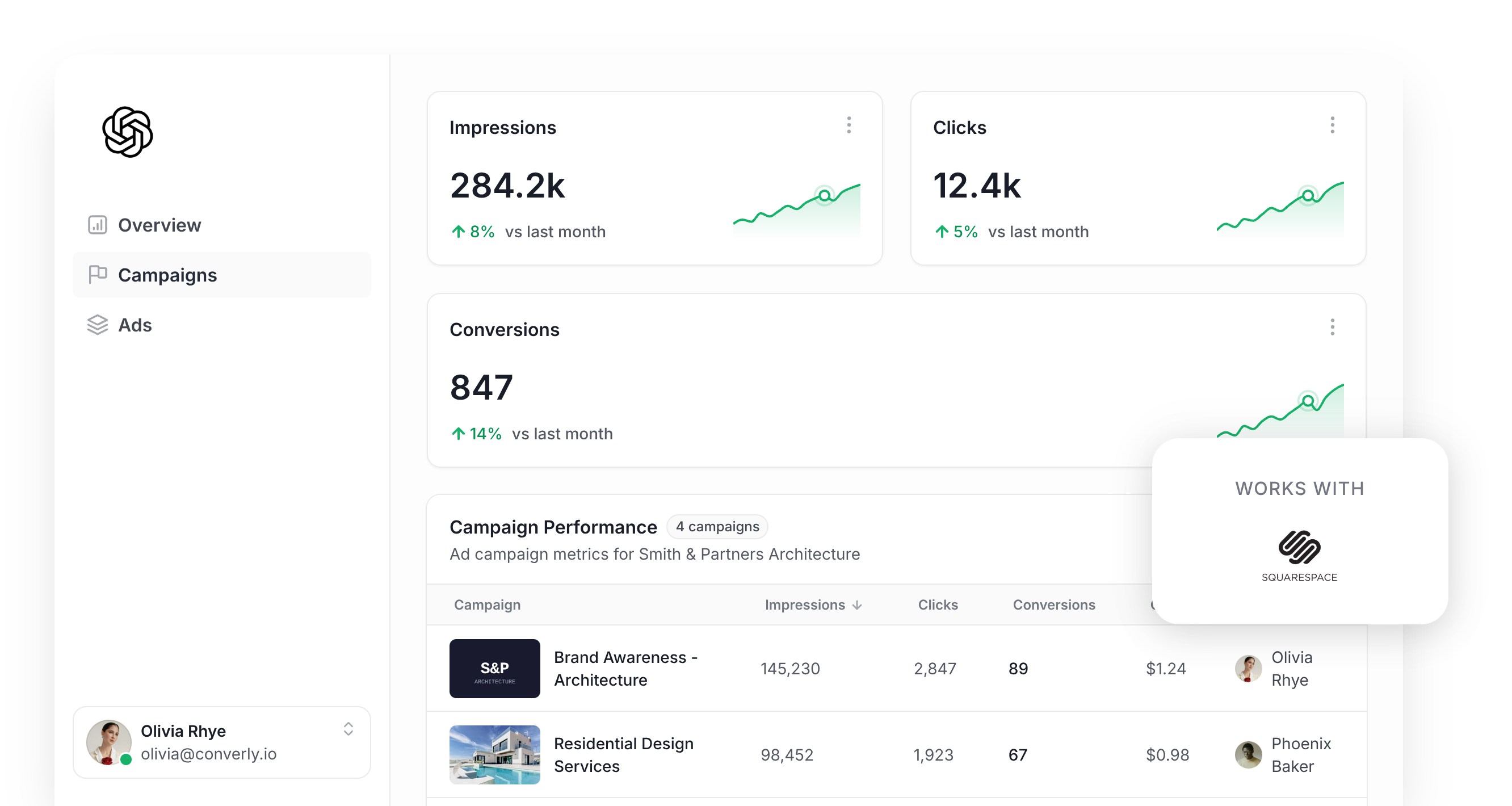
Thinking about using ChatGPT Ads to try to generate more leads for your business?
If so, sorting out your conversion tracking should be one of the first things you tackle. That's because ChatGPT Ads uses AI to figure out which people are most likely to become leads, and it then shows your ads more prominently to them.
But this AI system only works if you feed it accurate conversion data. If ChatGPT Ads doesn't know which clicks actually turned into leads, it doesn't know who it should show your ads to, and it will burn through your budget showing ads to people who were never going to fill out your form.
And this is an even bigger deal on ChatGPT Ads than on other platforms because you're not bidding on ‘keywords’ (you're essentially allowing ChatGPT to pick the conversations it inserts your ads into). So if it never finds out which of those conversations led to a lead, it's basically flying blind.
So what does good conversion tracking for ChatGPT Ads look like, and how do you set it up?
In this guide, we'll show you the easiest way to send a conversion to ChatGPT Ads every time someone submits a form on your Squarespace website.
What proper conversion tracking looks like in ChatGPT Ads
Getting conversion tracking right in ChatGPT Ads boils down to 2 things. You need every single conversion to actually reach OpenAI, and you need each one to carry enough detail that ChatGPT Ads can link it to a real person and the ad they originally clicked.
Getting every conversion delivered
The quickest conversion tracking setup is probably installing the ChatGPT Ads Measurement Pixel and firing a conversion when a visitor hits a thank you page (or sees the post-submit message on your Squarespace form).
Although it's simple, the whole thing depends on the visitor's browser passing that conversion along to ChatGPT Ads, and ad blockers and built-in privacy tools block it all the time.
In fact, research suggests 30% or more of conversions go missing this way, so you are massively undercounting how many leads you are getting from ChatGPT Ads (and you are giving the algorithm less data to work with when deciding who should see your ads).
To get around this, OpenAI recommends sending every conversion twice. One copy goes through the visitor's browser via the Measurement Pixel, and the other goes from a server straight to OpenAI using the Conversions API (and each one carries an ID that OpenAI then uses to deduplicate them). The idea is that if the pixel gets blocked in someone's browser, the server-side conversion still makes it through.
Making sure each conversion can be matched back to a real person
Delivering the conversion is only part of the job. After it's delivered, ChatGPT Ads still needs to tie the conversion back to a real user and the actual ad they clicked. If it can't make that link, the conversion simply doesn't count.
There are a few things that make this much trickier than it sounds:
- Browser privacy features - Safari and other privacy-focused browsers limit how long tracking cookies can live in the visitor's browser (often 7 days or less). So if someone clicks your ad but then doesn't complete your form until a week later, the cookie connecting them back to the original ad click has been wiped.
- Switching devices - Plenty of people click an ad on their phone and only get around to submitting your form days later on a laptop or desktop. Since the click and the submission happened on separate devices, the cookie that would traditionally link them together doesn't work because the click and the conversion happened on different devices.
- Switching browsers - A lot of people use the ChatGPT app on their phone, and when they click your ad it opens your site in a small browser window inside the app. That in-app window keeps its own cookies separate from Safari or Chrome's, so if the person comes back later in their regular browser and submits your form then ChatGPT Ads can't tie the conversion back to the original click.
The way around all 3 problems is to send extra information about the lead with every conversion. That includes their name, email address and phone number, plus the Click ID (ChatGPT Ads calls it the oppref). Sending the lead's IP address and user agent helps too (it tells ChatGPT about the device they used). ChatGPT Ads can then use all this data to match the conversion back to a real ChatGPT user, and ultimately back to the ad they clicked.
3 simple steps to send proper, server-side conversions to ChatGPT Ads from Squarespace
Now that you know what you're aiming for, here's the simplest way to get it running on your Squarespace site.
Step 1: Build your Conversion Flow in Converly
Converly is a conversion tracking tool that makes it easy to send proper, server-side conversions from Squarespace forms to ChatGPT Ads.
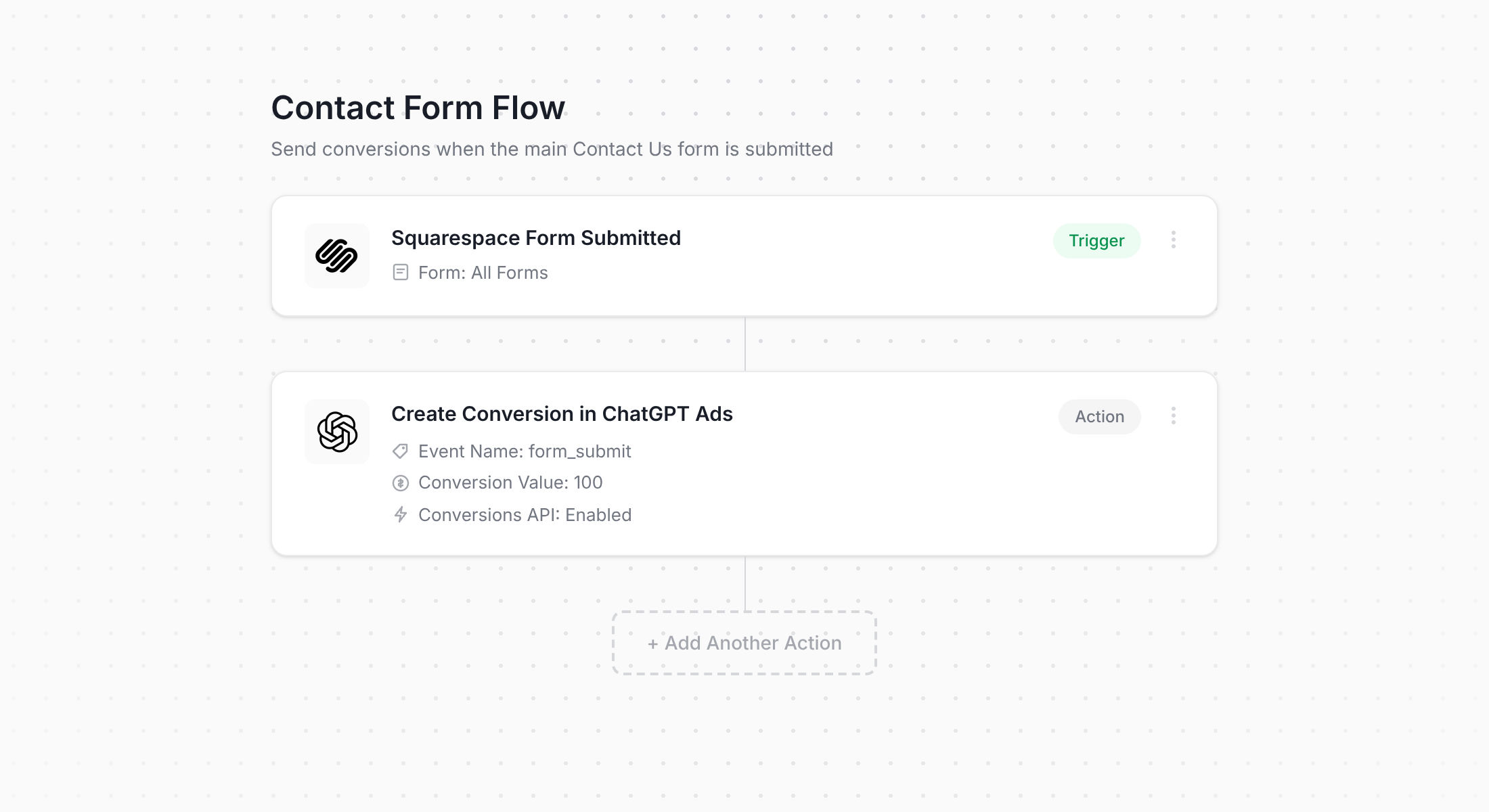
What you're looking at above is Converly's flow builder. If you've ever built a Zap in Zapier or set up an automation in an email marketing tool, you'll likely find this interface familiar.
You start by picking a trigger (in this case, someone submitting a form on your Squarespace site) and then decide what happens next (sending a conversion to ChatGPT Ads). Honestly, that's all there is to it. A few clicks later, you've got server-side conversion tracking working for ChatGPT Ads.
And it's even easier if you already use an AI assistant like Claude or ChatGPT. Just install the Converly plugin, ask it to 'Set up ChatGPT Ads conversion tracking for my Squarespace forms', and it will put the whole thing together for you!
Step 2: Add the Converly code to your website
When your Conversion Flow is built and published, Converly gives you a little code snippet to install on your website.
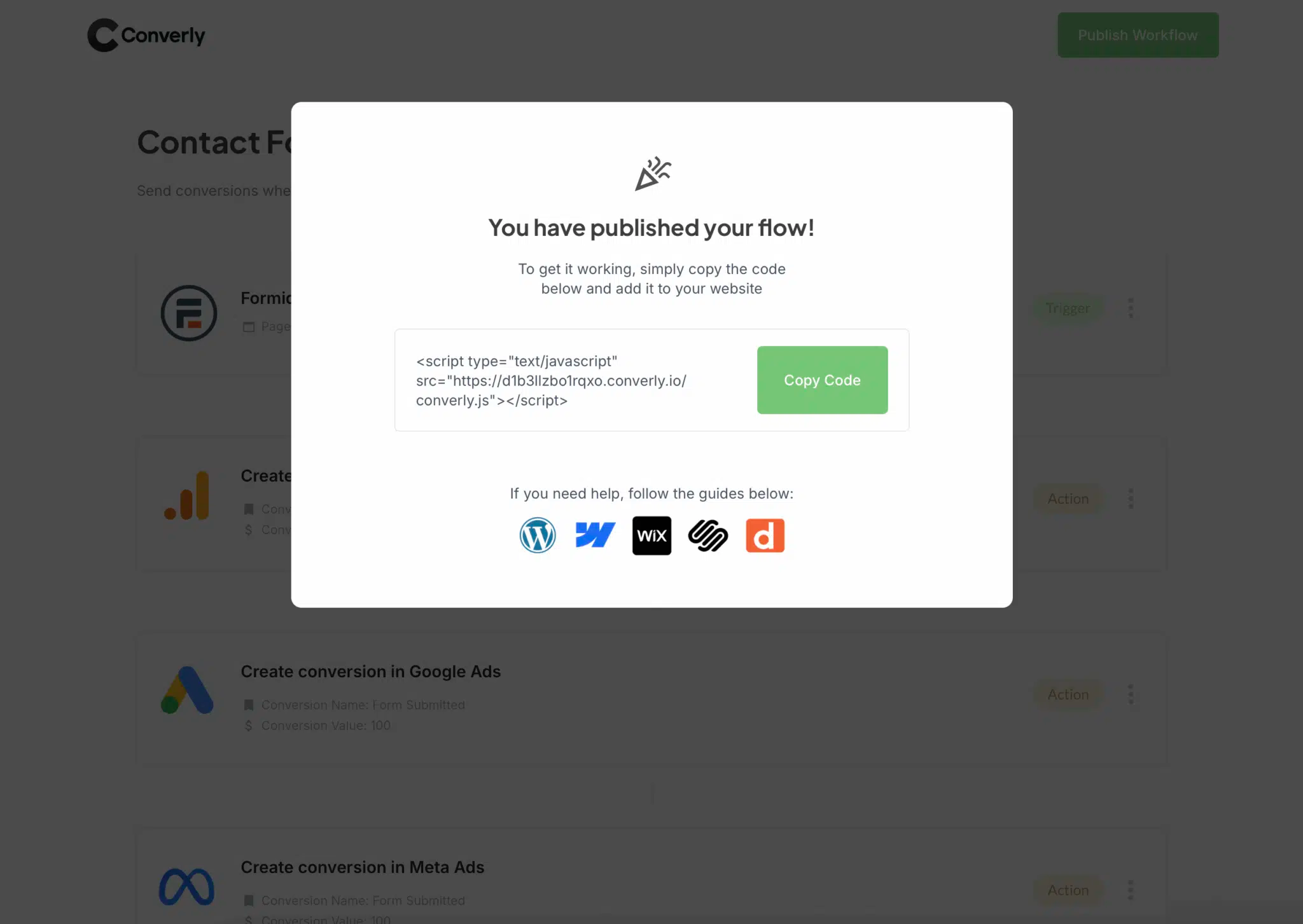
In Squarespace, the simplest place to put it is the Code Injection area. Open Settings, find Code Injection (it lives under Developer Tools on newer sites, or Advanced on older ones), paste the snippet into the Header box, and hit save. Just keep in mind that Code Injection is only available on paid Squarespace plans.
Alternatively, if you already manage your site's scripts through Google Tag Manager, you can load the snippet that way too.
Step 3: Test it works
To finish up, go to your live website and fill out your Squarespace form yourself.
Next, jump back into Converly and choose 'Logs' from the main menu.
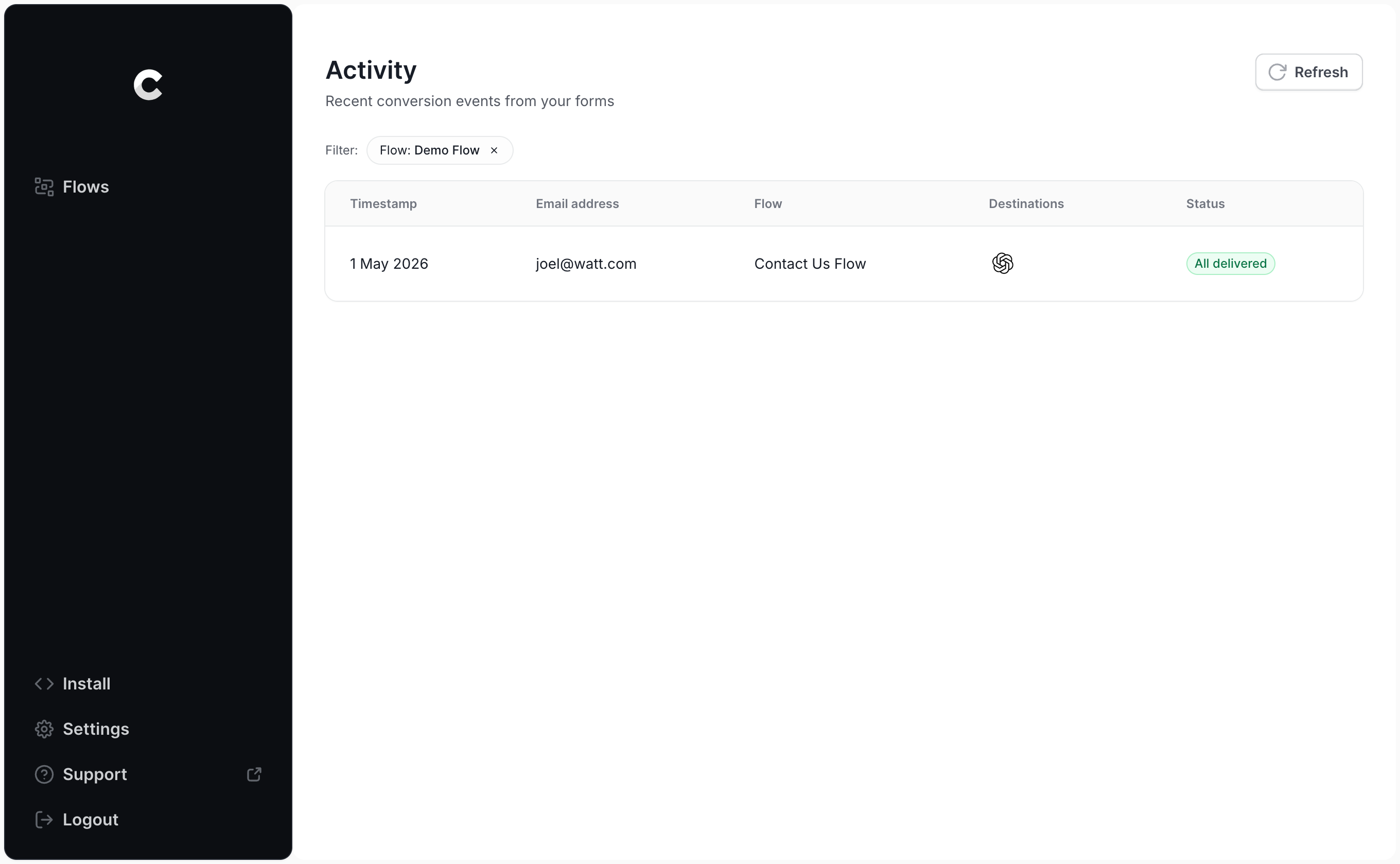
Find your test submission in the logs and click into it. You'll see all the details Converly picked up from the form, plus whether the conversion was successfully delivered to ChatGPT Ads.
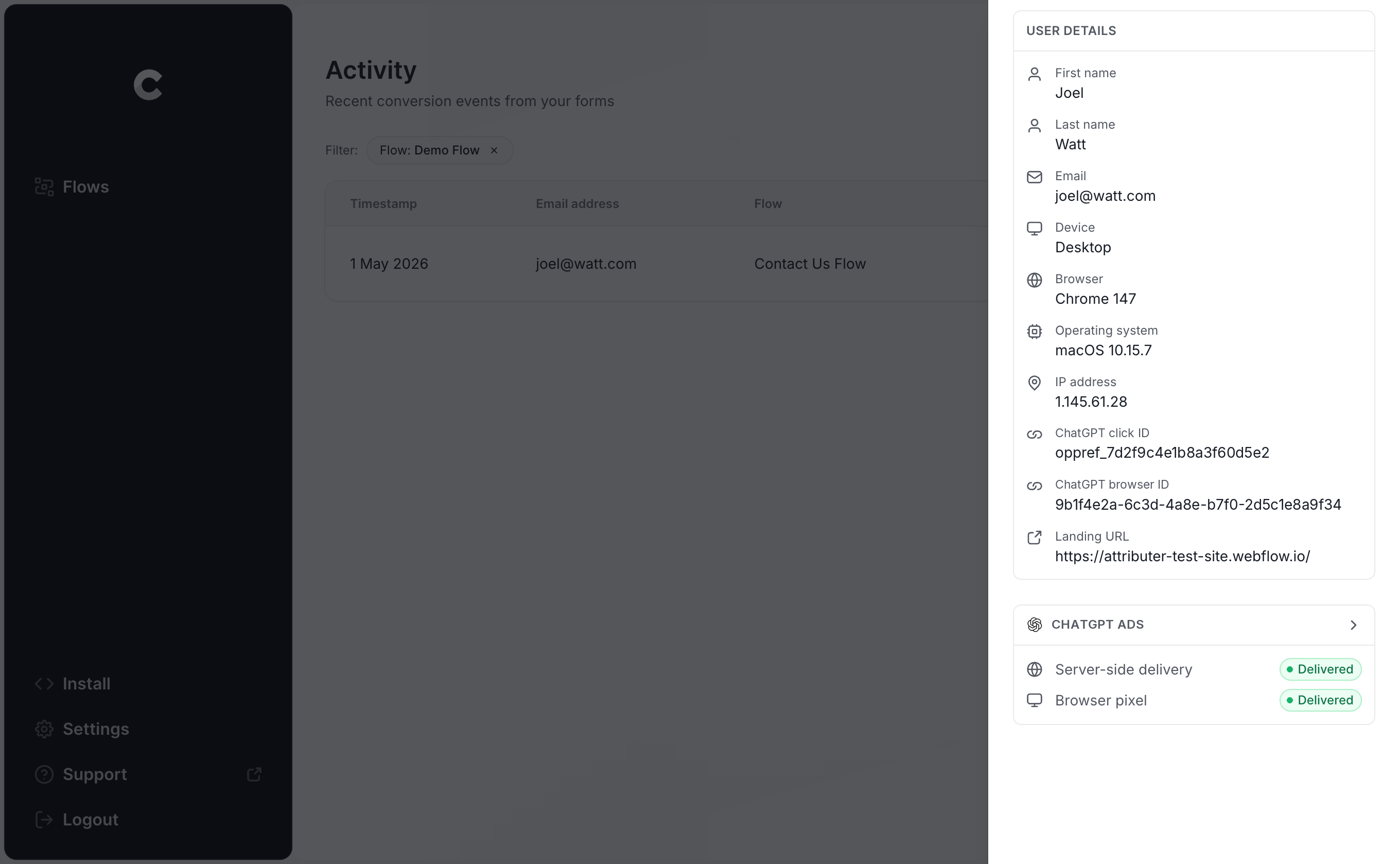
If you want to dig deeper, you can also view the exact payload that was sent to ChatGPT Ads (the click ID, browser ID and hashed email address included) along with the response OpenAI's server sent back.
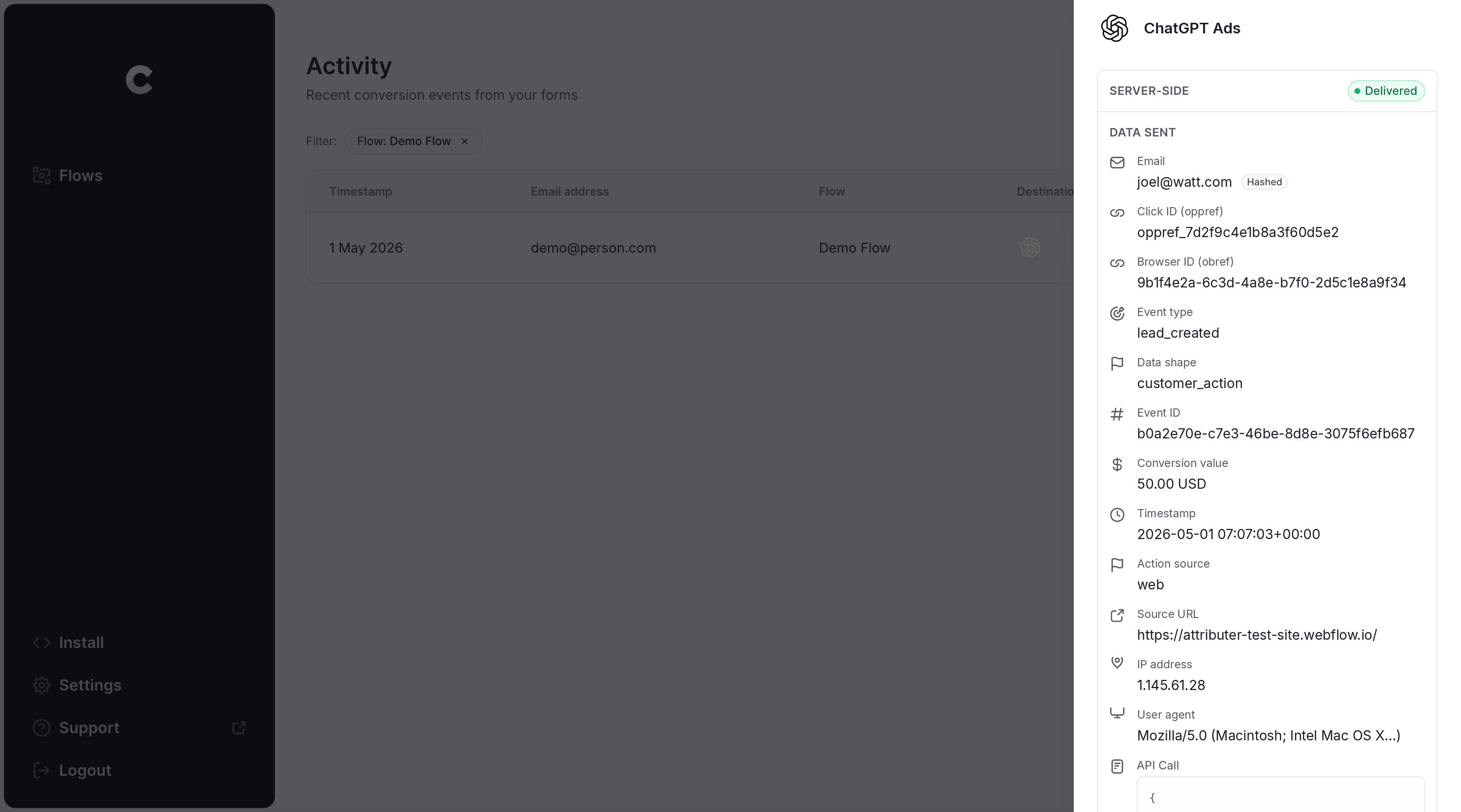
Once your test shows up in the log as successfully delivered to ChatGPT Ads, your tracking is live. Most people wrap up the entire setup in less than 5 minutes.
Why Converly is the best way to send conversions to ChatGPT Ads from Squarespace
You've got a few options for getting a conversion into ChatGPT Ads whenever a Squarespace form is submitted, so why choose Converly? Here's what makes it different:
1. Easy to set up
Doing this yourself would be a big job. You'd need to write code that detects when a Squarespace form has been submitted (which is fiddly, since Squarespace doesn't fire a simple event you can hook into), grabs the click ID and browser cookie, pulls out the name, email address and phone number, hashes those with SHA-256, formats the payload exactly how OpenAI expects it, and then sends it over to the Conversions API. You'd also need to handle API keys, deduplication, retries, logs, consent management, etc.
Converly does all of that for you. You simply pick a trigger (a Squarespace form submission), pick an action (a conversion sent to ChatGPT Ads), and Converly takes care of everything else. There's no custom code to write and no API keys to manage, just conversion tracking that does its job.
And if you already use an AI tool like ChatGPT or Claude, it's even easier. Simply install the Converly plugin, ask it to 'Set up ChatGPT Ads tracking for my Squarespace forms', and it will handle the setup for you!
2. Not affected by ad blockers and privacy restrictions
Relying on the ChatGPT Ads Measurement Pixel alone (without also sending conversions server-side through the Conversions API) means a real chunk of your conversions never reach OpenAI, because ad blockers and privacy-focused browsers stop the pixel from loading in the first place.
So how much are we talking? A study covering more than 7 million conversions found browser-based tracking missed roughly 30% of them. Or put another way, close to a third of your conversions would go uncounted.
Converly sends every conversion through both channels (via the browser to the ChatGPT Measurement Pixel, and server-side to the Conversions API), so your conversions make it back to ChatGPT Ads no matter what ad blocker or privacy settings your visitors are running.
3. Works across devices
It's really common for leads to find your website on one device (like scrolling on their phone during a lunch break) and then come back to fill out your Squarespace form later on their computer.
If you're relying on something like thank you page tracking, there's no way to link that conversion to the ad click, since the click and the submission happened in different browsers on different devices.
Converly solves that problem. It picks up the click ID (the oppref) and passes it to ChatGPT Ads along with the lead's name, email address and phone number. That gives ChatGPT Ads everything it needs to match the conversion back to a real ChatGPT user (and the exact ad they clicked).
4. Sends more data
As soon as a visitor arrives on your website, Converly captures their ChatGPT click ID, the browser cookie set by the ChatGPT Ads pixel, and their user agent, and then stores them. When that visitor eventually submits a form, Converly captures their name, email, and phone from the form, combines all the data, and sends it to ChatGPT Ads in one go.
All of this data makes it easy for ChatGPT Ads to connect each conversion back to a real ChatGPT user and the original ad they clicked, which ultimately means you get much more accurate conversion numbers.
5. Gives you a full conversion log and email alerts
Most other approaches to tracking ChatGPT Ads conversions (like using Google Tag Manager, for example) give you no simple way to know if things are working.
You can test the setup on day one, but if someone later switches your Squarespace form from a post-submit message to a redirect, rebuilds a page, or tweaks something in ChatGPT Ads Manager, your conversion tracking can break without anyone knowing.
Converly removes that uncertainty. You get a complete conversion log covering every submission of your Squarespace forms. It shows what data was captured, exactly what went to ChatGPT Ads, and whether it was accepted or not.
You can also switch on email notifications so you get notified when a new conversion is sent (or you can switch to receiving email notifications only on failures). That way, if something ever does go wrong, you'll find out right away.
6. Supports multiple tools and platforms
Converly detects conversions in more than 100 form builders, scheduling platforms, chat widgets, and other website tools. On the delivery side, it can send conversions to ChatGPT Ads, Google Ads, Meta Ads, LinkedIn Ads, Microsoft Ads, Google Analytics and plenty more.
So if you're running Google Ads or Meta Ads alongside ChatGPT Ads, there's no need to build a separate setup for each one. Simply add them as extra actions on your Conversion Flow and every Squarespace form submission goes to all of them at the same time. And when you decide to try a new ad platform down the track, it takes a few clicks rather than a whole new project.
7. Provides free support
Converly is built by a team of people who have over 20 years of experience in analytics and conversion tracking, and that team are on hand to help you get everything set up and working. You can contact us via email or book a call from within the app.
With tools like Google Tag Manager, you get no support from anyone, so if something doesn't work you are on your own.
2 things you can do when you properly send conversions to ChatGPT Ads from Squarespace
Once accurate conversion data is flowing from your Squarespace forms into ChatGPT Ads, you unlock a couple of things that just weren't possible before.
1. See which campaigns and ads actually produce leads
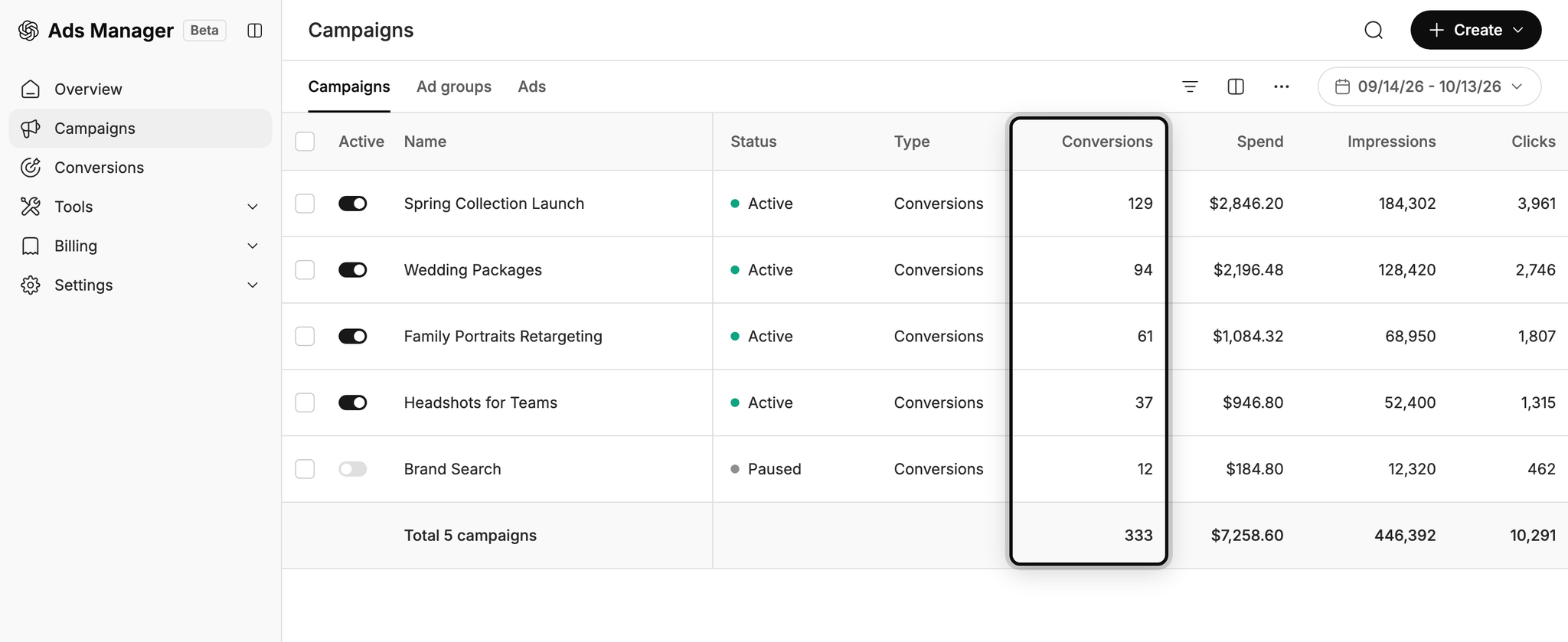
Without proper conversion tracking, ChatGPT Ads can only report on impressions and clicks, and that doesn't really tell you if campaigns are working or not.
With reliable conversion data coming through, you can see how many leads every campaign and ad is driving, how much each lead is costing you, and where your biggest opportunities to get more leads are.
2. Let OpenAI's algorithm find you more of the right people
ChatGPT Ads uses AI to decide who sees your ads and which conversations they show up in.
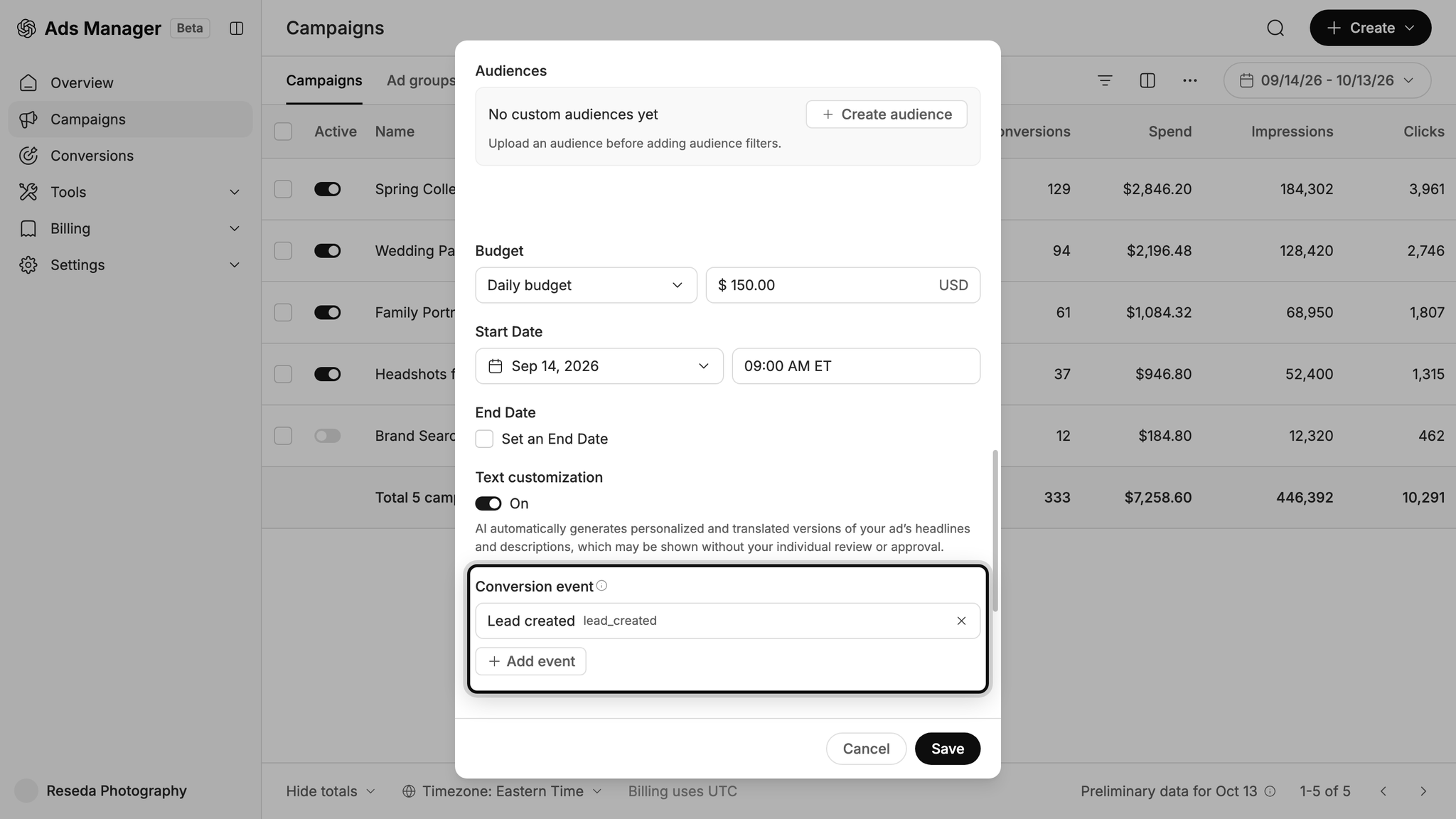
With conversion tracking set up properly, that AI gets the data it needs to understand what a good lead looks like for your business. With this understanding, it starts showing your ads to more people like them, and you ultimately end up getting more leads at a lower cost.
Wrap Up
If you want to send a conversion to ChatGPT Ads whenever someone submits a form on your Squarespace website, Converly is the easiest (and best) way to make it happen.
Because conversions go straight to OpenAI's servers, ad blockers and privacy-focused browsers can't stop them. And because each one carries all the identifiers OpenAI uses for matching (the click ID, name, email address and more), every conversion has the best possible chance of being matched back to a real ChatGPT user and the original ad they clicked.
Best of all, setup only takes a few minutes and there's a 14-day free trial (no credit card required), so start your free trial today!
About the author

Aaron is the founder of Converly. With over 15 years of experience in digital marketing and SaaS, he's passionate about helping businesses track and optimise their ad conversions.