


Track Intercom chats as conversions in ChatGPT Ads
Learn how to send server-side conversions to ChatGPT Ads every time a visitor starts a chat through the Intercom messenger on your website. No code required!
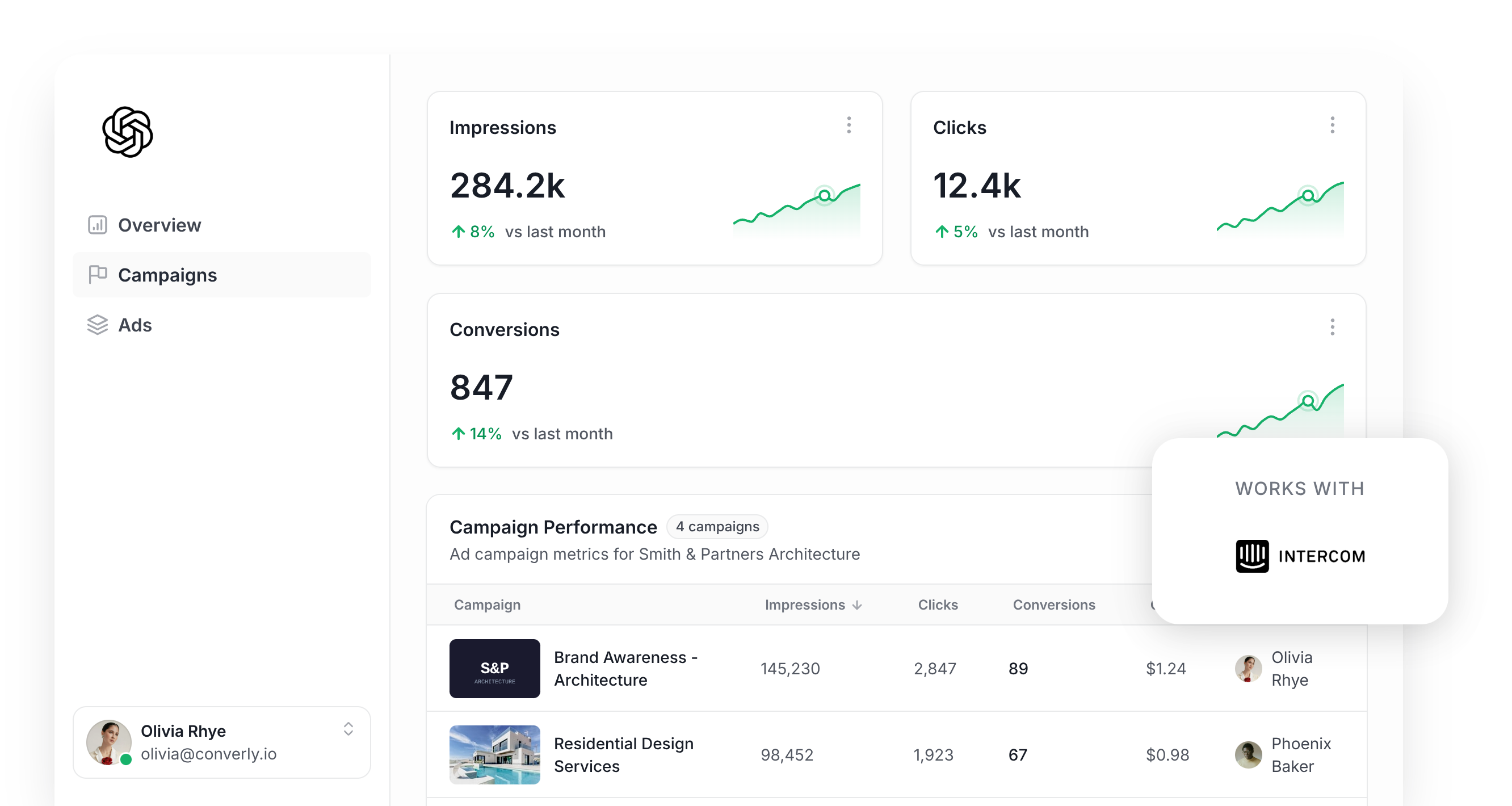
Are you looking at running ChatGPT Ads to get more leads for your sales team?
Before you put any real budget behind it, you'll want to set up your conversion tracking properly.
ChatGPT Ads, like almost every ad platform these days, uses AI to figure out which people are likely to become leads, then shows your ads more prominently to them.
But that AI can only learn from the conversions you send it. If ChatGPT Ads can't tell which ad clicks turned into real leads, it can't learn what your ideal customer looks like, and it will happily keep paying to put your ads in front of people who were never going to convert.
To make matters worse, ChatGPT Ads chooses which conversations your ad appears in (unlike other platforms where you bid on keywords), and the only way it can get better at this is by knowing which conversations actually generated real leads for your business.
So what does good conversion tracking in ChatGPT Ads involve, and how do you get it set up?
In this guide, we'll show you the most reliable way to send a conversion to ChatGPT Ads whenever a visitor starts a chat through Intercom on your website. It uses something called server-side tracking, and you won't have to touch a line of code.
What proper conversion tracking looks like in ChatGPT Ads
Getting ChatGPT Ads conversion tracking right really comes down to 2 things. One is delivery (making sure each conversion actually arrives at OpenAI), and the other is data (making sure every conversion carries enough detail for ChatGPT Ads to link it to a real person and the ad they clicked).
Let's walk through each of them:
Ensuring proper delivery
Most people start by adding the ChatGPT Ads Measurement Pixel to their website and firing a conversion from the browser when a chat begins. The trouble is that a good chunk of those conversions never actually reach OpenAI. There are a few reasons for this:
- Ad Blockers. If a visitor has an ad blocker installed, the ChatGPT Ads pixel never loads when they visit your site, so nothing they do can be tracked (including when they start a chat using your Intercom messenger widget).
- Browser Privacy Features. Safari and other privacy-first browsers drastically shorten how long tracking cookies are allowed to stick around. That means a person who clicks your ad on a Monday and comes back and converts the following Tuesday can't be linked back to the original ad click (because the cookie linking them has been deleted).
- Switching Devices. Plenty of people click an ad on their phone (say at lunch time), then return to your site on their laptop later when they're ready to convert. The pixel on the laptop has no record of the click on the phone, so the conversion and the original ad click never get connected.
That's why OpenAI recommends sending every conversion through 2 separate routes. One goes from the visitor's browser to the Measurement Pixel, and the other travels from a server directly to OpenAI through the Conversions API. If something blocks the browser route, the server-side route still makes it through, giving each conversion the best possible shot at being matched back to the original ad click (and therefore showing up in your reports).
Sending the right data
A generic 'Chat Started' event fired from the browser gives ChatGPT Ads no information about who started the chat or which ad brought them to your site.
To solve that, every conversion should carry the lead's name, email address and phone number (or as much as they share in the Intercom messenger). It also helps to capture and send the lead's IP address and User Agent, and the ChatGPT click ID (which OpenAI calls the oppref).
When you send those details with each conversion, you are giving ChatGPT Ads the data it needs to match the conversion back to a logged-in user and the exact ad they clicked, which helps make sure it shows up as a conversion in your reports (if ChatGPT Ads can't match the conversion back to a real user, it doesn't get counted).
3 simple steps to send proper, server-side conversions to ChatGPT Ads from Intercom
Now that you know what a solid conversion tracking setup needs, let's show you how to get it running with Converly:
Step 1: Build your Conversion Flow in Converly
Converly is a conversion tracking tool built to make sending proper, server-side conversions from Intercom to ChatGPT Ads really simple.
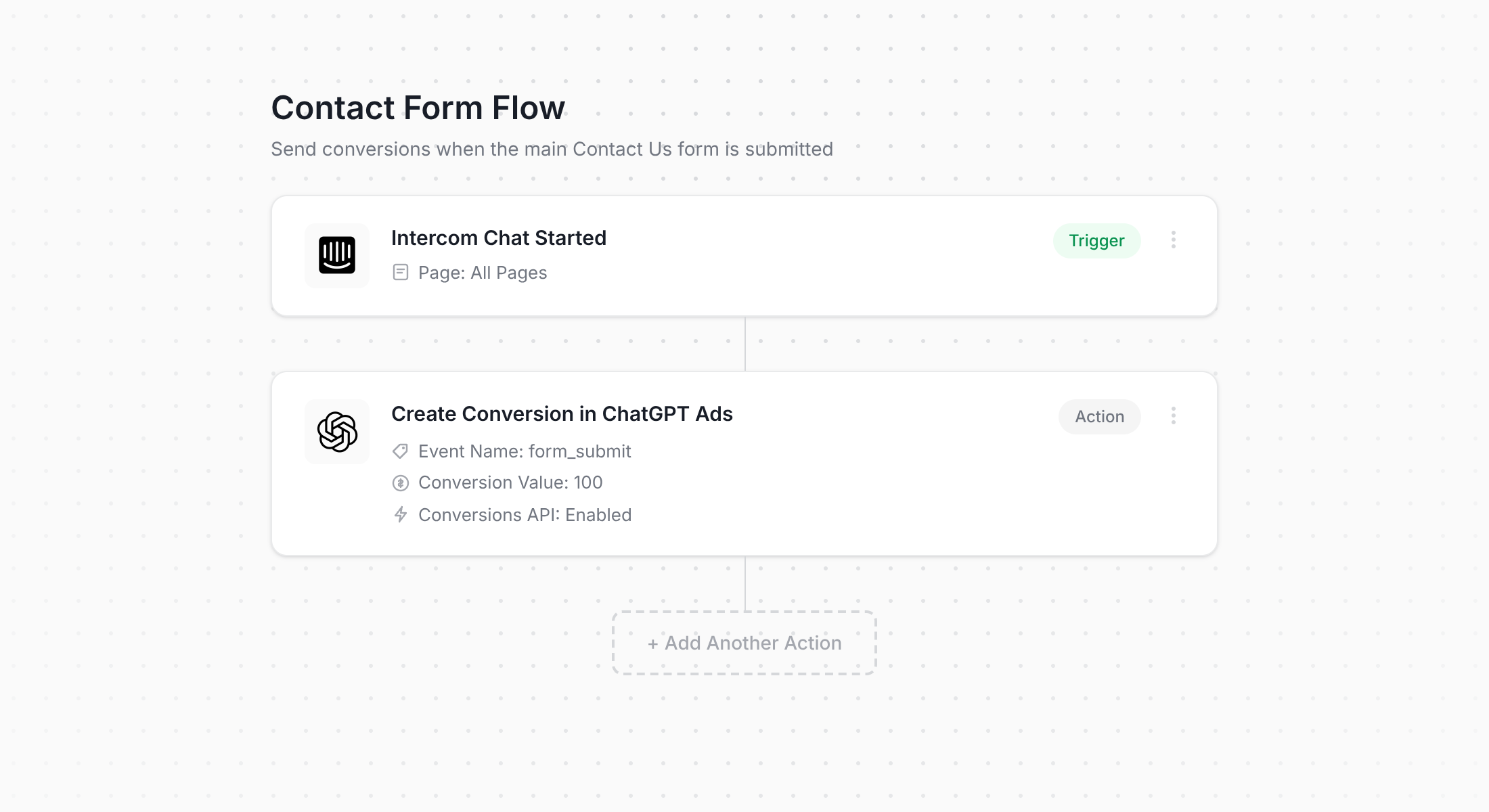
What you can see above is the Converly flow builder. If you've ever set up a Zap in Zapier or a workflow in HubSpot, you'll know your way around it immediately.
Begin by choosing your trigger (like a visitor starting a chat in the Intercom messenger on your website), then pick the action that should follow (a conversion being sent to ChatGPT Ads). That really is all there is to it. Within a couple of clicks you've got server-side conversion tracking for ChatGPT Ads up and running.
And if you already use an AI tool like Claude or ChatGPT, you can install the Converly plugin, ask it to 'Set up ChatGPT Ads conversion tracking for my Intercom chats', and it will put the flow together for you!
Step 2: Add the Converly code to your website
As soon as you publish your Conversion Flow, Converly gives you a small code snippet to add to your website.
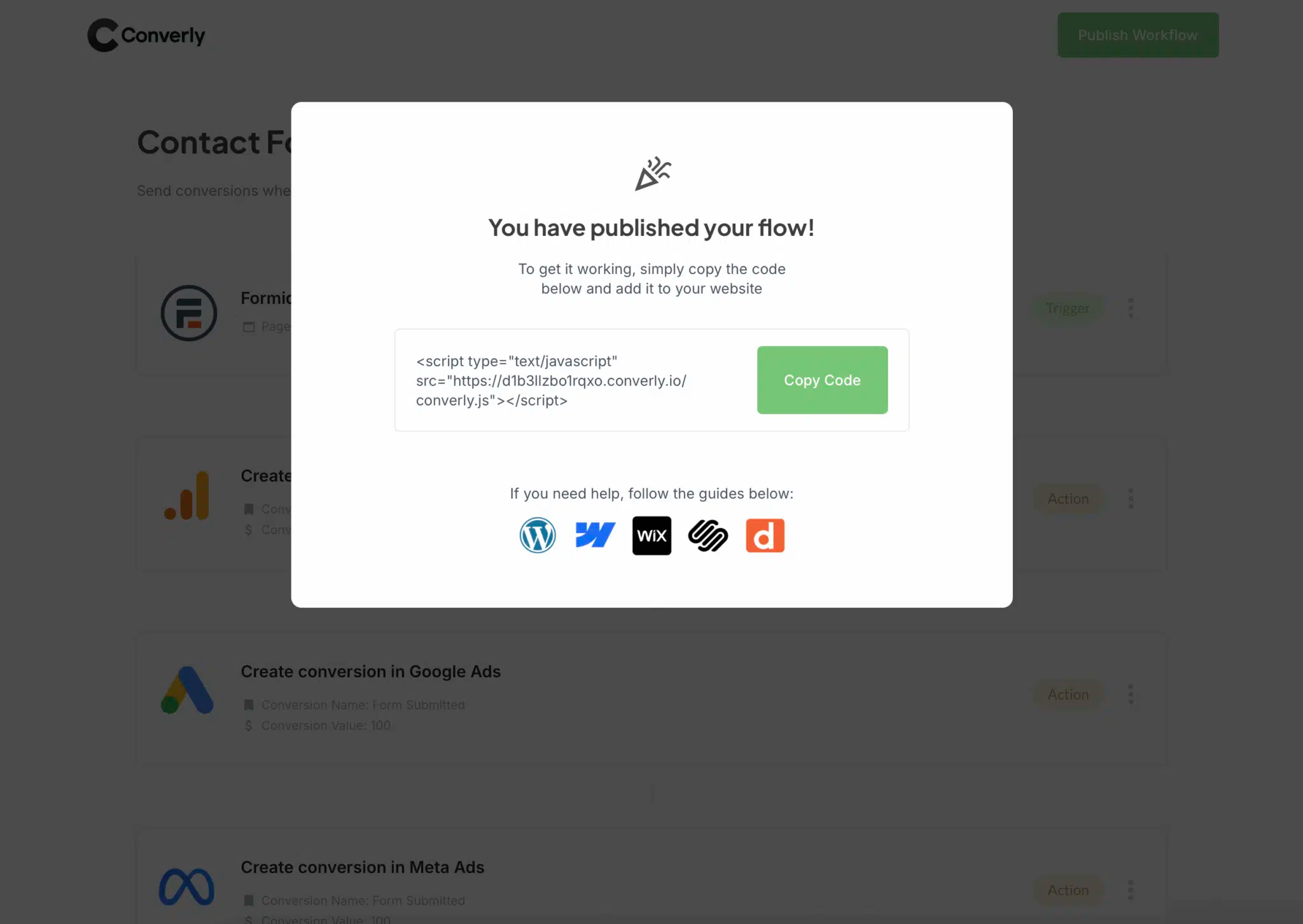
The snippet needs to go on the same website that loads your Intercom messenger (most likely your marketing site). WordPress, Webflow, Squarespace and most other website builders have a Header or Custom Code setting you can paste it into, and on WordPress a free plugin like Insert Headers and Footers works nicely too. If Google Tag Manager is already running on your site, you can also load the snippet through a Custom HTML tag.
Step 3: Test it works
With everything in place, it's time to make sure it all works. Open your website, click the Intercom chat bubble and start a test conversation.
Next, jump back into Converly and click 'Logs' in the main navigation.
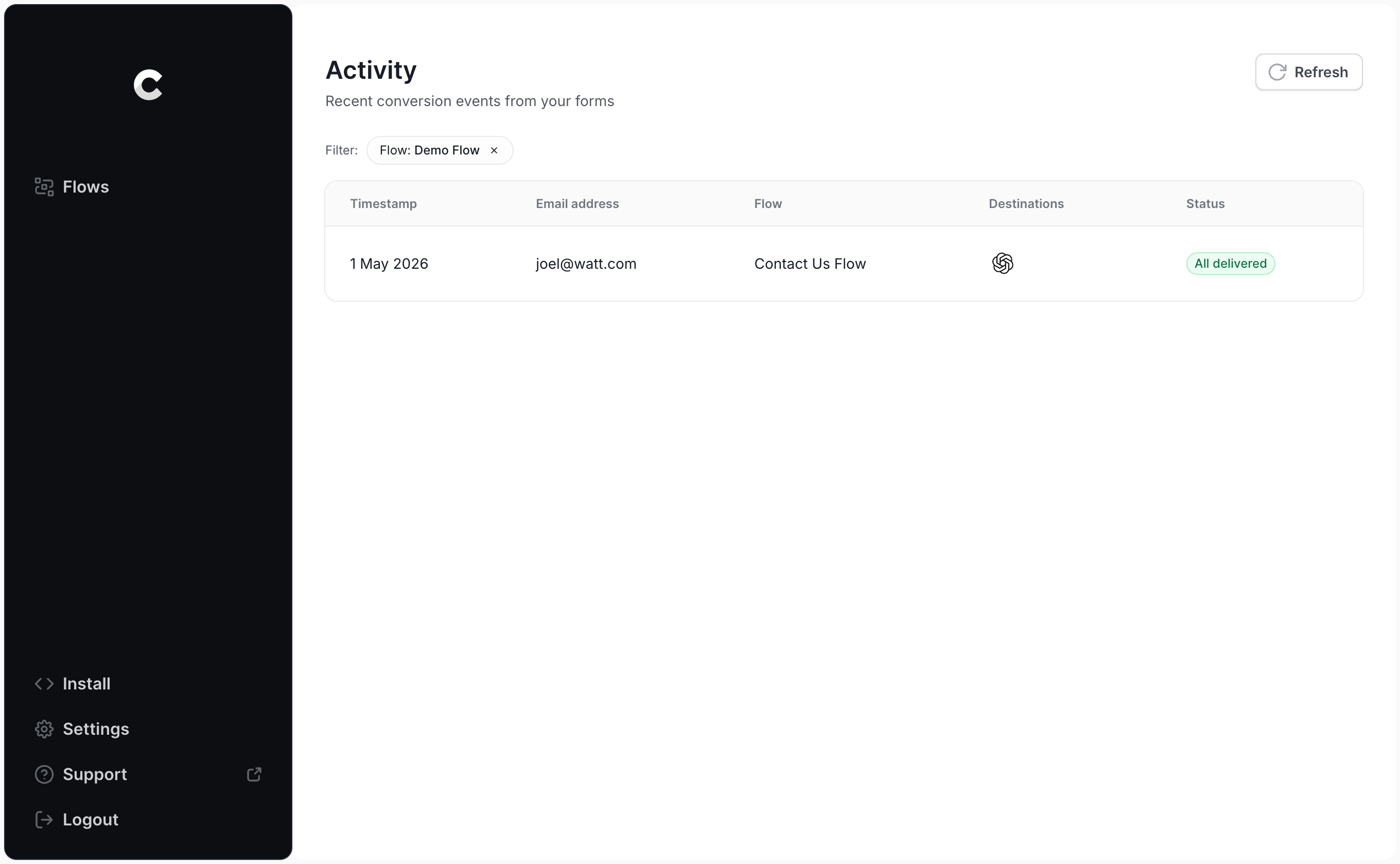
Find your test chat in the list and click into it. You'll see all the information Converly captured, plus whether the conversion made it through to ChatGPT Ads.
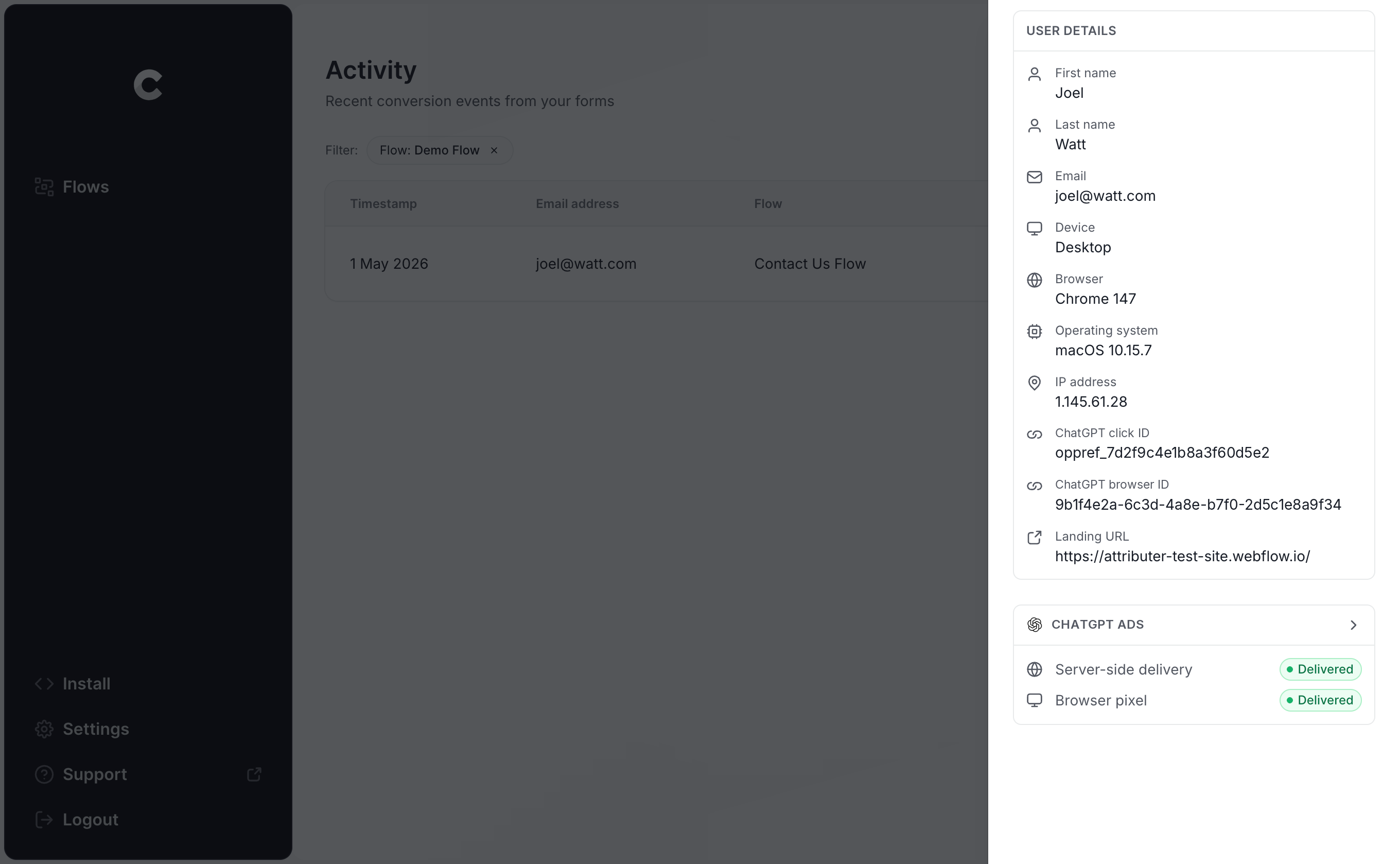
If you'd like to dig a little deeper, you can also view the exact payload Converly sent to ChatGPT Ads (including the click ID, browser ID and hashed email address) along with the response OpenAI's server sent back.
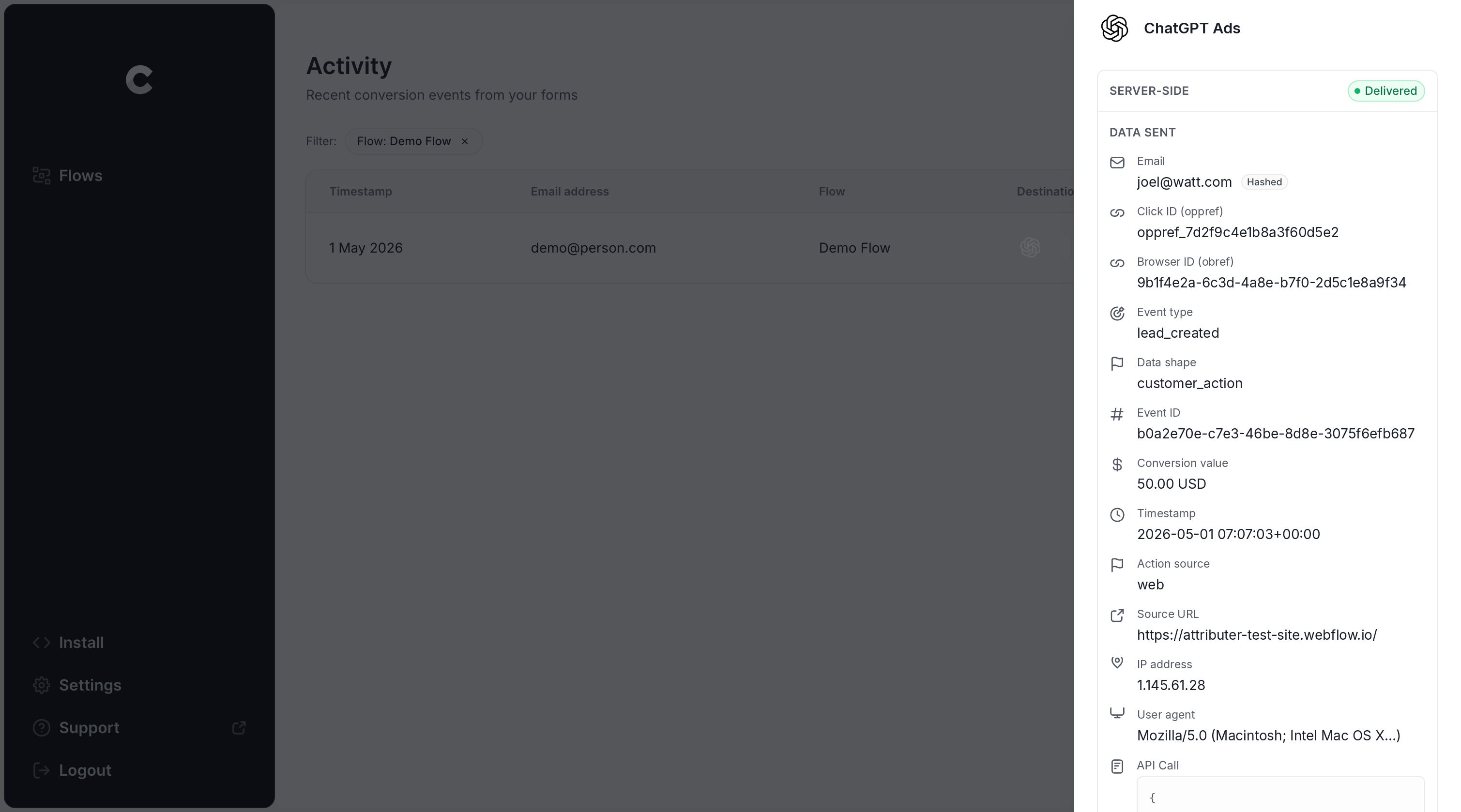
Once the log confirms your test chat was successfully sent to ChatGPT Ads, your conversion tracking is live! For most people, the whole thing takes less than 5 minutes.
Why Converly is the best way to send conversions to ChatGPT Ads from Intercom
You've got a few options for sending conversions to ChatGPT when someone starts an Intercom chat, so why choose Converly over the rest? Here's why:
1. Easy to set up
Doing this yourself means building directly against OpenAI's Conversions API. You'd have to write code that listens to Intercom's JavaScript API for new conversations, grabs the click ID and browser cookie, normalises and SHA-256 hashes the name, email and phone, shapes the payload exactly the way OpenAI expects, and then sends it all over. You'd also have to maintain the servers, deal with API keys, manage deduplication and retries, handle security (it's personally identifiable information after all), and a whole heap more.
Converly does every bit of that for you. You simply pick a trigger (a new Intercom chat) and an action (a ChatGPT Ads conversion) and the rest is taken care of. You won't need a developer, custom code, or any API keys.
And if you're already using AI tools like Claude or ChatGPT, it gets even faster. Install the Converly plugin, ask it to 'Set up ChatGPT Ads tracking for my Intercom chats', and it will handle the whole thing (using our MCP server or CLI).
2. Not affected by ad blockers and privacy restrictions
If you rely on the ChatGPT Ads Measurement Pixel alone (with nothing being sent server-side through the Conversions API), a big slice of your conversions will never make it to OpenAI, because ad blockers and privacy-focused browsers stop the pixel from loading when the visitor first lands on your site.
In fact, a study covering more than 7 million conversions found that browser-based tracking missed around 30% of them. In other words, if you aren't also sending conversions server-side, you should expect roughly 30% of your conversions to go missing.
Luckily, Converly takes care of this. Every conversion gets sent to OpenAI in two different ways, once through the browser to the ChatGPT Measurement Pixel and once from the server to the Conversions API. So no matter which ad blocker or privacy settings a visitor is using, the conversion should always get through.
3. Works across devices
Device switching happens all the time. Someone can find your website on one device (maybe their phone while waiting for a coffee) and then convert later from their work computer.
If you're just firing a browser event when the chat starts (using something like Google Tag Manager) then ChatGPT Ads can't join the dots, because the ad click and the eventual conversion took place in different browsers on different devices.
Converly fixes this as well. It grabs the click ID (the oppref) and sends it to ChatGPT Ads together with the lead's name, email address and phone number. This gives ChatGPT Ads the data it needs to tie the conversion back to a real, logged-in user (and the ad they first clicked), which means the conversion gets recorded against the campaign, ad, etc. regardless of the fact it happened on a different device.
4. Sends more data
As soon as a visitor lands on your website, Converly stores their ChatGPT click ID, the browser cookie created by the ChatGPT Ads pixel, and their user agent. Then when that same visitor starts a chat in Intercom, Converly pairs all of that with the contact details they share in the messenger and passes everything to ChatGPT Ads with each conversion.
That means ChatGPT Ads can match nearly every conversion to the ad click that originally drove it, so the conversion numbers in your reports are much more accurate.
5. Supports multiple tools and platforms
Converly integrates with over 100 form builders, scheduling tools, chat widgets and more, and it can send conversions to ChatGPT Ads, Google Ads, Meta Ads, LinkedIn Ads, Microsoft Ads, Google Analytics, etc.
So if you're also running Google Ads or Meta Ads, there's no need to build a separate conversion tracking setup for each one. Simply add them as extra actions inside the same Conversion Flow and every Intercom chat will be sent to all of them at once.
6. Gives you a full conversion log and email alerts
With most other approaches to ChatGPT Ads conversion tracking (like using Google Tag Manager), you have no real way of knowing whether it's actually working or not.
Sure you can test it the day you set it up, but if someone later changes the Intercom messenger, rotates an API key, or changes a setting in ChatGPT Ads Manager, your tracking can stop and nobody will notice.
Converly removes that uncertainty. The conversion log shows every chat started in your Intercom messenger, the data collected for each one, exactly what was passed to ChatGPT Ads, and whether it was accepted.
You can also switch on email alerts so you are notified about every conversion sent to ChatGPT Ads (or only the ones that fail). That way, if something ever goes wrong, you'll find out right away.
2 things you can do when you properly send conversions to ChatGPT Ads from Intercom
Once accurate conversion data is flowing from Intercom into ChatGPT Ads, you unlock two things that just aren't possible without it.
1. See which campaigns and ads actually produce leads
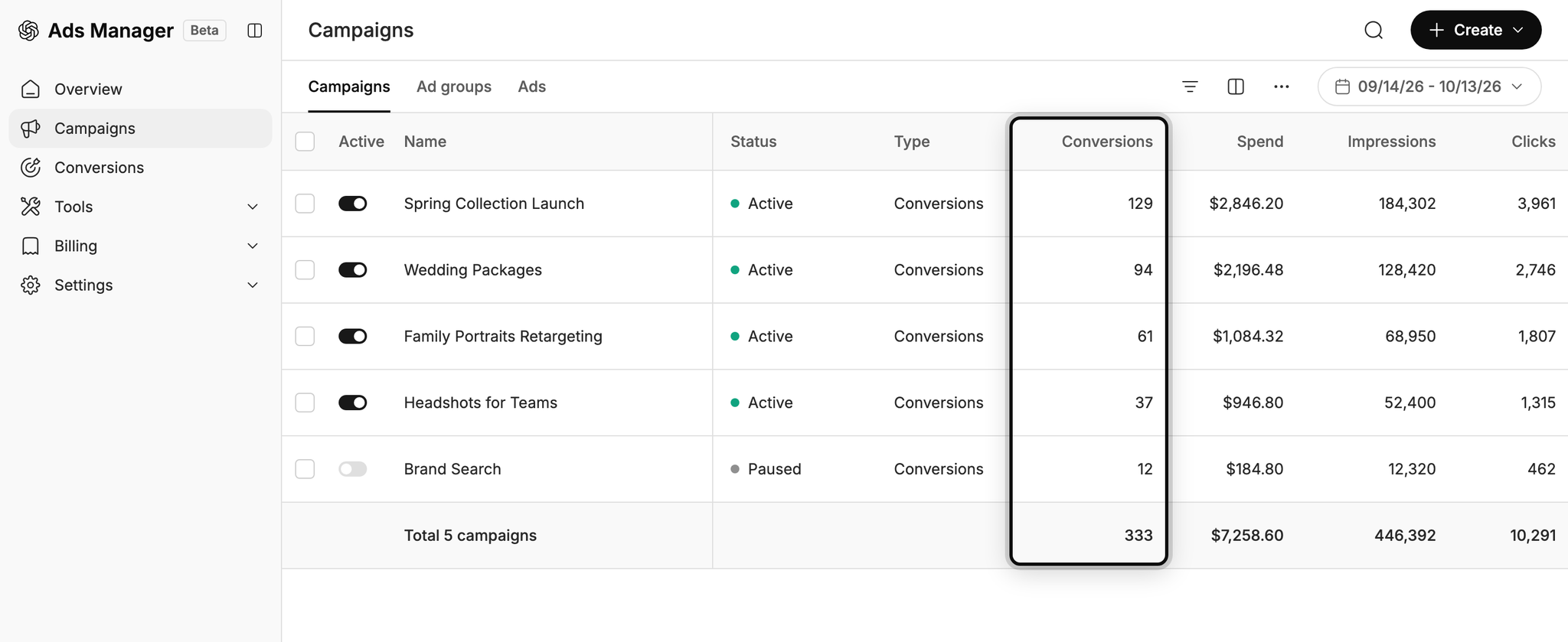
Without proper conversion tracking, the only numbers ChatGPT Ads can give you are impressions and clicks, and those aren't really the goal of your ad campaigns (leads and customers are).
But with reliable conversion data flowing into ChatGPT Ads, you can see how many leads each campaign and ad is driving, what each of those leads is costing you, and where your biggest opportunities to scale are hiding. This allows you to see what's working and what isn't, and you can make much more informed decisions on how to grow.
2. Let OpenAI's algorithm find you more of the right people
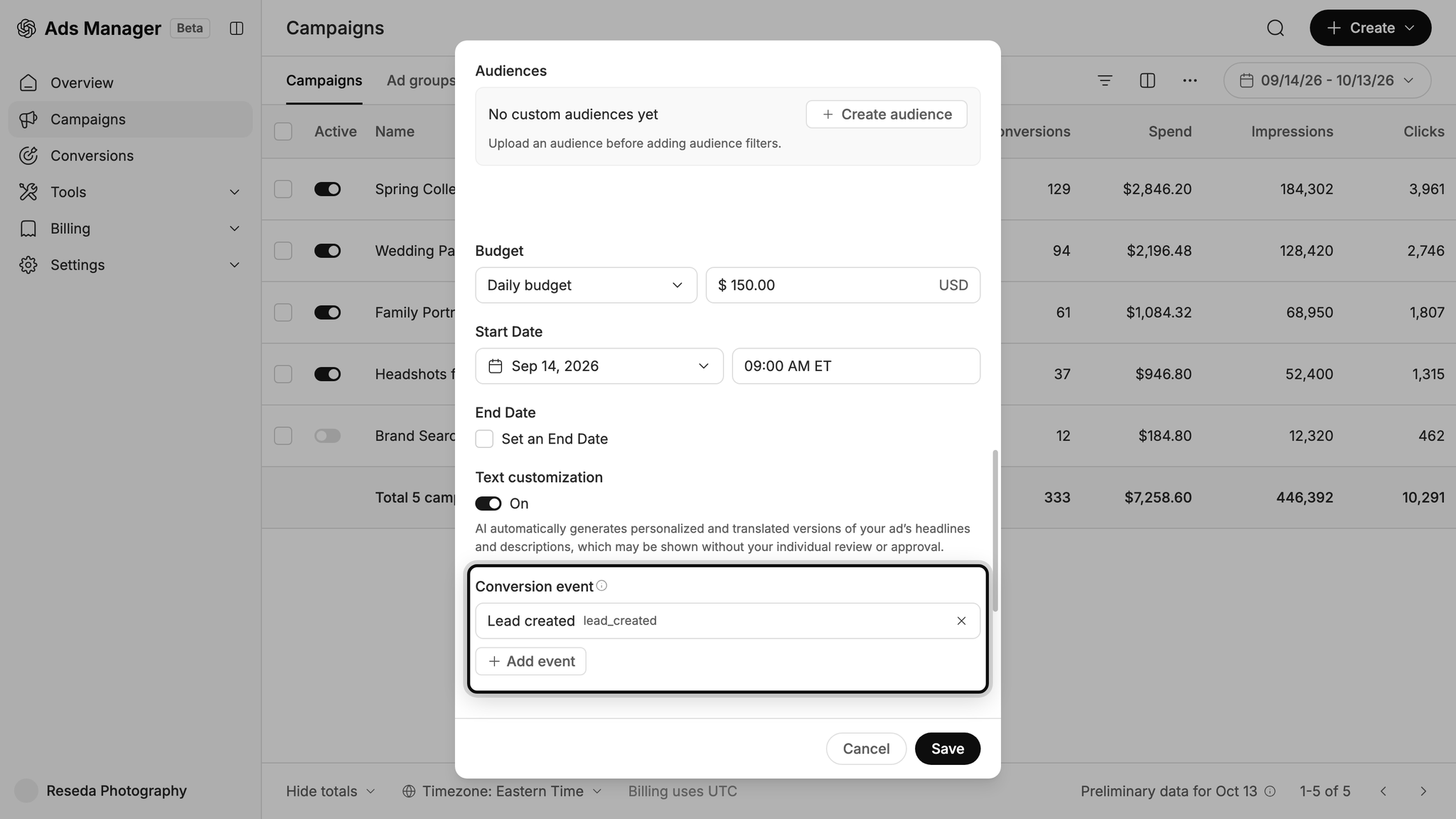
The AI systems behind ChatGPT Ads decide who sees your ads and which conversations they show up in, so making sure it knows who your ideal customer is and what good conversations look like is super important.
Give it good conversion data, and it will learn what a valuable lead looks like for your business and start showing your ads to more people just like them. But with a patchy conversion tracking setup (like one using Google Tag Manager), it has very little to learn from, so it keeps showing your ads to the wrong people (driving up your cost per lead and burning through your marketing budget).
Wrap Up
If you want to send a conversion to ChatGPT Ads every time a visitor starts a chat through Intercom on your website, Converly is the simplest and most effective way to make it happen.
Because conversions are sent straight to OpenAI's servers, ad blockers and privacy-focused browsers can't get in the way. And since Converly includes every identifier OpenAI uses to match a conversion back to a real user (the click ID, plus the lead's name, email and phone number, etc.), each chat has the best possible chance of being matched to the ad that generated it.
Best of all, it only takes a few minutes to set up and you can try it free for 14 days (no credit card required), so start your free trial today!
About the author

Aaron is the founder of Converly. With over 15 years of experience in digital marketing and SaaS, he's passionate about helping businesses track and optimise their ad conversions.