


Track HubSpot Forms submissions as conversions in ChatGPT Ads
Learn how to send server-side conversions to ChatGPT Ads every time someone submits a HubSpot form on your website. No code required!
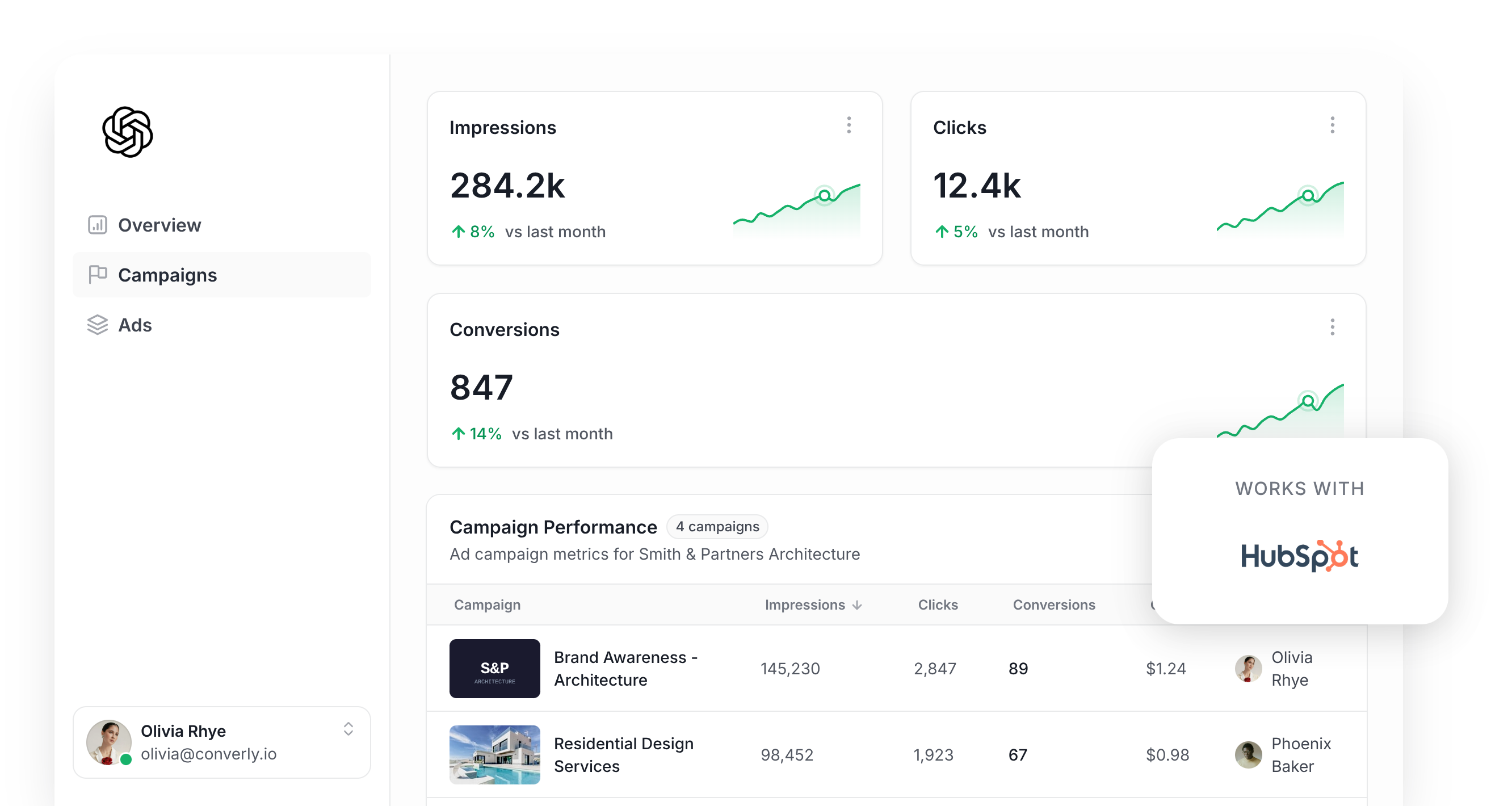
Are you looking at running ChatGPT Ads to bring in leads for your business?
If so, setting up proper conversion tracking should be at the top of your to-do list. ChatGPT Ads (like most modern ad platforms) relies on AI to predict which people are likely to become leads, and then puts your ads in front of those people more often.
The catch is that those predictions are only as good as the conversion data you feed it. If ChatGPT Ads can't see which clicks turned into leads, it never learns what your ideal lead looks like, so it keeps spending your budget showing ads to people who were never going to convert (and if you're paying per impression, that gets expensive fast).
This is particularly important in ChatGPT Ads when you aren't choosing specific ‘keywords’ to show your ads on. You are instead relying on ChatGPT to insert your ad into relevant conversations, and if it doesn't know which conversations are leading to conversions, it has no way to know which conversations to show your ads in moving forward.
So what does proper conversion tracking in ChatGPT Ads actually look like? And how do you set it up?
In this guide, we'll walk you through the best way to send conversions to ChatGPT Ads whenever someone submits a HubSpot form on your website, using a method called server-side tracking. You won't need to write a single line of code.
What proper conversion tracking looks like in ChatGPT Ads
Good conversion tracking in ChatGPT Ads comes down to 2 things. The first is delivery (i.e. making sure every conversion actually reaches the platform), and the second is data (i.e. giving ChatGPT Ads enough information to tie each conversion to a real person and the ad they clicked).
Let's look at each one:
Ensuring proper delivery
You could add the ChatGPT Ads Measurement Pixel to your website and fire a conversion whenever someone lands on your thank you page. The problem is that a big chunk of those conversions won't actually make it back to the ad platform, because of things like:
- Ad Blockers - When a visitor has an ad blocker installed, the ChatGPT Ads pixel is stopped from loading, which means none of their activity gets recorded.
- Browser Privacy Features - Browsers like Safari put tight limits on how long tracking cookies last, so a person who clicks your ad on Monday and submits your HubSpot form on Friday often can't be linked back to the original ad click.
- Switching Devices - It's really common for someone to click an ad on their phone, then come back later on their work laptop to fill out the form. The Measurement Pixel running in the laptop's browser has no idea about the ad click that happened on the phone, so the two events never get connected.
That's why OpenAI recommends sending conversions through 2 channels at once. One goes via the visitor's browser to the Measurement Pixel, and the other goes directly to OpenAI's servers through the Conversions API (which is what people mean by ‘server-side tracking’). If a conversion gets blocked in the browser, the server-side copy acts as a backup, giving you the best possible chance of every conversion reaching ChatGPT Ads.
Sending the right data
Firing a generic 'Form Submitted' event on your thank you page isn't enough for ChatGPT Ads to work out who converted and which ad brought them in. Alongside the conversion, you need to send the lead's email address, their IP address and User Agent, and the Click ID (called the oppref). When you send this extra information, ChatGPT Ads can match the conversion to a real, logged in user and the specific ad they clicked on with 100% accuracy.
3 simple steps to send proper, server-side conversions to ChatGPT Ads from HubSpot Forms
Now you know what good conversion tracking in ChatGPT Ads looks like, here's how to set it up with Converly in 3 easy steps:
Step 1: Build your Conversion Flow in Converly
Converly is a dedicated conversion tracking tool that makes it easy to send proper, server-side conversions from HubSpot Forms to ChatGPT Ads.
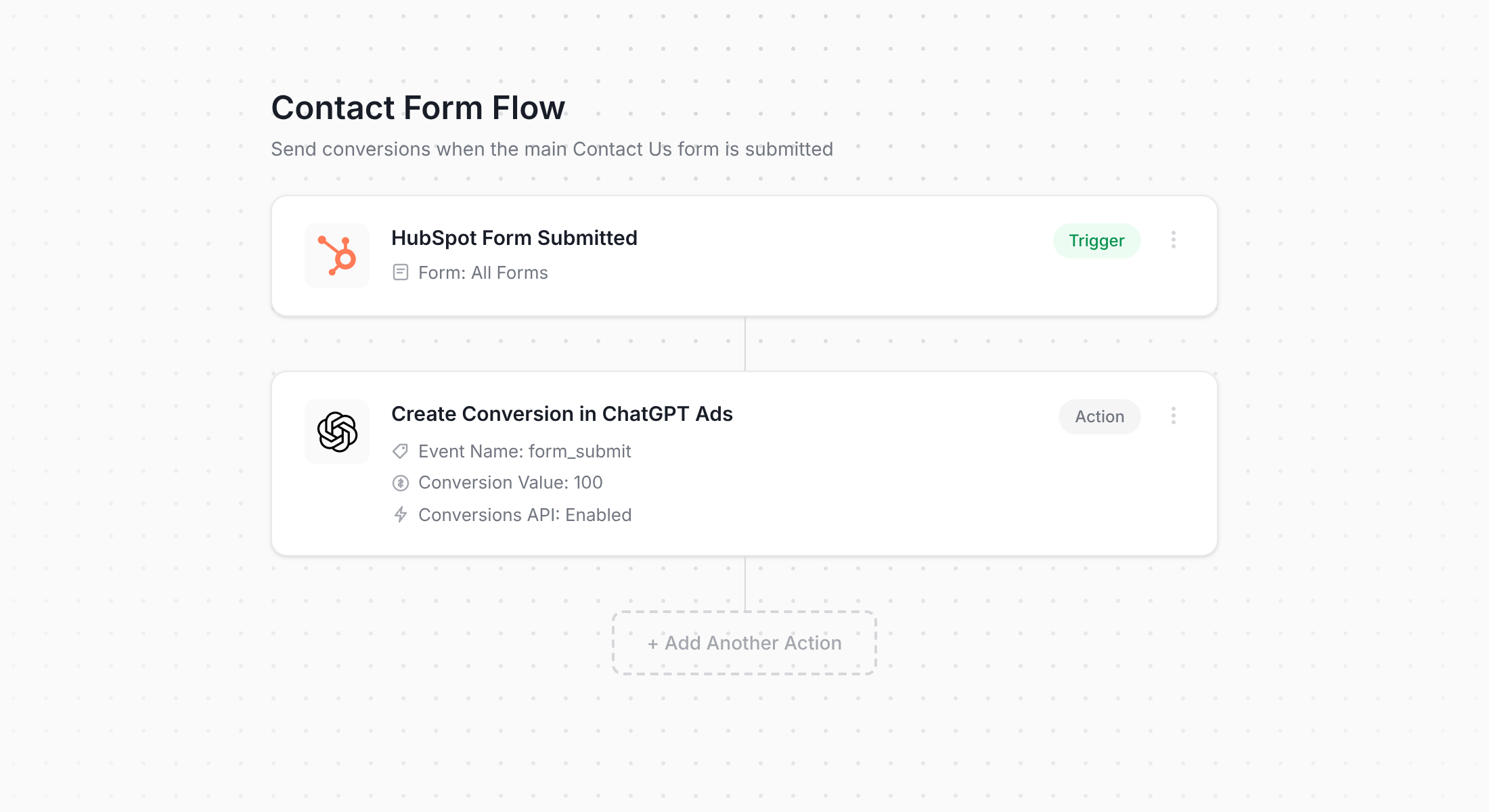
In the screenshot above, you can see Converly's workflow builder. If you've ever built a Zap in Zapier or a workflow inside HubSpot itself, it'll feel instantly familiar.
Start by choosing your trigger (someone submitting a HubSpot form on your website), and then pick the action that should follow (sending a conversion to ChatGPT Ads). And that's all there is to it. With just a couple of clicks, server-side conversion tracking for ChatGPT Ads is up and running.
It gets even easier if you use an AI assistant like Claude or ChatGPT. Just connect it to your Converly account and ask it to 'Set up ChatGPT Ads conversion tracking for my HubSpot forms', and it will take care of the whole thing for you!
Step 2: Add the Converly code to your website
After you've built and published your Conversion Flow, Converly will give you a short code snippet to install on your website.
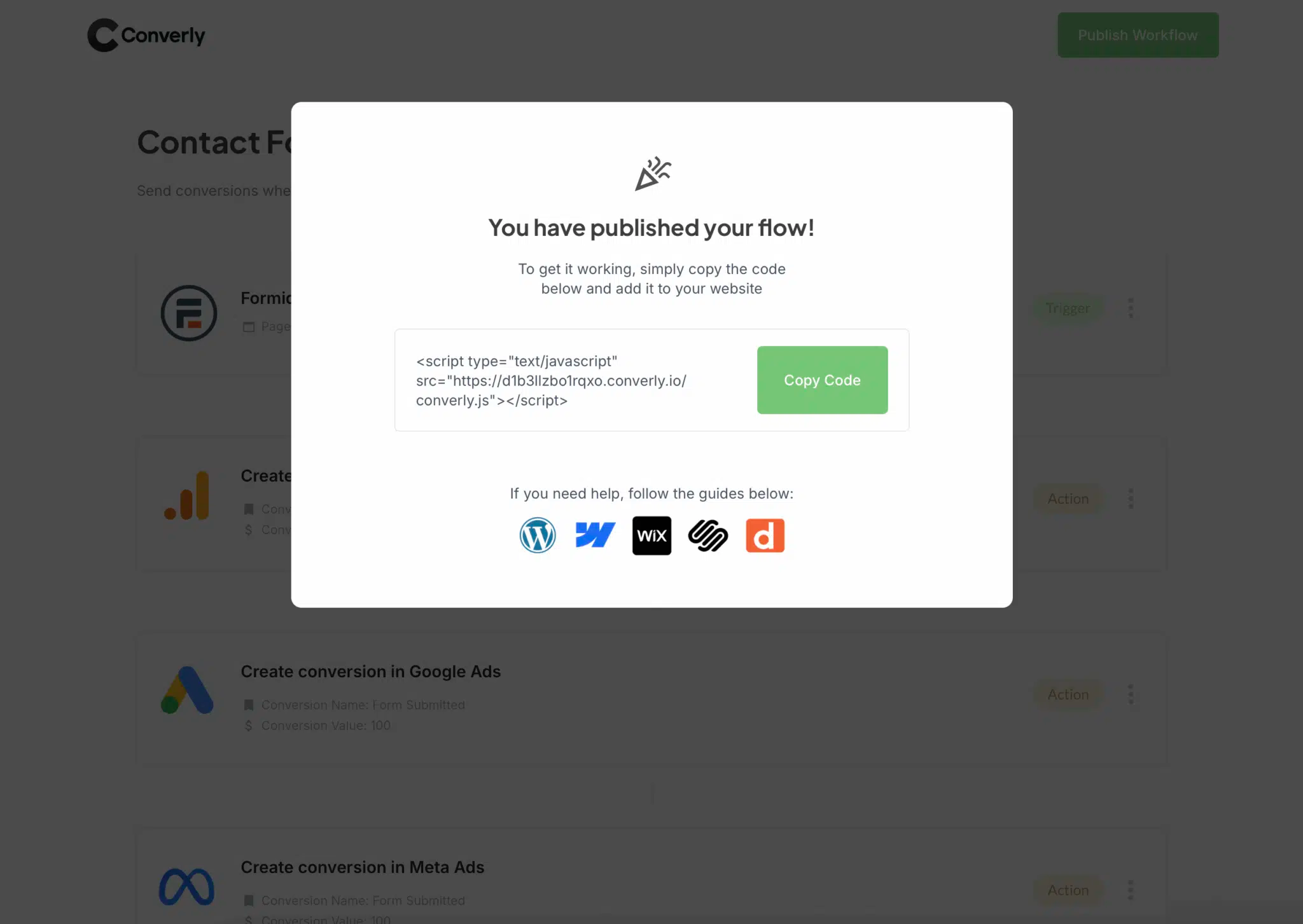
If your site is hosted on HubSpot's CMS, you can paste the snippet into the site header HTML in your website settings. On WordPress, Webflow and most other platforms, look for a Header or Custom Code setting, or use a header and footer plugin. And if you already use Google Tag Manager, you can load the snippet through there instead.
Step 3: Test it works
To finish up, head over to your website and fill out your HubSpot form yourself.
Next, jump back into Converly and click 'Logs' in the main navigation bar.
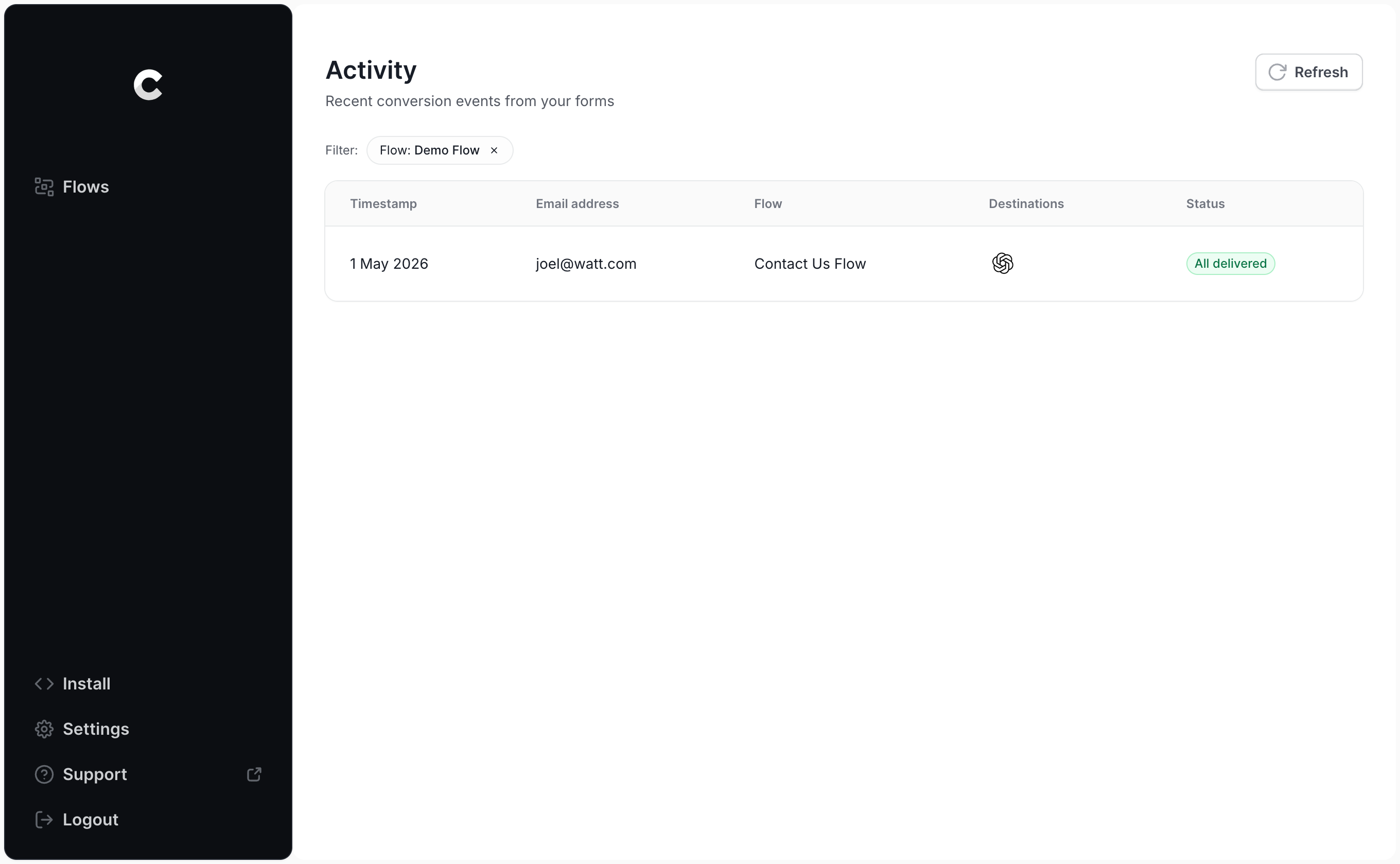
Find your test submission on the logs page and click into it. You'll see all the details Converly captured, plus whether the conversion was delivered to ChatGPT Ads successfully.
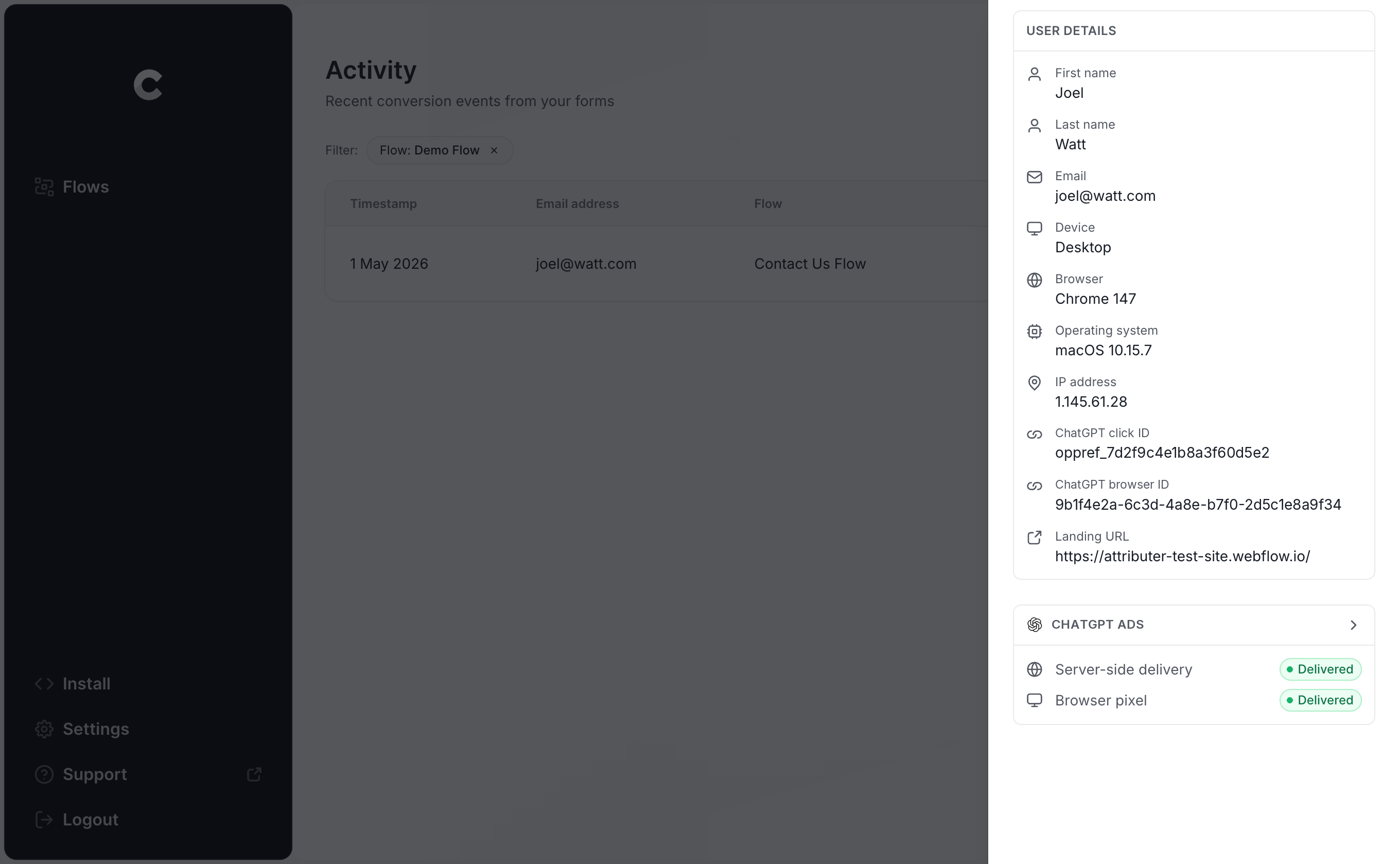
If you want to dig deeper, you can also view the exact payload Converly sent to ChatGPT Ads (including the click ID, browser ID and hashed email address), along with the response OpenAI's server sent back.
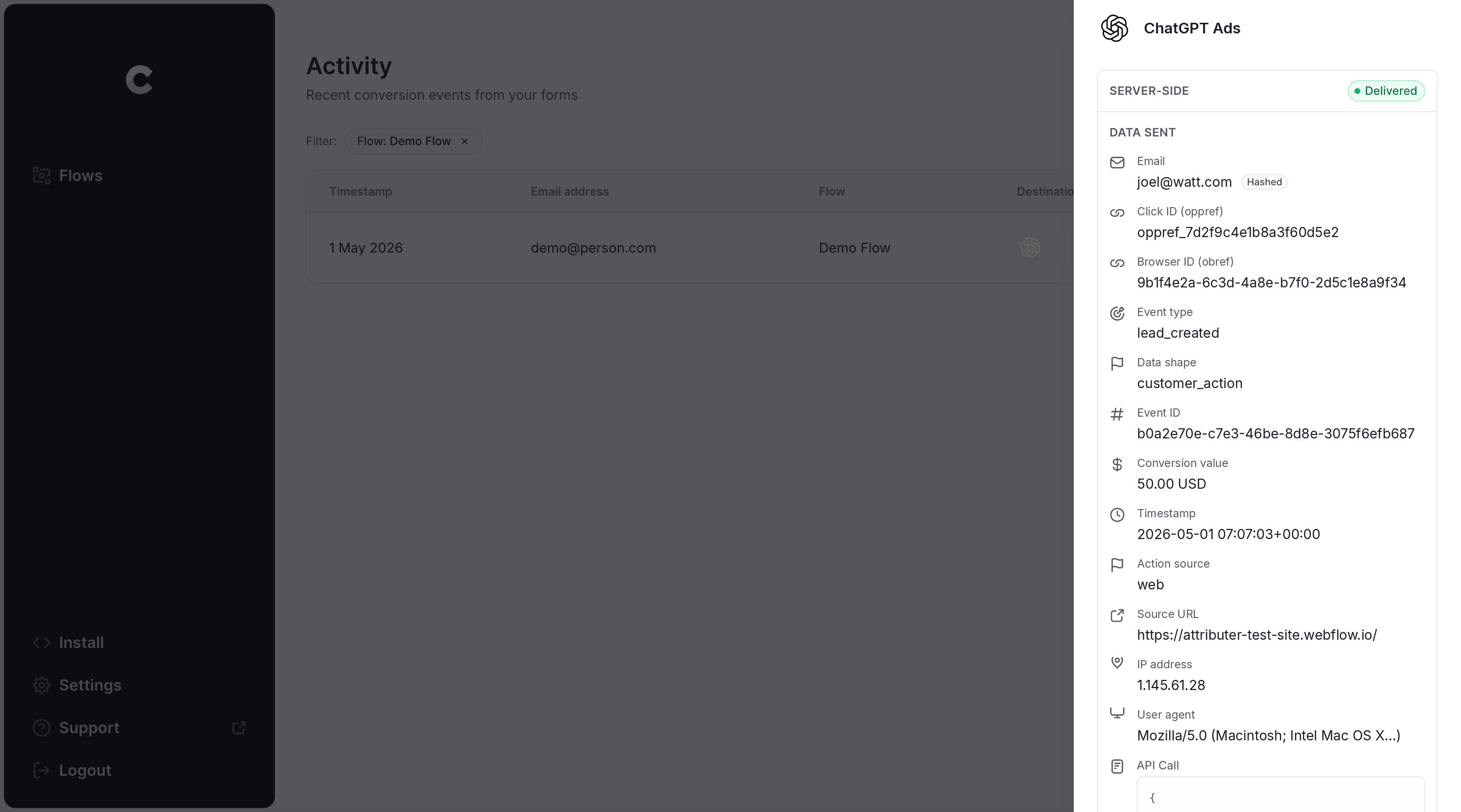
Once your test submission appears in the log marked as successfully sent to ChatGPT Ads, you know your conversion tracking is working. The whole process usually takes less than 5 minutes.
Why Converly is the best way to send conversions to ChatGPT Ads from HubSpot Forms
Converly isn't the only way to send a conversion to ChatGPT Ads when a HubSpot form gets submitted, so why choose it over the alternatives? Here are the main reasons:
1. Easy to set up
If you tried to build this yourself, you'd be working with OpenAI's Conversions API directly. That means writing code that listens for HubSpot form submissions, grabbing the click ID and browser cookie, normalising the lead's email address and hashing it with SHA-256, formatting the payload exactly the way OpenAI expects it, and then looking after API keys, deduplication and retries on top of all that.
With Converly, you skip all of it. You choose a trigger (a HubSpot form submission) and an action (a conversion sent to ChatGPT Ads), and Converly does the heavy lifting. There's no custom code and no API keys to manage, just conversion tracking that works.
And if you already use an AI tool like Claude or ChatGPT, you can connect it to Converly, ask it to 'Set up ChatGPT Ads tracking for my HubSpot forms', and it will build everything for you!
2. Not affected by ad blockers and privacy restrictions
Relying only on the ChatGPT Ads Measurement Pixel (without also sending conversions server-side through the Conversions API) means a sizeable portion of your conversions will never reach OpenAI, because ad blockers and privacy-focused browsers stop the pixel from loading in their browser in the first place.
To put a number on it, one study looking at more than 7 million conversions found that browser-based tracking missed around 30% of them.
Converly sends every conversion through both routes (browser-side to the ChatGPT Measurement Pixel and server-side to the Conversions API), so it has a great chance of getting through no matter what ad blocker or privacy settings your visitor is using.
3. Works across devices
Plenty of leads find your website on one device (like their phone during a lunch break) and then come back later on their computer to actually submit your HubSpot form.
If you are doing something like tracking thank you page visits, there's no way to link that conversion to the original ad click, because they happened in different browsers on different devices.
Converly solves this problem. It grabs the click ID (the oppref) and passes it to ChatGPT Ads together with the lead's email address. That gives ChatGPT Ads everything it needs to tie the conversion back to a real person and the original ad they clicked on, even when the click happened on another device weeks before the form was submitted.
4. Sends more data
When a visitor first lands on your site, Converly captures the ChatGPT click ID, the browser cookie set by the ChatGPT Ads pixel, and the user agent and stores it. Then, when they submit a form, it combines it with the lead's email address and sends the whole lot to ChatGPT Ads.
That means ChatGPT Ads has what it needs to match each conversion back to the original ad click, and you end up with conversion numbers you can actually rely on.
5. Supports multiple tools and platforms
Converly integrates with over 100 form builders, scheduling tools, chat widgets and more. On the delivery side, it can send conversions to ChatGPT Ads, Google Ads, Meta Ads, LinkedIn Ads, Microsoft Ads, Google Analytics and plenty of other platforms.
So if you're running Google Ads or Meta Ads alongside ChatGPT Ads, there's no need to build a separate setup for each one. Simply add them as extra actions on your existing Conversion Flow, and every HubSpot form submission will be sent to all of them at the same time. And when the next ad platform comes along, adding it takes a few clicks rather than a full rebuild.
6. Gives you a full conversion log and email alerts
With other approaches to ChatGPT Ads conversion tracking (like using Google Tag Manager, for example), you have no real way of knowing whether it's still working. You can test it when you first set it up, but if someone later edits the HubSpot form, rotates an API key, or tweaks a setting in ChatGPT Ads Manager, your tracking can break without anyone noticing.
Converly removes that uncertainty. You get a complete conversion log showing every conversion from your HubSpot forms, the data that was captured, exactly what was sent to ChatGPT Ads, and whether it went through successfully.
You can also switch on email notifications, so you're emailed every time a conversion is sent to ChatGPT Ads (or only when a send fails, if you'd prefer). That way, if something ever breaks, you'll hear about it right away.
2 things you can do when you properly send conversions to ChatGPT Ads from HubSpot Forms
Once accurate conversion data is flowing from your HubSpot forms into ChatGPT Ads, you can do two things that just aren't possible when you're working in the dark.
1. See which campaigns and ads actually produce leads
When you don't have proper conversion tracking set up, ChatGPT Ads can only show you impressions and clicks, and clicks on their own don't grow your business.
With reliable conversion data in place, you can see how many leads every campaign and ad is bringing in, how much each lead is costing you, and where your biggest opportunities for growth are.
2. Let OpenAI's algorithm find you more of the right people
ChatGPT Ads uses advanced AI to decide who sees your ads, and each conversion you send it acts as a training signal.
With proper conversion tracking in place, it gets the information it needs to learn what a great lead looks like for your business, and then it goes out and finds more people just like them. On the other hand, a poor setup will mean it won't have enough data to work with and will keep showing your ads to the wrong audience (driving up your cost per lead and burning through your marketing budget).
Wrap Up
If you'd like ChatGPT Ads to receive a conversion every time someone submits a HubSpot form on your website, Converly is the simplest and most effective way to make it happen.
Because it sends conversions straight to OpenAI's servers, ad blockers and privacy-focused browsers can't get in the way. And because it passes along both identifiers OpenAI relies on (the click ID and the hashed email address), every lead has the best chance of being matched to the ad that generated it.
Best of all, setup only takes a few minutes and there's a 14-day free trial (with no credit card required), so start your free trial today!
About the author

Aaron is the founder of Converly. With over 15 years of experience in digital marketing and SaaS, he's passionate about helping businesses track and optimise their ad conversions.