


Track Gravity Forms submissions as conversions in ChatGPT Ads
Learn how to send server-side conversions to ChatGPT Ads whenever a Gravity Form is submitted on your website. No code required!
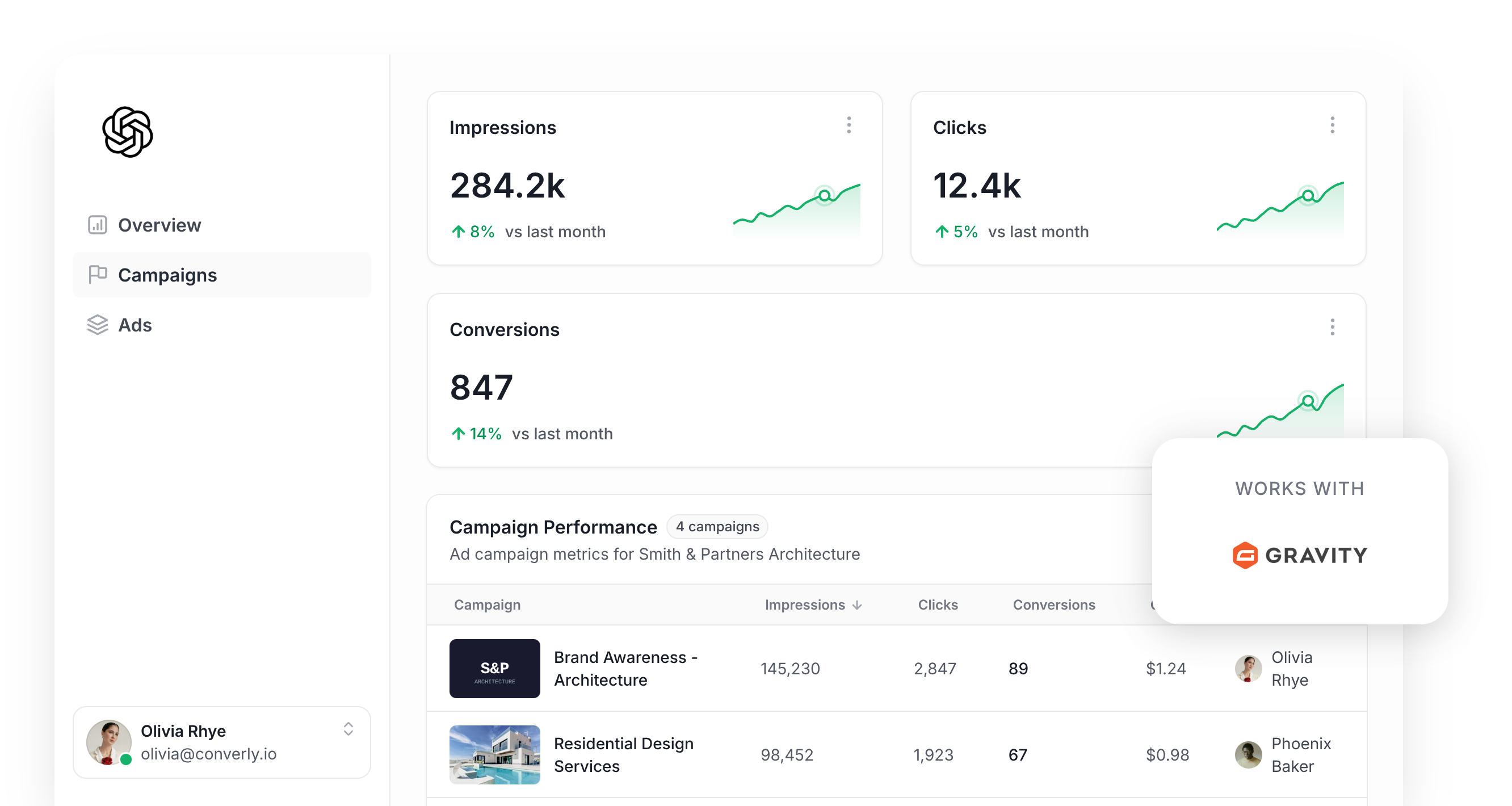
Are you wanting to use ChatGPT Ads to generate leads for your business?
If so, setting up conversion tracking is one of the most important items on the to-do list. Ad platforms like ChatGPT Ads use advanced AI algorithms to figure out who is likely to convert and who isn't, and they'll use those predictions to show your ads more prominently to the people who are likely to convert.
But it only works if you have proper conversion tracking set up. If you're not accurately telling ChatGPT Ads who converted and who didn't, then it has no way to know what a good lead looks like for your business and will continue showing your ads to the wrong type of people (which is particularly bad if you pay on an impression basis).
So what does proper conversion tracking even look like in ChatGPT Ads? And how can you get it set up?
In this article, we'll show you how to set up proper conversion tracking in ChatGPT Ads whenever someone submits a Gravity Form on your website, using an approach known as server-side tracking. No code required.
What proper conversion tracking looks like in ChatGPT Ads
There are two elements to having proper conversion tracking set up in ChatGPT Ads. The first is delivery (i.e. making sure all your conversions are being delivered to the platform) and the second is data (i.e. making sure ChatGPT Ads gets the data it needs to match the conversion back to a real person and the original ad they clicked).
Here's a breakdown of each:
Ensuring proper delivery
It is possible to put the ChatGPT Ads Measurement Pixel on your website and then fire a conversion event on a thank you page or something like that. The trouble is that a lot of those conversions won't be counted because of:
- Ad Blockers — If a visitor runs an ad blocker, the ChatGPT Ads pixel never loads on your site, so nothing they do can be tracked.
- Privacy Features in Browsers — Safari and other privacy-focused browsers limit how long tracking cookies survive, so if someone clicks your ad today and converts later in the week, they can't be tied back to their original ad click.
- Using multiple devices — Plenty of people click an ad on their phone and fill in the form later from a laptop. The browser on the laptop has never seen the ad click, so it can't connect the two.
Because of this, OpenAI actually recommends you send conversions both through the visitor's browser to the Measurement Pixel, and straight to their servers through the Conversions API (an approach known as server-side tracking). This gives the best chance of the conversions being successfully delivered to ChatGPT Ads because there is a fallback for any conversions that don't make it through the browser.
Sending the right data
For ChatGPT Ads to accurately match the conversion back to a real person and the ad they clicked, it's not enough to just fire a 'Form Submitted' event when a thank you page is visited. You need to send the lead's email alongside their IP address, User Agent, and Click ID (known as the oppref). This gives ChatGPT Ads the data it needs to match the conversion back to a real, logged in user and the exact ad they originally clicked.
3 simple steps to send proper, server-side conversions to ChatGPT Ads from Gravity Forms
Now that you understand what proper conversion tracking looks like in ChatGPT Ads, let's walk through the 3 simple steps to get it set up using Converly:
Step 1: Build your Conversion Flow in Converly
Converly is a tool that makes it easy to send proper, server-side conversions from Gravity Forms to ChatGPT Ads.
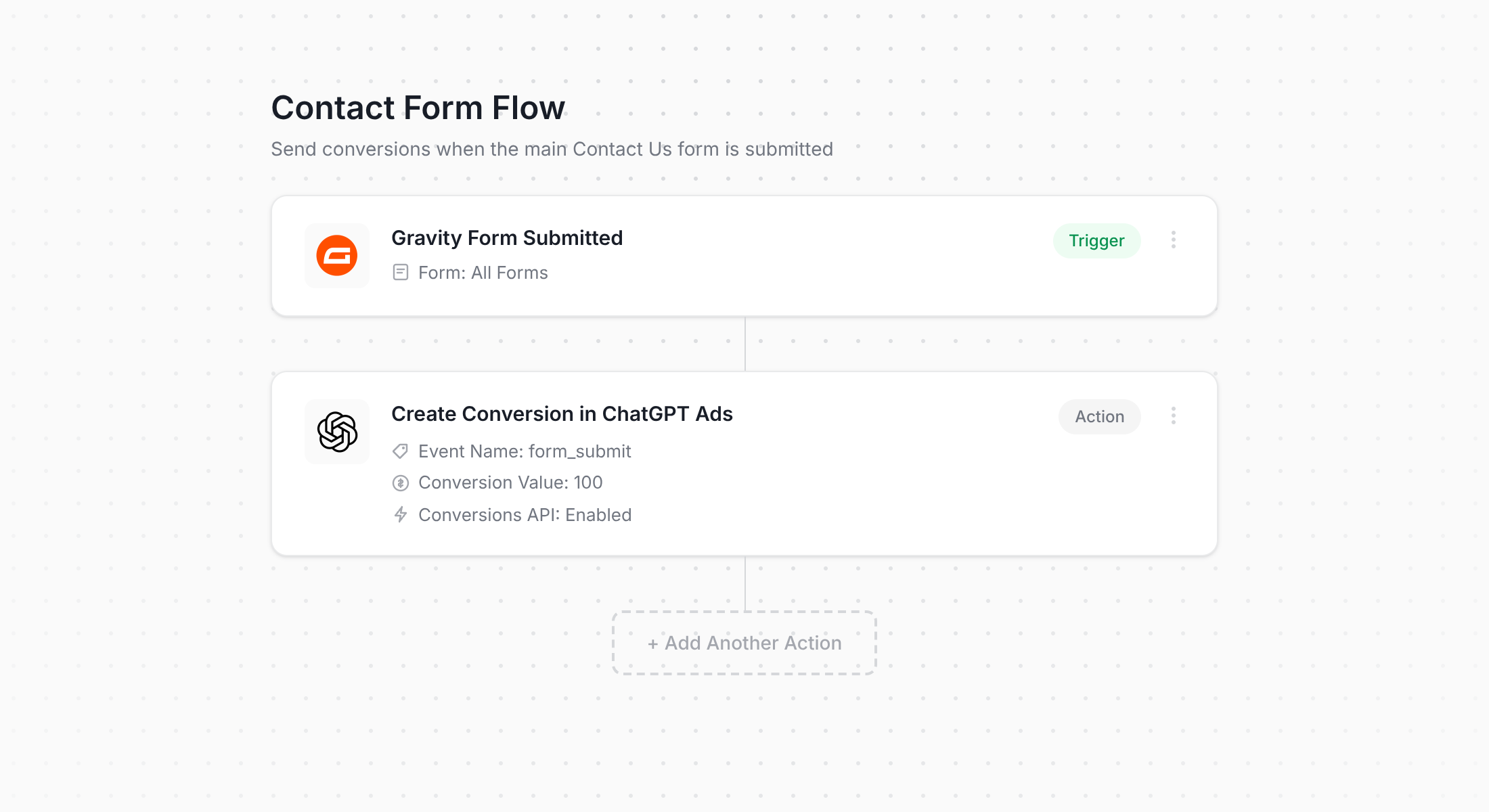
As the screenshot shows, Converly gives you a simple workflow builder that works the same way as other tools you've likely used in the past (like Zapier or HubSpot Workflows).
You simply select your trigger (a Gravity Form being submitted on your site), then choose the action you want to happen as a result (a conversion being sent to ChatGPT Ads). That's genuinely it. A few clicks and you have server-side conversion tracking set up in ChatGPT Ads.
And if you use an AI assistant like ChatGPT or Claude, it's even easier. You simply connect it to your Converly account, tell your AI assistant to 'Setup conversion tracking in ChatGPT Ads whenever someone submits my Gravity Form' and it will handle everything for you!
Step 2: Add the Converly code to your website
Once you've built and published your Conversion Flow, Converly gives you a small snippet of code to add to your website.
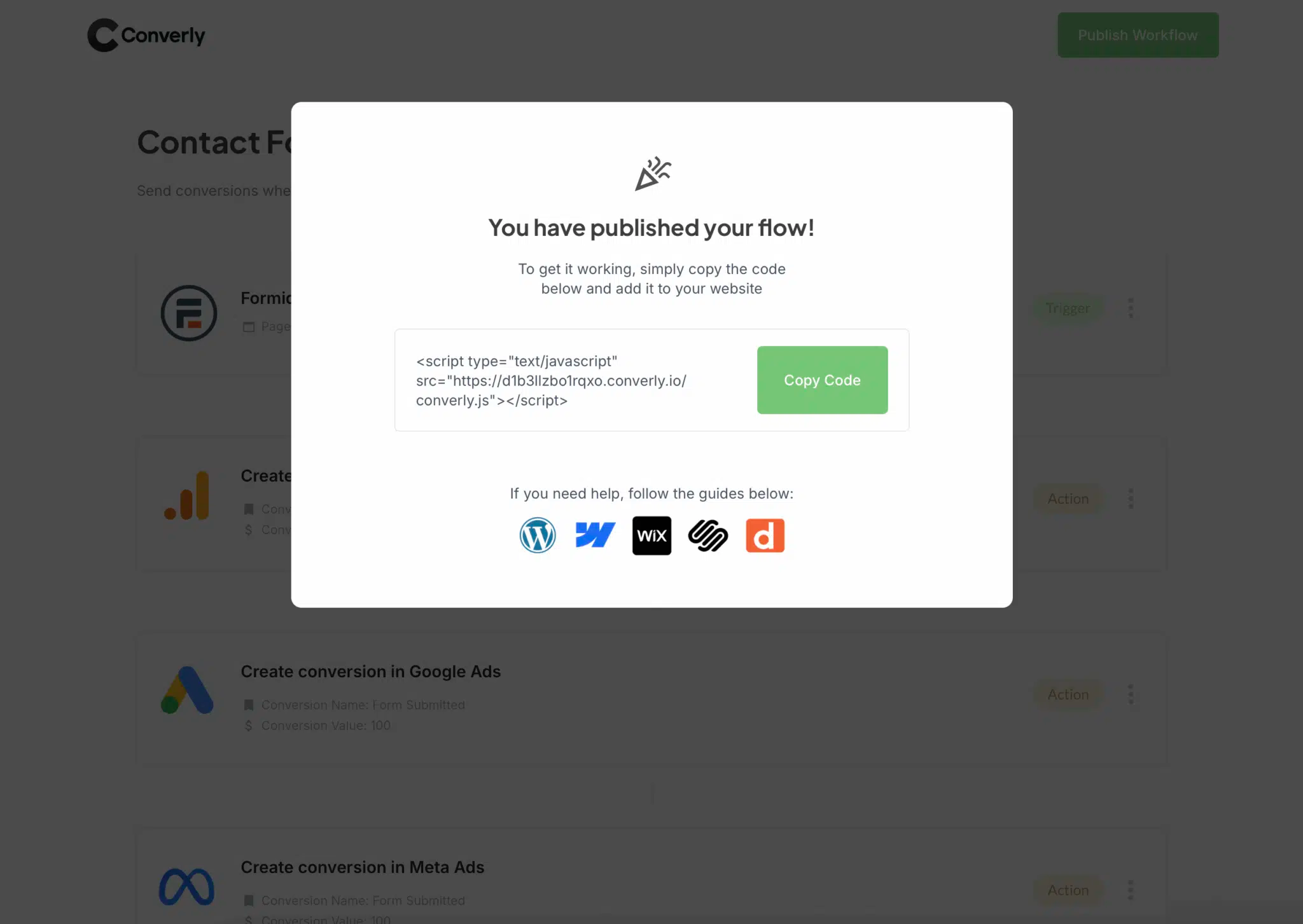
If your site runs on WordPress, Webflow, HubSpot or something similar, you can usually paste it into your CMS settings under a Header or Custom Code area, or drop it in with a header/footer plugin. If you're already running Google Tag Manager, you can add it through there instead.
Step 3: Test it works
The last step is to go to your website and submit the Gravity Form yourself.
Then head back into your Converly account and select 'Logs' from the main navigation bar.
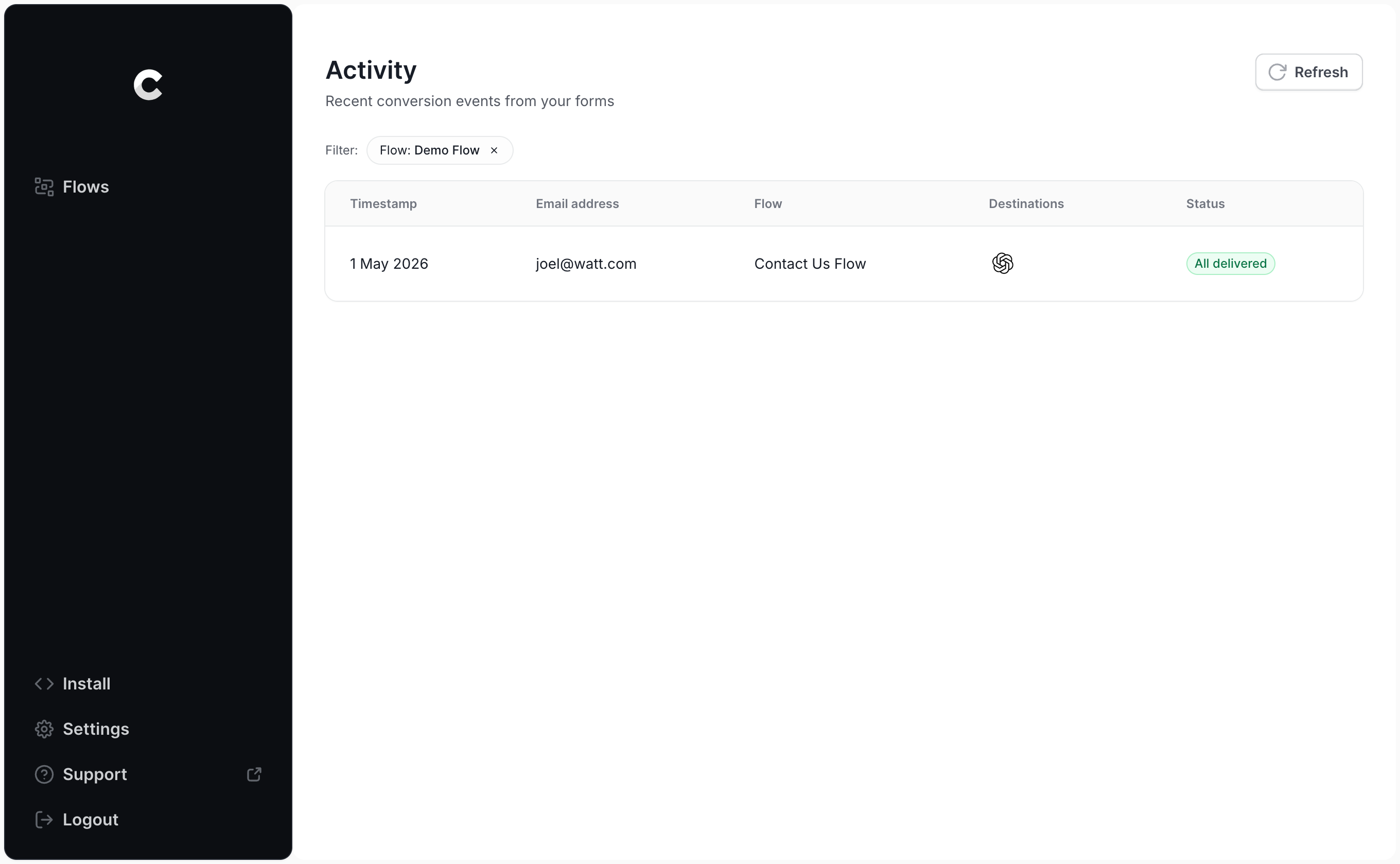
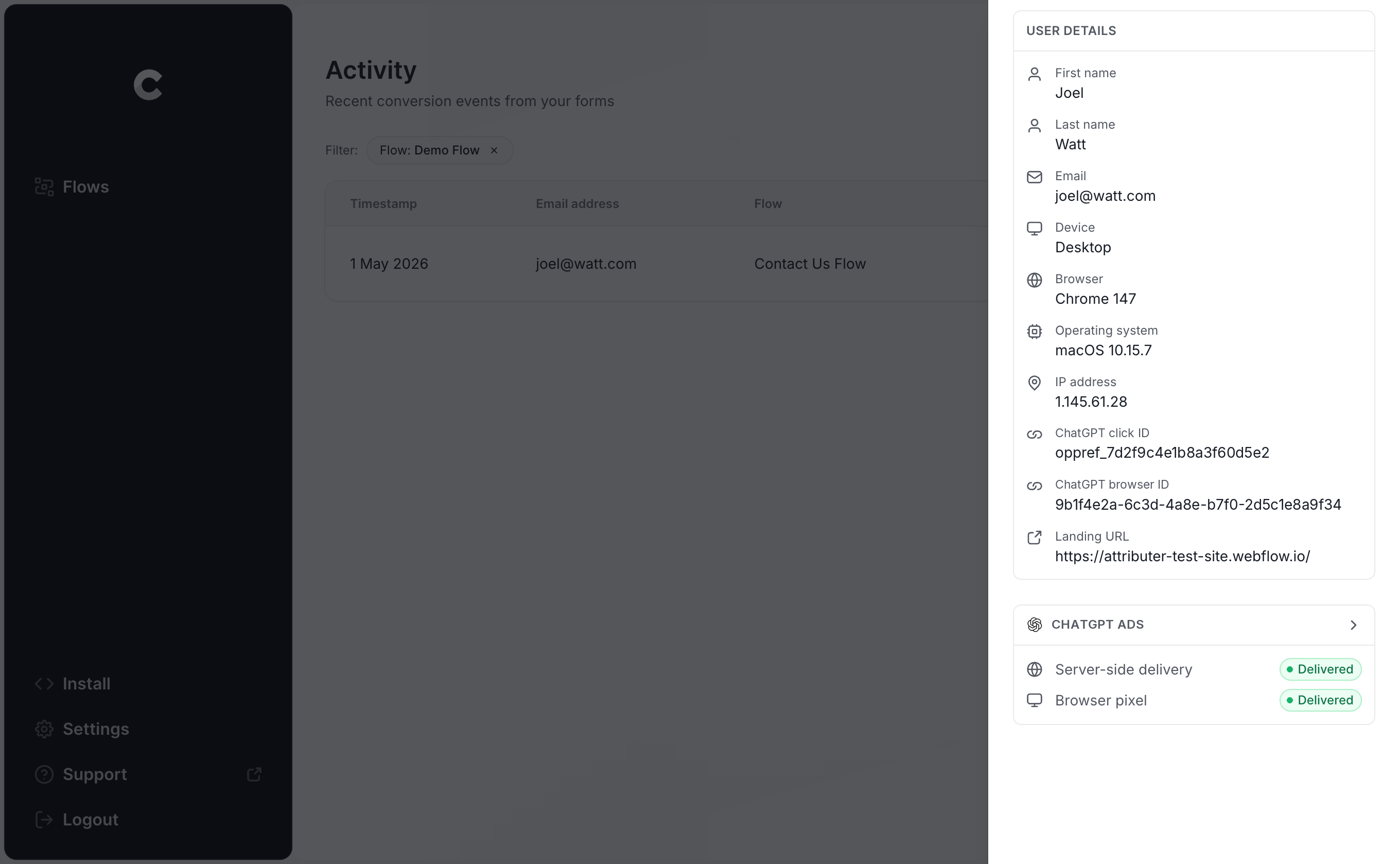
On the logs page, click into your test entry and you'll see everything Converly captured about it, along with whether it was successfully sent to ChatGPT Ads.
You can also drill in further and see the exact payload that was sent to ChatGPT Ads (including the click ID, browser ID and hashed email) and what their server responded with.
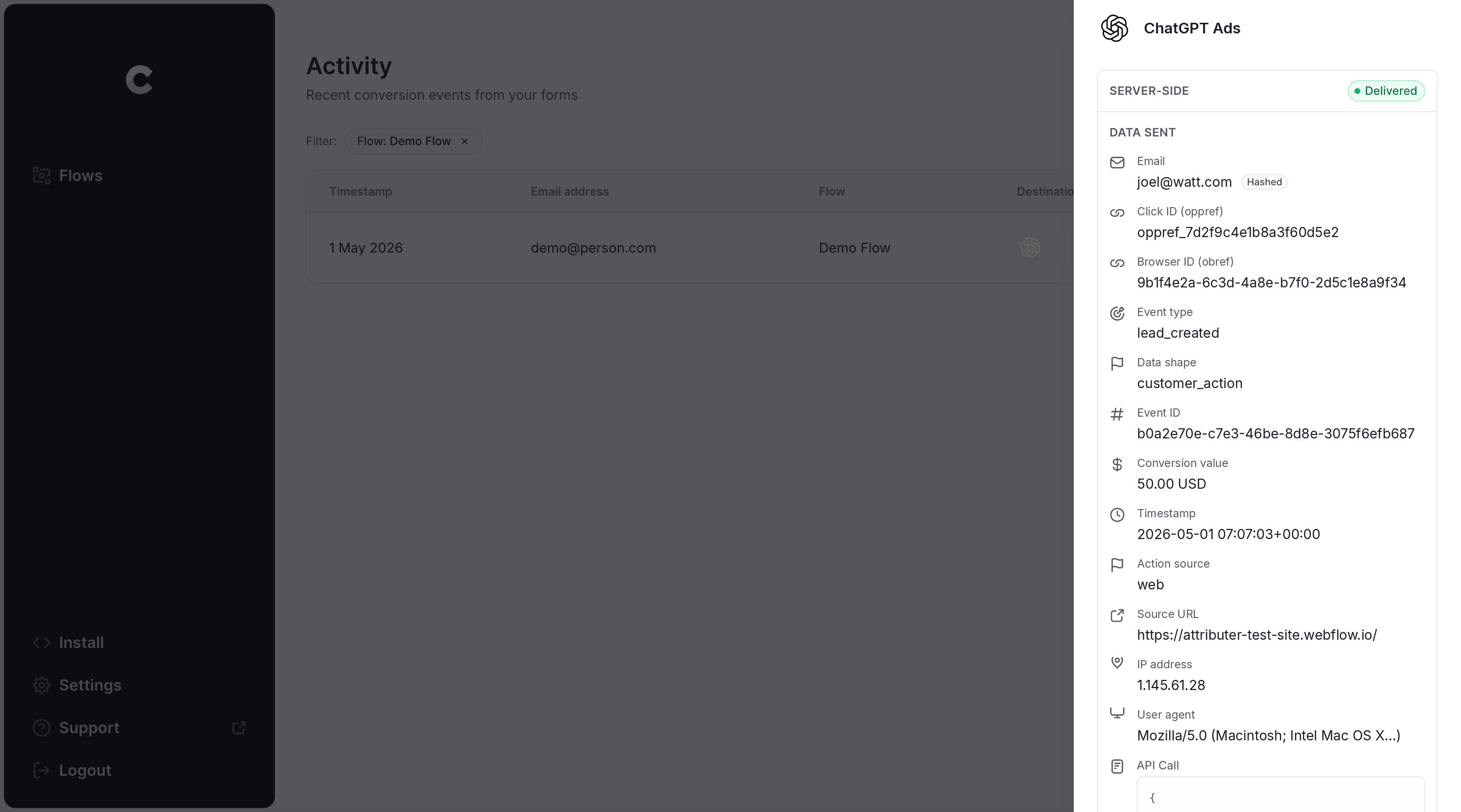
If your test submission is in the log and it shows as successfully sent to ChatGPT Ads, your conversion tracking is working. Start to finish, it shouldn't take more than 5 minutes.
Why Converly is the best way to send conversions to ChatGPT Ads from Gravity Forms
There are other ways to get a conversion into ChatGPT Ads when someone submits a Gravity Form, so why use Converly? A few reasons stand out:
1. Easy to set up
Doing this yourself means working with OpenAI's Conversions API directly. You'd need to write code to listen for Gravity Forms submissions, capture the click ID and browser cookie, normalise and SHA-256 hash the lead's email address, build the payload in exactly the format OpenAI expects, and then manage API keys, deduplication and retries.
Converly makes it simple. Pick a trigger (a Gravity Form being submitted), pick an action (send a conversion to ChatGPT Ads), and it handles the rest. No custom code, no API keys to juggle, just conversion tracking that works.
Plus, if you use AI tools like Claude or ChatGPT, you can simply connect your Converly account, tell your AI assistant to 'Setup ChatGPT Ads tracking from Gravity Forms' and it will set everything up for you!
2. Not affected by ad blockers and privacy restrictions
If you just use the ChatGPT Ads Measurement Pixel (and don't send anything server-side via the Conversions API), then a meaningful share of your conversions never make it back to OpenAI, because ad blockers and privacy-focused browsers stop the pixel from loading or firing.
In fact, a study that analysed over 7 million conversions found that browser-based tracking was missing roughly 30% of conversions.
Converly sends conversions browser-side to ChatGPT's Measurement Pixel and server-side to the Conversions API, which means that they are likely to be delivered regardless of whatever ad blockers and privacy restrictions the visitor might have.
3. Works across devices
It's common for a lead to first land on your site on one device (their phone, say) and then come back on a computer to actually fill out the form.
If you're doing something like tracking thank you page visits, then that conversion couldn't be tied back to the original ad click and it just wouldn't show up in your reports.
Converly captures the click ID (known as the oppref) and sends it to ChatGPT Ads along with the lead's email address. This gives ChatGPT Ads all the data it needs to match the conversion back to a real person and the ad they clicked, even if that original ad click happened on a different device several weeks earlier.
4. Sends more data
Converly doesn't just send the bare minimum. It captures the ChatGPT click ID and the browser cookie the ChatGPT Ads pixel sets, the lead's email address, and technical data like the IP address and user agent, and sends all of it to OpenAI with every conversion.
The result is that OpenAI has everything it needs to match each conversion back to a real ad click, and you get conversion data you can trust.
5. Supports multiple tools and platforms
Converly works with more than 100 different form builders, scheduling tools, chat widgets and more. And it can send conversion events to ChatGPT Ads, Google Ads, Meta Ads, LinkedIn Ads, Microsoft Ads, Google Analytics and a host of other platforms.
So if you're already running Google Ads or Meta Ads alongside ChatGPT Ads, you don't need a separate setup for each one. You can just add them as extra actions on the same Conversion Flow and every form submission goes to all of them at once. And when the next new ad platform comes along, it's a few clicks to add it rather than a rebuild.
6. Gives you a full conversion log and email alerts
If you use another approach to set up conversion tracking in ChatGPT Ads (like using Google Tag Manager for instance), then you have no way to know if it's working or not. You test it when you first set it up, but if someone edits the form, rotates an API key, or changes something in ChatGPT Ads Manager, your tracking can easily break and you'd never know.
Converly takes the guesswork away. You get a full conversion log showing every conversion that came through your Gravity Forms, what data was captured, exactly what was sent to ChatGPT Ads, and whether it was successful or not.
You can also turn on email notifications so you get an email every time a conversion is sent to ChatGPT Ads (or you can set it so that you only get notified when a send fails). This means that if anything ever goes wrong then you'll know about it straight away.
2 things you can do when you properly send conversions to ChatGPT Ads from Gravity Forms
Once you have accurate conversion data flowing into ChatGPT Ads, a few things become possible that simply aren't when you're flying blind.
1. See which campaigns and ads actually produce leads
Without conversion tracking, all you can see in ChatGPT Ads is impressions and clicks, and clicks don't pay the bills.
With accurate conversions coming through, you can see how many leads each campaign and ad is generating, what each lead is costing you, and where the real opportunities to grow are.
2. Let OpenAI's algorithm find you more of the right people
Ad platforms like ChatGPT Ads use advanced AI algorithms to figure out who to show your ad to, and every conversion you send is a training signal.
When you set up proper conversion tracking, it gets the data it needs to understand what an ideal lead looks like for your business and it will go and show your ads to more people like them. But if you've got a bad conversion tracking setup, it won't get the data it needs to work and will end up showing your ads to the wrong people (which will increase your cost per lead and just waste your marketing budget).
Wrap Up
If you want to send conversions to ChatGPT Ads each time someone submits a Gravity Form on your website, Converly is the easiest and best way to do it.
It sends conversions directly to OpenAI's servers so they aren't blocked by ad blockers or privacy-focused browsers, and it sends both of the identifiers OpenAI needs (the click ID and the hashed email address) along with the supporting data, so every lead has the best possible chance of being matched back to the ad that produced it.
Best of all, it takes just a few minutes to set up and comes with a 14-day free trial, so check it out today!
About the author

Aaron is the founder of Converly. With over 15 years of experience in digital marketing and SaaS, he's passionate about helping businesses track and optimise their ad conversions.