


Track Framer form submissions as conversions in Google Analytics
Use Converly to send conversion events to Google Analytics every time a Framer Form is submitted on your site. No code or complicated setup needed!
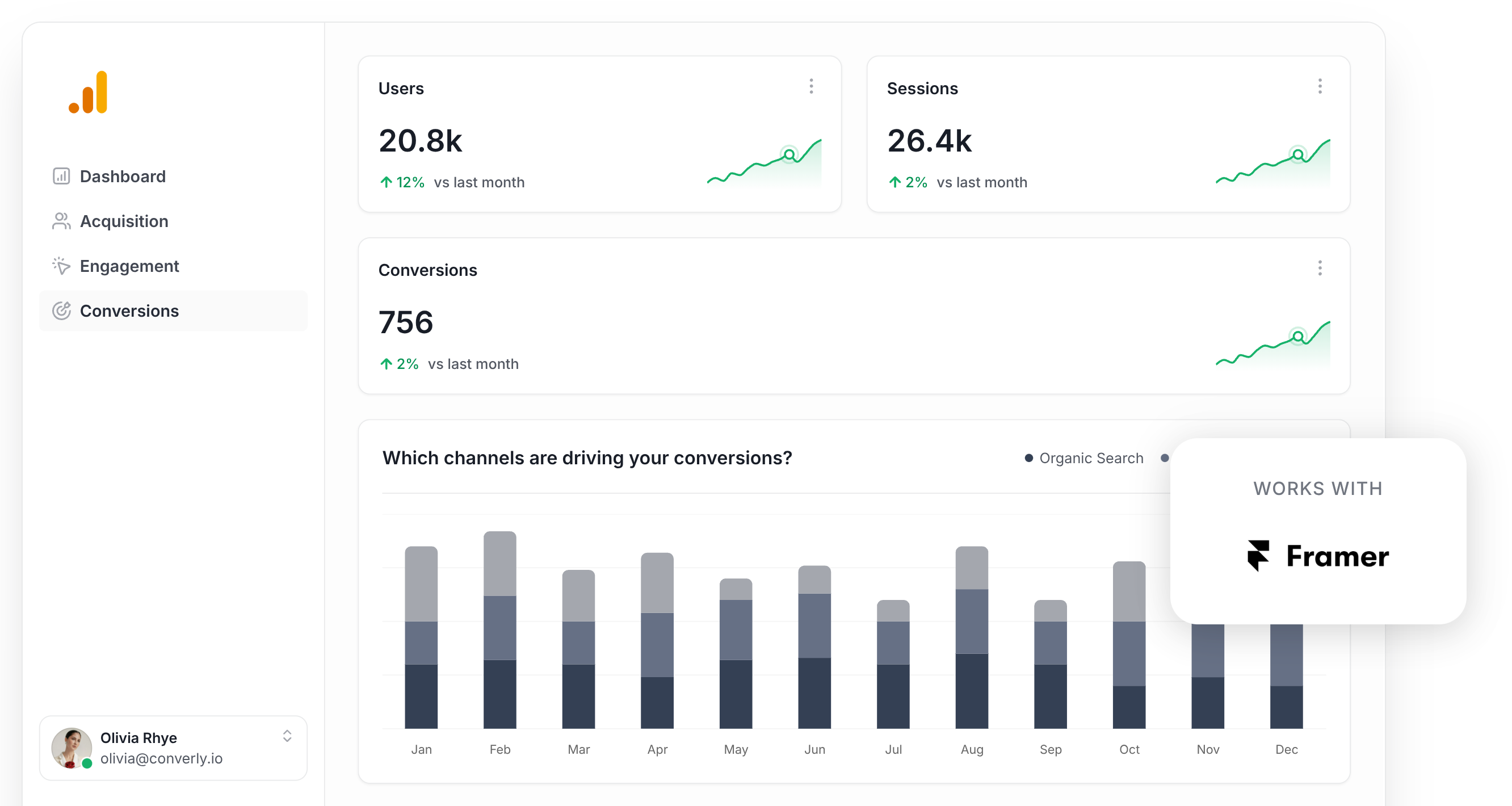
Finding it difficult to tell how many leads your marketing is actually generating across channels like Google Ads, Meta Ads, SEO, and others?
You are far from the only one.
When there is no easy way to see which campaigns are actually bringing in leads, it is all too easy to keep throwing money at things that are not producing results.
The good news is there is a straightforward fix, and it does not involve writing any code.
In this guide, we will walk you through how to use Converly to automatically send a conversion event to Google Analytics whenever someone submits a form on your Framer site. Once it is set up, you will be able to see exactly which campaigns are generating leads, which ads are performing best, and much more.
4 simple steps for tracking Framer form submissions as conversions in Google Analytics
Here's how to get conversion tracking up and running in Google Analytics in 4 simple steps:
Step 1: Build your Conversion Flow in Converly
Converly is a tool that takes care of sending conversion events to your ad platforms and analytics tools (including Google Analytics) whenever a form gets submitted on your website.
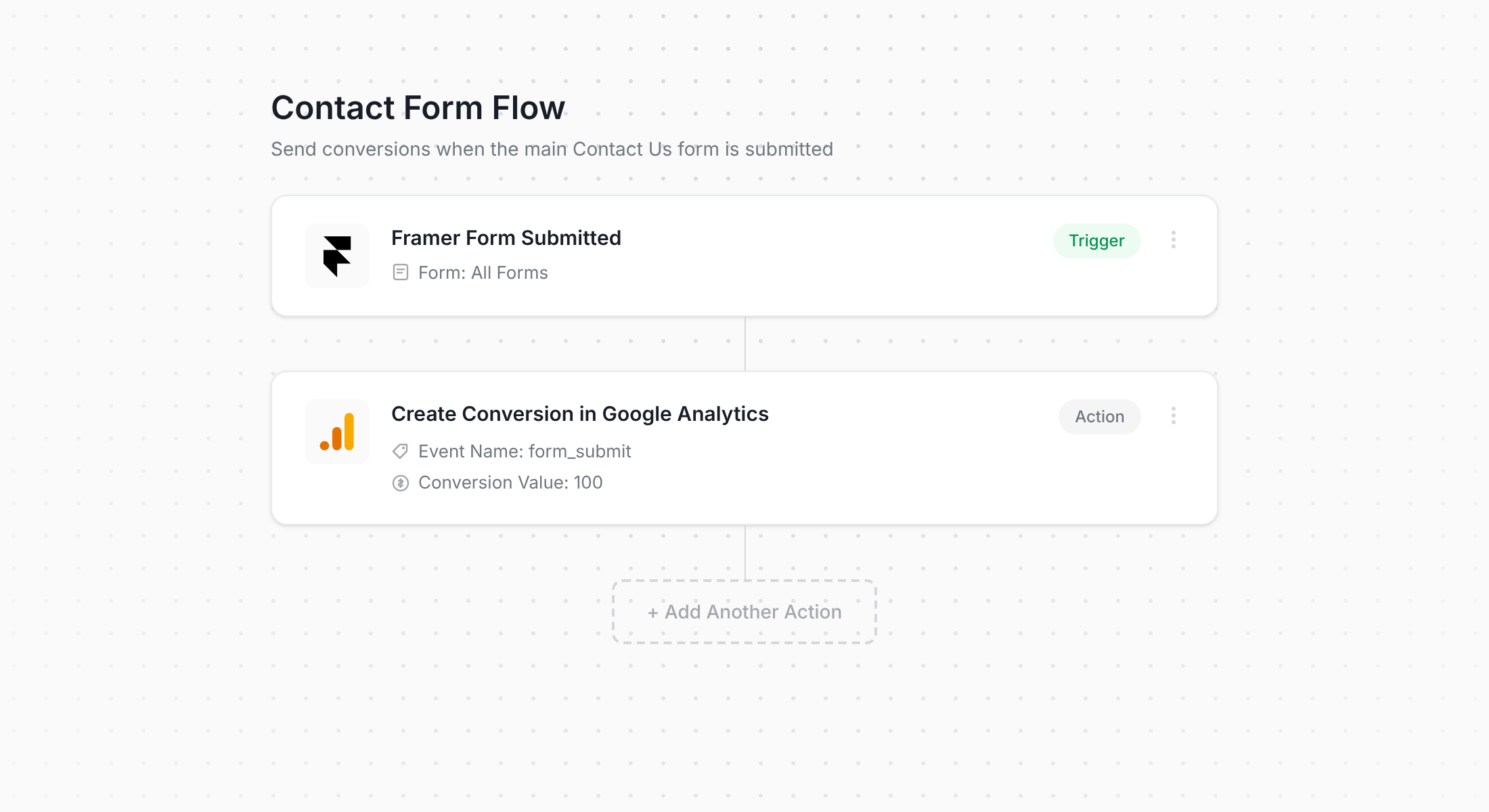
As you can see in the screenshot above, Converly comes with an intuitive workflow builder that is really easy to pick up. If you have ever used something like Zapier or HubSpot Workflows, this will feel very familiar.
All you need to do is choose a trigger (like when someone submits a Framer Form on your site) and then select where you want the conversion event sent (such as Google Analytics). It really is that straightforward.
Step 2: Add the Converly code to your Framer site
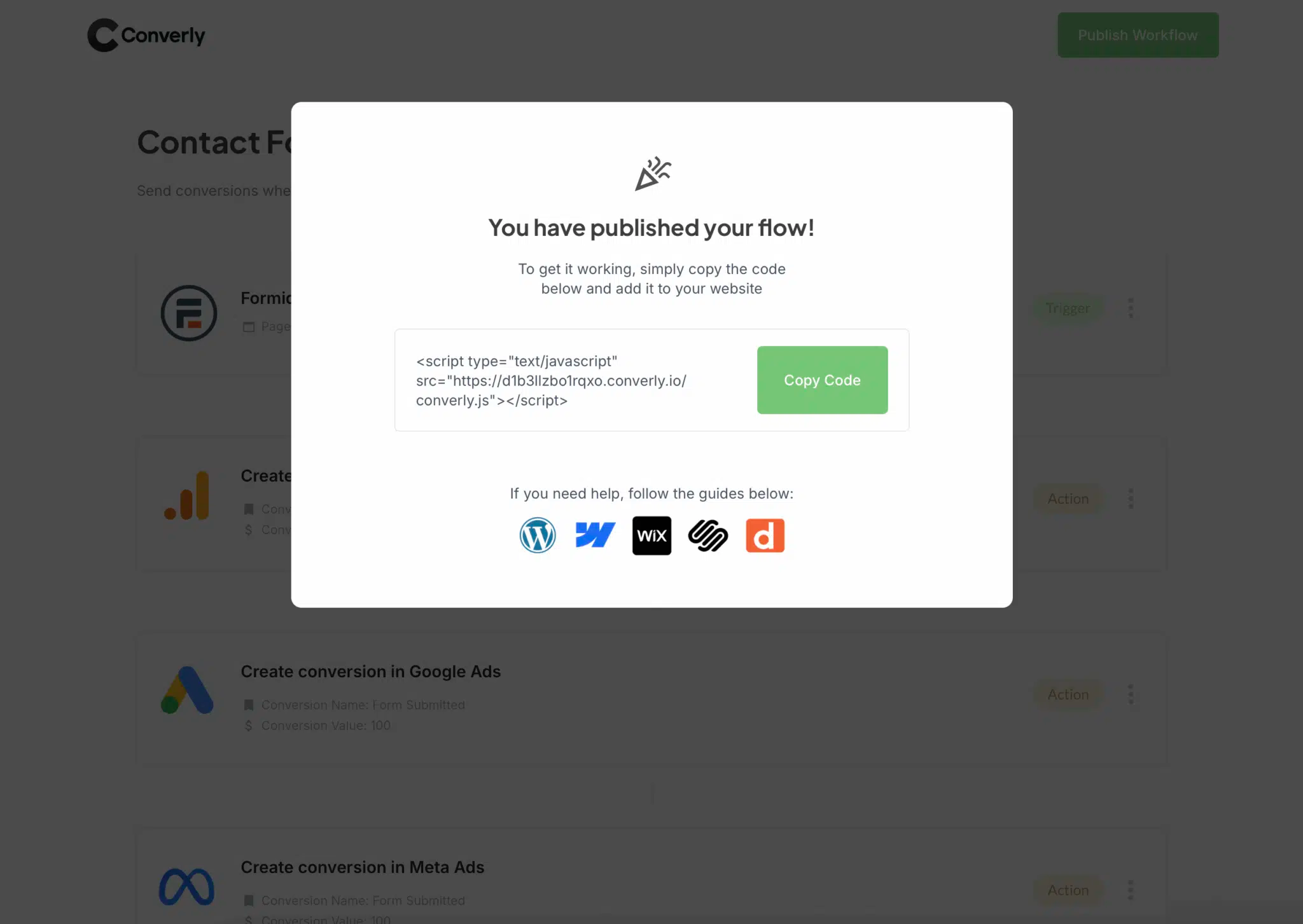
After building your Conversion Flow, Converly provides a small code snippet to add to your site.
With Framer, you can paste this into the Custom Code section of your site settings (either in the Head or Body area). Just add it, hit publish, and you are done.
From that point on, Converly handles everything automatically. It detects when someone submits a Framer Form and sends the conversion data to Google Analytics (along with any other platforms you have added to your flow).
Step 3: Test it's working
With Converly installed and your Conversion Flow in place, the next thing to do is make sure everything is tracking correctly.
The quickest way to check is to open an incognito window, go to the page on your Framer site that has the form, and submit a test entry.
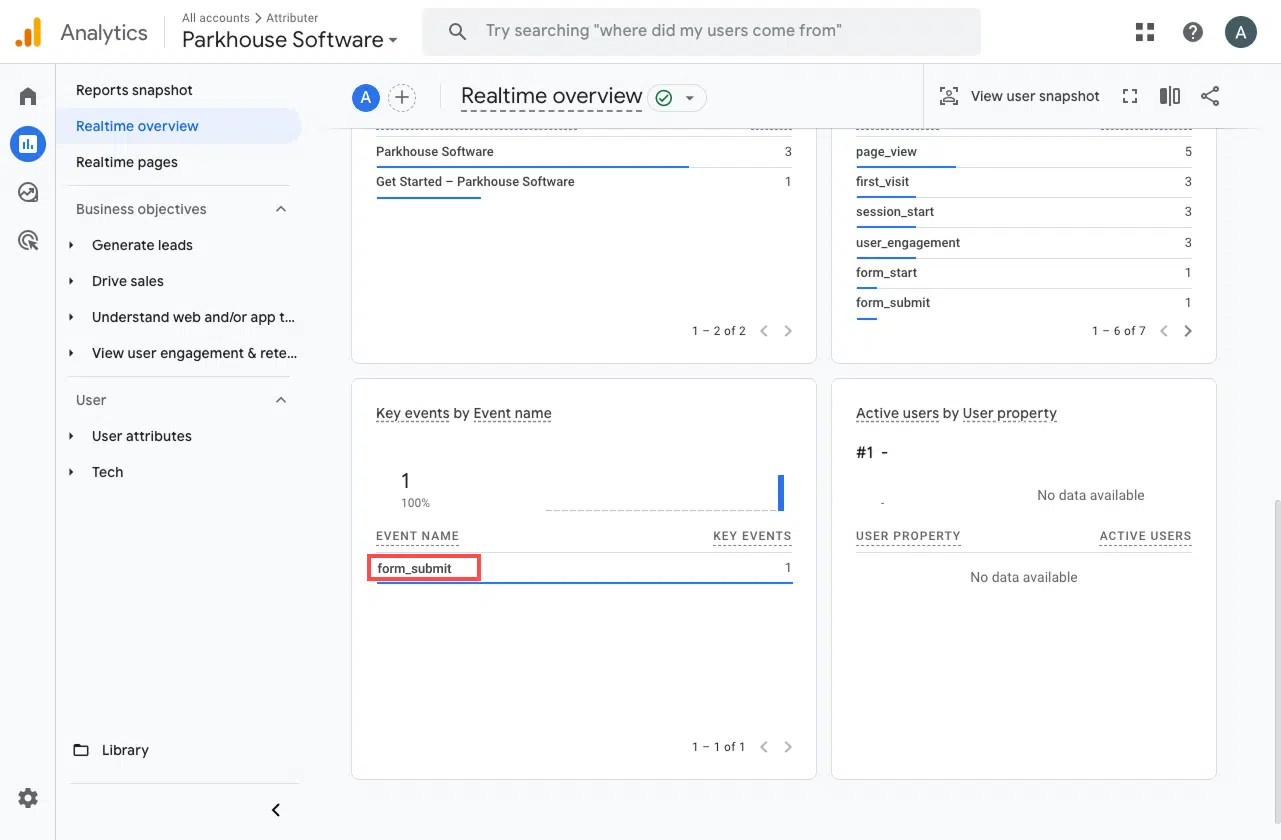
After that, jump into Google Analytics and open up the Real Time dashboard. Take a look at the Recent Events section. If your test submission shows up there, you are all set and everything is working as expected.
Step 4: Mark the event as a 'Key Event' (Optional, but recommended)
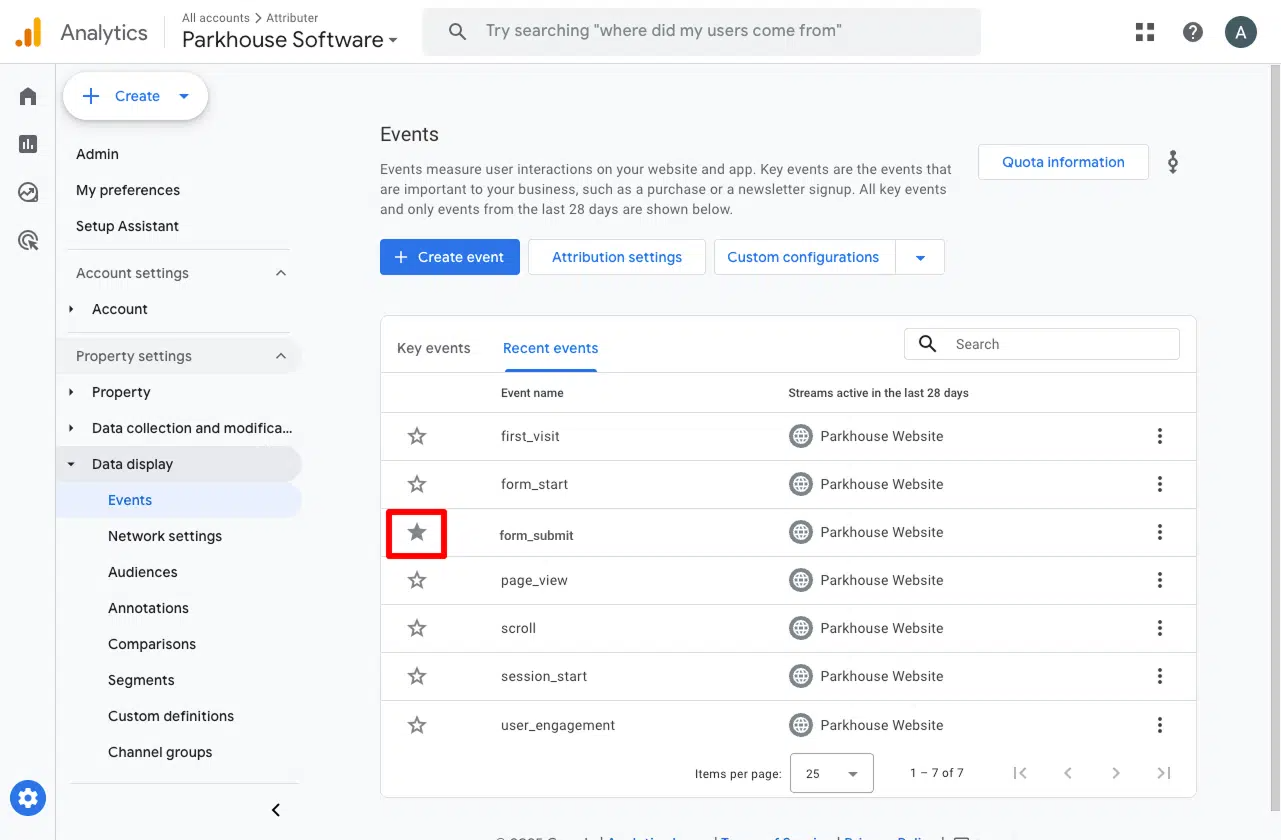
As a last step, we suggest marking the form_submit event as a Key Event in Google Analytics 4. This signals to GA4 that it should count this event as a conversion, which opens up extra reporting capabilities. For example, you will be able to use it in your acquisition reports or set it as a conversion point when you are building funnels and path analysis.
To get this done, head to the Admin section of your GA4 property and click Events under the Data Display menu. Open up the Recent Events tab where you will see all the events that have been tracked. Find your form_submit event (or whatever name you gave it) and click the star icon to mark it as a Key Event.
Why Converly is the best way to trigger conversions in Google Analytics
As we mentioned earlier, there are a number of ways to get conversion tracking running in Google Analytics when someone submits a form on your Framer site.
So what makes Converly the better option? Here are a few reasons:
1. No code or complicated setup
Most other approaches to conversion tracking involve getting into the weeds with Google Tag Manager, data layers, and custom scripts. That can get overwhelming fast, especially if you are not a developer.
Converly was built to be the opposite of that. The workflow builder is visual and intuitive, and if you have ever used tools like Zapier or HubSpot Workflows, you will feel right at home.
Just pick your trigger (such as a Framer Form submission) and choose what happens next (like firing a conversion event to Google Analytics). That is the whole process. No code, no Tag Manager, no headaches.
2. More accurate conversion numbers
Rather than relying on a traditional browser tag (such as the Google Tag), Converly sends your conversions directly to Google Analytics' servers via the Measurement Protocol.
Why does that matter? Because tags get blocked. Ad blockers stop them from loading on your site, and modern browser privacy features (like Apple's Intelligent Tracking Prevention) prevent them from working properly too.
In fact, a study looking at over 7 million conversions found that tag-based setups were missing around 30% of conversions. Roughly 5% of those losses came from ad blockers, while the bigger chunk (around 25%) came down to browser-level privacy restrictions.
But by sending conversions server-side with Converly, those missing 30% show back up in your Google Analytics reports.
3. Supports multiple tools and platforms
Converly works with over 50 different tools, covering everything from form builders and scheduling apps to chatbots and more. It can also push conversion events to a wide range of destinations like Google Analytics, Google Ads, Meta Ads, LinkedIn Ads, and plenty of others.
So if you ever add a new tool to your Framer site or start running ads on a new platform, getting conversion tracking set up is just a few clicks away.
4. Makes it easy to add conditional logic
Converly gives you the ability to set up smart rules that send different conversion events depending on what someone does on your site.
For instance, imagine you are running marketing for an accounting firm. You could create one conversion called Consultation Requested when someone fills out your contact form, and a separate conversion called Tax Guide Downloaded when a visitor grabs one of your free resources.
This lets you track each type of conversion on its own, giving you a much sharper view of which campaigns are driving the actions that matter most to your business.
5. Great support provided for free
Anyone who has tried reaching out to Google or Meta for help with conversion tracking knows how hard it can be to get a useful answer.
That is not how we operate at Converly.
Our team has more than 20 years of experience in advertising and analytics, and we genuinely enjoy helping people get things working. Whether you would rather sort things out over email or hop on a quick video call, we offer free support to make sure your conversion tracking is set up correctly and running without any issues.
6. Gives you a full conversion log and email alerts
With a tool like Google Tag Manager handling your conversions, you can never be totally sure your tracking is still sending to Google Analytics. A few checks at setup tell you it works right then, but unless you keep testing it week to week, things can break without warning (a change to the form, a tweak in Google Tag Manager, or an edit in Google Analytics) and you would not notice until the data dries up.
Converly takes that worry off your plate. You get a full conversion log showing every conversion that fired, the data Converly captured, what it passed to Google Analytics, the response Google Analytics returned, and more.
You can also turn on email notifications. Get one for every conversion sent to Google Analytics, or only when a send fails, so you instantly know if your tracking ever breaks.
3 useful reports you can run when you track Framer form submissions as conversions in Google Analytics
Having spent more than 15 years leading marketing teams, I have logged a lot of hours inside Google Analytics trying to pin down exactly where our visitors and leads were coming from.
Of all the reports I have built and analysed during that time, these 3 have consistently given me the most useful insights. And once you are tracking Framer form submissions as conversions in Google Analytics, you will be able to run them too.
1. Conversions by Channel
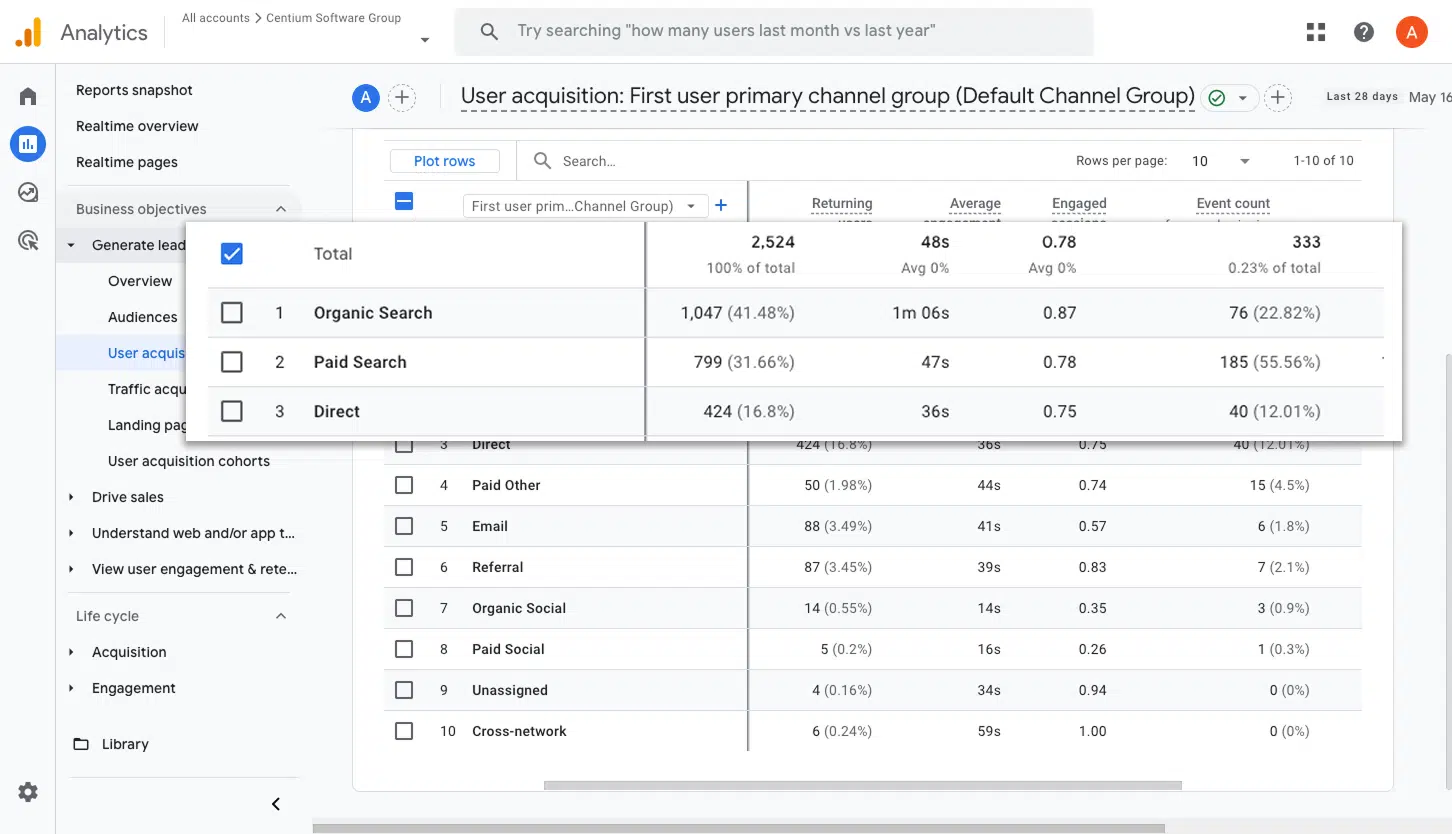
This report shows you how many form submissions are coming in from each of your marketing channels, whether that is Organic Search, Paid Search, Paid Social, Organic Social, or anything else.
It is a really useful way to quickly see which channels are pulling their weight and where there might be room to double down and generate even more leads.
2. Conversions by Meta Ads Network
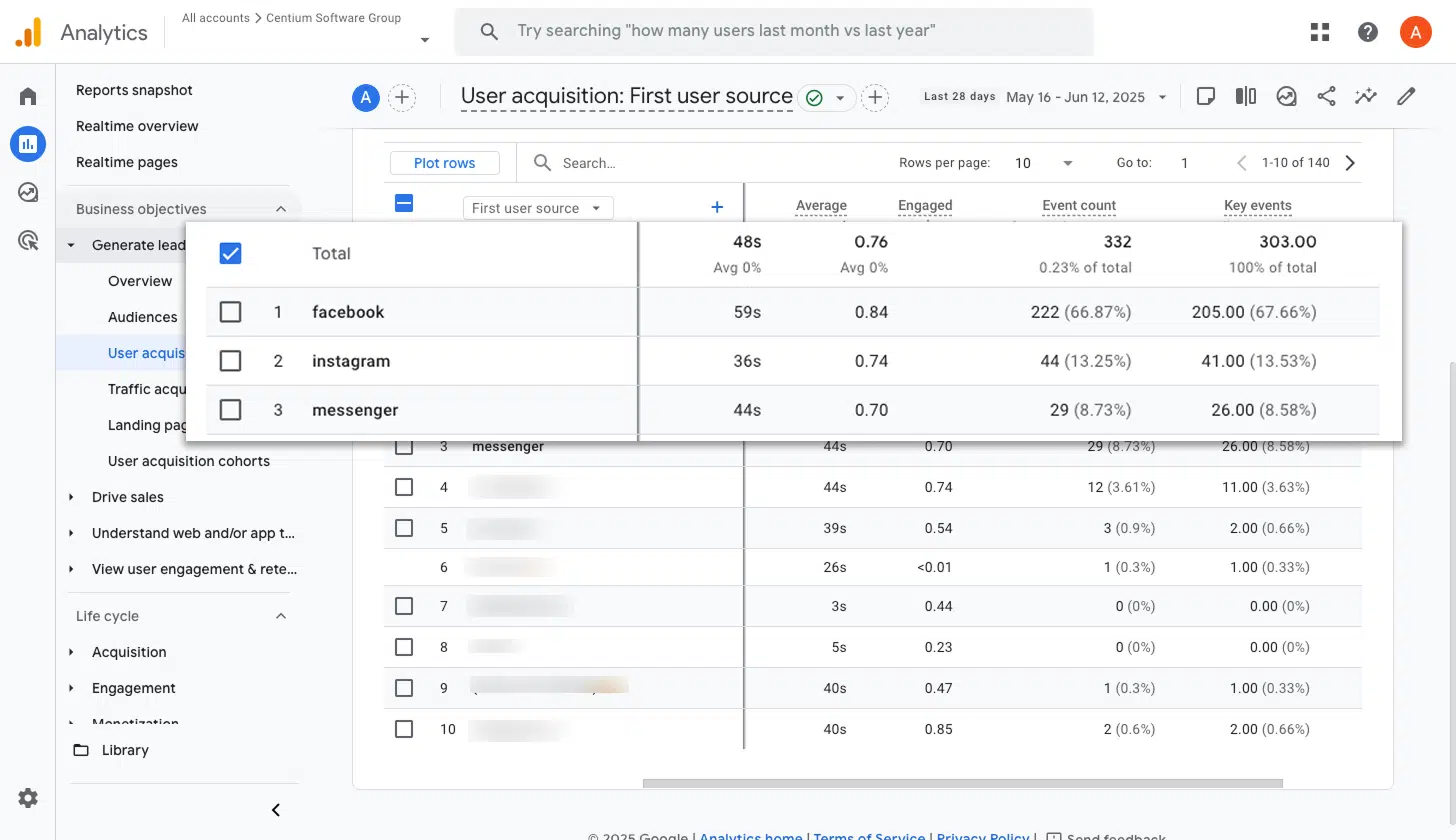
When you run ads through Meta, they typically get shown across several different networks including Facebook, Instagram, Messenger, and WhatsApp.
Since each of these platforms can perform very differently, it pays to know which ones are actually generating leads rather than just collecting impressions and clicks.
This report makes that easy. It shows you how many conversions each network has driven, so you can put more budget into the ones delivering results and scale back on the ones that are underperforming.
3. Conversions by Google Ads Campaign
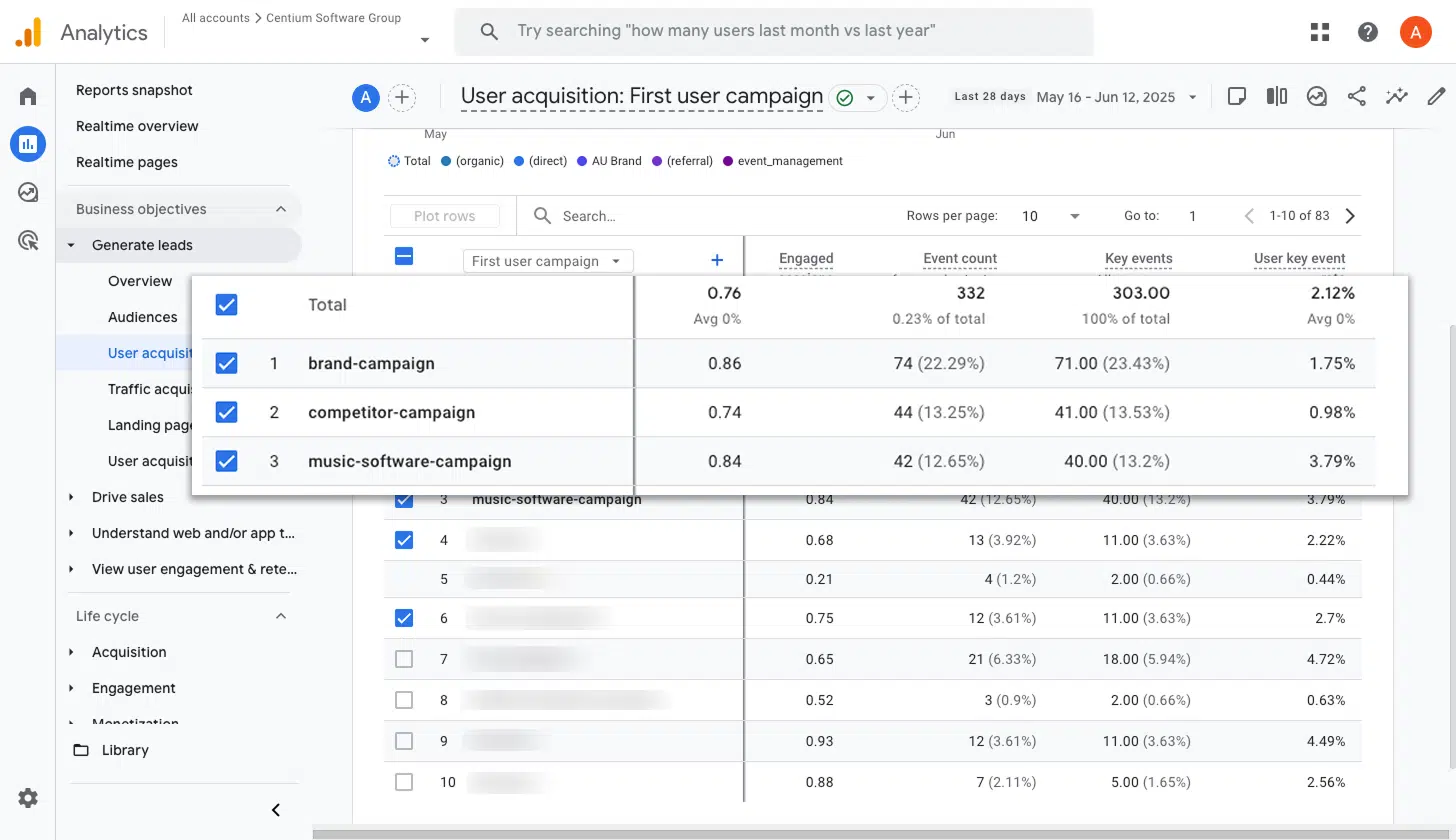
If you are advertising on Google, you most likely have several campaigns running at once. Some might target different services, others could focus on different keyword strategies like brand versus non brand terms, and some may be aimed at different geographic areas.
Whatever the setup, understanding which campaigns are actually converting is essential. This report shows you exactly that. You can see how many conversions each campaign has driven, making it easy to invest more in the campaigns that are working well and dial back the ones that are not.
Wrap up
Converly makes it simple to get conversion events flowing into Google Analytics whenever someone submits a form on your Framer site. No code to write, no complex setup to deal with, no stress.
And if you decide to start advertising on platforms like Google Ads or Meta Ads in the future, adding them to your existing Conversion Flow is just a few clicks. The same conversion data will automatically start flowing through to those platforms too.
Ready to give it a go? There is a 14 day free trial, and most people have everything set up in under 10 minutes. Try Converly today and see how much easier conversion tracking can be.
About the author

Aaron is the founder of Converly. With over 15 years of experience in digital marketing and SaaS, he's passionate about helping businesses track and optimise their ad conversions.