


Track Fluent Forms submissions as conversions in ChatGPT Ads
Learn the best way to send a conversion to ChatGPT Ads whenever someone submits a Fluent Form on your WordPress website. No code required!
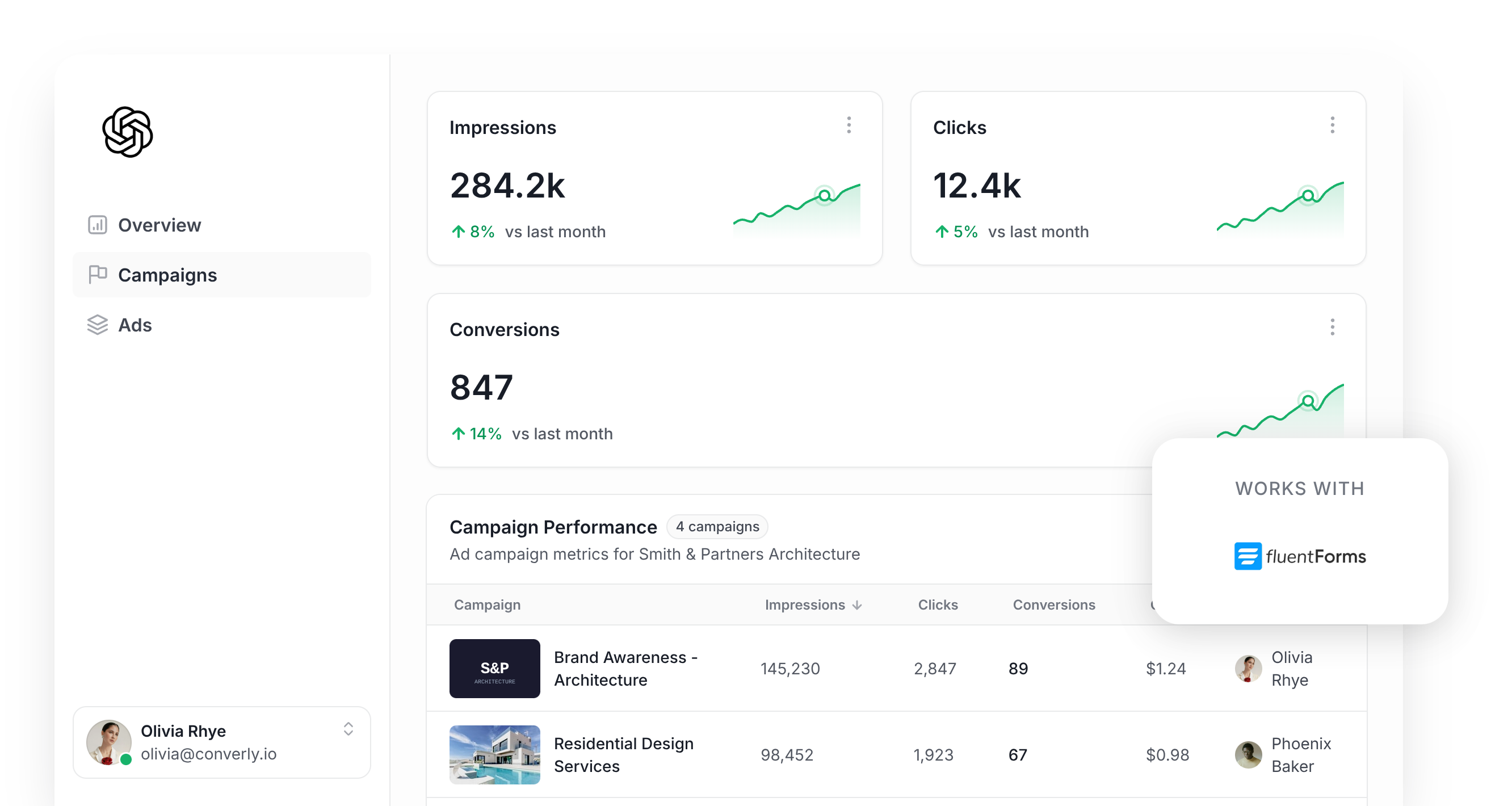
Are you planning to run ChatGPT Ads to bring more leads into your business? If you are, getting your conversion tracking right needs to be your top priority.
ChatGPT Ads uses AI to work out which users are most likely to turn into leads, and then shows your ads to those people more often. Similarly, you aren't bidding on 'keywords' in ChatGPT (it basically chooses which conversations to drop your ads into), so if it never hears back about which conversations produced real leads for your business, it doesn't really know which conversation to insert your ads into in the future.
So what does proper ChatGPT Ads conversion tracking actually involve, and how do you get it working?
In this guide, we'll walk you through the easiest way to send a conversion to ChatGPT Ads whenever someone submits a Fluent Form on your WordPress website.
What proper conversion tracking looks like in ChatGPT Ads
There are really 2 parts to doing ChatGPT Ads conversion tracking well. First, every conversion has to make it all the way to OpenAI's servers. Second, each of those conversions needs to include enough information for ChatGPT Ads to connect it back to a real person and the original ad that person clicked.
Getting every conversion delivered
Probably the fastest way to start tracking conversions is to add the ChatGPT Ads Measurement Pixel to your site and fire a conversion whenever someone lands on a thank you page (or sees the success message Fluent Forms displays after a submission).
It's easy, but it relies entirely on the visitor's browser sending that conversion over to ChatGPT Ads, and that's something ad blockers and browser privacy features regularly prevent from happening.
In fact, industry studies show that over 30% of conversions get blocked due to ad blockers and browser privacy features, which means your reporting would be massively undercounting the number of leads that actually came from ChatGPT Ads.
That's why OpenAI suggests sending each conversion through 2 separate routes. The first goes via the visitor's browser using the Measurement Pixel, while the second goes from a server directly to OpenAI through the Conversions API. That way, if a browser blocks the pixel, the server-side copy still gets there (and they get deduplicated by a shared ID you send with both).
Making sure each conversion can be matched back to a real person
Getting the conversion delivered is only half the battle. Once OpenAI has it, ChatGPT Ads still has to work out which user it belongs to and which ad they clicked, and if it can't do that, the conversion won't be counted at all.
A few things make that matching harder than you'd expect:
- Browser privacy features - Safari and other privacy-first browsers cap how long tracking cookies can be stored in your visitor's browser (usually to 7 days). So if someone clicks your ad and then waits more than a week before filling out your Fluent Form, the cookie that ties them back to the original ad click is gone.
- Switching devices - It's very common for someone to tap your ad on their phone and then finish your form a few days later on their computer. Because the click and the submission took place on 2 different devices, there's no shared cookie to connect them.
The solution to these is to send extra details about the lead with each conversion. That includes their name, email address and phone number, along with the Click ID (which ChatGPT Ads calls the oppref). Adding the lead's IP address and user agent helps as well, since it tells ChatGPT which device they were on.
With all of that data, ChatGPT Ads can match the conversion back to a real ChatGPT user and then to the ad they clicked, which means it will show up in your reports as a conversion.
3 simple steps to send proper, server-side conversions to ChatGPT Ads from Fluent Forms
Now you know what good looks like, here's the easiest way to set it up on your Fluent Forms.
Step 1: Build your Conversion Flow in Converly
Converly is a conversion tracking tool that makes it really simple to send proper, server-side conversions from Fluent Forms to ChatGPT Ads.
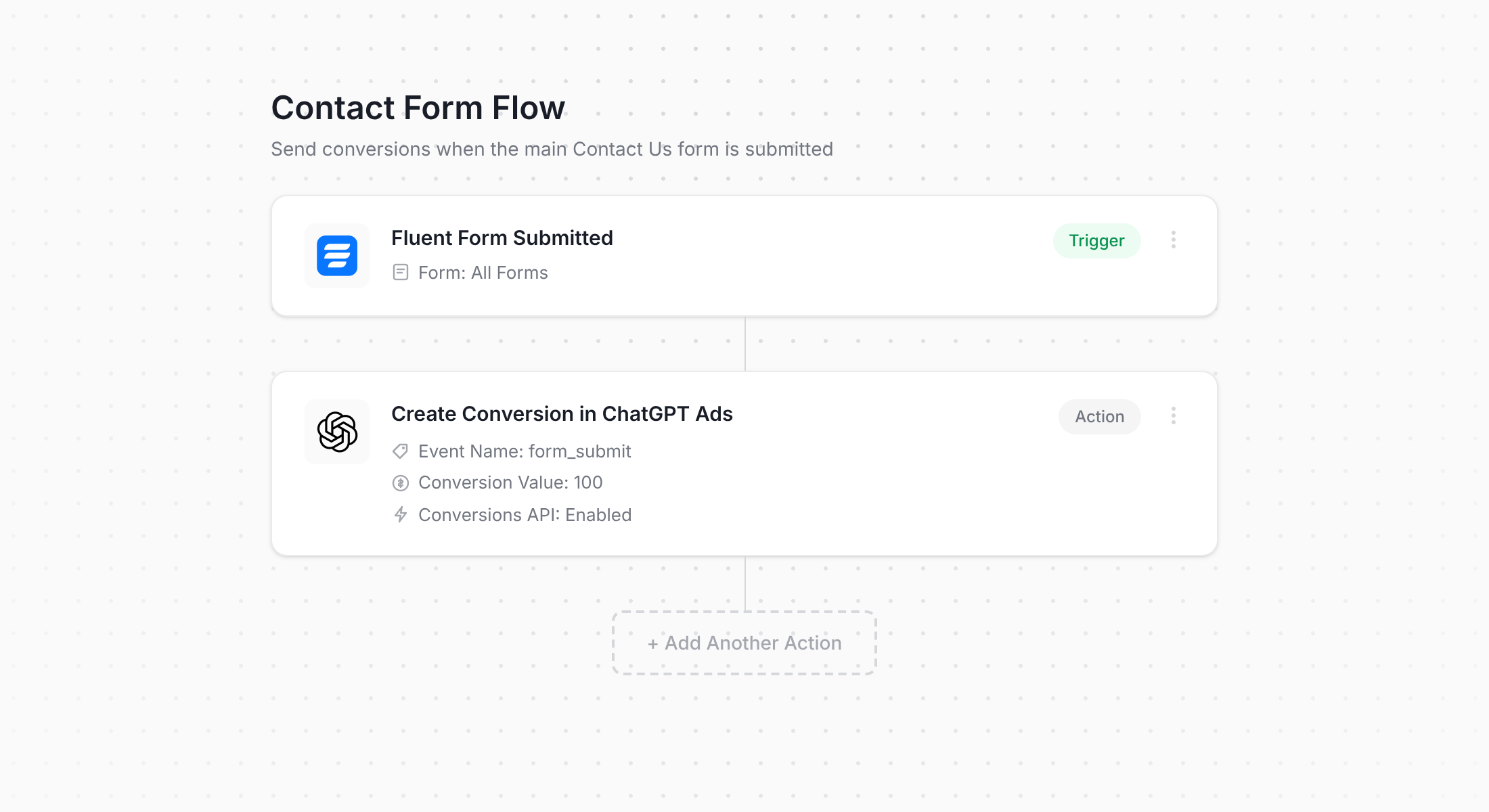
The screenshot above shows Converly's flow builder. Anyone who has created a Zap in Zapier or built an automation in their email marketing platform will probably recognise how it works.
First, you choose a trigger (like a visitor submitting a Fluent Form on your website), and then you choose what should happen as a result (a conversion being sent to ChatGPT Ads). That really is the whole process, and in a couple of clicks your ChatGPT Ads conversion tracking is ready to go.
And if you already work with an AI assistant like Claude or ChatGPT, it's even easier. Install the Converly plugin, ask it to 'Set up ChatGPT Ads conversion tracking for my Fluent Forms', and it will build everything for you!
Step 2: Add the Converly code to your website
As soon as you've built and published your Conversion Flow, Converly gives you a small snippet of code to add to your website.
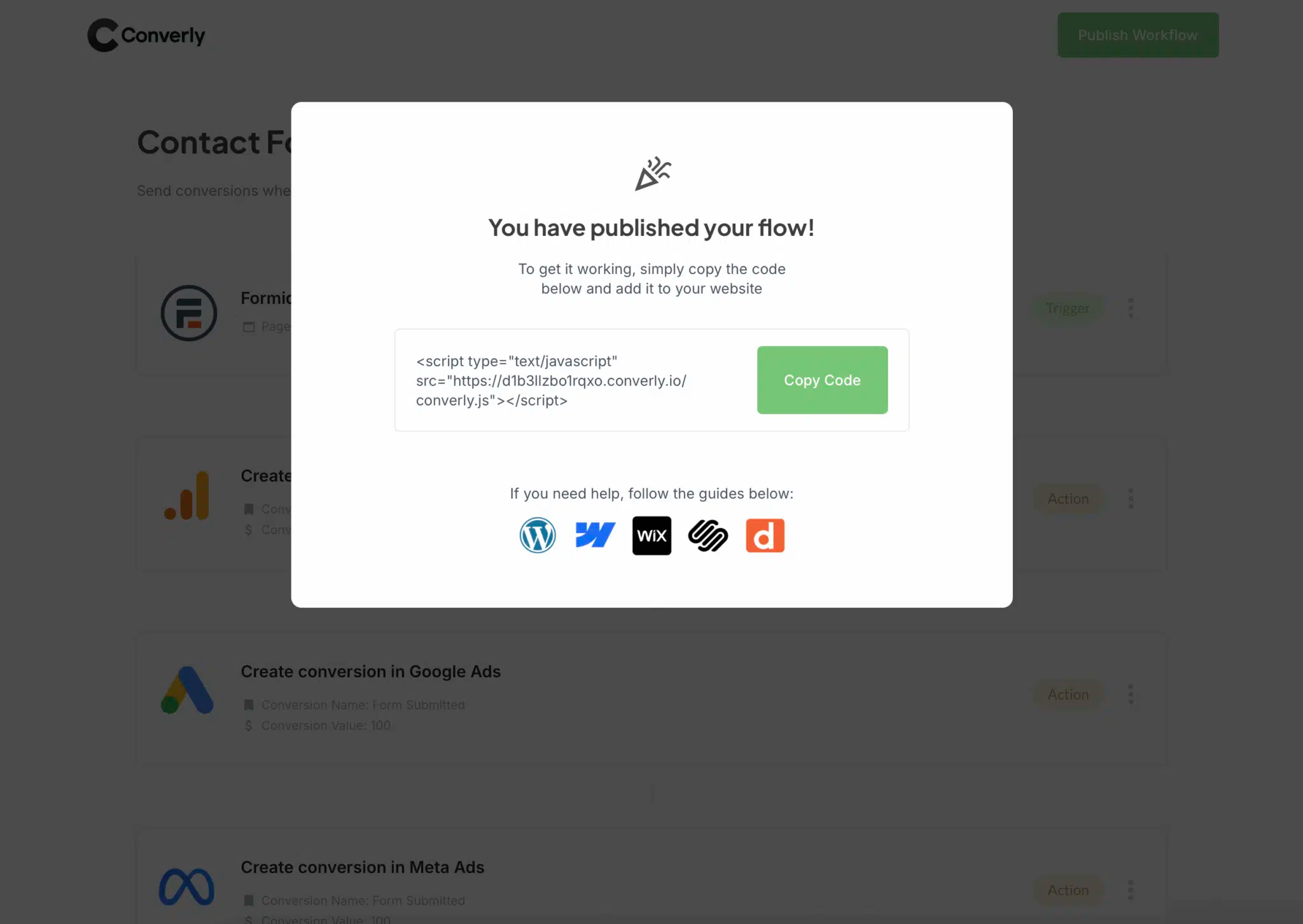
Because Fluent Forms is a WordPress plugin, there are a few easy ways to get that snippet onto your site. Plenty of themes have a header scripts or custom code area in their settings where you can paste it straight in. If your theme doesn't, then you can simply install the Converly plugin, sign in to your account, and it will be added automatically.
Alternatively, if Google Tag Manager is already running on your site, you can load the snippet through it as a Custom HTML tag instead.
Step 3: Test it works
Last of all, open your live website and submit one of your Fluent Forms yourself.
After that, head back into Converly and click 'Logs' in the main menu.
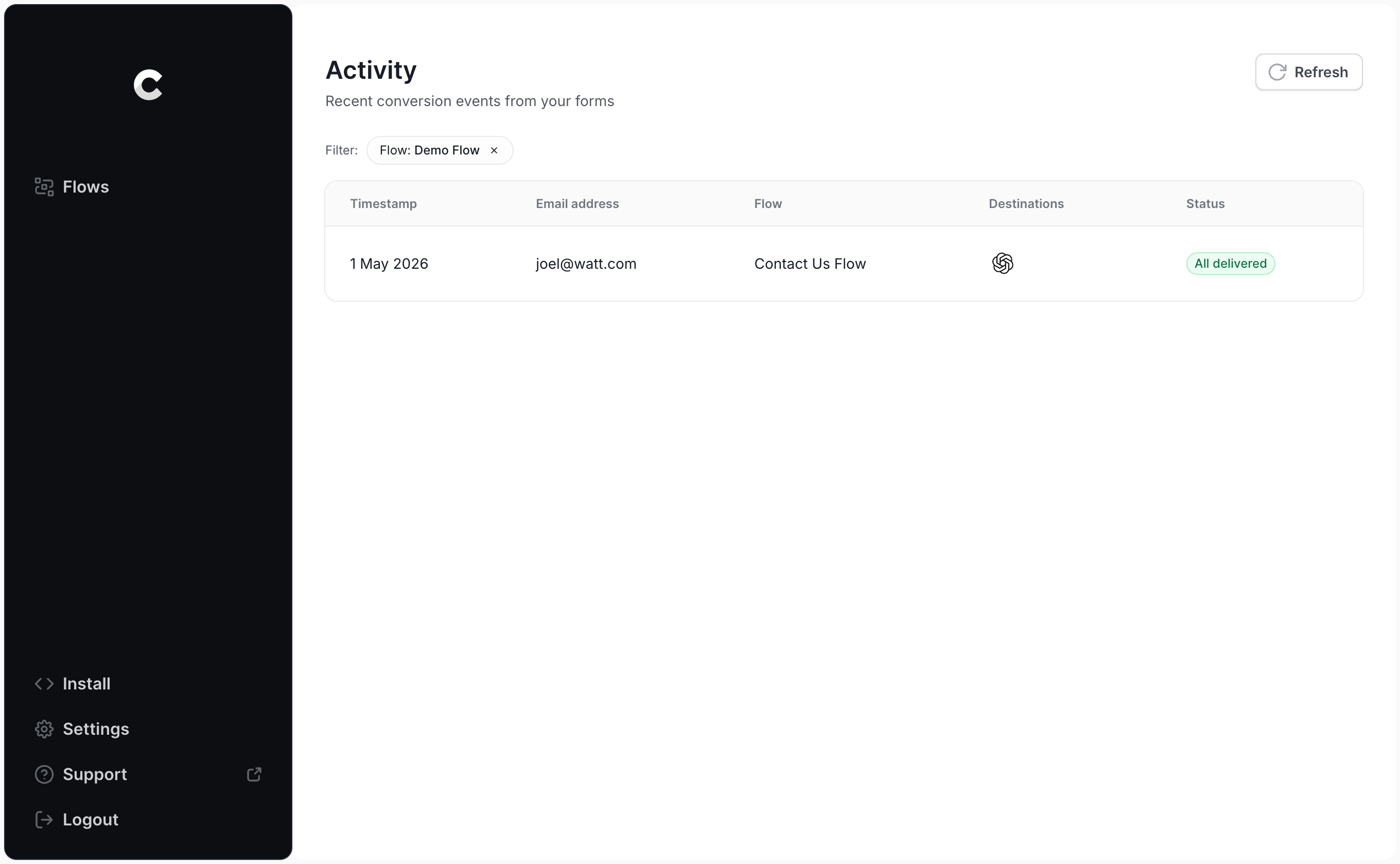
Locate your test submission in the list and click on it. You'll see every detail Converly collected from the form, along with whether the conversion was delivered to ChatGPT Ads.
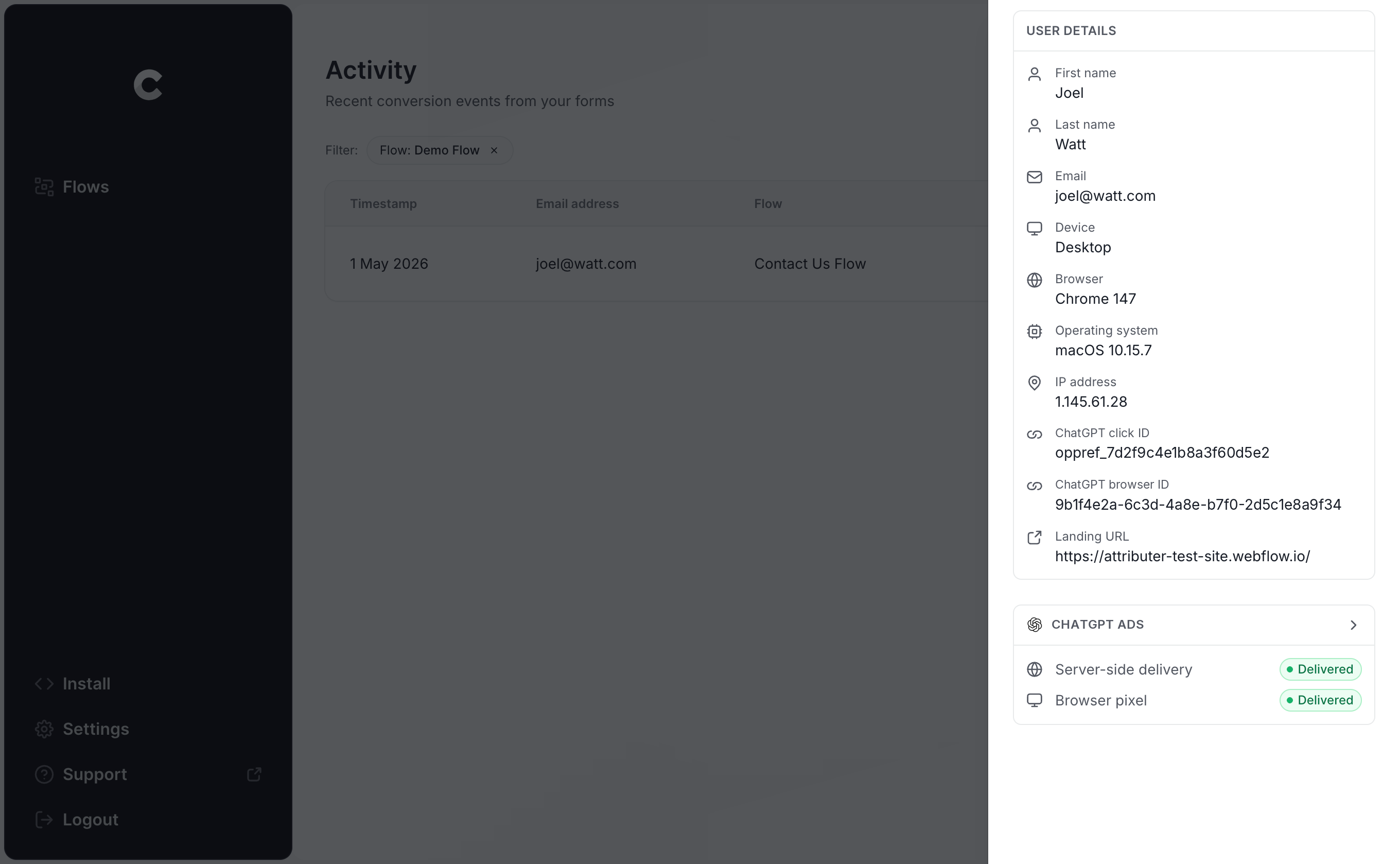
For a more detailed look, you can also open the exact payload Converly sent to ChatGPT Ads (including the click ID, browser ID and hashed email address) and the response that came back from OpenAI's server.
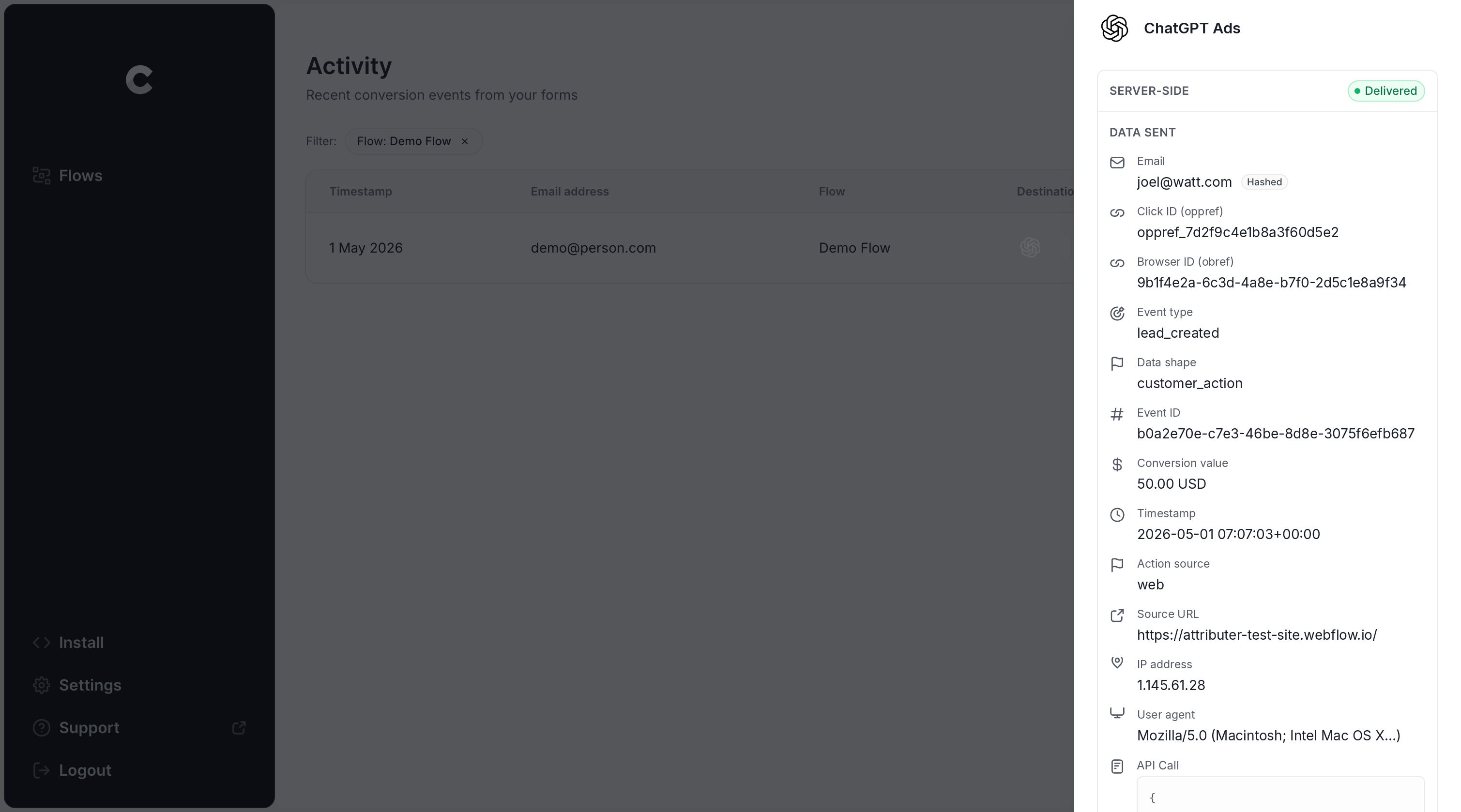
When your test appears in the log marked as successfully delivered to ChatGPT Ads, you're all set. The whole process usually takes most people about 5-10 minutes to set up.
Why Converly is the best way to send conversions to ChatGPT Ads from Fluent Forms
There's more than one way to get a conversion into ChatGPT Ads each time a Fluent Form is submitted, so why go with Converly? Here's what sets it apart:
1. Easy to set up
Building this yourself is no small task. You'd have to write code that detects when a Fluent Form has been submitted (and because Fluent Forms submits in the background via AJAX, there's often no page load or thank you page to latch onto), collect the click ID and browser cookie, extract the name, email address and phone number from the form, hash them with SHA-256, structure the payload exactly the way OpenAI wants it, and finally post it to the Conversions API. On top of that, you'd be responsible for API keys, deduplication, retries, logging, consent management and more.
Converly takes care of the lot for you. You simply choose a trigger (a Fluent Forms submission) and an action (a conversion sent to ChatGPT Ads), and Converly handles everything else. No custom code, no API keys to look after, just conversion tracking that works.
And it's even simpler if you use an AI tool like ChatGPT or Claude. Just install the Converly plugin, ask it to 'Set up ChatGPT Ads tracking for my Fluent Forms', and it will do the setup for you!
2. Not affected by ad blockers and privacy restrictions
If you only use the ChatGPT Ads Measurement Pixel (and don't also send conversions server-side through the Conversions API), a meaningful share of your conversions will never get to OpenAI, because ad blockers and privacy-focused browsers prevent the pixel from loading when the visitor lands on your site (so nothing they do gets tracked).
In fact, one study looking at over 7 million conversions found that browser-based tracking missed about 30% of them. In other words, nearly a third of your conversions would simply never be counted if you didn't use a tool like Converly to send every conversion down both paths (through the browser to the ChatGPT Measurement Pixel, and server-side to the Conversions API).
3. Works across devices
Leads very often discover your website on one device (like browsing on their phone while waiting for a coffee) and then return later on another device (like their work laptop) to fill out your form.
If you're using tools like Google Tag Manager, that conversion can't be tied back to the ad click, because the click and the form submission happened in separate browsers on separate devices.
Converly solves this issue. It captures the click ID (the oppref) and sends it to ChatGPT Ads together with the lead's name, email address and phone number, which gives ChatGPT Ads what it needs to match the conversion to a real ChatGPT user (and the specific ad they clicked).
4. Gives you a full conversion log and email alerts
The majority of other ways to track ChatGPT Ads conversions (Google Tag Manager being a common example) don't give you any easy way to check that everything is still working.
You might test it all on the first day, but if someone later changes your Fluent Form's confirmation setting from showing a message to redirecting to a page, or they rebuild the page the form sits on, or they adjust something in ChatGPT Ads Manager, then your tracking could stop working and nobody would notice.
Converly solves that issue too. You get a full conversion log of every Fluent Forms submission, showing what data was collected, exactly what was sent to ChatGPT Ads, and whether it was accepted or not.
You can also turn on email notifications to hear about every new conversion and its status. So if anything ever breaks, you'll know about it straight away.
5. Supports multiple tools and platforms
Converly can detect conversions in over 100 form builders, booking tools, chat widgets, etc. And when it comes to delivering them, it can send conversions to ChatGPT Ads, Google Ads, Meta Ads, LinkedIn Ads, Microsoft Ads, Google Analytics, and many more.
That means if you advertise on Google Ads or Meta Ads as well as ChatGPT Ads, you don't need to build a separate setup for each platform. Just add them as additional actions in your Conversion Flow and every Fluent Forms submission is sent to all of them simultaneously.
6. Provides free support
The team behind Converly has more than 20 years of experience in analytics and conversion tracking, and they're available to help you get everything up and running. You can reach us by email or book a call directly from inside the app.
Tools like Google Tag Manager don't come with any support at all, so if something isn't working, you're left to figure it out on your own.
2 things you can do when you properly send conversions to ChatGPT Ads from Fluent Forms
When accurate conversion data starts flowing from your Fluent Forms into ChatGPT Ads, a couple of really useful things become possible.
1. See which campaigns and ads actually produce leads
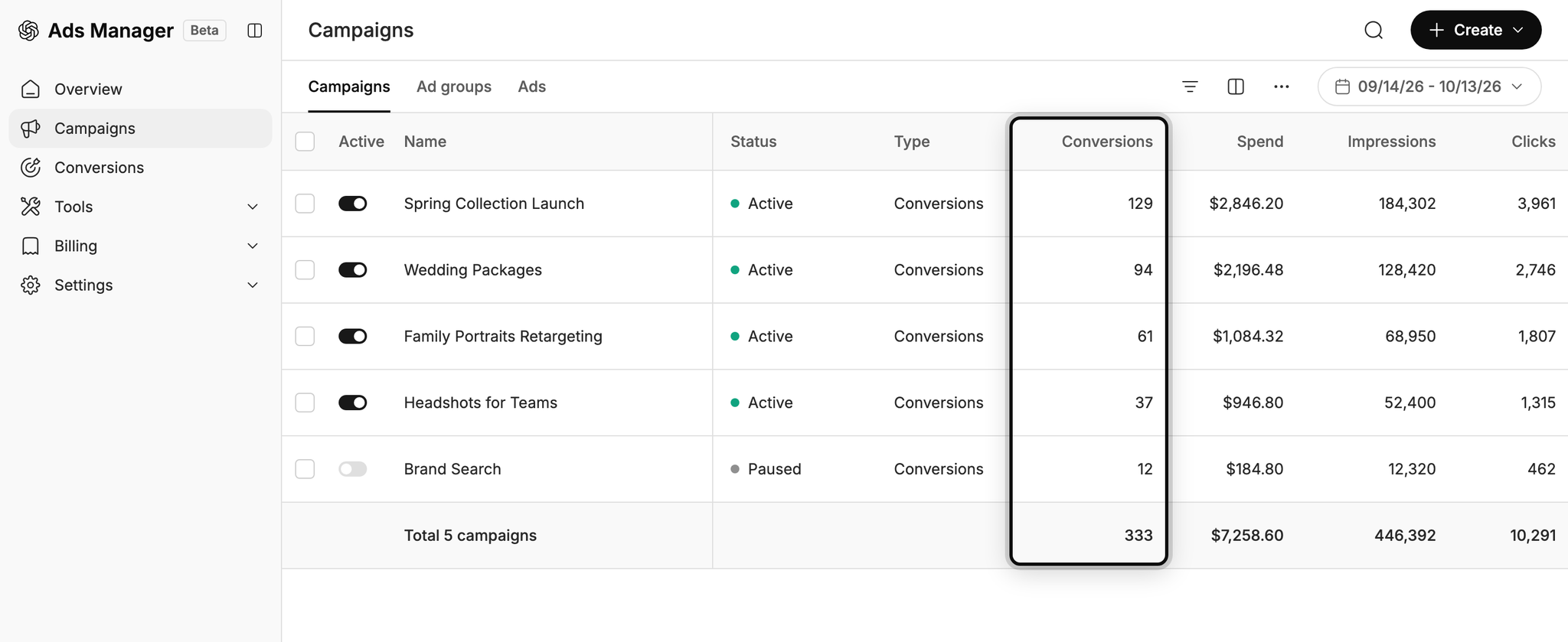
Without good conversion tracking, ChatGPT Ads can only show you impressions and clicks, which doesn't tell you much about whether your campaigns are actually working.
Once you have reliable conversion data coming in, you can see how many leads each campaign and ad generates, what you're paying per lead, and where the best opportunities are to get even more leads.
2. Let OpenAI's algorithm find you more of the right people
As we mentioned earlier, ChatGPT Ads uses AI to choose who sees your ads and which conversations they appear in.
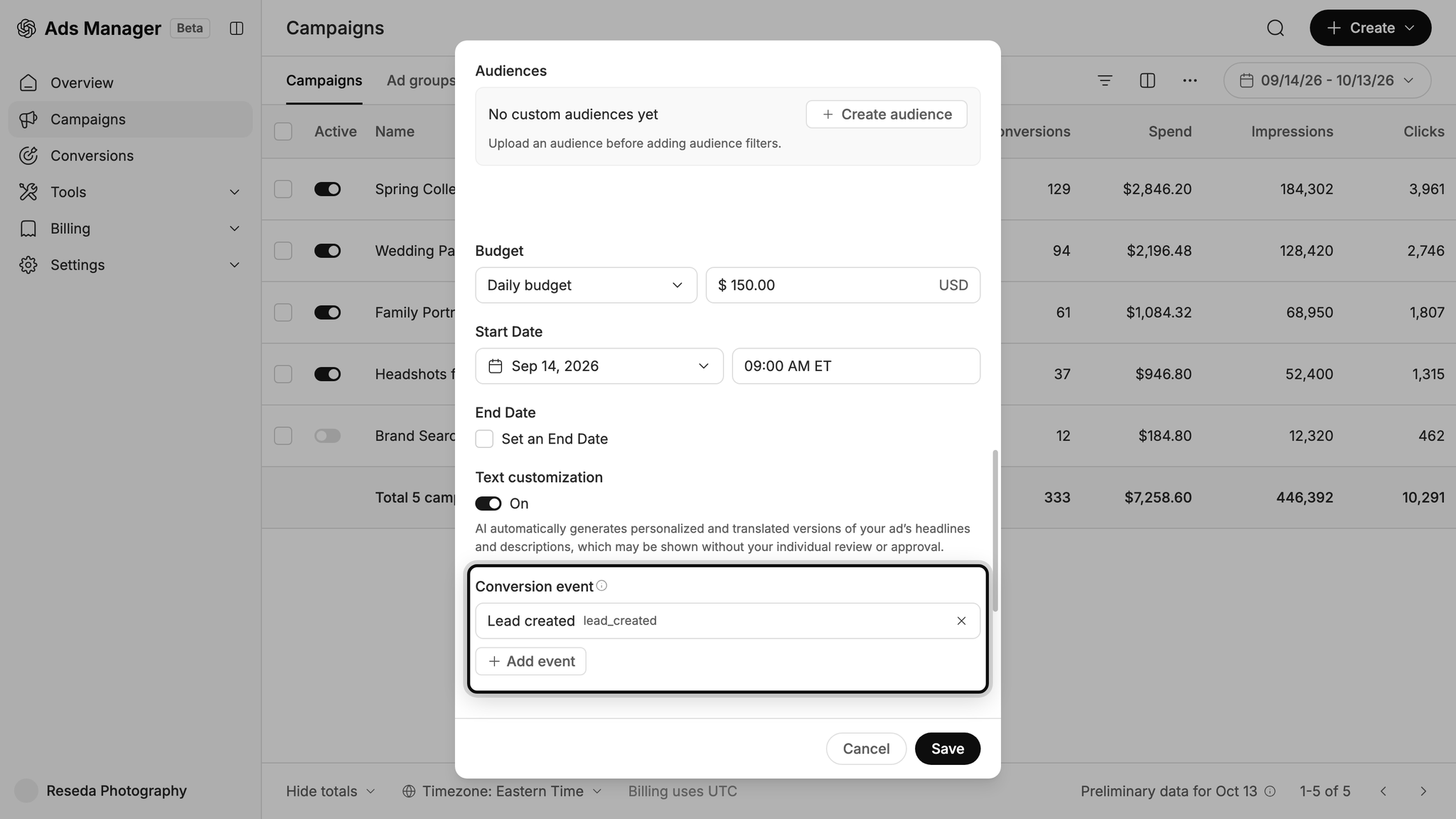
When your conversion tracking is set up properly, that AI finally has the data it needs to learn what a good lead looks like for your business (and what kind of conversations to insert your ad into). It then starts putting your ads in front of the right people at the right time, so you end up with more leads at a lower cost.
Wrap Up
If you'd like to send a conversion to ChatGPT Ads every time someone submits a Fluent Form on your WordPress website, Converly is the easiest (and best) way to do it.
Since conversions are sent directly to OpenAI's servers, ad blockers and privacy-focused browsers can't get in the way. And because every conversion includes all the identifiers OpenAI uses for matching (the click ID, name, email address and more), each one has the best possible chance of being linked back to a real ChatGPT user and the ad they originally clicked (which means it will show up in your reports).
Best of all, setup takes just a few minutes and there's a 14-day free trial (no credit card required), so start your free trial today!
About the author

Aaron is the founder of Converly. With over 15 years of experience in digital marketing and SaaS, he's passionate about helping businesses track and optimise their ad conversions.