


Track ActiveCampaign form submissions as conversions in ChatGPT Ads
Learn how to send a server-side conversion to ChatGPT Ads every time someone submits an ActiveCampaign form on your website.
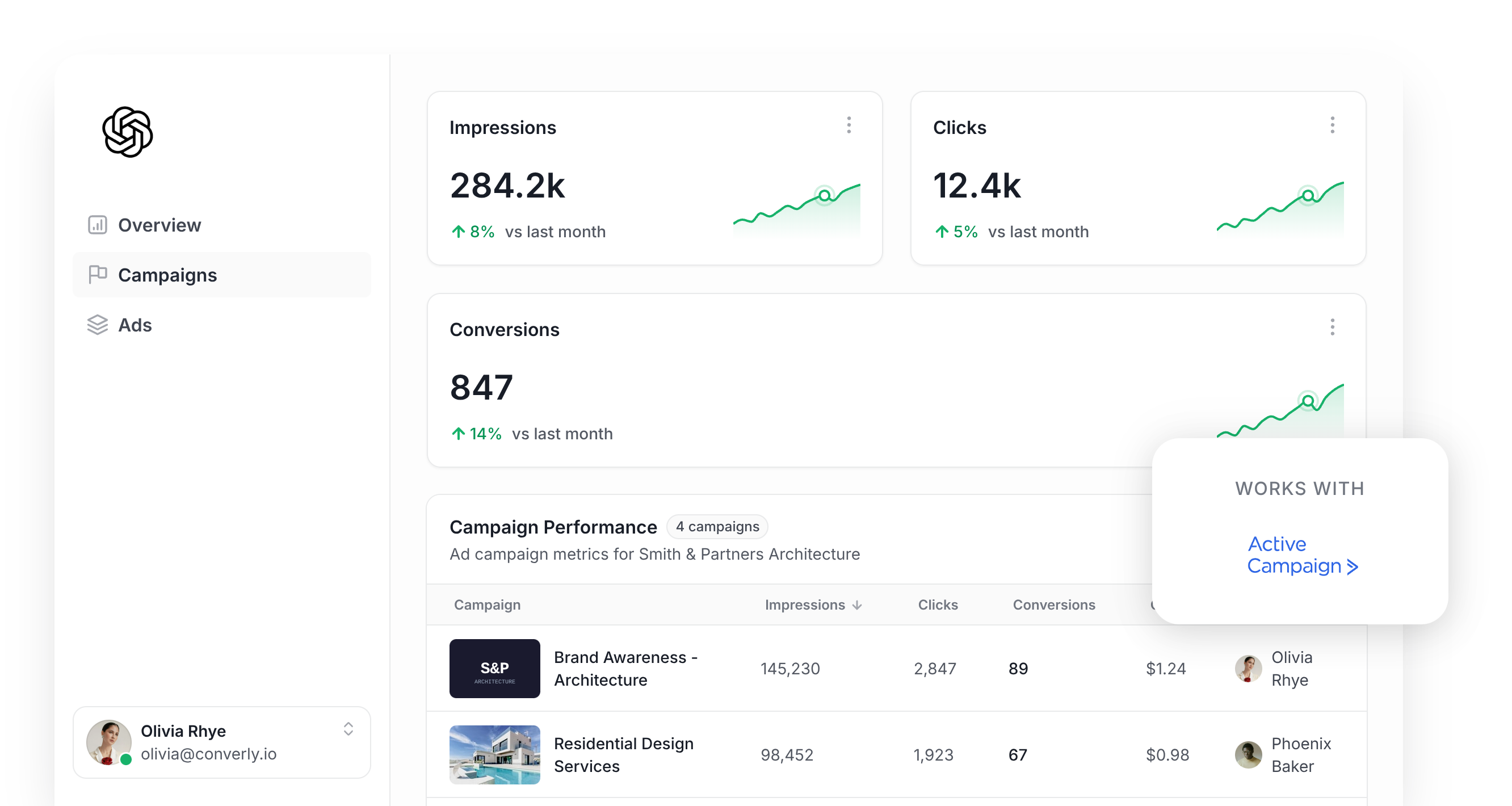
Imagine hiring a salesperson to call potential customers, and then never telling them which of their calls worked and which ones didn't. They’d keep calling random people and saying random things, and they’d never get better at picking who to call and what to say.
That’s basically how your ChatGPT Ads account is running if you don't have proper conversion tracking set up.
ChatGPT Ads uses AI to decide who to show your ads to and which conversations your ads should appear in, and without knowing which clicks became leads, it’s working blind. Because there are no keywords to fall back on, the data you send back is the only thing steering it.
In this guide, we’ll show you how to send a conversion to ChatGPT Ads every time a visitor submits an ActiveCampaign form, so the AI learns who your real leads are.
What proper conversion tracking looks like in ChatGPT Ads
When it comes to conversion tracking in ChatGPT Ads, there are really 2 things you need to get right. The first is making sure every conversion actually makes it back to ChatGPT Ads. The second is making sure each one includes enough information on the lead for ChatGPT Ads to tie it back to a real person and the original ad that person clicked.
Let's look at each one in a bit more detail:
Getting every conversion delivered
Most people set up conversion tracking by adding the ChatGPT Measurement Pixel to their website and calling it a day. The trouble is that the pixel relies on the visitor's browser to send the conversion back to ChatGPT Ads, and ad blockers and built-in privacy features stop that from happening all the time.
In fact, industry research suggests that approach can lose 30% or more of conversions. That means if you only used the pixel, you'd see far fewer leads in your reports than you're actually getting, and ChatGPT's algorithm would have much less information to work with when choosing who sees your ads.
That's why OpenAI recommends sending each conversion along 2 paths at once. The first goes through the visitor's browser via the Measurement Pixel, and the second goes straight to ChatGPT via the Conversions API (this second path is what people mean when they talk about "server-side tracking"). The idea is that, if a browser blocks the pixel, the server-side conversion still gets through.
Making sure each conversion can be matched
Getting the conversion over to ChatGPT Ads is only half the battle. Once it arrives, the platform has to match it back to a real person and the specific ad they clicked (and any conversion it can't connect simply isn't counted). There are a few things that make this quite hard to do consistently:
- Browser privacy features - Browsers built around privacy (like Safari) only keep tracking cookies for a short time, often 7 days or less. So when someone clicks your ad on a Tuesday and returns 2 weeks later to fill in your ActiveCampaign form, the cookie that linked them to that ad click has already been deleted.
- Switching devices - It's very common for someone to tap an ad on their phone and then come back later on another device (like their laptop) and submit the form then. Because the click happened on one device and the conversion on another, there's no shared cookie to connect the two events together.
- Switching browsers - Lots of people use the ChatGPT app on their phone. When they tap your ad, your site opens inside the app's built-in browser and the cookies get stored there (totally separate from Safari, Chrome or whatever browser they normally use). If they later visit your site in their usual browser and submit your form, the cookie isn't there to link the conversion back to the ad click.
The fix for all 3 situations is to include extra information about the lead with every conversion you send. That includes their name, email address and phone number, along with the Click ID (which ChatGPT Ads calls the oppref), their IP address and their User Agent. ChatGPT Ads then uses these details to match the conversion to a real ChatGPT user, and from there to the ad they first clicked.
3 simple steps to send proper, server-side conversions to ChatGPT Ads from ActiveCampaign
So now that you know what a good conversion tracking setup looks like, let's walk through the easiest way to set it up for the ActiveCampaign forms on your website.
Step 1: Build your Conversion Flow in Converly
Converly is a dedicated conversion tracking tool that makes it easy to send proper, server-side conversions to ChatGPT Ads whenever a visitor submits an ActiveCampaign form on your website.
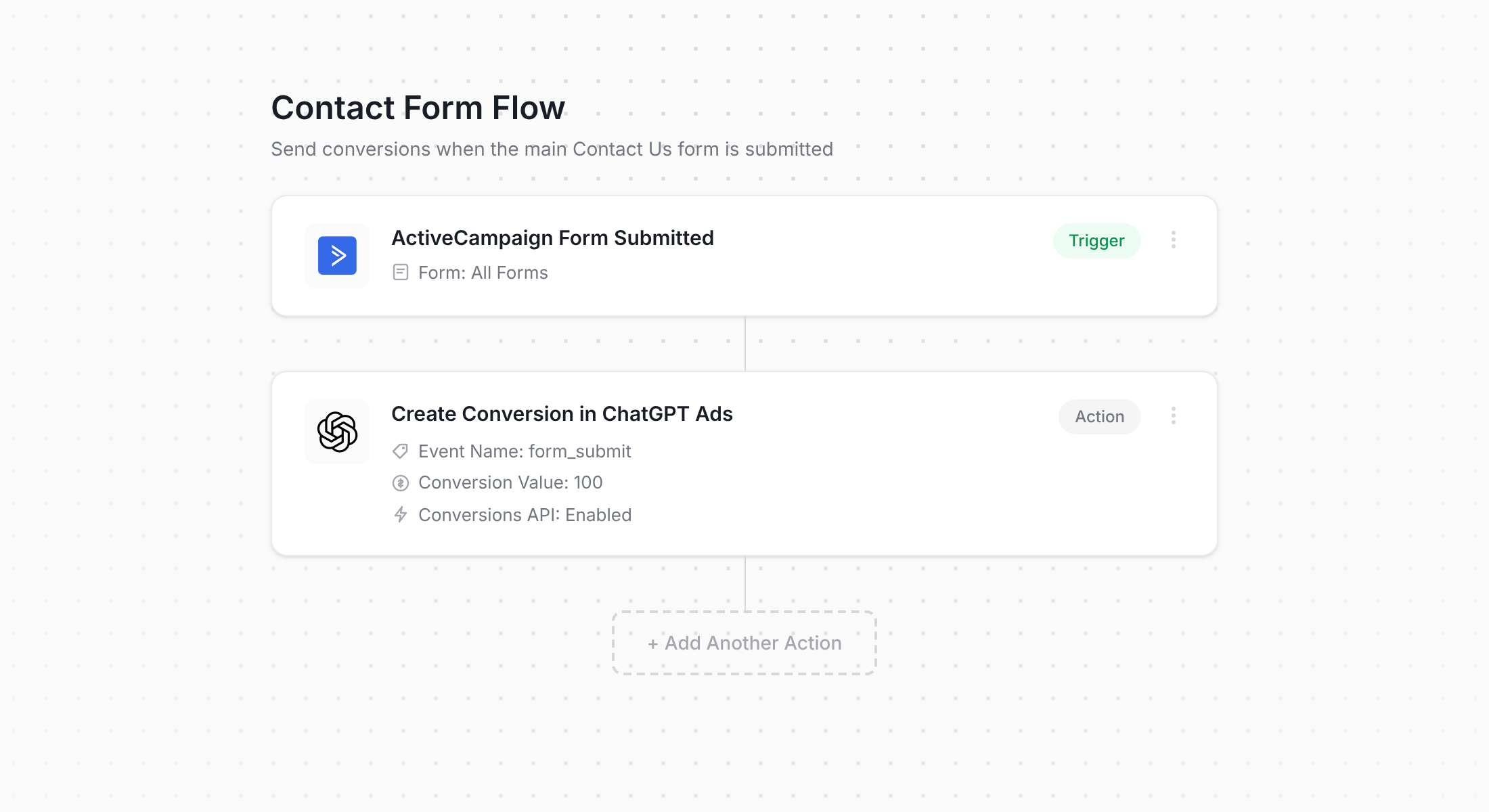
The screenshot above shows the Converly flow builder. If you've ever set up an automation in ActiveCampaign itself (or built a Zap in Zapier), the whole thing will feel very familiar.
First, you choose a trigger (like someone submitting one of your ActiveCampaign forms), and then you choose the action that should follow (like sending a conversion to ChatGPT Ads). That really is the whole process. With a few clicks, you've got server-side conversion tracking for ChatGPT Ads live and working.
It's even quicker if you use an AI assistant like Claude or ChatGPT. Install the Converly plugin, ask it to 'Set up ChatGPT Ads conversion tracking for my ActiveCampaign forms', and it will do the whole thing for you!
Step 2: Add the Converly code to your website
Once your Conversion Flow is built and published, Converly will give you a little code snippet to place on your website.
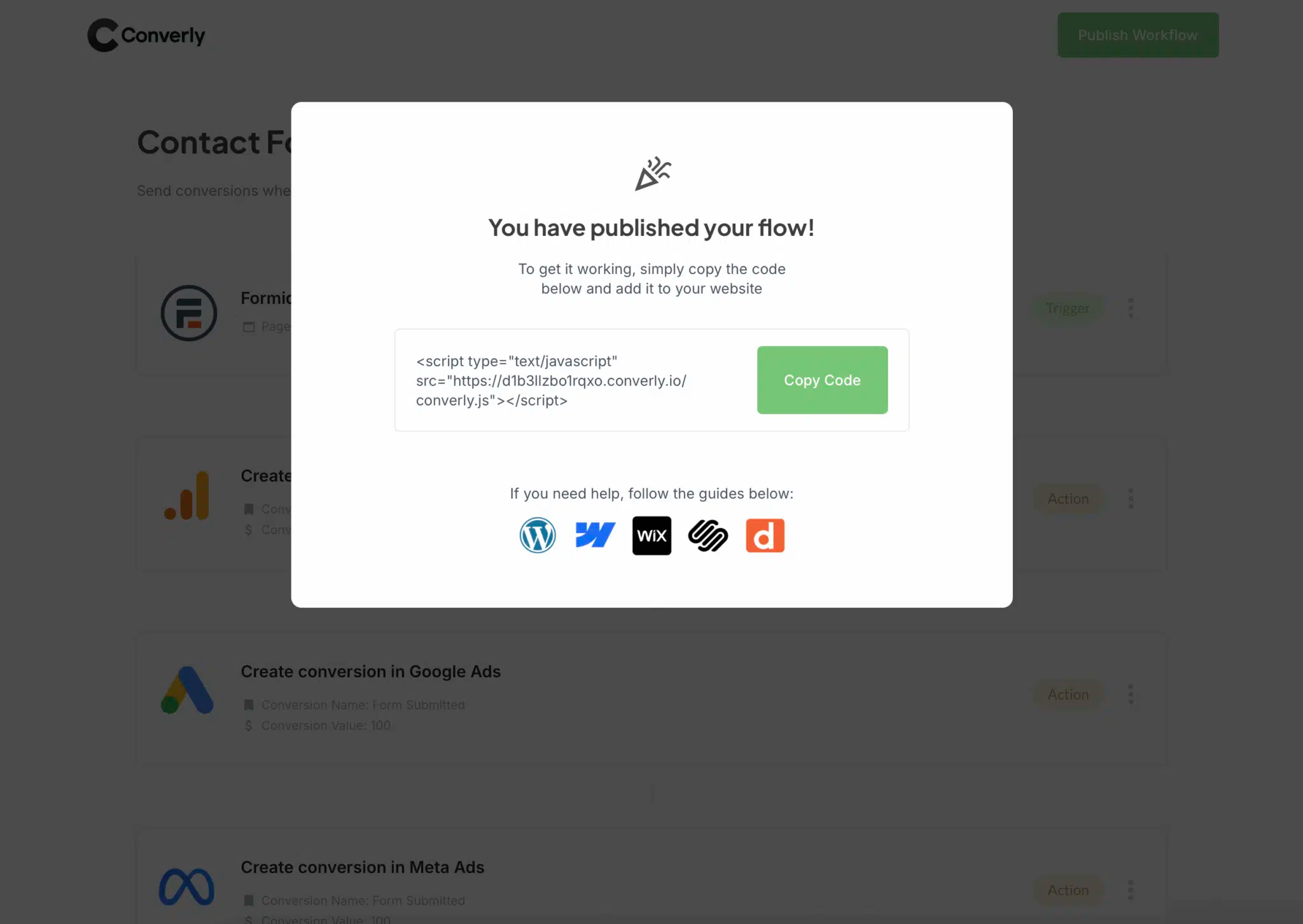
Because ActiveCampaign forms are embedded on your own website, the snippet goes on that website (not inside ActiveCampaign). If you use WordPress, Wix or Webflow then you can just install the Converly plugin, sign in to your account, and it will work automatically. If you already run your scripts through Google Tag Manager, you can add it there instead.
Step 3: Test it works
With the code in place, it's time to make sure everything is working properly. Head to a page on your website that has one of your ActiveCampaign forms and submit it yourself.
After that, go back into Converly and click 'Logs' in the main navigation.
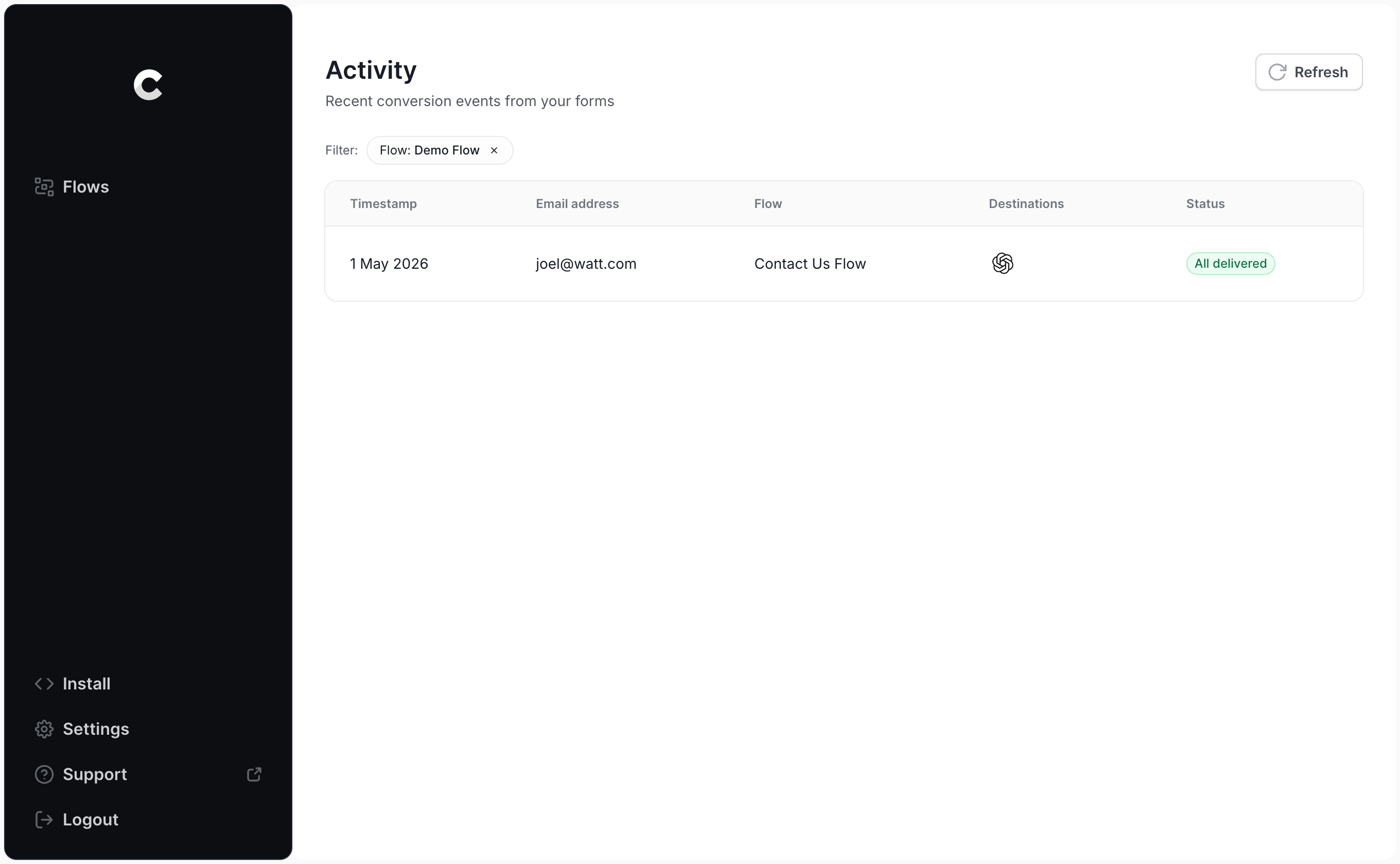
Look for your test submission in the list and click into it. You'll see everything Converly captured about that submission, as well as whether the conversion made it to ChatGPT Ads.
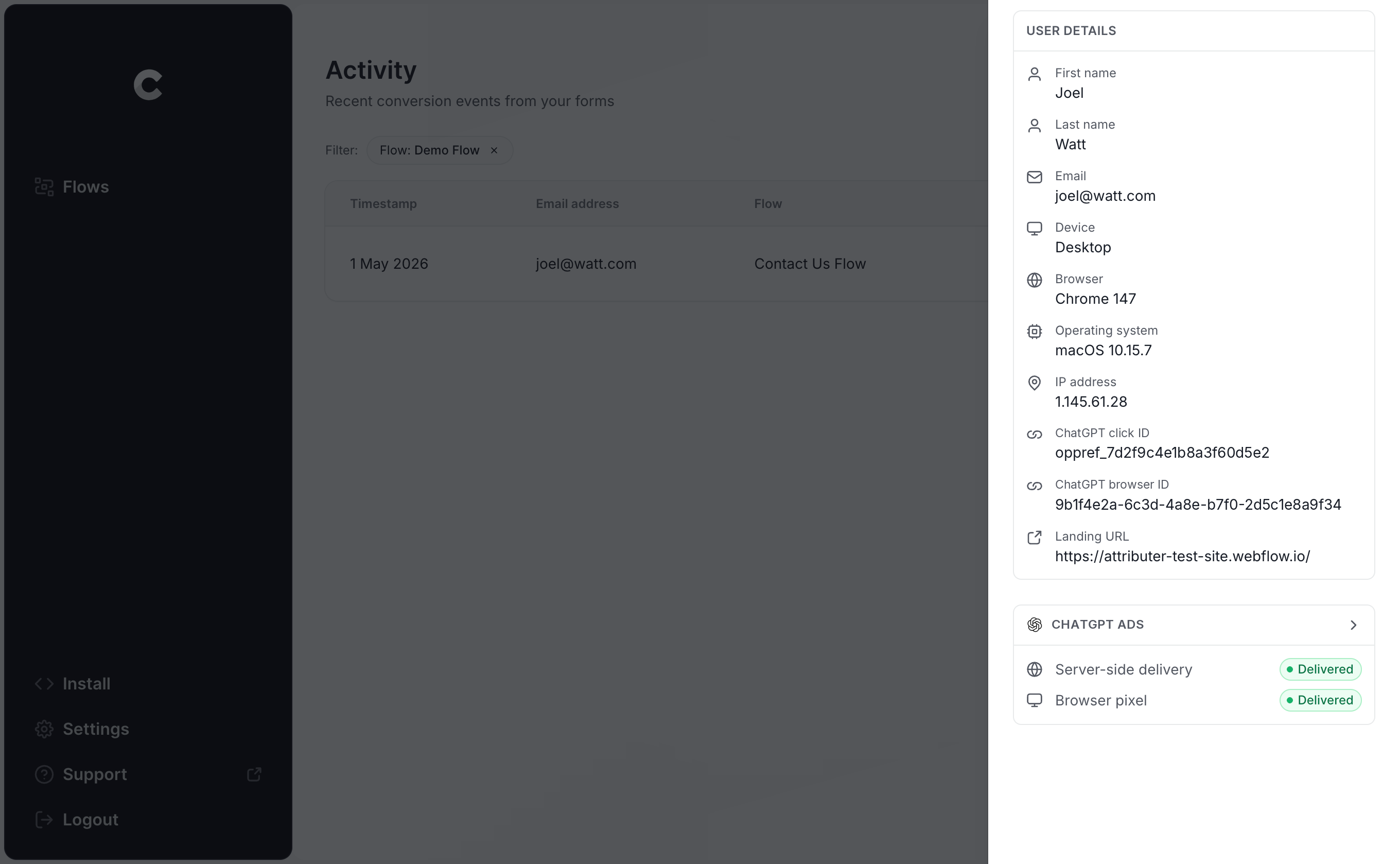
For a closer look, you can click into it and see the exact payload Converly sent to ChatGPT Ads (including the click ID, browser ID and hashed email address) and the response that came back from OpenAI's server.
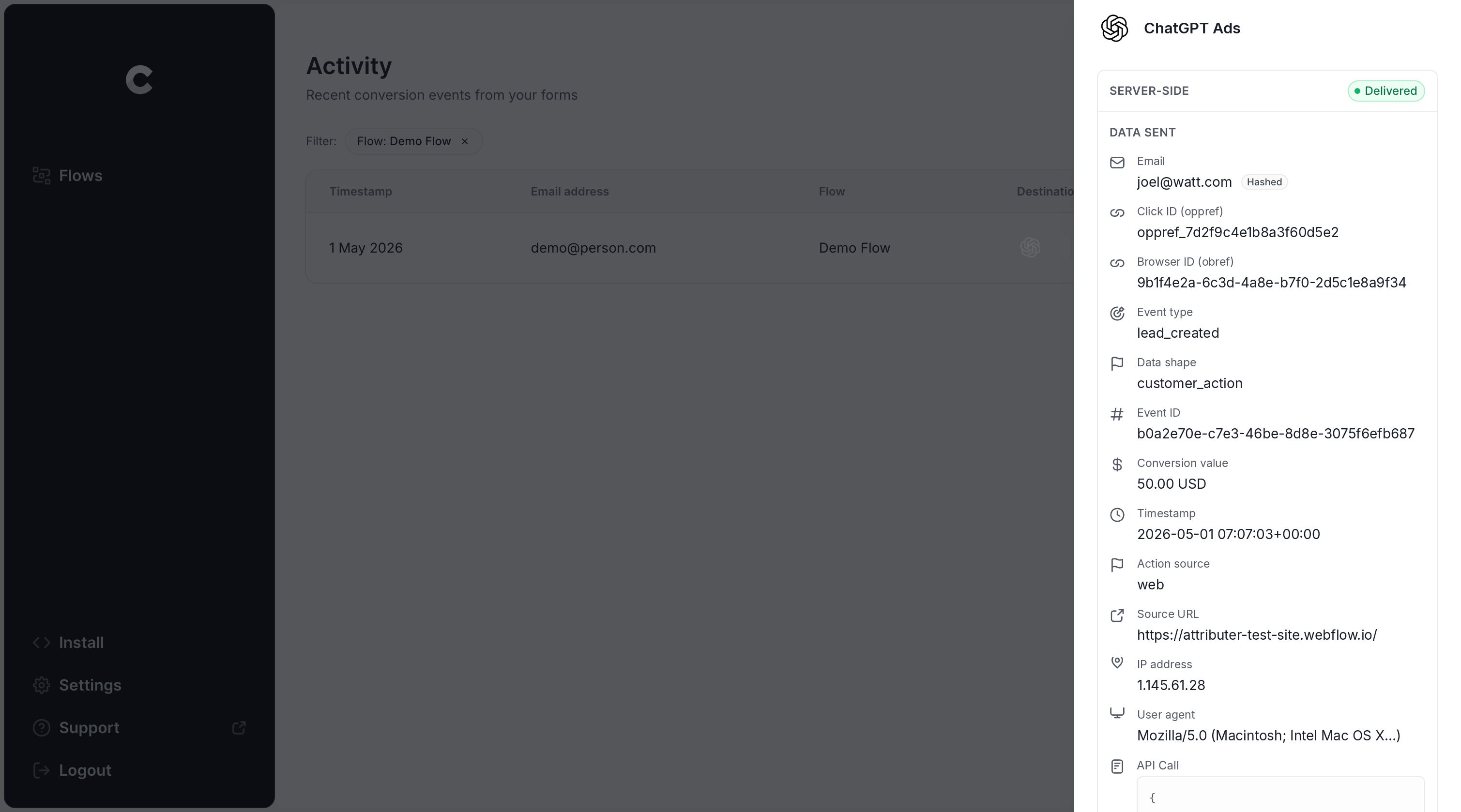
As soon as your test submission shows up in the log as successfully delivered to ChatGPT Ads, your conversion tracking is up and running. The entire setup usually takes less than 5 minutes.
Why Converly is the best way to send conversions to ChatGPT Ads from ActiveCampaign
There are other ways to send a conversion to ChatGPT Ads when an ActiveCampaign form is submitted, so what makes Converly the better choice? Here's how it stands apart:
1. Easy to set up
Doing it yourself is a big job (particularly if you want to do it properly). You'd need code that detects when an ActiveCampaign form is submitted, picks up the click ID and browser cookie, pulls the lead's name, email and phone number out of the form fields, hashes those details with SHA-256, and then sends the whole lot to ChatGPT Ads in the precise format OpenAI requires. On top of that, you'd have to handle API keys, deduplication, retries, the security of all that personal data, and plenty more.
Converly takes all of that off your plate. You pick a trigger (an ActiveCampaign form submission), pick an action (a conversion sent to ChatGPT Ads), and Converly handles the rest. You won't write any custom code or manage any API keys, and your conversion tracking simply works.
And if you're already using an AI tool like Claude or ChatGPT, just install the Converly plugin, ask it to 'Set up ChatGPT Ads tracking for my ActiveCampaign forms', and it will take care of the setup for you!
2. Not affected by ad blockers and privacy restrictions
If you rely on the ChatGPT Ads Measurement Pixel alone (and don't send conversions server-side through the Conversions API as well), a large share of your conversions will never reach OpenAI, because ad blockers and privacy-focused browsers prevent the pixel from loading at all.
A study of more than 7 million conversions found that browser-based tracking missed about 30% of conversions. Or put another way, close to a third of your conversions would never be counted.
Converly sends each conversion through both paths (via the browser to the ChatGPT Measurement Pixel and server-side to the Conversions API), so your conversions reach ChatGPT Ads regardless of the ad blockers or privacy settings your visitors use.
3. Sends more data
As soon as someone lands on your website, Converly captures and stores the ChatGPT click ID, the browser cookie dropped by the ChatGPT Ads pixel, and the visitor's user agent. Then, when that person submits an ActiveCampaign form, Converly grabs their name, email and phone number from the form and sends it all to ChatGPT Ads along with the conversion.
That gives ChatGPT Ads the data it needs to match each conversion back to a real person and the original ad they clicked, so all of your conversions get counted regardless of what device they converted on, when they converted, etc.
4. Supports multiple tools and platforms
Converly can detect conversions in over 100 form builders, scheduling tools, chat widgets, and more. It can also send those conversions to ChatGPT Ads, Google Ads, Meta Ads, LinkedIn Ads, Microsoft Ads, Google Analytics and a long list of other platforms.
That means if you run Google Ads or Meta Ads as well as ChatGPT Ads (which you likely do), you don't need a separate setup for each platform. Simply add them as additional actions in your Conversion Flow, and every ActiveCampaign form submission goes to all of them at once.
5. Gives you a full conversion log and email alerts
Most other ways of setting up conversion tracking (like using Google Tag Manager) give you no way of knowing whether it's working or not.
You can test everything on the day you set it up, but if someone later updates the ActiveCampaign form, or switches the form's submit action from showing a thank you message to opening a new URL, your tracking can stop working without anyone realizing.
Converly takes away that uncertainty. You get a full conversion log showing every conversion that came from your ActiveCampaign forms, the data that was captured, exactly what went to ChatGPT Ads, and whether it was accepted.
You can also turn on email notifications (either for every conversion or only for failures), so if anything ever breaks, you'll hear about it straight away.
2 things you can do when you properly send conversions to ChatGPT Ads from ActiveCampaign
When accurate conversion data from your ActiveCampaign forms is flowing into ChatGPT Ads, a couple of things become possible that you simply can't do without it.
1. See which campaigns and ads actually produce leads
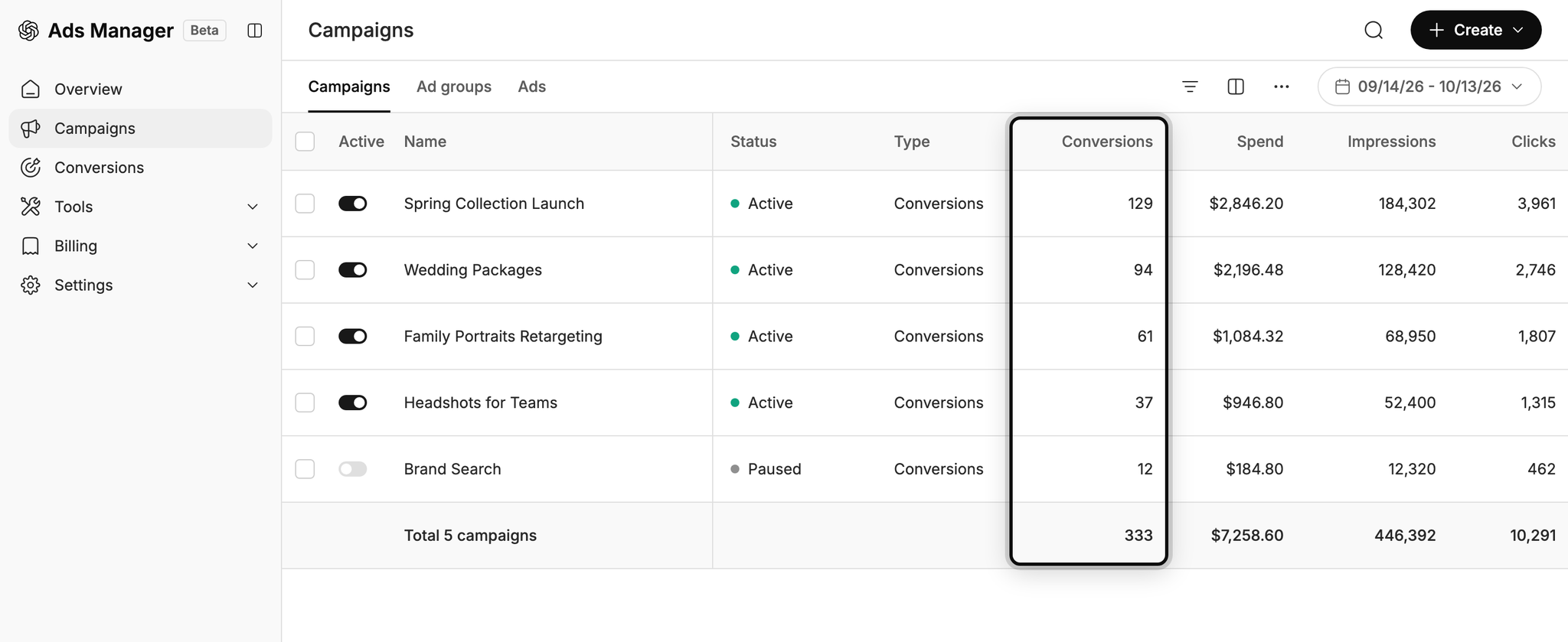
Without proper conversion tracking, the only things ChatGPT Ads can really report on are impressions and clicks.
Once reliable conversion data is coming through, you can see exactly how many leads each campaign and ad is generating, how much you're paying for each of those leads, and where the best opportunities to get more leads are.
2. Let OpenAI's algorithm find you more of the right people
Behind the scenes, ChatGPT Ads uses advanced AI to choose who it shows your ads to and which conversations they appear in.
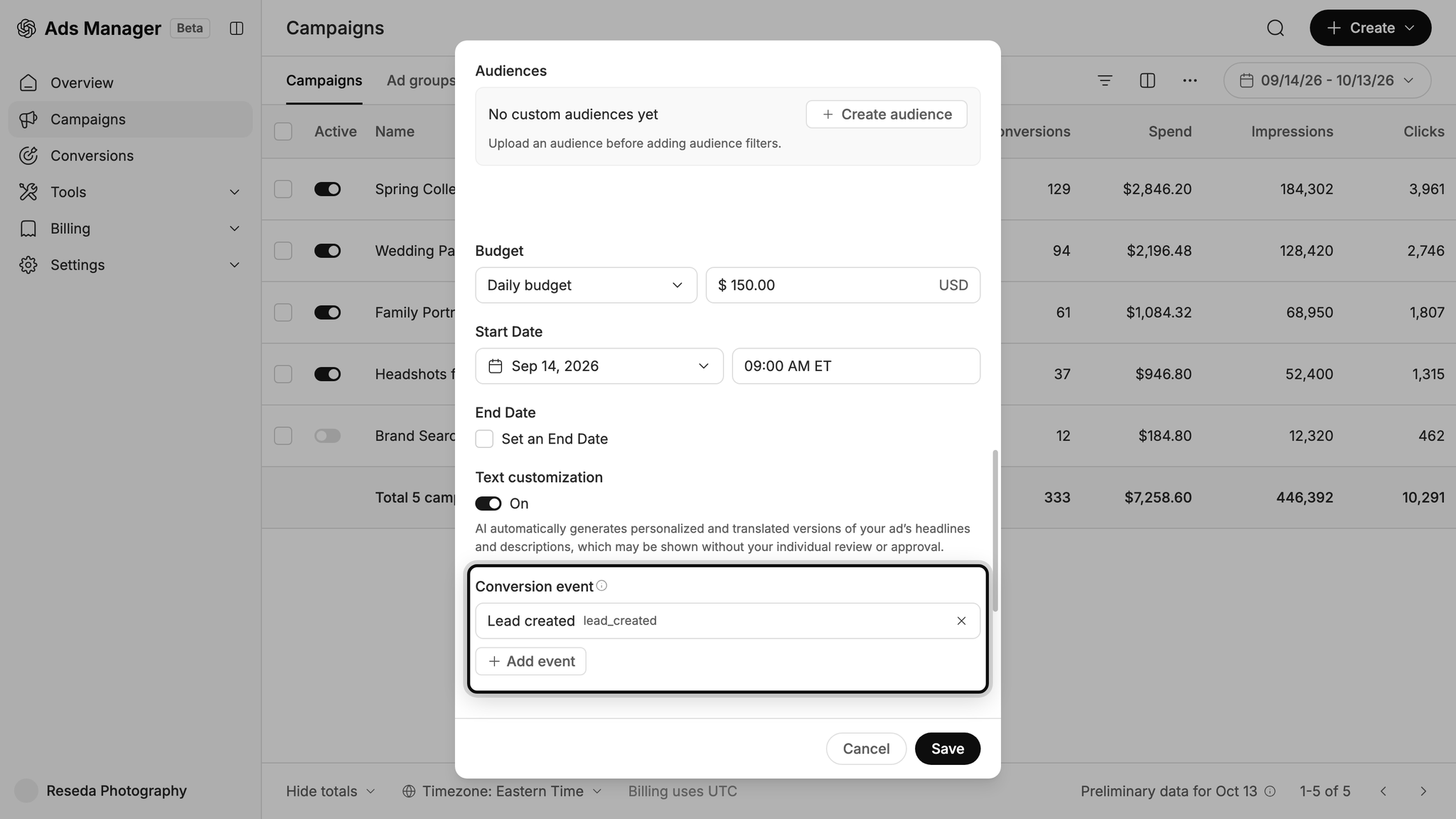
When your conversion tracking is set up properly, that AI gets the data it needs to understand what a good lead looks like for your business. It then uses that knowledge to show your ads to the right people at the right time (i.e. in relevant conversations) moving forward. This ultimately means you get more leads at a lower cost per lead.
Wrap Up
If you need to send a conversion to ChatGPT Ads every time someone submits an ActiveCampaign form on your website, Converly is the simplest (and best) way to do it.
Since it sends conversions directly to OpenAI's servers, ad blockers and privacy-focused browsers can't stop them getting through. And because it sends the lead's name, email, phone, click ID and more with each conversion, there's a high chance the conversion can be matched back to a real user and the original ad they clicked (which means it will actually show up in your reports).
Best of all, setup takes just a few minutes and there's a 14-day free trial (no credit card needed), so start your free trial today!
About the author

Aaron is the founder of Converly. With over 15 years of experience in digital marketing and SaaS, he's passionate about helping businesses track and optimise their ad conversions.