


Track ActiveCampaign form submissions as conversions in Google Ads
Learn how to send server-side conversions to Google Ads whenever someone submits an ActiveCampaign form on your website. No code required!
Google Ads can bring a steady stream of new leads and customers into your business. The tricky part is getting conversion tracking set up properly so you actually know which clicks turn into leads.
If you go down the Google Tag Manager route, you're looking at writing custom code to detect form submissions and then wiring up triggers, tags, variables and a pile of other fiddly settings.
And the simpler approaches, like counting visits to a thank you page, tend to leak. You can lose as much as 30% of your conversions to ad blockers, to privacy protections baked into browsers such as Safari, or to people who tap your ad on their phone but don't actually convert until they're back at their laptop.
So where does that leave you?
This guide walks you through a cleaner approach. We'll show you how to record a proper conversion in Google Ads every time someone submits an ActiveCampaign form on your site, using a method called server-side tracking.
Why you need to send conversions to Google Ads server-side
Accurate conversion tracking is the foundation of everything that works well in Google Ads.
That's because Google Ads runs on smart bidding, which weighs thousands of signals (someone's location, their past purchases, the time of day and so on) to judge how likely a given person is to buy what you sell. It then bids more or less aggressively in the ad auction based on how good a fit it thinks that person is.
For any of that to work, Google needs to know who actually converted and who didn't. Feed it that information and it quickly learns what your best customers look like.
The trouble with most conversion methods (counting thank you page views, or wiring things up in Google Tag Manager) is that they report conversions through the visitor's browser. And relying on the browser causes a few problems:
- Ad blockers. When a visitor runs an ad blocker, the Google Tag never fires, so none of their activity on your site gets recorded.
- Browser privacy features. Browsers like Safari actively limit how long the Google Tag can follow a visitor, often to a single day. So if someone clicks your ad today and converts 3 days later, that conversion can't be tied back to the original ad click.
- Multiple devices. A lead might first click your ad on their work computer and then come back to convert on their phone or home laptop. When that happens, the browser can't connect the later conversion to the original click.
Server-side tracking sidesteps all of this. Rather than sending the conversion through the visitor's browser and hoping it works, you send a direct, private message straight to Google's servers containing the lead's details. Because it never depends on the browser, ad blockers and privacy settings can't get in the way.
And the difference is real. Google's own figures show that businesses moving to server-side tracking see roughly a 23% lift in the total conversions they record, alongside a 10% drop in cost per conversion. This is because when you have better conversion data, Google's algorithms can learn who your ideal customers are faster and target your ads more effectively.
3 simple steps to send server-side conversions to Google Ads from ActiveCampaign
Here are the 3 steps to connect ActiveCampaign and Google Ads with server-side conversion tracking.
Step 1: Build your Conversion Flow in Converly
Converly is built to make sending server-side conversions from ActiveCampaign to Google Ads about as painless as it gets.
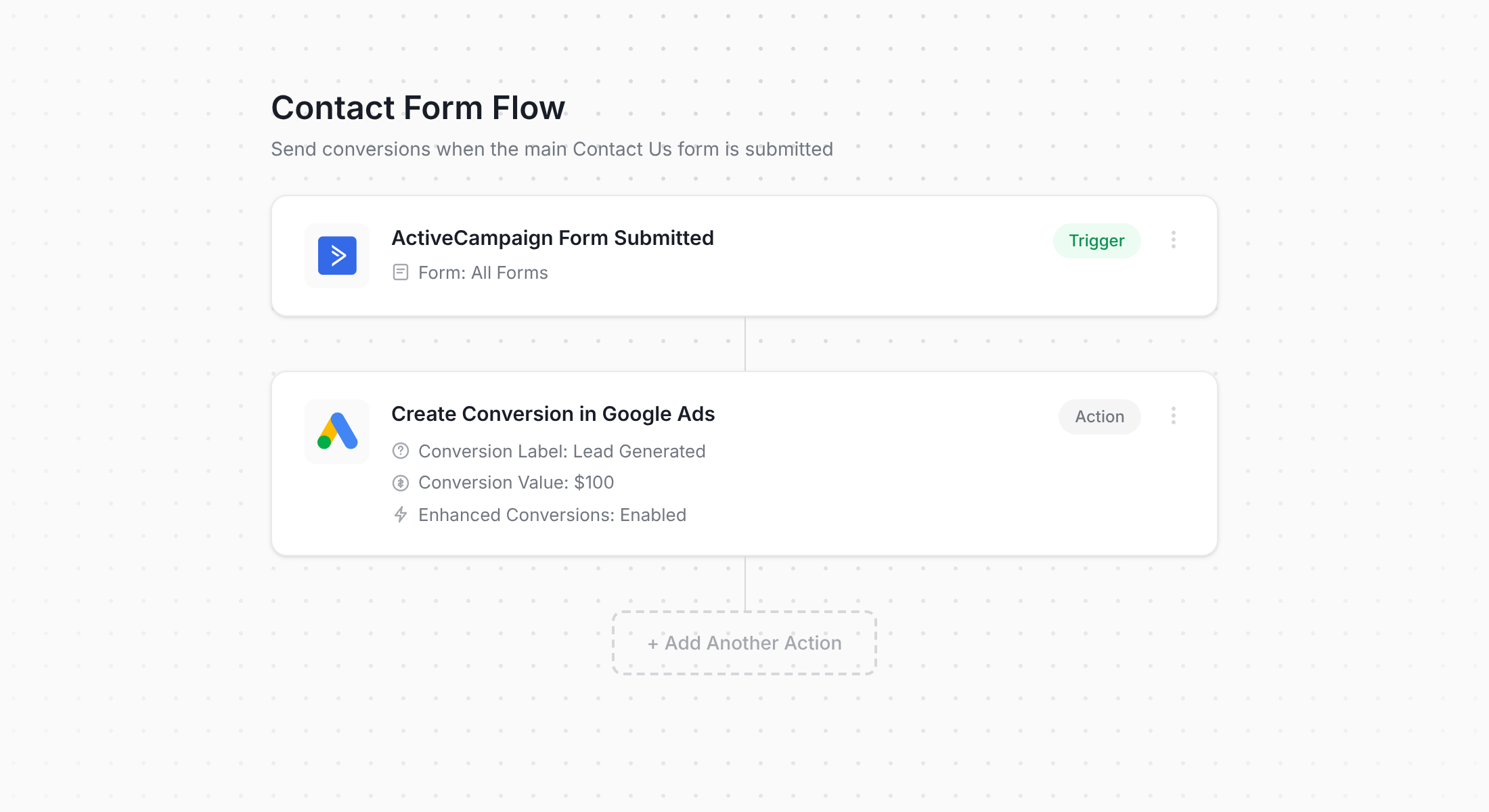
The screenshot above shows the conversion flow builder inside Converly. If you've ever used Zapier or even ActiveCampaign's own automation builder, you'll recognise how this works immediately.
You start by choosing a trigger, which in this case is somebody submitting one of your ActiveCampaign forms. Then you choose the actions that should follow, such as firing a conversion off to Google Ads.
That really is the whole job. A few clicks and your server-side conversion tracking is live.
Step 2: Add the Converly code to your website
After you've built your Conversion Flow and hit publish, Converly hands you a short snippet of code to drop onto your website.
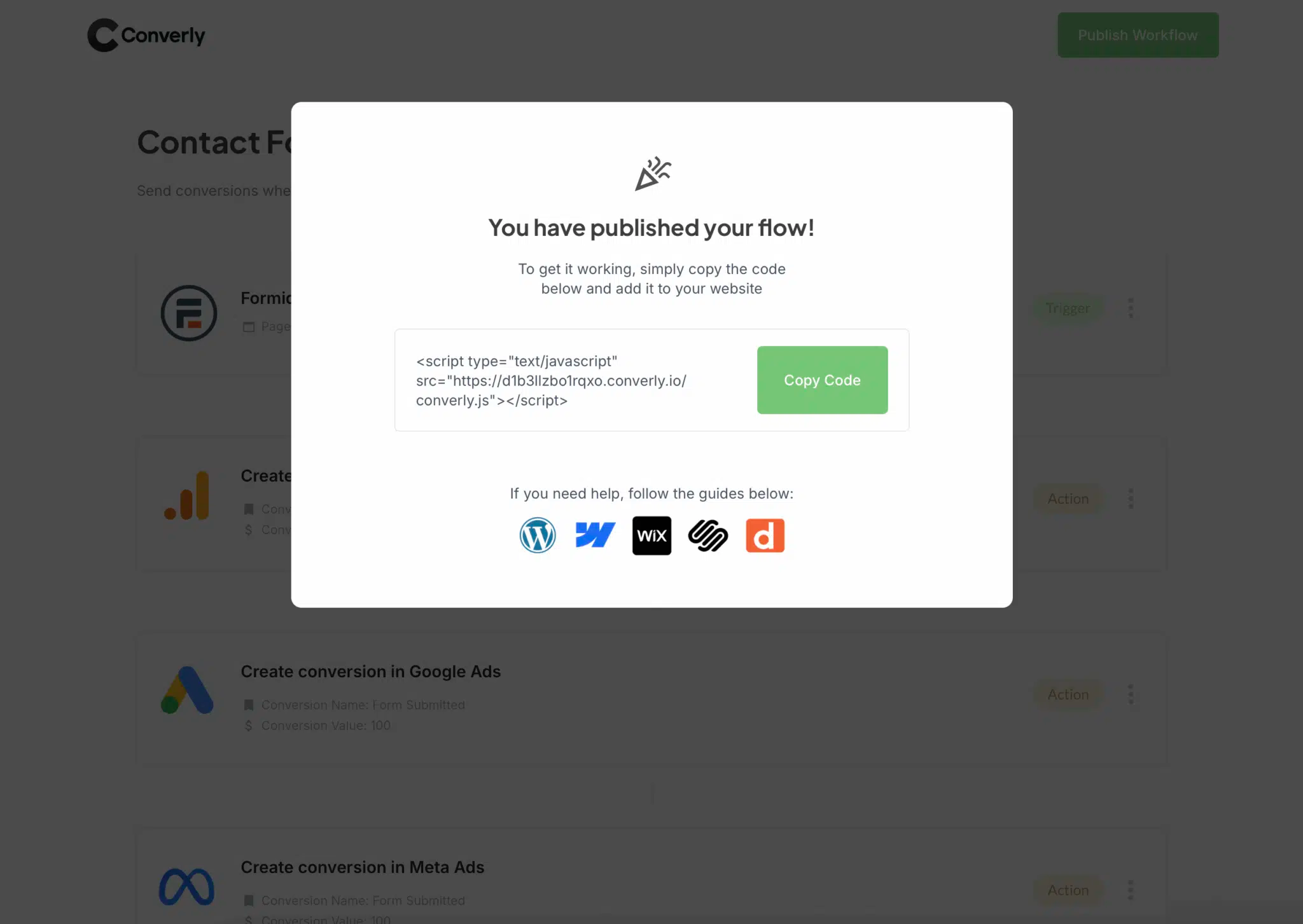
Where it goes depends on your website builder, but it's usually pretty easy. On WordPress you can paste it into the Header or Custom Code section of your settings, or add it with a simple header/footer plugin. If you use other paltforms (like Wix, Squarespace, Webflow, etc) then they usually have a ‘Custom Code’ section you can add it to. Or if you'd rather manage it through Google Tag Manager, that works just as well.
Step 3: Test it works
To confirm everything is wired up correctly, head over to your website and submit one of your ActiveCampaign forms as a test.
Then jump back into your Conversion Flow, open the 3 dots menu in the top right corner, and choose View Logs.
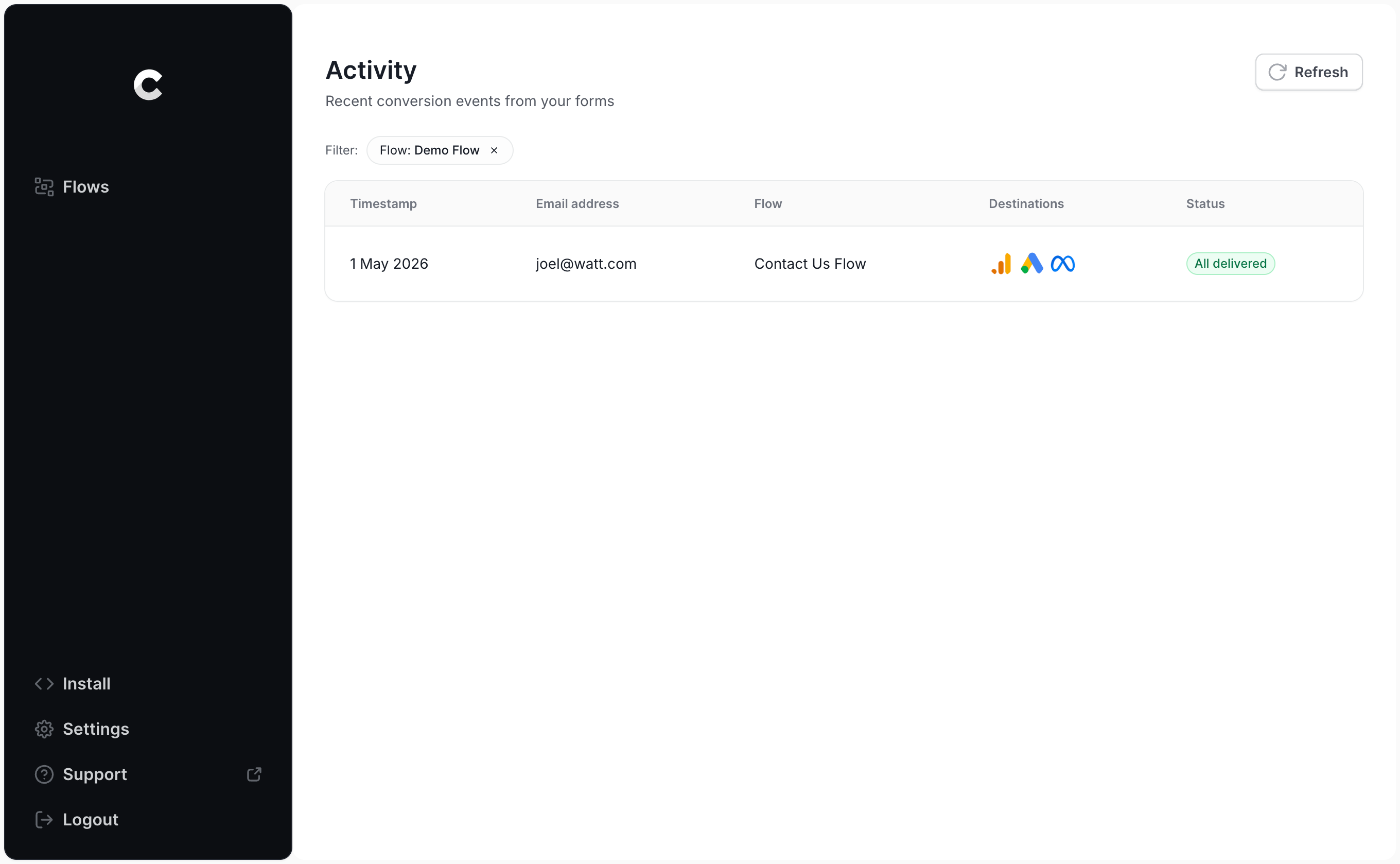
On the logs page, click into your test entry and you'll see all the details for that submission, including whether it made it through to Google Ads.
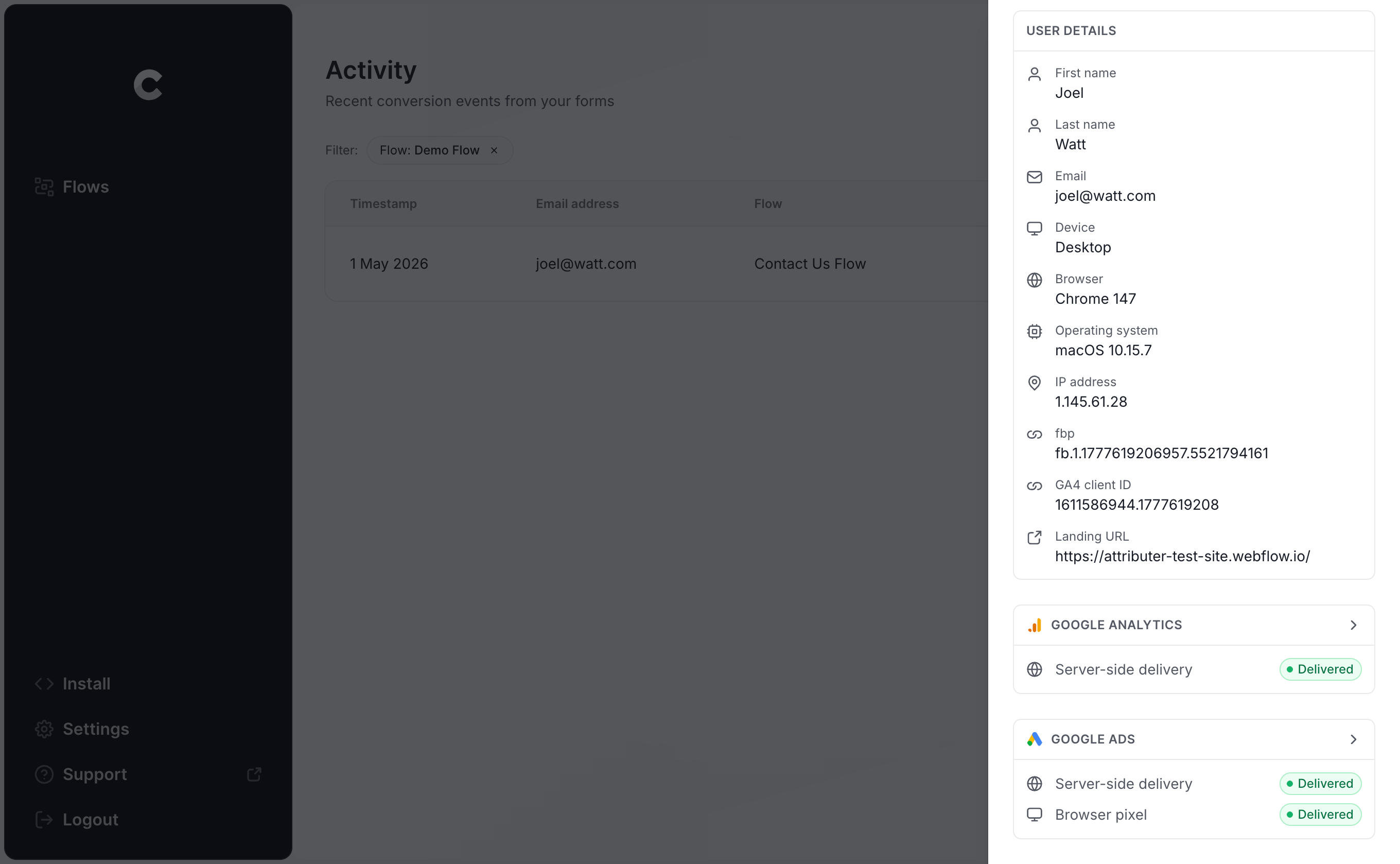
Want to go deeper? Click in further and you can inspect exactly what was sent to Google Ads, how Google's servers responded, and more.
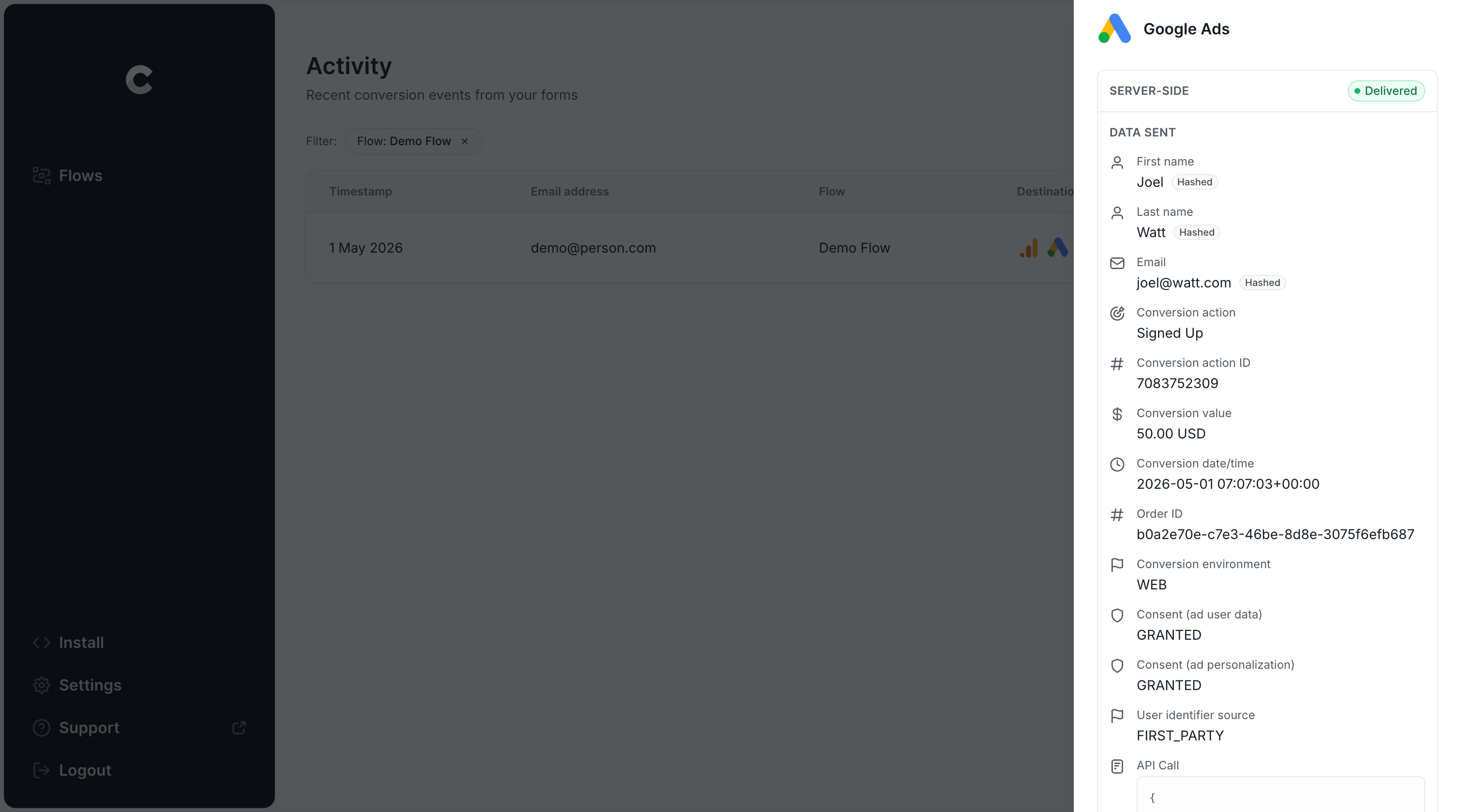
If your test submission shows up in the log and it's marked as successfully sent to Google Ads, your tracking is good to go. From start to finish, the whole setup usually takes less than 5 minutes.
Why Converly is the best way to send conversions to Google Ads from ActiveCampaign
You've got a handful of options for getting conversions into Google Ads when an ActiveCampaign form is submitted, so why lean on Converly instead of the alternatives? A few things set it apart:
1. Easy to set up
Most people use Google Tag Manager to push conversions into Google Ads. The problem is that usually involves writing custom code to catch form submissions, pulling the lead's name and email out of the form and into the DataLayer, working out how to hash that data with SHA-256 (which Google insists on), and then setting up your variables, triggers and tags to send the data to Google Ads.
Unless you live and breathe Google Tag Manager, that's hours of your life you won't get back.
Converly takes a different path. You choose a trigger (an ActiveCampaign form being submitted) and pick the result you want (a conversion sent to Google Ads). No code to write, nothing complicated to configure, just conversion tracking that works.
2. Not affected by ad blockers and privacy restrictions
If you use Google Tag Manager (or something basic like counting thank you page visits) then a real chunk of your conversions never reach Google, because ad blockers and privacy-first browsers stop the Google Tag from loading in the first place.
One study of more than 7 million conversions found that tag-based tracking was missing somewhere around 30% of conversions. Ad blockers accounted for roughly 5% of that loss, and the bigger slice, about 25%, came down to privacy controls built into the browser itself.
Converly avoids the whole issue by sending conversions straight to Google's servers. Ad blockers and privacy settings in the browser aren't involved, so they can't block it, and the numbers you end up with are far closer to reality.
3. Works across devices
It's quite common for people to interact with your website on different devices over time. Maybe they originally click your ad and land on your site on their phone on the train home, but hold off on filling out a form until they're sitting at a computer.
When conversions are tracked in the browser (the Google Tag Manager way), those two visits look like two unrelated strangers, because they took place in different browsers on different devices.
Converly handles this by sending identity data such as name and email directly to Google's servers. With that, Google can tie the eventual conversion back to that first ad click on the phone, so your ads finally get the credit they're owed for the leads they brought in.
4. Sends more data
Converly sends extra data to help increase the chances Google can match the conversion back to the original ad click. So as well as sending the lead's name, email and phone number, it also gathers the technical signals Google loves, things like the GCLID, IP address and User Agent, and passes all of it through to Google Ads.
That gives Google a rich picture of each person who converted, which makes it far better at matching that conversion to the right ad click, even if the click happened on another device weeks earlier.
For you, that translates into more accurate tracking and better data for Google's Smart Bidding algorithms to optimizeagainst.
5. Supports multiple tools and platforms
Converly with over 100 different form builders, scheduling tools, chat widgets and more.
And on the delivery side, it can push conversion events to Google Analytics, Google Ads, Meta Ads, LinkedIn Ads, Microsoft Ads and plenty of other platforms.
So if you add a new tool to your site (like a Calendly scheduling widget), or start advertising on a new channel like Meta or LinkedIn, there's no need to rebuild anything. A few clicks in Converly and your conversion tracking is set up and working.
6. Gives you a full conversion log and email alerts
The trouble with a tool like Google Tag Manager is that you have no easy way to confirm your conversion tracking is still doing its job. Sure, you can run a few checks when you first set it up, but unless you go back and re-test on a regular basis, the whole thing can break without a peep (maybe someone edits the form, changes a tag in Google Tag Manager, or tweaks something in Google Ads) and you'd be none the wiser.
Converly closes that gap with a full conversion log. It records every single conversion that fired, the exact data Converly captured for it, what was sent to Google Ads, the response Google Ads sent back, and plenty more.
There's also email notifications you can flip on. Have one land in your inbox for every conversion that goes to Google Ads, or limit them to only the times a send fails, so the second your tracking stops working you'll hear about it.
3 things you can do when you properly send conversions to Google Ads from ActiveCampaign
Once accurate conversion tracking is flowing into Google Ads, a whole set of options opens up that simply weren't possible before.
1. Report on conversions by campaign, ad group, keyword, etc.
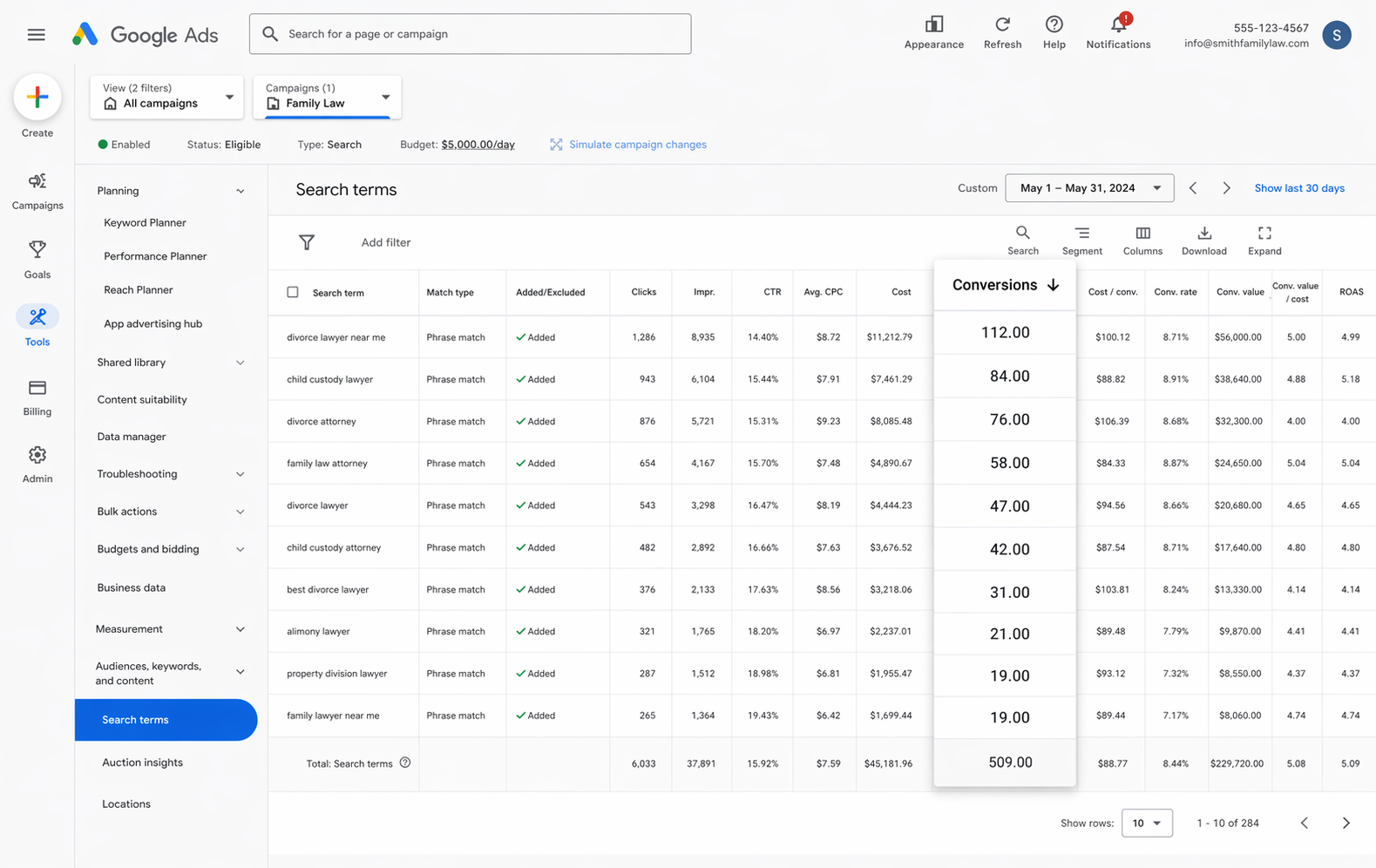
With proper tracking in place, your Google Ads account shows you far more than impressions and clicks. You get conversions, conversion rate, cost per conversion, return on ad spend and plenty more.
Better still, you can slice all of those numbers by campaign, ad group, keyword, individual ad, country and so on to see what's working and what isn't.
That kind of detail tells you exactly how your ads are pulling their weight and where the real room to grow is hiding.
2. Use Google's Smart Bidding technology
With manual bidding, you're basically telling Google "I'll pay $3 a click" and leaving it there. Smart bidding flips takes a different approach. You tell Google your actual goal, say $45 per conversion, and let it do the bidding in each auction on your behalf.
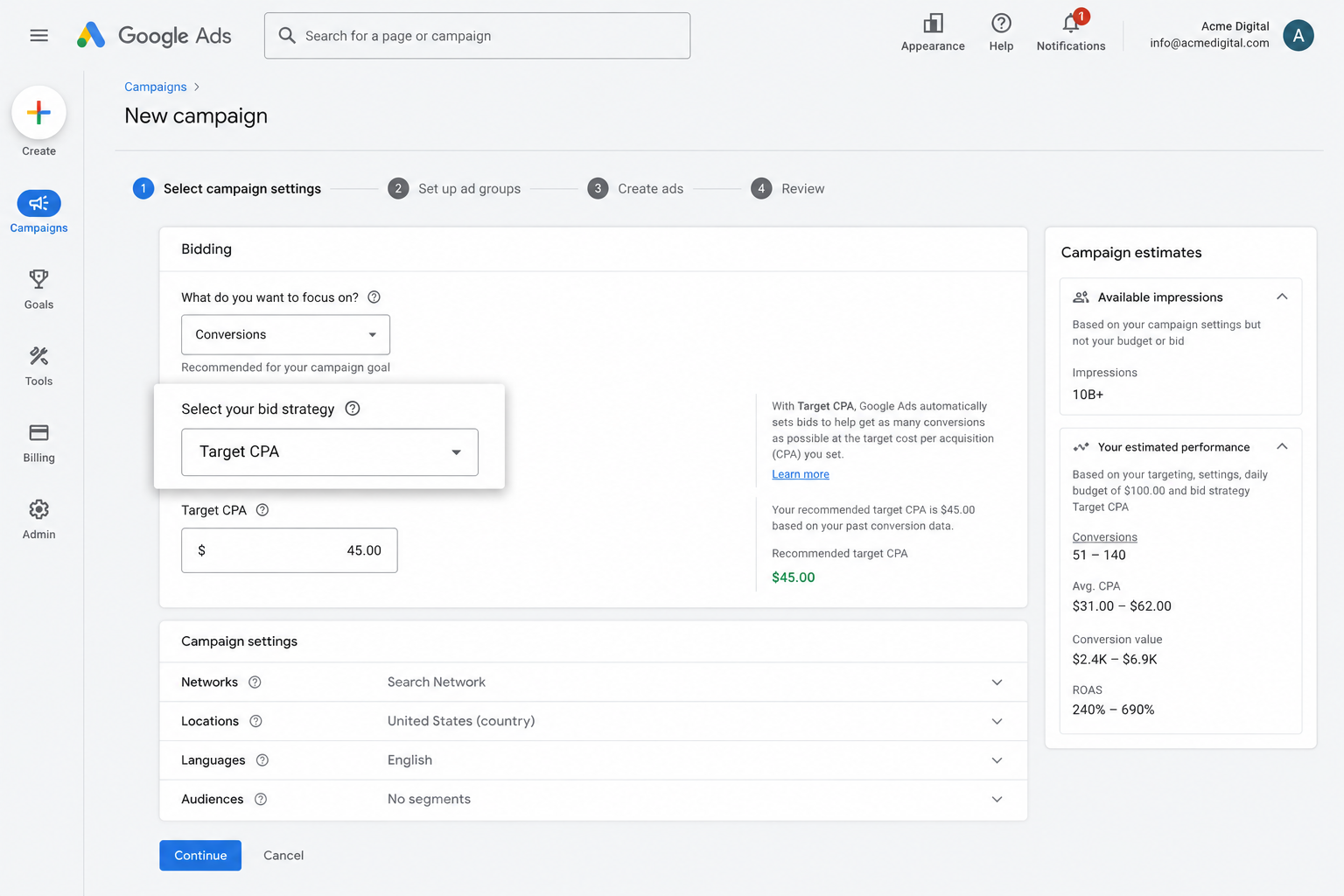
To make its call, Google draws on everything it knows about the searcher (age, location, device, buying history and the rest) and decides whether to bid high or lower depending on how likely that person is to convert.
It's a proven way to get more conversions at a lower cost, but the catch is that none of it works without solid conversion tracking underneath. Starve it of that data and Google has no sense of what a valuable searcher looks like for your business, so it ends up bidding aggressively for the wrong clicks and quietly draining your budget.
Set up accurate, server-side tracking with Converly and you give smart bidding the fuel it needs to bring in more leads at a lower cost.
3. Retarget people who visited your site but didn't convert
Feeding accurate conversion data into Google Ads also lets you build remarketing lists of the people who came to your site but left without converting.
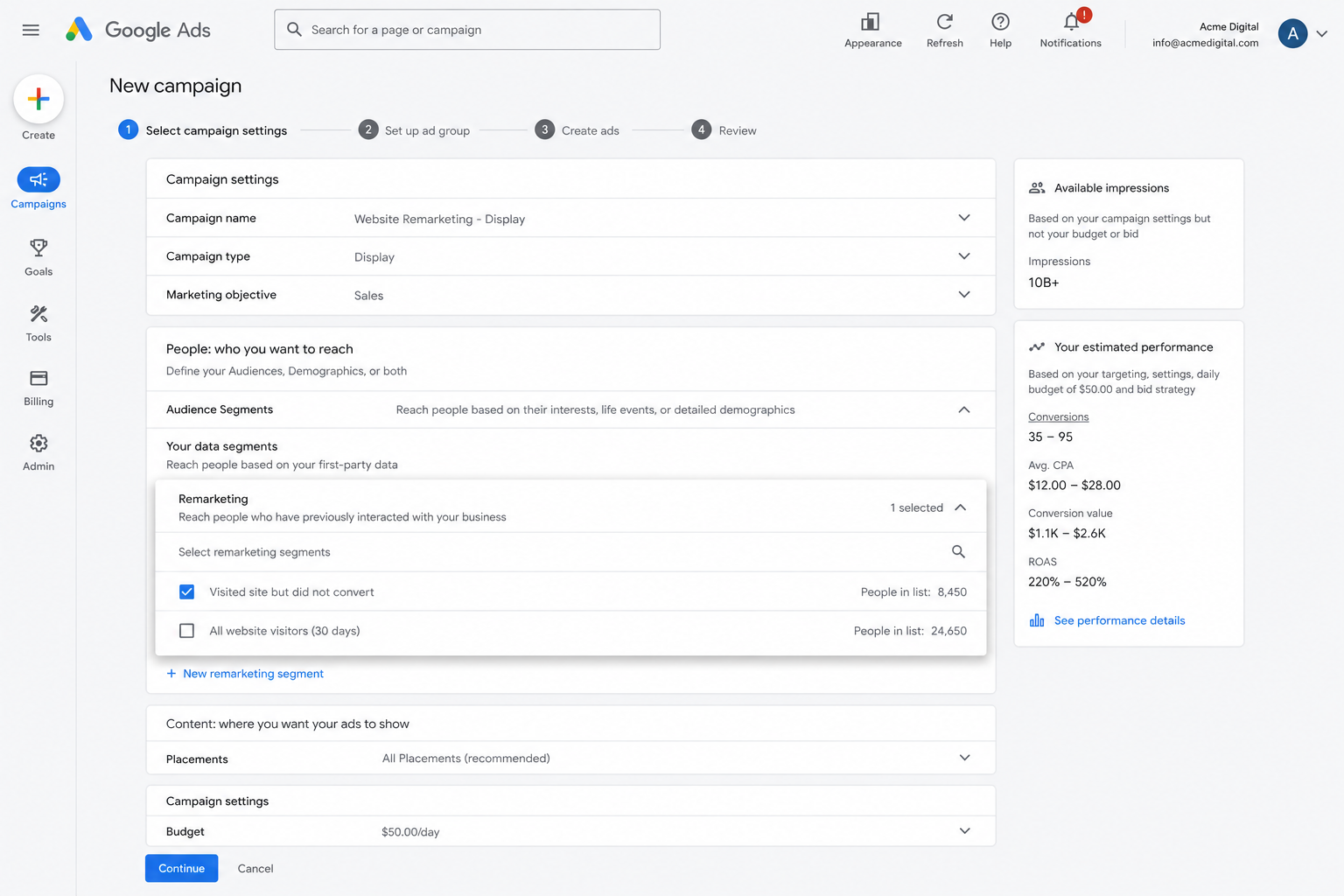
From there, you can go after those visitors again in several ways:
- Search. Bid more (or less, if that's your call) for these people the next time they search for your keywords.
- Display. Show display ads across the Google Display Network aimed only at this group, keeping your brand in front of them as they move around the web.
- YouTube. Run YouTube ads pointed squarely at these visitors so your brand keeps showing up while they watch.
Wrap Up
If your goal is to send a conversion to Google Ads every time someone submits an ActiveCampaign form on your site, Converly is a genuinely easy way to get there.
It delivers those conversions straight to Google's servers, well out of reach of ad blockers and privacy-focused browsers, and it passes along a wealth of detail about each lead (name, email, phone, IP address, User Agent and more) so Google has the best possible shot at tying the conversion back to the original ad click.
Best of all, the whole thing takes only a few minutes to set up and comes with a 14-day free trial, so give it a go today!
About the author

Aaron is the founder of Converly. With over 15 years of experience in digital marketing and SaaS, he's passionate about helping businesses track and optimise their ad conversions.