If you're running ads to generate leads for your business, then conversion tracking is one of the most important things you can set up.
It tells you which campaigns and ads are actually bringing in your leads, and it gives your ad platforms (Google, Meta, etc) the data they need to learn who converts and who doesn't (so they can serve your ads to the type of people most likely to convert).
The problem is that getting proper conversion tracking set up is surprisingly hard.
There are several ways to go about it, and the right one mostly depends on where you want the data to end up. Some of them involve custom code and fiddly configuration. ActiveCampaign forms also behave a little differently to most form tools when someone clicks Submit, which trips up a lot of the standard approaches.
So in this article, we'll walk you through three ways to set up conversion tracking for ActiveCampaign forms, and we'll give you full instructions for each one as well as resources (code snippets, a Google Tag Manager recipe, etc) to make it easy.
Method 1: Send a GA4 event via Google Tag Manager
Good for: Sending form submission events to Google Analytics 4, for free.
If all you need is to send an event to GA4 when your ActiveCampaign form is submitted, this is the best approach. Unlike Google Ads or Meta Ads, Google Analytics doesn't need to know who filled in the form, just that somebody did (it's actually against the terms of service to send personally identifiable information to GA4).
ActiveCampaign does connect to Google Analytics, but only for things like email campaign links and its own landing pages. There's no built-in option that sends an event to GA4 when one of its forms is submitted on your website. So the best, free way to do it is to use Google Tag Manager and a Recipe (i.e. a bundle of pre-built pieces you import straight into your Google Tag Manager account). We've built one for ActiveCampaign forms, and you can grab it for free below.
Step 1: Download the ActiveCampaign Conversion Tracking GTM Recipe
Start by grabbing the ActiveCampaign GTM recipe from this page. Inside, you'll find:
- A Custom HTML Tag that watches your ActiveCampaign forms and pushes an
activecampaign_form_submitted event to Google Tag Manager when a form has been successfully submitted (determined by either the form's thank-you message appearing, or ActiveCampaign redirecting the visitor on to your thank-you page).
- A Variable that records the ID of the ActiveCampaign form that was submitted, which is useful if you only want to send the conversion when a particular form is submitted (i.e. you want a conversion in GA4 when someone fills in your Request A Quote form, but not your Newsletter Signup form).
- A Trigger tied to the
activecampaign_form_submitted event, which you can use to fire the conversion Tags you build (a GA4 event, a Google Ads conversion, and so on).
Step 2: Import the GTM recipe into your account
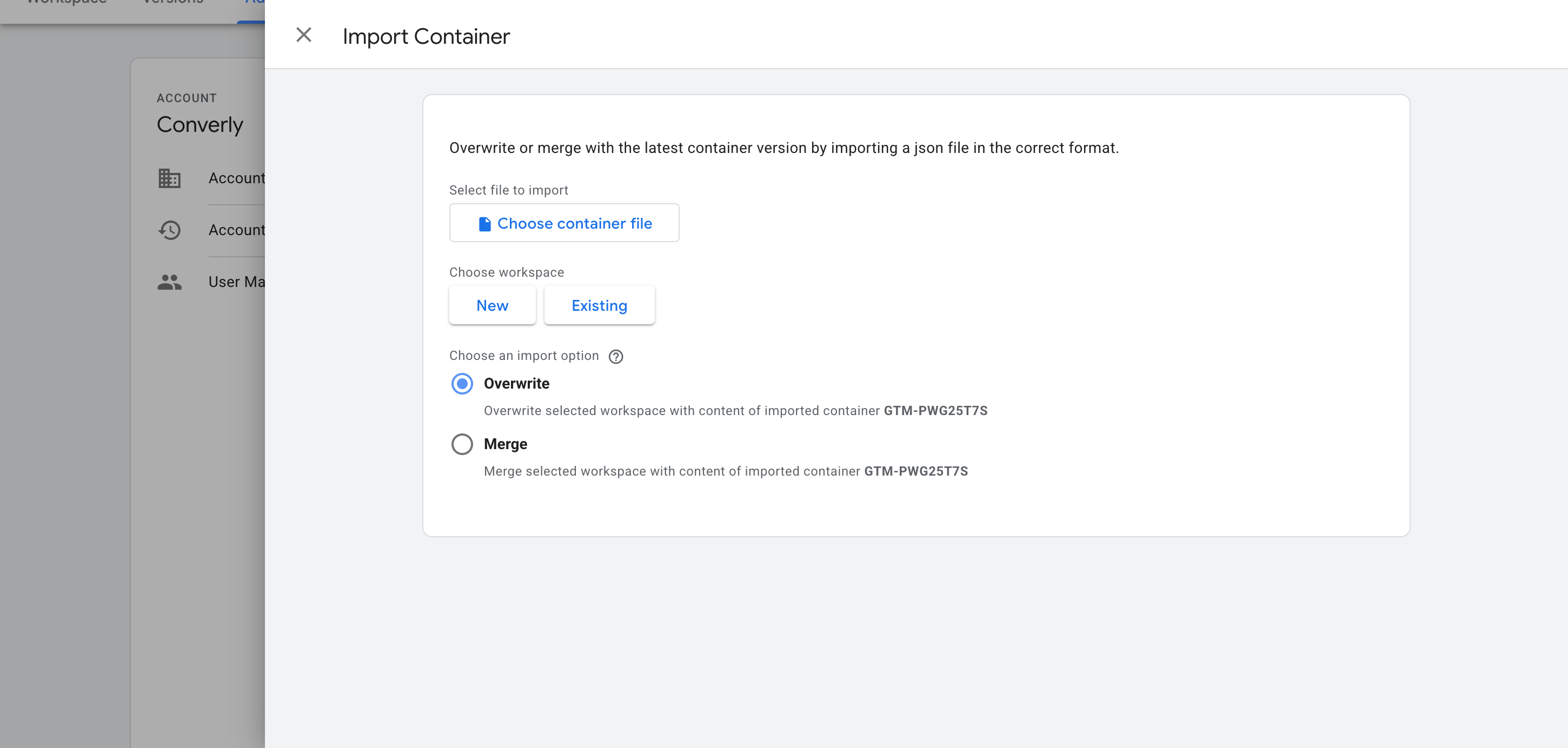
With the file downloaded, the next job is getting it into your Google Tag Manager container. Open Google Tag Manager, go to Admin, choose Import Container, select the file, and pick the Merge option (so nothing already in your container gets overwritten). The listener, variable and trigger are all added automatically.
Step 3: Build a GA4 event tag
The recipe now tells Google Tag Manager when an ActiveCampaign form has been submitted, so the next piece is to build a tag that passes that on to Google Analytics. Create a GA4 event tag and set its Trigger to the one that came with the recipe (called CE - ActiveCampaign Form Submitted).
Step 4: Test it, then mark it as a Key Event in GA4
With the tag in place, the last step is checking it works and telling GA4 the event matters. Submit a test entry on your ActiveCampaign form, open GA4's Realtime report, and check the event appears in the Recent Events list.
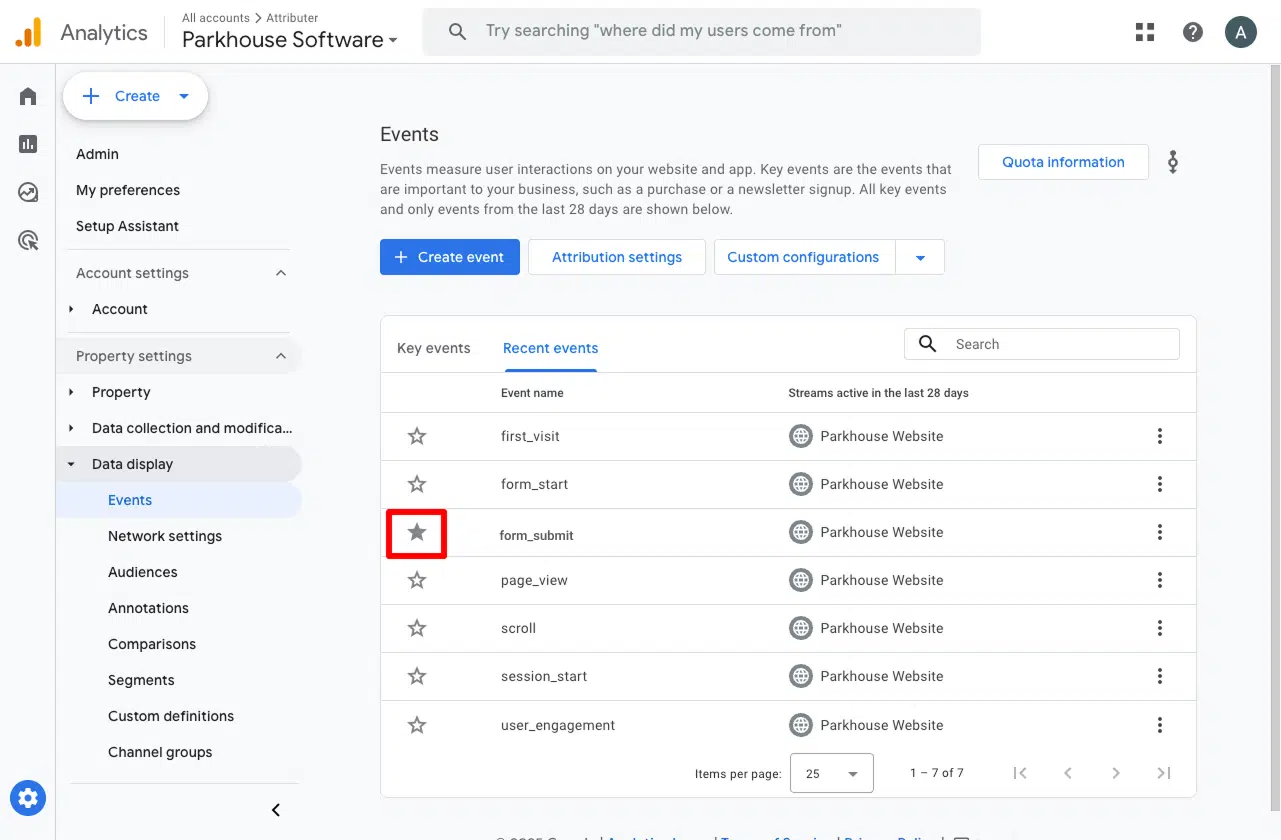
Once it's arriving, go to Admin, then Events, find the event, and switch it on as a Key Event. That's what tells GA4 to treat it as a conversion in your acquisition and funnel reports, rather than leaving it as an ordinary event.
Pros and cons
Pros:
- It's free. Google Tag Manager doesn't cost anything.
- Works with every ActiveCampaign form style (inline, modal, floating box and floating bar) and with both of ActiveCampaign's embed options.
- Only counts a successful form submission. An attempt that gets rejected (a required field left blank, an email typed in the wrong format, a phone number ActiveCampaign refuses) never fires a conversion.
- Most of the work is already done for you. The listener, trigger and variable come ready-made, so the only thing you build by hand is the GA4 event tag (which is the simplest part).
Cons:
- There's still setup to do. The recipe takes care of the hard part, but building the GA4 tag and checking it all works is on you. And if you get stuck, nobody is there to help (Google doesn't offer support for Google Tag Manager).
- Every ActiveCampaign form on your site sends the same event. The recipe does record the form number, but unless you build extra triggers filtered on it yourself, a Quote Request form submission and a Contact Support form submission both land in GA4 as the same
activecampaign_form_submitted event. Fine if you only have one form, but a major issue if you have multiple.
- The event travels to Google Analytics through the visitor's browser, so ad blockers and privacy-focused browsers like Safari can stop it from ever reaching GA4. Industry studies show that about 30% of your conversions won't make it to GA4 this way.
- It stops at Google Analytics. Nothing here reaches Google Ads, Meta Ads or anywhere else (that's what Methods 2 and 3 are for).
Method 2: Use Google Tag Manager for Enhanced Conversions
Good for: Sending Enhanced Conversions to Google Ads.
Counting submissions (the way Method 1 does) is enough for Google Analytics, but it won't get you very far in Google Ads.
Google Ads wants to match each conversion back to the real person who clicked your ad, and to do that you need to send the lead's details (like their name, email and phone) with every conversion (Google calls this Enhanced Conversions).
Here's how to capture those details from an ActiveCampaign form and send them with Google Tag Manager.
Step 1: Set up a Custom HTML Tag with the form listening code
In GTM, create a new Custom HTML Tag, paste in the snippet below, and set it to fire on the All Pages trigger, with the tag firing option set to Once per event.
<!--
Converly GTM Recipe: ActiveCampaign form submission listener (Method 2, with PII)
This is the richer snippet used by the blog post's "Method 2: GTM with
Enhanced Conversions data". It captures the lead's email, first name, last
name and phone alongside the submission event, which is what turns on
Enhanced Conversions in Google Ads and lifts Meta's Event Match Quality.
It shares its detection core with the event-only recipe snippet
(blog-snippet.html) line for line: the same two success signals, the same
form identity, the same one-attempt-per-form bookkeeping. So the two can
never drift on WHEN they fire or WHICH form fired. The only difference is
that this one also reads the field values and pushes them.
How ActiveCampaign submits (measured, not assumed):
- Every form style (inline, modal, floating box, floating bar) and both embed
options (the Simple Embed script and the Full Embed paste) render a real
<form> inside your page. There is no iframe, so the fields are readable.
- Its submit handler always cancels the normal submit, checks the fields in
the browser, then sends the data by adding a <script> tag that calls
https://<account>.activehosted.com/proc.php. The page never reloads.
- The reply is a tiny script, and what it DOES is the verdict. On success it
either reveals the form's thank-you message or sends the visitor to your
thank-you URL, depending on the form's "On submit" setting. On a server
rejection it shows an error box instead. A reply arriving is not success.
When it fires (confirmed success only, never the submit click):
- "Show thank you message" forms. When the form's own thank-you element,
which sits in the form hidden and empty from the start, becomes visible
with the message in it.
- "Open URL" forms. When ActiveCampaign's own reply starts the navigation to
your thank-you URL. The push lands on the form page, before the browser
leaves it, with the data already captured.
How it captures the data:
- The values are read at the moment of the submit (before ActiveCampaign's
handler runs) and held until success is confirmed. A rejected attempt
never pushes them.
- Email, phone and name are found by input type, ActiveCampaign's own field
names, autocomplete hint, visible label and field name, in that order of
strength, and only in single-line text boxes. ActiveCampaign's email box
is type="text" named "email", and its standard name box is ONE field
("fullname" on inline forms, "name" on modal and floating ones), split on
the first space into first_name and last_name. An email must contain an @
and a phone at least six digits, so a comments box that mentions "email"
is never mistaken for the address.
- The phone is two inputs on ActiveCampaign. The visible box holds what the
visitor typed, and a hidden input[name=phone] is filled with the full
international number (+12015550198) by ActiveCampaign itself. That hidden
value is what ActiveCampaign stores, so it is what this pushes.
- Passwords, card numbers, CVV, one-time codes, SSN and PIN fields are
skipped before their value is ever read (by type, autocomplete, name, id,
aria-label, placeholder and label), and hidden fields are never read apart
from that one phone input.
Use this snippet OR the event-only recipe on a page, not both. They push the
same event name, so a page running both counts every submission twice.
Pushes: { event: 'activecampaign_form_submitted', form_id: '1', email,
first_name, last_name, phone } (each value only when the form has it)
Verification: see HOW-IT-WORKS.md, "Live-verified". Tested 2026-09-24 in
Chromium, Firefox and WebKit against real ActiveCampaign forms (their live
markup and live submit JavaScript). The account behind those forms has
lapsed and now refuses every submission, so every rejection case is the real
server. The two success replies are ActiveCampaign's own recorded replies
from 24 Aug 2026, played back to the live page.
Last verified: 2026-09-24
-->
<!-- STEP 1: Custom HTML tag. Create one GTM tag with this content,
firing trigger: All Pages, tag firing option: Once per event. -->
<script>
(function () {
'use strict';
// Install once, even if GTM injects this tag more than once on the page.
if (window.__converlyActivecampaignMethod2Installed) return;
window.__converlyActivecampaignMethod2Installed = true;
window.dataLayer = window.dataLayer || [];
var EVENT_NAME = 'activecampaign_form_submitted';
// Two submit events on the same form this close together are one attempt
// (a double click, or a re-dispatch), not two.
var RAPID_RESUBMIT_MS = 500;
// An attempt still undecided after this long is dropped, with anything it
// holds. ActiveCampaign's round trip was measured at about 2.5 seconds.
var WATCH_MS = 60000;
// Private marker set on each ActiveCampaign reply script this tag has seen.
// Named per snippet, so the recipe and the Method 2 snippet never read each
// other's marks.
var CLAIM_KEY = '__converlyActivecampaignMethod2Seen';
// Only used by browsers WITHOUT the Navigation API (older Safari). There, a
// page navigation counts as ActiveCampaign's redirect only if it starts
// within this long of ActiveCampaign's response. Same window as Converly's
// production module.
var NAV_TRUST_MS = 4000;
// Chrome, Edge, Firefox and Safari 26.2+ have the Navigation API, and in all
// of them its `navigate` event fires WHILE the script that started the
// navigation is still running. That lets this tag prove it was
// ActiveCampaign's own response that sent the visitor to the thank-you page,
// rather than inferring it from timing.
var HAS_NAV_API = false;
try {
HAS_NAV_API = !!(window.navigation && typeof window.navigation.addEventListener === 'function');
} catch (e) {
HAS_NAV_API = false;
}
function now() { return new Date().getTime(); }
// ============================================================
// Sensitive-field guard
// ============================================================
// Passwords, card numbers, CVV / CVC, one-time codes, SSN and PIN are never
// lead identifiers and must never reach the dataLayer. This runs BEFORE a
// field's value is read, and checks the field type, its autocomplete hint,
// its name, its aria-label, its placeholder AND its visible <label> text, so
// a secret under a generic field name is still caught.
var SENSITIVE_AUTOCOMPLETE = {
'current-password': true, 'new-password': true, 'one-time-code': true,
'cc-number': true, 'cc-csc': true, 'cc-exp': true, 'cc-exp-month': true,
'cc-exp-year': true, 'cc-name': true, 'cc-given-name': true,
'cc-family-name': true, 'cc-additional-name': true, 'cc-type': true
};
var SENSITIVE_NAME_SUBSTRINGS = [
'password', 'passwd', 'passcode', 'cardnum', 'ccnumber', 'creditcard',
'onetimecode', 'securitycode', 'socialsecurity'
];
var SENSITIVE_NAME_TOKENS = {
otp: true, cvv: true, cvc: true, ssn: true, pwd: true, pin: true
};
function normaliseKey(value) {
return String(value || '').toLowerCase().replace(/[^a-z0-9]/g, '');
}
function isSensitiveName(name) {
if (!name) return false;
// Split camelCase into words BEFORE lowercasing, so otpCode, cardCvv,
// userPin and PINCode are read as "otp code", "card cvv", "user pin" and
// "pin code".
var lower = String(name)
.replace(/([a-z0-9])([A-Z])/g, '$1 $2')
.replace(/([A-Z]+)([A-Z][a-z])/g, '$1 $2')
.toLowerCase();
var norm = normaliseKey(lower);
for (var i = 0; i < SENSITIVE_NAME_SUBSTRINGS.length; i++) {
if (norm.indexOf(SENSITIVE_NAME_SUBSTRINGS[i]) !== -1) return true;
}
var parts = lower.split(/[^a-z0-9]+/);
for (var p = 0; p < parts.length; p++) {
if (SENSITIVE_NAME_TOKENS[parts[p]] === true) return true;
}
return false;
}
function isSensitiveField(type, autocomplete, name) {
if (type === 'password') return true;
if (autocomplete) {
var tokens = autocomplete.split(/\s+/);
for (var t = 0; t < tokens.length; t++) {
if (SENSITIVE_AUTOCOMPLETE[tokens[t]] === true) return true;
}
}
return isSensitiveName(name);
}
function labelTextFor(el) {
try {
if (el.closest) {
var wrap = el.closest('label');
if (wrap && wrap.textContent) return wrap.textContent;
}
var doc = el.ownerDocument;
if (!doc) return '';
if (el.id && doc.getElementsByTagName) {
var labels = doc.getElementsByTagName('label');
for (var i = 0; i < labels.length; i++) {
var lf = labels[i].getAttribute && labels[i].getAttribute('for');
if (lf && lf === el.id && labels[i].textContent) return labels[i].textContent;
}
}
var lb = el.getAttribute ? (el.getAttribute('aria-labelledby') || '') : '';
if (lb && doc.getElementById) {
var ids = lb.split(/\s+/);
var txt = '';
for (var k = 0; k < ids.length; k++) {
var n = doc.getElementById(ids[k]);
if (n && n.textContent) txt += ' ' + n.textContent;
}
if (txt) return txt;
}
} catch (e) {}
return '';
}
// ============================================================
// Read the form's fields (the visitor's values, minus secrets)
// ============================================================
// Hidden inputs are skipped. On an ActiveCampaign form they are the
// platform's own controls (u, f, s, c, m, act, v, or) plus anything another
// tool has added, none of which is the lead's identity. The one hidden input
// this tag does read, the E.164 phone, is read by name at fire time below.
function walkForm(formEl) {
var fields = [];
if (!formEl || !formEl.elements) return fields;
for (var i = 0; i < formEl.elements.length; i++) {
var el = formEl.elements[i];
var tag = (el.tagName || '').toLowerCase();
if (tag !== 'input' && tag !== 'textarea' && tag !== 'select') continue;
var type = (el.type || 'text').toLowerCase();
if (type === 'submit' || type === 'button' || type === 'reset' ||
type === 'image' || type === 'file' || type === 'hidden') {
continue;
}
var name = el.name || el.id || '';
if (!name) continue;
var autocomplete = (el.autocomplete || '').toLowerCase();
var ariaLabel = el.getAttribute ? (el.getAttribute('aria-label') || '') : '';
var placeholder = el.placeholder || '';
var label = labelTextFor(el);
// Never read a secret. Both the name and the id are checked, as well as
// everything a visitor can see about the field.
if (isSensitiveField(type, autocomplete, el.name || '') || isSensitiveName(el.id || '') ||
isSensitiveName(ariaLabel) || isSensitiveName(placeholder) || isSensitiveName(label)) {
continue;
}
var value;
if (type === 'checkbox' || type === 'radio') {
value = el.checked ? (el.value || 'on') : '';
} else {
value = el.value || '';
}
fields.push({
name: name,
tag: tag,
type: type,
autocomplete: autocomplete,
label: String(label || '').replace(/^\s+|\s+$/g, ''),
value: value
});
}
return fields;
}
// ============================================================
// Work out which field is the email, phone, first and last name
// ============================================================
// Only single-line text boxes (type text, email or tel) can be the lead's
// email, phone or name. A textarea, a dropdown or a checkbox never is, even
// if its label mentions "email" ("Best way to reach you: email or phone?").
// Layered signals, strongest wins:
// 100 explicit input type (type=email, type=tel)
// 95 ActiveCampaign's own field names (email, phone, fullname, name,
// firstname, lastname)
// 90 autocomplete attribute
// 80 visible label text
// 50 any other field name / id containing the word
// ActiveCampaign renders its email box as type="text" named `email`, so its
// own field name is what carries it. Its standard name field is ONE box,
// named `fullname` on inline forms and `name` on modal and floating forms,
// so it is split on the first space into first and last name. A value only
// counts as an email if it contains an @, and as a phone if it has at least
// six digits.
function scoreField(field) {
var scores = { email: 0, phone: 0, firstName: 0, lastName: 0, fullName: 0 };
if (field.tag !== 'input') return scores;
var type = field.type, ac = field.autocomplete;
if (type !== 'text' && type !== 'email' && type !== 'tel') return scores;
var key = normaliseKey(field.name), labelKey = normaliseKey(field.label);
if (type === 'email') scores.email = 100;
if (type === 'tel') scores.phone = 100;
if (key === 'email') scores.email = Math.max(scores.email, 95);
if (key === 'phone' || key === 'phoneiti') scores.phone = Math.max(scores.phone, 95);
if (key === 'firstname') scores.firstName = Math.max(scores.firstName, 95);
if (key === 'lastname') scores.lastName = Math.max(scores.lastName, 95);
if (key === 'fullname' || key === 'name') scores.fullName = Math.max(scores.fullName, 95);
if (ac === 'email') scores.email = Math.max(scores.email, 90);
if (ac === 'tel' || ac === 'tel-national' || ac === 'tel-local') scores.phone = Math.max(scores.phone, 90);
if (ac === 'given-name') scores.firstName = Math.max(scores.firstName, 90);
if (ac === 'family-name') scores.lastName = Math.max(scores.lastName, 90);
if (ac === 'name') scores.fullName = Math.max(scores.fullName, 90);
if (labelKey.indexOf('email') !== -1) scores.email = Math.max(scores.email, 80);
if (labelKey.indexOf('phone') !== -1 || labelKey.indexOf('mobile') !== -1 || labelKey === 'tel' || labelKey.indexOf('telephone') !== -1) scores.phone = Math.max(scores.phone, 80);
if (labelKey.indexOf('firstname') !== -1 || labelKey === 'first') scores.firstName = Math.max(scores.firstName, 80);
if (labelKey.indexOf('lastname') !== -1 || labelKey === 'last' || labelKey.indexOf('surname') !== -1) scores.lastName = Math.max(scores.lastName, 80);
if (scores.firstName === 0 && scores.lastName === 0 && (labelKey === 'name' || labelKey === 'fullname' || labelKey === 'yourname')) scores.fullName = Math.max(scores.fullName, 80);
if (key.indexOf('email') !== -1) scores.email = Math.max(scores.email, 50);
if (key.indexOf('phone') !== -1 || key.indexOf('mobile') !== -1 || key === 'tel' || key.indexOf('telephone') !== -1) scores.phone = Math.max(scores.phone, 50);
if (key === 'first' || key === 'fname' || key === 'givenname' || key.indexOf('firstname') !== -1 || key.indexOf('givenname') !== -1) scores.firstName = Math.max(scores.firstName, 50);
if (key === 'last' || key === 'lname' || key === 'familyname' || key.indexOf('lastname') !== -1 || key.indexOf('surname') !== -1 || key.indexOf('familyname') !== -1) scores.lastName = Math.max(scores.lastName, 50);
if (scores.firstName === 0 && scores.lastName === 0 && key === 'yourname') scores.fullName = Math.max(scores.fullName, 50);
return scores;
}
function plausible(category, value) {
if (category === 'email') return value.indexOf('@') > 0;
if (category === 'phone') return (value.replace(/\D/g, '')).length >= 6;
return true;
}
function identify(fields) {
var best = {
email: { value: undefined, score: 0 },
phone: { value: undefined, score: 0 },
firstName: { value: undefined, score: 0 },
lastName: { value: undefined, score: 0 },
fullName: { value: undefined, score: 0 }
};
for (var i = 0; i < fields.length; i++) {
var trimmed = String(fields[i].value || '').replace(/^\s+|\s+$/g, '');
if (!trimmed) continue;
var scores = scoreField(fields[i]);
for (var category in scores) {
if (!Object.prototype.hasOwnProperty.call(scores, category)) continue;
if (!plausible(category, trimmed)) continue;
if (scores[category] > best[category].score) best[category] = { value: trimmed, score: scores[category] };
}
}
var result = {};
if (best.email.value) result.email = best.email.value;
if (best.phone.value) result.phone = best.phone.value;
if (best.firstName.value) result.firstName = best.firstName.value;
if (best.lastName.value) result.lastName = best.lastName.value;
if (best.fullName.value && !result.firstName && !result.lastName) {
var parts = best.fullName.value.split(/\s+/);
result.firstName = parts[0];
if (parts.length > 1) result.lastName = parts.slice(1).join(' ');
}
return result;
}
// ============================================================
// Which forms are ActiveCampaign forms, and which form is it?
// ============================================================
// ActiveCampaign renders a real <form> into the page for every style
// (inline, modal, floating box, floating bar) and both embed options (the
// Simple Embed script and the Full Embed paste). The stable identity across
// all of them is the `_form _form_<id>` class pair plus a hidden input
// `f=<id>` carrying the same number. The element id and the hidden `u` do
// NOT carry the form id (they are a per-form hash on a Simple Embed and the
// number on a Full Embed), so neither is used.
function parseUrlParts(str) {
if (!str) return null;
var s = String(str);
try {
if (typeof URL === 'function') {
var u = new URL(s);
return {
scheme: (u.protocol || '').replace(/:$/, '').toLowerCase(),
host: (u.hostname || '').toLowerCase(),
path: u.pathname || '/'
};
}
} catch (e) {}
var m = /^([a-z][a-z0-9+.\-]*):\/\/([^\/?#]*)([^?#]*)/i.exec(s);
if (!m) return null;
var authority = m[2] || '';
var at = authority.lastIndexOf('@');
if (at !== -1) authority = authority.slice(at + 1);
return {
scheme: m[1].toLowerCase(),
host: authority.replace(/:\d+$/, '').toLowerCase(),
path: m[3] || '/'
};
}
// ActiveCampaign's submission endpoint: https://<account>.activehosted.com/proc.php
// Matched structurally, never by substring, so a lookalike URL such as
// https://example.com/x?next=activehosted.com/proc.php can never pass.
function isAcProcUrl(parts) {
return !!parts && parts.scheme === 'https' && /\.activehosted\.com$/.test(parts.host) &&
parts.path === '/proc.php';
}
// Reads ONE control key off a submission URL. That URL also carries every
// value the visitor typed, so it is never split, decoded, stored or logged.
function readQueryControl(src, key) {
if (key !== 'f' && key !== 'act' && key !== 'jsonp') return null;
var m = new RegExp('[?&]' + key + '=([^&#]*)').exec(String(src));
return m ? m[1] : null;
}
function classOf(el) {
var cls = el && typeof el.className === 'string' ? el.className : '';
if (!cls && el && el.getAttribute) {
try { cls = el.getAttribute('class') || ''; } catch (e) { cls = ''; }
}
return cls;
}
function classFormId(formEl) {
var cls = classOf(formEl);
if (!/(^|\s)_form(\s|$)/.test(cls)) return null;
var m = /(^|\s)_form_(\d+)(\s|$)/.exec(cls);
return m ? m[2] : null;
}
function hiddenControlValue(formEl, name) {
try {
var el = formEl.querySelector('input[type="hidden"][name="' + name + '"]');
if (!el) return null;
return String(el.value == null ? '' : el.value);
} catch (e) {
return null;
}
}
function numericHiddenF(formEl) {
var f = hiddenControlValue(formEl, 'f');
return (f !== null && /^\d+$/.test(f)) ? f : null;
}
// Returns { formId, host } for an ActiveCampaign sign-up form, or null for
// anything else. The hidden `act` must be `sub` (a subscription), so
// ActiveCampaign's unsubscribe and preference forms are never watched.
// `host` is the account's exact activehosted.com host, read from the form's
// own action. It is null when the action is not ActiveCampaign's endpoint,
// and then only the thank-you signal can fire for that form.
function describeForm(formEl) {
if (!formEl || (formEl.tagName || '').toLowerCase() !== 'form') return null;
var f = numericHiddenF(formEl);
if (!f) return null;
if (hiddenControlValue(formEl, 'act') !== 'sub') return null;
var parts = null;
try { parts = parseUrlParts(String(formEl.action || '').replace(/[?#][\s\S]*$/, '')); } catch (e) { parts = null; }
var host = isAcProcUrl(parts) ? parts.host : null;
if (classFormId(formEl) === f || host) return { formId: f, host: host };
return null;
}
// ============================================================
// Visibility and error helpers
// ============================================================
function isNodeHidden(el) {
try {
if (el.hidden) return true;
if (el.getAttribute && el.getAttribute('aria-hidden') === 'true') return true;
var view = el.ownerDocument && el.ownerDocument.defaultView;
if (view && view.getComputedStyle) {
var cs = view.getComputedStyle(el);
if (cs && (cs.display === 'none' || cs.visibility === 'hidden')) return true;
}
} catch (e) {}
return false;
}
// Hidden itself, or inside something hidden, up to but NOT including the
// form. Whether the form itself is on screen (a modal the visitor closed
// while the request was in flight, say) says nothing about the verdict.
function isConcealed(el, form) {
var node = el;
var depth = 0;
while (node && node.nodeType === 1 && node !== form && depth < 12) {
if (isNodeHidden(node)) return true;
node = node.parentNode;
depth++;
}
return false;
}
function hasContent(el) {
try {
if (String(el.textContent || '').replace(/^\s+|\s+$/g, '') !== '') return true;
if (el.children && el.children.length > 0) return true;
} catch (e) {}
return false;
}
// ActiveCampaign's two rejection displays. In-browser validation marks the
// field `._has_error` and adds an `._error-inner` tooltip, and it does this
// again as the visitor types, even after the data has been sent. A server
// or network rejection inserts an `._error-inner._form_error` box above the
// submit button, and ONLY ActiveCampaign's `_show_error` ever draws that.
var ERROR_SELECTOR = '._has_error, ._error-inner';
function collectErrorNodes(w) {
var found = [];
try {
var nodes = w.form.querySelectorAll(ERROR_SELECTOR);
for (var i = 0; i < nodes.length; i++) {
if (!isConcealed(nodes[i], w.form)) found.push(nodes[i]);
}
} catch (e) {}
return found;
}
function serverErrorNodes(w) {
try { return w.form.querySelectorAll('._form_error'); } catch (e) { return []; }
}
function snapshotErrors(w) {
var nodes = collectErrorNodes(w);
w.errorsAtArm = [];
for (var i = 0; i < nodes.length; i++) {
w.errorsAtArm.push({ node: nodes[i], text: String(nodes[i].textContent || '') });
}
}
// A `._form_error` box that was not in the form when this attempt started
// is the server's (or the network's) verdict on it. Visible or not: a site
// can hide ActiveCampaign's error box with its own CSS, and the rejection
// is just as real.
function hasNewServerError(w) {
var nodes = serverErrorNodes(w);
for (var i = 0; i < nodes.length; i++) {
var known = false;
for (var j = 0; j < w.serverErrorsAtArm.length; j++) {
if (w.serverErrorsAtArm[j] === nodes[i]) { known = true; break; }
}
if (!known) return true;
}
return false;
}
// An error that was already showing when this attempt started is not a
// verdict on it. Once it goes away it is forgotten, so if it comes back it
// counts as new (ActiveCampaign rebuilds its tooltips on every attempt).
// Returns the visible error nodes that are new since the attempt started.
function newErrorNodes(w) {
var i;
var fresh = [];
for (i = w.errorsAtArm.length - 1; i >= 0; i--) {
var old = w.errorsAtArm[i];
var gone = true;
try {
gone = old.node.isConnected !== true || isConcealed(old.node, w.form) ||
String(old.node.textContent || '') !== old.text;
} catch (e) { gone = true; }
if (gone) w.errorsAtArm.splice(i, 1);
}
var current = collectErrorNodes(w);
for (i = 0; i < current.length; i++) {
var stale = false;
for (var j = 0; j < w.errorsAtArm.length; j++) {
if (w.errorsAtArm[j].node === current[i] &&
w.errorsAtArm[j].text === String(current[i].textContent || '')) {
stale = true;
break;
}
}
if (!stale) fresh.push(current[i]);
}
return fresh;
}
// ============================================================
// Attempt tracking: one watcher per form, per submit
// ============================================================
var watchers = []; // attempts still waiting for a verdict
var armCount = 0;
// Counts replies and navigation starts in the order they happen. The clock
// only has whole milliseconds, so two events in the same millisecond cannot
// be ordered by time. This says which really came first.
var eventCount = 0;
var recentlyFired = []; // forms that fired within RAPID_RESUBMIT_MS
var beforeUnloadOn = false;
function findWatcher(formEl) {
for (var i = 0; i < watchers.length; i++) {
if (watchers[i].form === formEl) return watchers[i];
}
return null;
}
function firedRecently(formEl) {
var t = now();
for (var i = recentlyFired.length - 1; i >= 0; i--) {
if (t - recentlyFired[i].at >= RAPID_RESUBMIT_MS) { recentlyFired.splice(i, 1); continue; }
if (recentlyFired[i].form === formEl) return true;
}
return false;
}
function safeCurrentScript() {
try {
var cs = document.currentScript;
if (cs && cs.nodeType === 1 && (cs.tagName || '').toLowerCase() === 'script') return cs;
} catch (e) {}
return null;
}
// ---- Matching ActiveCampaign's response to the attempt that sent it ----
//
// ActiveCampaign submits by adding a script tag whose address is
// https://<account>.activehosted.com/proc.php?...&f=<id>&act=sub&...&jsonp=true
// Whatever that script does when it runs IS the server's verdict. It shows
// the thank-you message, sends the visitor to a thank-you URL, or shows an
// error.
//
// ActiveCampaign adds that script synchronously, inside the very submit
// event it answers, so it belongs to the attempt that was armed in that same
// event. A script is therefore matched only to an attempt armed in the
// current task (the newest one for that account and form, on a form still in
// the page). Every ActiveCampaign script this tag sees is marked the moment
// it is seen, matched or not, so no later attempt can ever be credited with
// an earlier reply. Once a reply has run, the mark is reduced to a plain
// string and every reference to the script is dropped, because its address
// carries everything the visitor typed.
function claimOf(node) {
try {
var v = node[CLAIM_KEY];
return (v && typeof v === 'object') ? v : null;
} catch (e) {
return null;
}
}
function markNode(node, value) {
try { node[CLAIM_KEY] = value; } catch (e) {}
}
function isAcSubmitScript(node) {
if (!node || node.nodeType !== 1 || (node.tagName || '').toLowerCase() !== 'script') return null;
var type = '';
try { type = String((node.getAttribute && node.getAttribute('type')) || '').toLowerCase(); } catch (e) { return null; }
if (type && type !== 'text/javascript' && type !== 'application/javascript') return null;
var src = '';
try { src = String(node.src || ''); } catch (e) { return null; }
// Only the address up to the "?" is parsed. The rest holds the visitor's
// values and is only ever searched for the three control keys.
var parts = parseUrlParts(src.replace(/[?#][\s\S]*$/, ''));
if (!isAcProcUrl(parts)) return null;
if (readQueryControl(src, 'act') !== 'sub' || readQueryControl(src, 'jsonp') !== 'true') return null;
var f = readQueryControl(src, 'f');
src = null;
if (!f || !/^\d+$/.test(f)) return null;
return { host: parts.host, f: f };
}
function tryClaim(node) {
try {
if (!node || node[CLAIM_KEY] !== undefined) return claimOf(node);
} catch (e) {
return null;
}
var info = isAcSubmitScript(node);
if (!info) return null;
var owner = null;
for (var i = 0; i < watchers.length; i++) {
var w = watchers[i];
if (!w.claimOpen || w.sent || w.host !== info.host || w.formId !== info.f) continue;
try { if (w.form.isConnected !== true) continue; } catch (e) { continue; }
if (!owner || w.seq > owner.seq) owner = w;
}
if (!owner) {
markNode(node, 'unowned');
return null;
}
var claim = { node: node, watcher: owner, onLoad: null, onError: null };
claim.onLoad = function () { onResponse(claim, 'load'); };
claim.onError = function () { onResponse(claim, 'error'); };
markNode(node, claim);
owner.claim = claim;
owner.sent = true;
try {
node.addEventListener('load', claim.onLoad, false);
node.addEventListener('error', claim.onError, false);
} catch (e) {}
syncBeforeUnload();
return claim;
}
function releaseClaim(claim, mark) {
if (!claim || !claim.node) return;
try {
claim.node.removeEventListener('load', claim.onLoad, false);
claim.node.removeEventListener('error', claim.onError, false);
} catch (e) {}
markNode(claim.node, mark);
if (claim.watcher && claim.watcher.claim === claim) claim.watcher.claim = null;
claim.node = null;
claim.watcher = null;
}
function liveWatcherFor(node) {
var claim = node ? tryClaim(node) : null;
if (!claim || !claim.watcher || claim.watcher.done) return null;
return claim.watcher;
}
function onResponse(claim, kind) {
var w = claim && claim.watcher;
releaseClaim(claim, 'answered');
if (!w || w.done) return;
if (kind === 'error') {
// The request itself failed. ActiveCampaign shows "Sorry, your
// submission failed" and nothing was submitted.
finish(w);
return;
}
// The response script has finished running. Anything it did (reveal the
// thank-you, start a navigation, show an error, throw) has happened.
w.responseAt = now();
w.responseSeq = ++eventCount;
evaluate(w);
tryRedirectPath(w);
syncBeforeUnload();
if (!HAS_NAV_API) {
try { setTimeout(syncBeforeUnload, NAV_TRUST_MS + 50); } catch (e) {}
}
}
// ---- The thank-you signal (forms set to "Show thank you message") ----
//
// ActiveCampaign's `._form-thank-you` element is ALREADY in the form, empty
// and hidden, before anyone submits. Its presence proves nothing. Success is
// the change: hidden when this attempt started, then visible with the
// message in it. It must still be this form's own thank-you element when we
// look, and one that was already showing when the attempt started can never
// count.
function thankYouRevealed(w) {
var node = w.thankYou;
if (!node || !w.thankYouHiddenAtArm || w.thankYouLost) return false;
var owned = false;
try { owned = node.isConnected === true && w.form.querySelector('._form-thank-you') === node; } catch (e) { owned = false; }
if (!owned) {
w.thankYouLost = true;
return false;
}
return !isConcealed(node, w.form) && hasContent(node);
}
function evaluate(w) {
if (!w || w.done) return;
if (thankYouRevealed(w)) {
fire(w);
return;
}
if (hasNewServerError(w)) {
// The server (or the network) refused this attempt.
finish(w);
return;
}
var fresh = newErrorNodes(w);
if (!fresh.length) return;
if (!w.responseAt && w.sent) {
// The request is already on its way and ActiveCampaign keeps validating
// fields as the visitor types. A tooltip now is the visitor editing, not
// the server's answer, so it is set aside and the response decides.
snapshotErrors(w);
return;
}
// Rejected in the browser: nothing was sent.
finish(w);
}
// ---- The redirect signal (forms set to "Open URL") ----
//
// ActiveCampaign's whole response is `window.top.location.href = "<your
// thank-you URL>"`. Nothing changes in the form. The browser just leaves.
function identityStillValid(w) {
try {
if (!w.form || w.form.isConnected !== true) return false;
if (numericHiddenF(w.form) !== w.formId) return false;
var parts = parseUrlParts(String(w.form.action || '').replace(/[?#][\s\S]*$/, ''));
return isAcProcUrl(parts) && parts.host === w.host;
} catch (e) {
return false;
}
}
function tryRedirectPath(w) {
if (!w || w.done || !w.host || !w.responseAt || w.responseThrew) return;
// Proof: the navigation started while this attempt's own reply was
// running. Without the Navigation API, the fallback: a navigation that
// starts AFTER the reply (in event order, not just by the clock), within
// NAV_TRUST_MS of it.
var proven = w.navByResponse;
if (!proven && !HAS_NAV_API && w.navSeq > w.responseSeq &&
w.navAt - w.responseAt <= NAV_TRUST_MS) {
proven = true;
}
if (!proven) return;
if (hasNewServerError(w) || newErrorNodes(w).length) {
finish(w);
return;
}
if (!identityStillValid(w)) return;
fire(w);
}
// A navigation is starting. If ActiveCampaign's response script for an
// attempt is the code running right now, that response IS the redirect.
function onNavigationStart() {
var cs = safeCurrentScript();
var owner = cs ? liveWatcherFor(cs) : null;
if (owner) owner.navByResponse = true;
var t = now();
var seq = ++eventCount;
var pending = watchers.slice();
for (var i = 0; i < pending.length; i++) {
pending[i].navAt = t;
pending[i].navSeq = seq;
tryRedirectPath(pending[i]);
}
}
function needsBeforeUnload() {
if (HAS_NAV_API) return false;
var t = now();
for (var i = 0; i < watchers.length; i++) {
var w = watchers[i];
if (!w.host || !w.sent) continue;
if (!w.responseAt || t - w.responseAt <= NAV_TRUST_MS) return true;
}
return false;
}
// Only browsers without the Navigation API need `beforeunload`, and only
// while a sent attempt could still turn out to be a redirect. It is removed
// straight after, so it never lingers on the page.
function syncBeforeUnload() {
var want = needsBeforeUnload();
if (want === beforeUnloadOn) return;
try {
if (want) window.addEventListener('beforeunload', onNavigationStart, true);
else window.removeEventListener('beforeunload', onNavigationStart, true);
beforeUnloadOn = want;
} catch (e) {}
}
// ---- Firing, and tearing an attempt down ----
function finish(w) {
if (!w || w.done) return;
w.done = true;
try { if (w.observer) w.observer.disconnect(); } catch (e) {}
w.observer = null;
if (w.lifeTimer) {
try { clearTimeout(w.lifeTimer); } catch (e) {}
w.lifeTimer = null;
}
if (w.claim) releaseClaim(w.claim, 'answered');
for (var i = watchers.length - 1; i >= 0; i--) {
if (watchers[i] === w) watchers.splice(i, 1);
}
w.errorsAtArm = [];
w.serverErrorsAtArm = [];
w.thankYou = null;
w.user = null;
syncBeforeUnload();
}
function fire(w) {
if (!w || w.done) return;
var formId = w.formId;
var formEl = w.form;
var user = w.user || {};
// ActiveCampaign's phone field is two inputs. The visible box holds what
// the visitor typed, and a HIDDEN input[name=phone] is filled with the
// full international number inside ActiveCampaign's own submit handler.
// The hidden one is what ActiveCampaign actually stores, so it wins.
try {
var hiddenPhone = formEl.querySelector('input[type="hidden"][name="phone"]');
if (hiddenPhone && hiddenPhone.type === 'hidden') {
var e164 = String(hiddenPhone.value == null ? '' : hiddenPhone.value).replace(/^\s+|\s+$/g, '');
if (e164) user.phone = e164;
}
} catch (e) {}
finish(w);
recentlyFired.push({ form: formEl, at: now() });
var payload = { event: EVENT_NAME, form_id: formId };
if (user.email) payload.email = user.email;
if (user.firstName) payload.first_name = user.firstName;
if (user.lastName) payload.last_name = user.lastName;
if (user.phone) payload.phone = user.phone;
window.dataLayer.push(payload);
}
// ActiveCampaign adds its script inside the submit event, so an attempt can
// only be matched to a script during the task it was armed in. The window is
// closed by a zero-delay timer, which runs after that task and after the
// page observer has seen the script.
function openClaimWindow(w) {
w.claimOpen = true;
try {
setTimeout(function () { w.claimOpen = false; }, 0);
} catch (e) {
w.claimOpen = false;
}
}
function arm(formEl, desc) {
var w = {
form: formEl,
formId: desc.formId,
host: desc.host,
seq: ++armCount,
armedAt: now(),
claimOpen: false,
claim: null,
sent: false,
responseAt: 0,
responseSeq: 0,
responseThrew: false,
navAt: 0,
navSeq: 0,
navByResponse: false,
done: false,
observer: null,
lifeTimer: null,
errorsAtArm: [],
serverErrorsAtArm: [],
thankYou: null,
thankYouHiddenAtArm: false,
// Snapshot the visitor's values now, while the fields hold exactly what
// is being submitted.
user: identify(walkForm(formEl)),
thankYouLost: false
};
snapshotErrors(w);
var existingErrors = serverErrorNodes(w);
for (var i = 0; i < existingErrors.length; i++) w.serverErrorsAtArm.push(existingErrors[i]);
try { w.thankYou = formEl.querySelector('._form-thank-you'); } catch (e) { w.thankYou = null; }
w.thankYouHiddenAtArm = !!w.thankYou && isConcealed(w.thankYou, formEl);
watchers.push(w);
openClaimWindow(w);
// Nothing ActiveCampaign does takes anywhere near this long, so an attempt
// still undecided after it is dropped, along with anything it holds.
try { w.lifeTimer = setTimeout(function () { finish(w); }, WATCH_MS); } catch (e) {}
try {
w.observer = new MutationObserver(function () { evaluate(w); });
w.observer.observe(formEl, {
childList: true,
subtree: true,
characterData: true,
attributes: true,
attributeFilter: ['style', 'class', 'hidden', 'aria-hidden']
});
} catch (e) {
w.observer = null;
}
syncBeforeUnload();
}
// Capture phase on the document, so this runs BEFORE ActiveCampaign's own
// submit handler on the form. It never fires anything. It only notes that
// an attempt started and what the form looked like at that moment.
function handleSubmit(event) {
try {
var formEl = event.target;
var desc = describeForm(formEl);
if (!desc) return;
if (firedRecently(formEl)) return;
var existing = findWatcher(formEl);
if (existing) {
if (now() - existing.armedAt < RAPID_RESUBMIT_MS) {
// The same attempt dispatched again (a double click, or a wrapper
// re-sending the submit). Keep it, and let this dispatch's script
// be matched to it if the first one sent nothing.
if (!existing.sent) openClaimWindow(existing);
return;
}
// Settle the old attempt on what the page shows right now before
// replacing it, so a success it already earned is not lost.
evaluate(existing);
if (!existing.done) finish(existing);
else if (firedRecently(formEl)) return;
}
arm(formEl, desc);
} catch (e) {
// Never throw back into ActiveCampaign's own form handling.
}
}
// ============================================================
// Page-level listeners, installed once
// ============================================================
document.addEventListener('submit', handleSubmit, true);
// Replies to submissions made before this tag loaded belong to nobody.
try {
var existingScripts = document.getElementsByTagName('script');
for (var s = 0; s < existingScripts.length; s++) {
if (isAcSubmitScript(existingScripts[s])) markNode(existingScripts[s], 'unowned');
}
} catch (e) {}
// Match response scripts the moment ActiveCampaign adds them to the page.
try {
var headObserver = new MutationObserver(function (records) {
for (var i = 0; i < records.length; i++) {
var added = records[i].addedNodes || [];
for (var j = 0; j < added.length; j++) tryClaim(added[j]);
}
});
headObserver.observe(document.head || document, { childList: true, subtree: true });
} catch (e) {}
// Backstop for a response script that was not matched on insertion.
function onScriptEvent(event) {
try {
var claim = tryClaim(event.target);
if (claim) onResponse(claim, event.type === 'error' ? 'error' : 'load');
} catch (e) {}
}
document.addEventListener('load', onScriptEvent, true);
document.addEventListener('error', onScriptEvent, true);
// A response script that THROWS is never read as a redirect. That is what
// happens when ActiveCampaign rejects a submission but cannot draw its error
// box (for example the page has replaced the submit button). The rejection
// is real, and nothing on screen shows it.
window.addEventListener('error', function () {
try {
var w = liveWatcherFor(safeCurrentScript());
if (w) w.responseThrew = true;
} catch (e) {}
}, true);
if (HAS_NAV_API) {
try { window.navigation.addEventListener('navigate', onNavigationStart); } catch (e) {}
}
// The page is going away. Browsers without the Navigation API and without
// `beforeunload` (iOS Safari) get their last chance to see the redirect
// here, then every attempt still waiting ends with the page.
window.addEventListener('pagehide', function () {
try {
if (!HAS_NAV_API) onNavigationStart();
var pending = watchers.slice();
for (var i = 0; i < pending.length; i++) finish(pending[i]);
} catch (e) {}
}, true);
})();
</script>
<!-- STEP 2: Data Layer Variables. Create one for each value you want to use:
Name: DLV - ActiveCampaign Form ID | Data Layer Variable Name: form_id
Name: DLV - Email | Data Layer Variable Name: email
Name: DLV - First Name | Data Layer Variable Name: first_name
Name: DLV - Last Name | Data Layer Variable Name: last_name
Name: DLV - Phone | Data Layer Variable Name: phone -->
<!-- STEP 3: Trigger. Create one Custom Event trigger:
Name: ActiveCampaign Form Submission
Event name: activecampaign_form_submitted (does not match regex) -->
<!-- STEP 4: attach the trigger from Step 3 to your destination tag (Google
Ads Enhanced Conversions, Meta Pixel, etc.) and map the Data Layer
Variables from Step 2 into that tag's user-data / customer-data fields.
That mapping is destination-specific and isn't included in this recipe. -->
The above code does a bunch of things:
- Watches your ActiveCampaign forms. It identifies the ActiveCampaign forms on your site (including inline, modal, floating box and floating bar forms) regardless of which embed method you use (Simple Embed or Full Embed).
- Identifies which field is which. It finds the key fields to extract data from, including the name, email, and phone fields. This is particularly challenging for the email address because ActiveCampaign's email field is a plain text field rather than an actual email field, so the snippet recognises it from the field name ActiveCampaign gives it (and falls back to the label). It also checks the value makes sense (an email needs an @, a phone needs at least six digits), so a comments box that happens to mention email is never mistaken for the actual email address.
- Skips sensitive fields. Passwords, card numbers, CVV fields, one-time codes and similar sensitive fields are checked and dropped before the code ever reads them.
- Reads the lead's details when they click Submit. The snippet grabs the values just before ActiveCampaign's own submission code takes over, and holds on to them until it knows how the submission went.
- Splits the name into first and last. ActiveCampaign's standard name field is a single box, so the snippet splits "Jane Smith" into a first name of Jane and a last name of Smith, which is the shape Google Ads expects.
- Waits for ActiveCampaign's answer. After the visitor clicks the submit button, ActiveCampaign checks the fields and sends the submission to its own servers, which reply with either a success or an error. The snippet waits for that reply and doesn't fire the conversion if there is an error.
- Recognises both kinds of success. If your form is set to show a thank-you message, the snippet fires when that message appears. If it's set to open a thank-you page, the snippet fires when ActiveCampaign's reply sends the visitor there (and never if the visitor simply clicks away).
- Sends all the data to the dataLayer. Finally, it pushes an event to the dataLayer with the form number and the lead's name, email, and phone. On redirect forms this happens before the browser leaves the page, and the phone number sent is the full international version ActiveCampaign itself saves (e.g. +12015550198), not whatever format the visitor typed.
This snippet has been extensively tested and addresses a number of issues that other scripts on the internet do not, including:
Issue 1: The browser's submit event happens on every attempt, not just successful ones. The obvious approach to this is to listen for the browser's form submit event (which is what GTM's built-in Form Submission trigger does). But ActiveCampaign takes over every submission and checks the details after that event has already happened, so if you were firing conversions on the browser submit event, then you would be counting failed form submissions (where someone left a field blank or mistyped their email and then got an error message). And then when the lead fixes the error and submits the form again, you'd be sending a second conversion for the same lead.
Issue 2: ActiveCampaign sends its rejections back as a normal reply. When ActiveCampaign's servers refuse a submission (for example a phone number it won't accept), the reply arrives just like a successful one would, with an error message inside. A script that treats "we got a reply" as success would record every one of those errors as a conversion. This snippet looks at what the reply actually says and only counts the ones that actually mean the form was successfully submitted.
Issue 3: The thank-you message is sitting in the page before anyone submits. Every ActiveCampaign form loads with its thank-you message already in place, just hidden. A script that checks whether the thank-you message exists would fire on every page view, regardless of whether anyone submitted or not. This snippet only fires when that hidden message becomes visible after a successful form submission.
Issue 4: Forms that open a thank-you page are easy to miss, or to over-count. A script that only watches for the thank-you message never fires for forms that redirect visitors to a thank-you page. And one that fires whenever someone leaves the page after clicking Submit could count submissions that were rejected and then the user just navigated away from the page themselves. This snippet only fires when ActiveCampaign itself redirects the visitor to your thank-you page, ensuring you're getting the most accurate conversion numbers.
As you can probably tell, this isn't a snippet we threw together for this article. It's the same detection logic our own conversion tracking software uses to track ActiveCampaign form submissions and send them to ad platforms and analytics tools, and it has been tested against real ActiveCampaign forms, so you can use it with confidence.
Step 2: Create Data Layer Variables for the captured data
The snippet puts the lead's details (the email, first name, last name and phone) into the dataLayer, but Google Tag Manager can't use them until you teach it how to pull each one out. That's the job of a Data Layer Variable.
To create one, go to the Variables section in GTM, click New under User-Defined Variables, choose Data Layer Variable as the type, and give it a name.
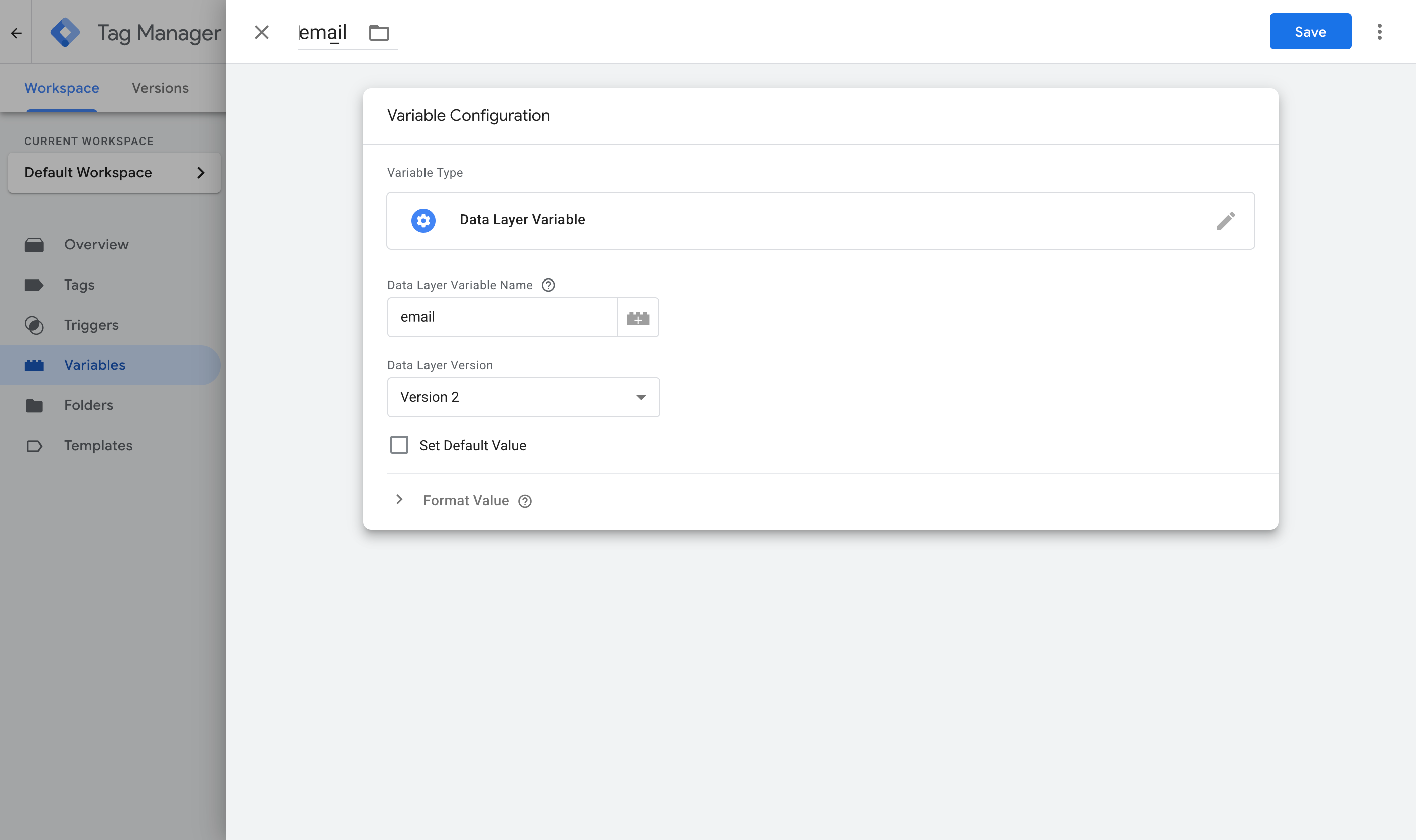
Here are the four you need.
Variable 1:
- Name: Email
- Variable Type: Data Layer Variable
- Data Layer Variable Name: email
Variable 2:
- Name: First Name
- Variable Type: Data Layer Variable
- Data Layer Variable Name: first_name
Variable 3:
- Name: Last Name
- Variable Type: Data Layer Variable
- Data Layer Variable Name: last_name
Variable 4:
- Name: Phone
- Variable Type: Data Layer Variable
- Data Layer Variable Name: phone
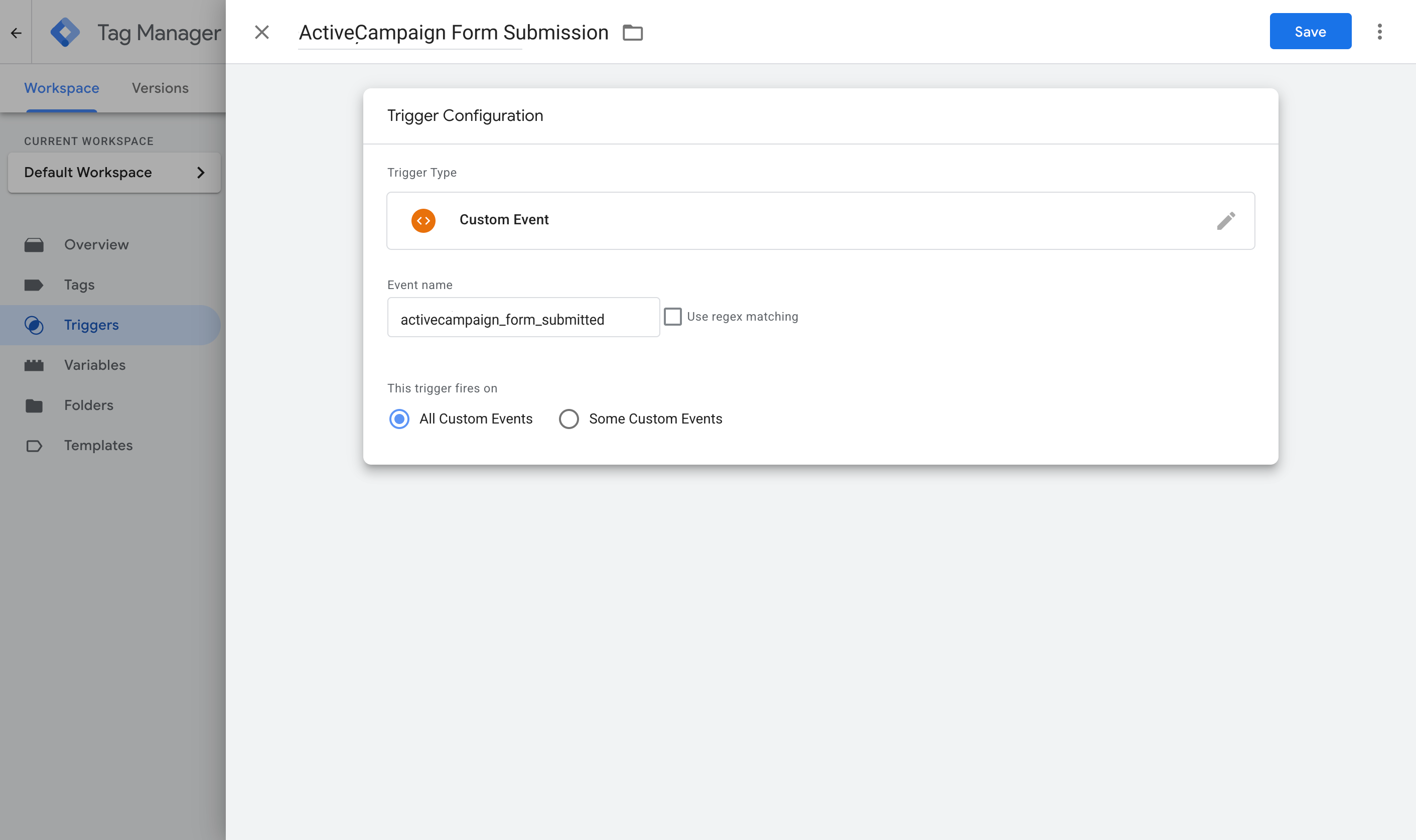
Step 3: Create a Custom Event trigger
With the Variables pulling the details out, Google Tag Manager now needs to know when to use them. That's what a Trigger does. It watches for the event the snippet pushes into the dataLayer when an ActiveCampaign form is submitted successfully, and tells your conversion tags to fire when it shows up.
Go to the Triggers section, click New, choose the Custom Event type, and set the event name to activecampaign_form_submitted (it has to match what the code pushes exactly).
Step 4: Turn on Enhanced Conversions in Google Ads
Everything so far lives in Google Tag Manager, but Google Ads also has to agree to receive the customer data before any of it gets used. Head to your Google Ads account, go to Goals, then Conversions, then Settings, and turn on Enhanced Conversions.
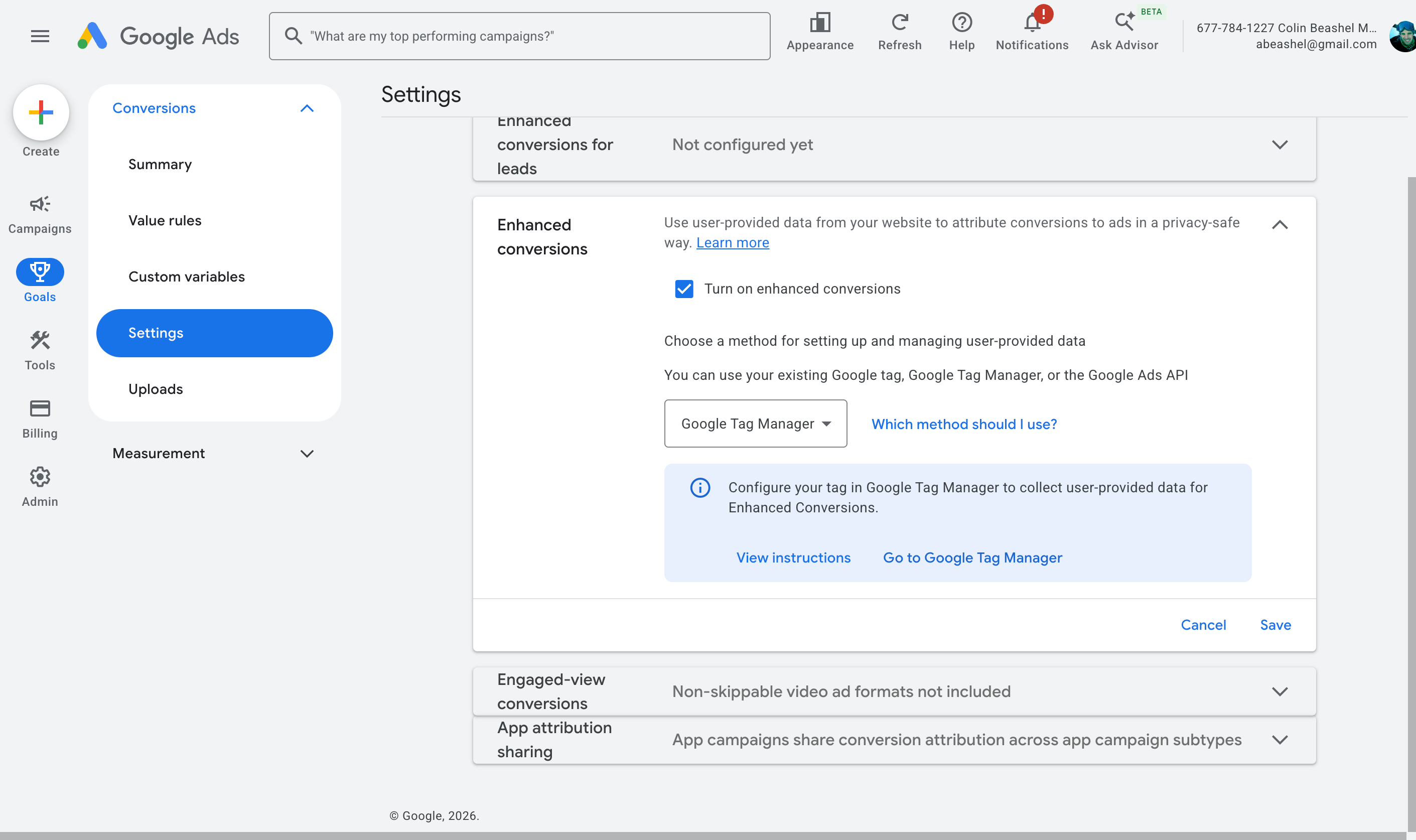
When it asks how you want to implement it, choose Google Tag Manager. This gives Google Ads permission to receive and use the customer data you're about to send.
Step 5: Create your Google Ads conversion tag and map the data
This is where the pieces come together. The tag you build now is what actually sends the conversion, using the Variables from Step 2 for the data and the Trigger from Step 3 for the timing. Jump back into GTM, go to Tags, select New, choose Google Ads User Provided Data Event as the tag type, and map the variables from Step 2 to the fields it asks for.
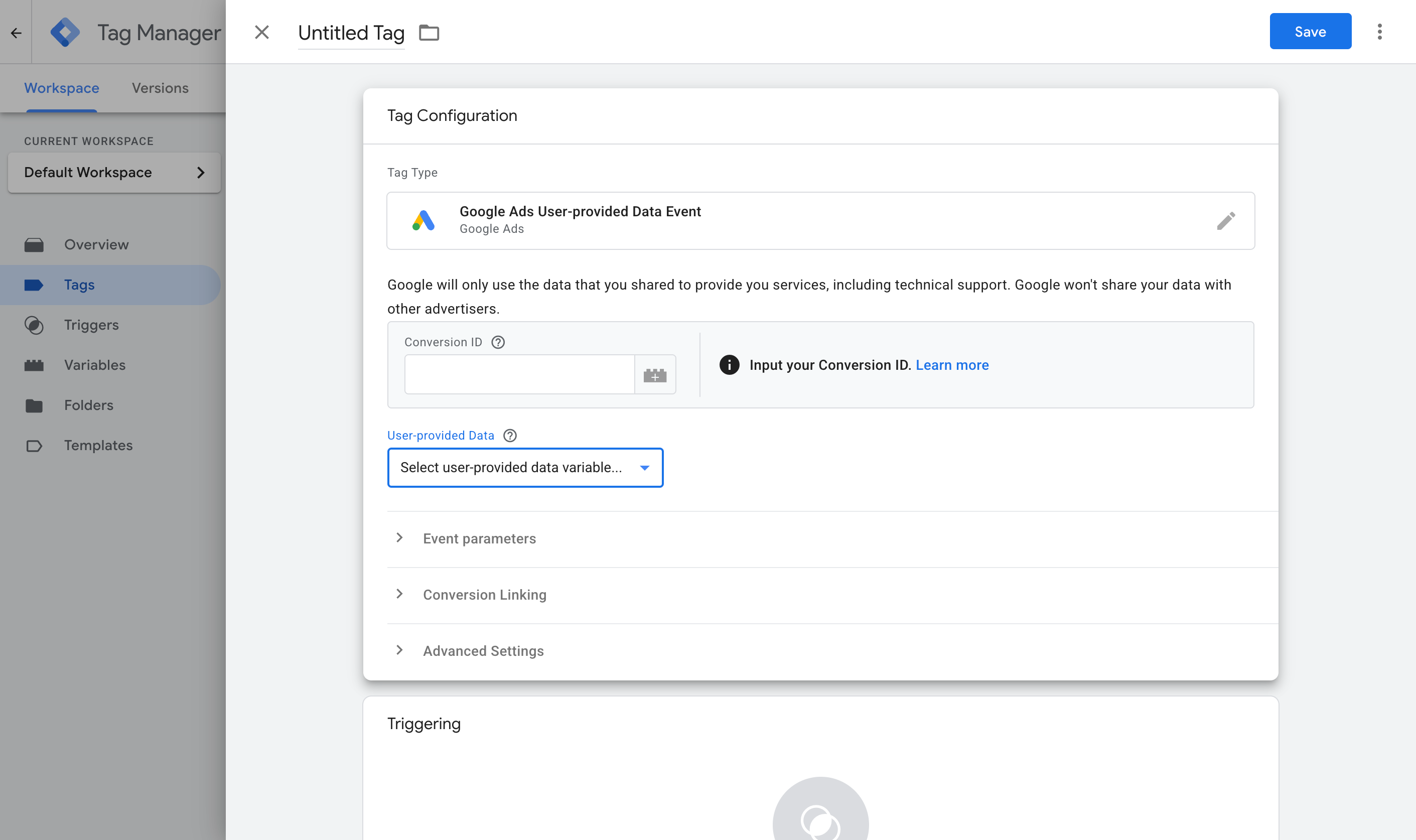
Then set it to fire on the Custom Event trigger you created in Step 3.
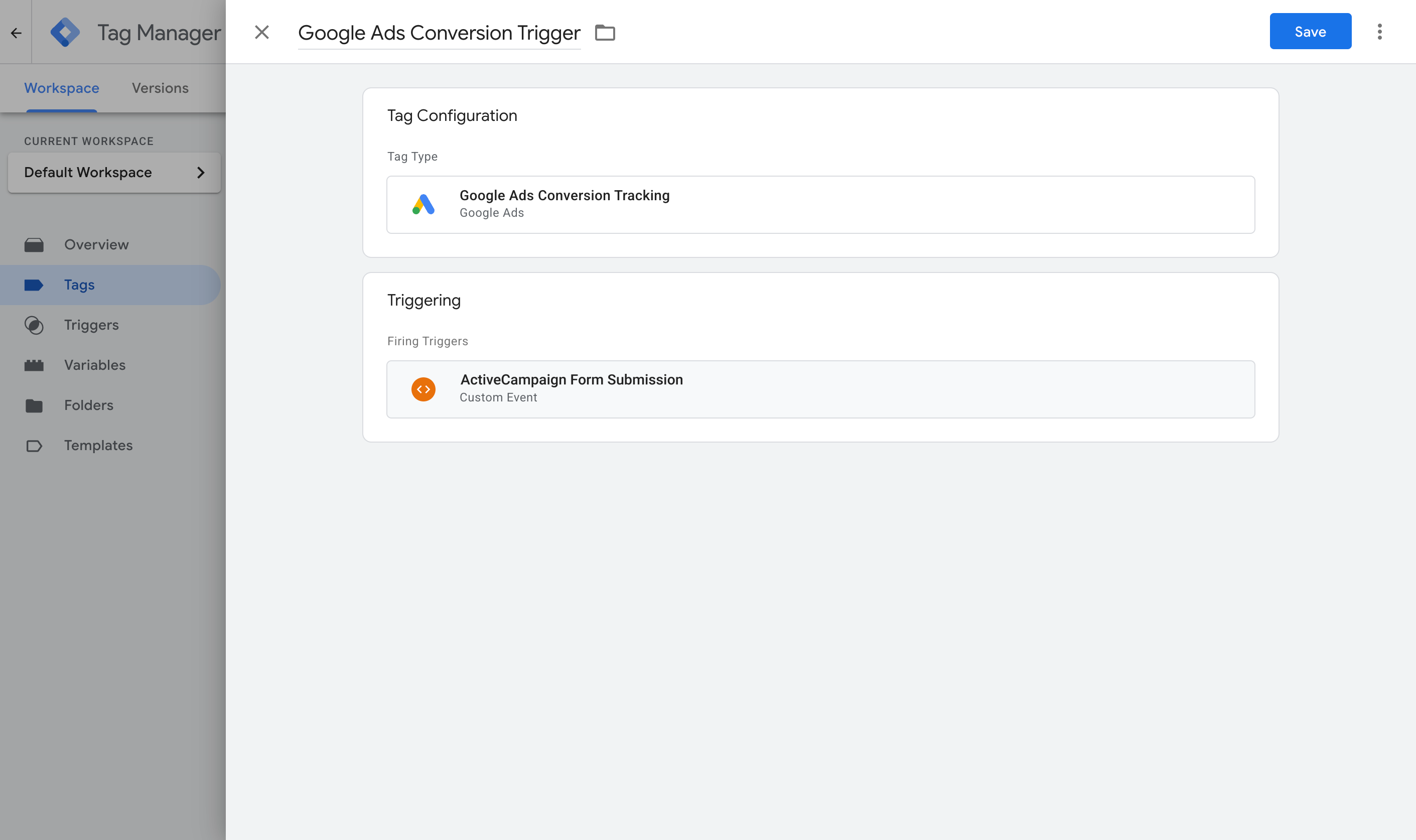
Once that's done, publish your GTM container. You should now have a Tag that listens for ActiveCampaign form submissions and sends an event to the dataLayer, Variables that pull the lead's details out of the dataLayer, a Trigger that watches for the event, and a second Tag that sends the conversion when the Trigger fires.
To check it's working, open GTM Preview mode, submit the ActiveCampaign form on your site, and confirm the activecampaign_form_submitted event arrives with the email and name filled in.
Pros and cons
Pros:
- It's free, and you may already have Google Tag Manager installed on your site, so that's a start.
- Unlike Method 1, it captures the name, email and phone and sends them to Google Ads (the minimum you need for Enhanced Conversions).
- It only fires when an ActiveCampaign form is successfully submitted (and doesn't fire when the form is submitted but the submission is rejected due to errors).
- It works whether your form shows a thank-you message or sends people to a thank-you page. It works whether you use the Simple Embed method or the Full Embed method. It works with all ActiveCampaign form types (including inline, modal, floating box and floating bar forms).
Cons:
- There are a lot of moving parts. Between the GTM tag, the Trigger, four Variables, the Google Ads settings and the conversion Tag itself, there's plenty to get wrong. And if something does go wrong, nothing tells you where or why. It just doesn't work, and you have to figure out the reason yourself (and Google doesn't provide any support for Google Tag Manager).
- It still sends the conversion through the visitor's browser, so ad blockers and privacy browsers can stop it from firing. Expect to lose 30% or more of your conversions this way.
- On forms that open a thank-you page, the browser is already on its way to the next page when the conversion fires. Whether each tag finishes sending before the page changes depends on the tag, so some of those conversions can go missing without anything telling you.
- It still misses the data Google values most. The name, email and phone are useful, but millions of people share the same name, and plenty of people have more than one email address (so the one they typed into your form may not be the one they were logged into Google with when they clicked your ad). Ideally you'd also capture the Google Click ID, which ties the conversion back to the original ad click with 100% accuracy, and this method doesn't do that.
That last point is the one that moves a lot of people on to Method 3.
Method 3: Use Converly
Best for: Sending proper, server-side conversions to Google Ads, Meta Ads, ChatGPT Ads, LinkedIn Ads, and more, without having to do complicated configuration in Google Tag Manager.
Converly is a dedicated conversion tracking tool, built to send server-side conversions to Google Ads, Meta Ads, LinkedIn Ads, ChatGPT Ads, and more whenever someone submits an ActiveCampaign form on your site.
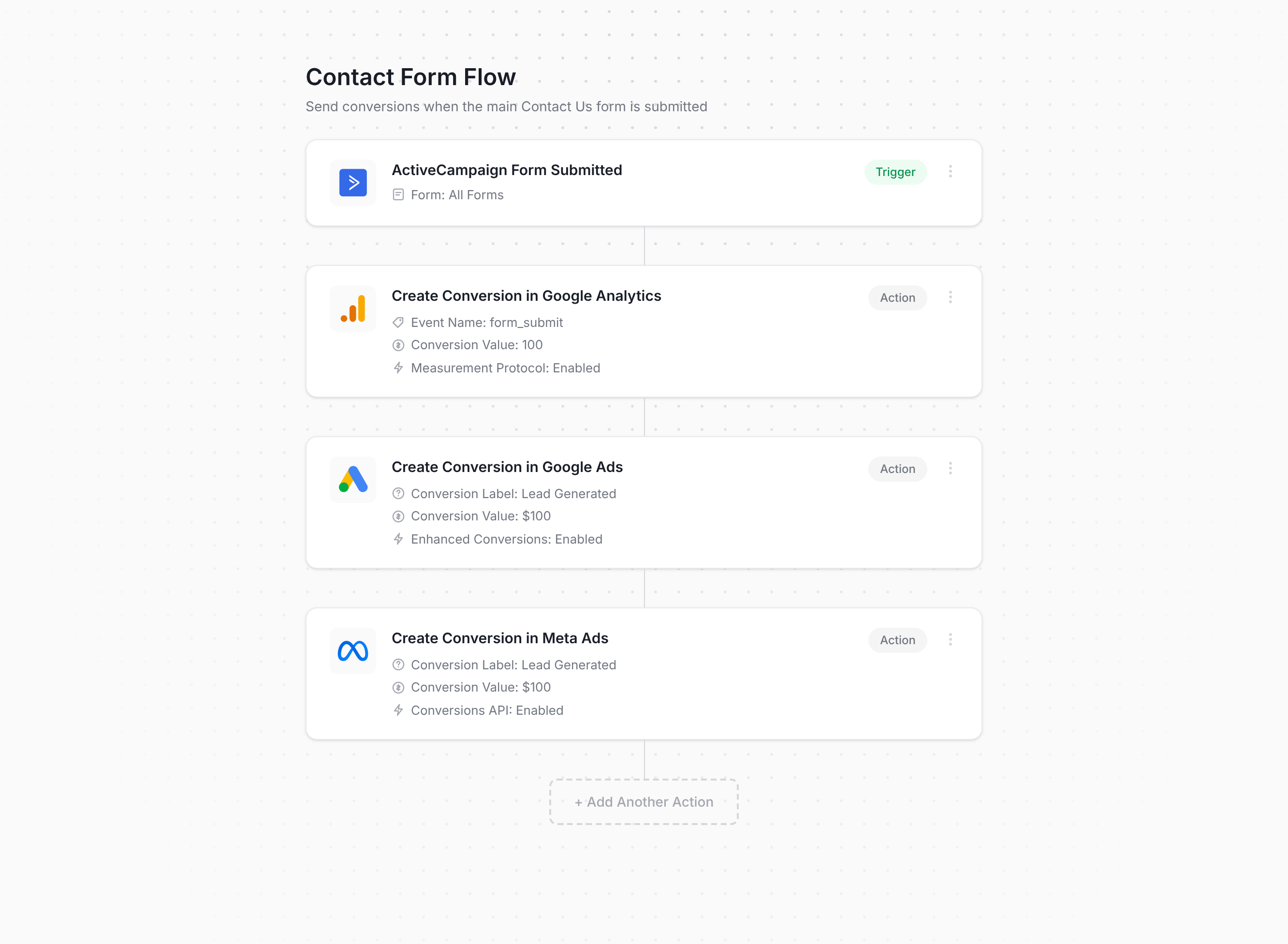
The screenshot above is basically the whole setup process. You choose a trigger (in this case an ActiveCampaign form being submitted), add one or more actions (such as sending a conversion to Google Ads or Meta Ads), and you're done! You don't write any code or wire anything together by hand in Tag Manager (and it makes no difference whether your form shows a thank-you message or sends people to a thank-you page, because Converly handles both for you).
Once that's configured, you add the snippet of code Converly gives you to your site and it takes care of everything else. It watches for ActiveCampaign form submissions, extracts the name, email and phone, and sends them to Converly's own servers. Those servers then forward it to Google Ads, Meta Ads, and any other destination you've connected. Because the forwarding happens on Converly's servers rather than in the browser (a process known as server-side tracking), ad blockers and privacy browsers like Safari can't get in the way (so the ad platforms receive far more accurate conversion data).
And for ad platforms like Google, Meta, ChatGPT, LinkedIn, etc., this next part is what really makes the difference. Alongside the name, email and phone, Converly also picks up the click IDs (i.e. GCLID, fbclid, etc), the browser cookies set by the ad platforms, the visitor's IP address and their user agent, and sends all of it with every conversion. Ad platforms lean heavily on these signals, so sending all of them is what lifts your match quality from mediocre to strong (Meta's Event Match Quality, for instance, usually rises from around 3 to somewhere between 9 and 10).
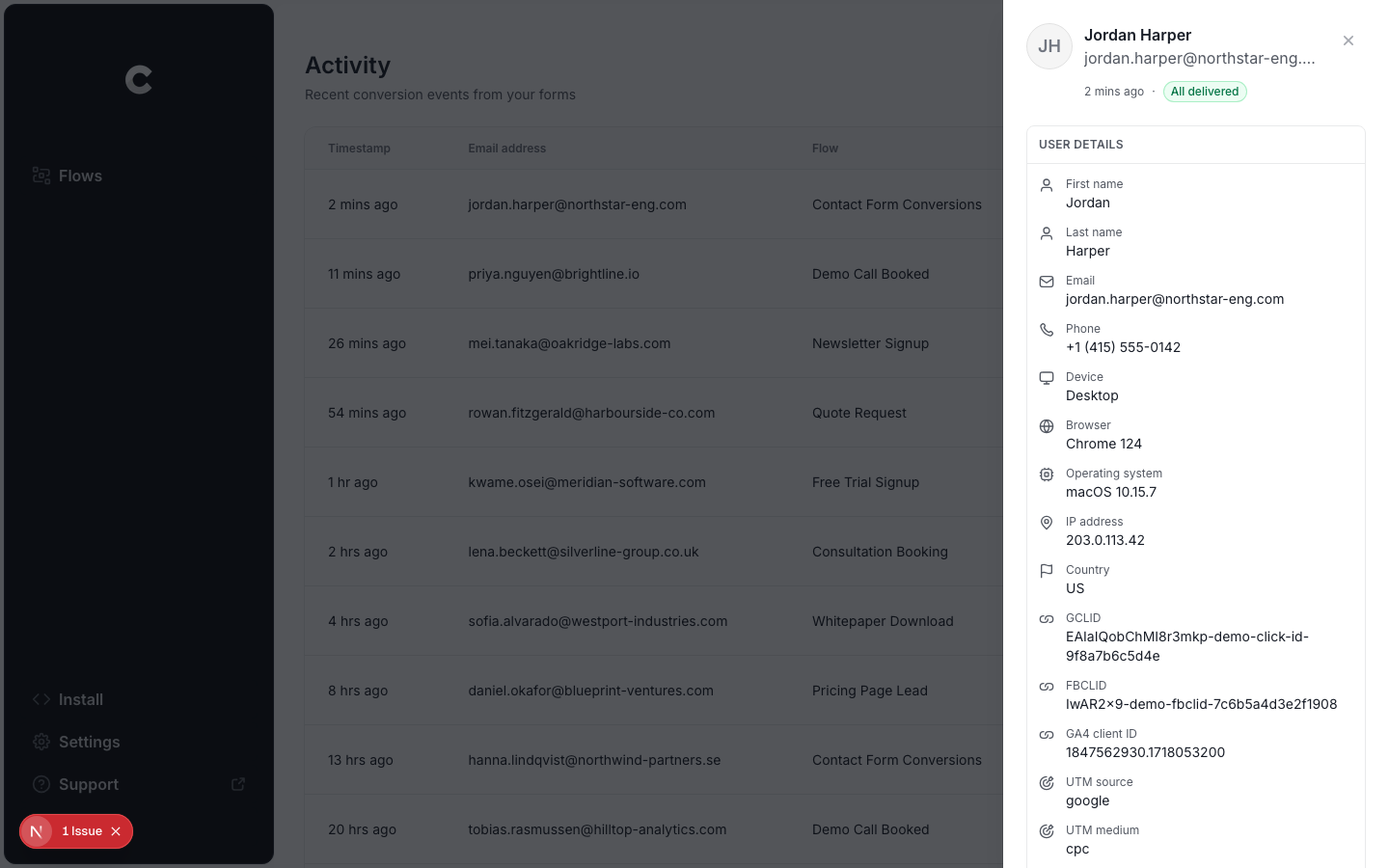
There's also a full conversion log built in, showing every lead who submitted an ActiveCampaign form, exactly what data Converly captured, what got forwarded to each platform, and whether it made it through successfully.
Pros and cons
Pros:
- Setup is quick and easy. Choose a trigger, choose your actions, and you're done. No code to write or maintain, no complicated configuration in Google Tag Manager, and no need to worry about how your ActiveCampaign form is set up.
- Sends click IDs, cookies, IP address and user agent with every conversion, which noticeably improves match quality in the ad platform (as one example, Meta's Event Match Quality typically goes from a 3 or 4 up to a 9 or 10 with Converly).
- Sends conversions server-side, so ad blockers and privacy browsers can't block them. Expect about 30% more recorded conversions than a Google Tag Manager setup.
- Supports conditional logic, so you get to decide which forms trigger a conversion (like firing one when someone submits your Quote Request form but not when they fill in your Contact Support form).
- Lets you connect Google Ads, Meta Ads, etc right inside the platform and just pick which conversion should fire. No digging around for account IDs or conversion IDs.
- Comes with a dedicated MCP and CLI, so you can connect AI tools like Claude or ChatGPT, say ‘Set up conversion tracking in Google Ads and Meta Ads when someone submits my ActiveCampaign form’, and it does everything for you.
- Includes a full conversion log of every lead who submitted an ActiveCampaign form, what data was captured, whether it reached your ad platforms, and more.
- Backed by a real support team who'll help you get set up and fix any problems (good luck getting that kind of help from Google when your GTM setup breaks).
Cons:
- It costs money once the free trial ends. Plans start at $19 a month.
What not to do
We've now covered the three best ways to set up conversion tracking for ActiveCampaign forms and when each one makes sense to use. But it's just as useful to know which approaches to avoid, because some of the most popular ways of tracking ActiveCampaign form submissions as conversions have real problems. Here are the ones to steer clear of.
Tracking thank-you page visits
This is still the most common DIY approach. ActiveCampaign lets you redirect to a URL after the form is submitted, so pointing that at a thank-you page and tracking visits to it feels like the natural thing to do. In practice it creates more problems than it solves:
It fires for people who never submitted anything. A thank-you page is just a URL, and people can reach a URL without ever completing a form. They bookmark it, pull it up from their browser history or autocomplete, get sent the link by a colleague, or find it in Google if it's ever been indexed. Each of those counts as a conversion, even though nobody submitted a form.
It can double count real submissions. Refresh the thank-you page and you've got a second conversion. Hit the back button and come back, or revisit it later from your history, and you get more. One lead can clock up several conversions, which inflates your numbers and means Google and Meta are optimising your ads against the wrong data.
You would get terrible match rates. A page visit doesn't know who submitted the form, so it can't pass on the name, email, phone, GCLID, fbclid, and so on that ad platforms need for proper conversion tracking. So even though conversions are reaching these ad platforms, they barely help, because they're missing the data needed to tie each one to a real person and the original ad they clicked.
The three methods above all fire when ActiveCampaign confirms the submission, so they stay tied to what actually happened.
Relying on the default form submit event in Google Tag Manager
When people set up tracking in Google Tag Manager, the obvious move is GTM's built-in Form Submission trigger (which listens for the browser's form submit event).
The catch with ActiveCampaign is that the browser's form submit event fires regardless of whether the form submission is successful or not. So if a lead submits the form but there's an error (they missed a required field, typed the email wrong, entered the phone in the wrong format, etc) then the conversion is sent regardless of the fact the submission failed. And then when they fix the error and submit the form again, a second conversion is fired.
You need to listen for successful form submissions (not just any form submission), the way Methods 1 through 3 above do.
Using GA4's automatic form tracking (Enhanced Measurement)
GA4 has an Enhanced Measurement feature that promises to track form submissions automatically, with no setup.
It works the same way GTM's form submission trigger works, which means it inherits the same problems. It will fire even when the form submission was rejected, and then it will fire again when the lead fixes the error and submits the form again, which means you'll end up with 2 conversions for one lead.
If you want submissions recorded reliably in GA4, use the free recipe from Method 1 above, or use Converly.
Firing the conversion on the submit button click
Some ActiveCampaign tracking setups we've seen fire the conversion when the visitor initially clicks the submit button, usually with a click trigger on the button in GTM. It's an easy shortcut, but a click isn't a submission.
After the visitor clicks Submit, ActiveCampaign checks the fields in the browser, and anything wrong (a blank required field, a badly formatted email) gets flagged and the form submission is cancelled. But if you were firing conversions on the button click, then a conversion would have been sent regardless of the fact the form wasn't actually submitted.
And even when the form does get sent, ActiveCampaign's servers can still refuse it (for example, over a phone number in a format they won't accept). Every one of those clicks gets counted as a conversion, and when the visitor fixes the problem and submits again, that's counted a second time.
As we said above, you should only fire a conversion when ActiveCampaign confirms the form was submitted successfully, not on a stand-in for it (like clicks of the Submit button).
So which method should I use?
Here's how the three ways to track ActiveCampaign conversions compare.
| Method | Best for | Sends conversions to | Data sent |
|---|
| Method 1. GA4 event built in Google Tag Manager | Sending submissions to Google Analytics (use our free GTM recipe to make it easier) | Google Analytics 4 | The submission event only |
| Method 2. Enhanced Conversions through Google Tag Manager | Sending to Google Ads, if fiddly configuration doesn't put you off | Google Ads | Name, email and phone |
| Method 3. Converly | Sending to any ad platform, with the least setup work | Google Ads, Meta Ads, LinkedIn Ads, ChatGPT Ads, GA4 and more | Name, email and phone, plus the GCLID, the Meta click ID, IP address and user agent |
Wrap up
Conversion tracking doesn't get much attention, but it's actually one of the bigger factors in how well your advertising performs.
If you take the time to set it up properly, Google and Meta's algorithms will have the data they need to learn what your ideal customer looks like, and can then show your ads to more people like them. Get it wrong (or skip it completely) and you'll keep paying to show ads to people who were never going to convert.
Both platforms have even put numbers on the difference. Google says businesses that switch to proper server-side conversion tracking see around 19% more conversions on average, and Meta reports a 23% increase from making the same move.
Converly gives you all the benefits of server-side tracking without any of the hard work. Just choose your trigger (someone submitting an ActiveCampaign form), pick the platforms you want the conversions sent to, and you're done!
Converly is free to start (you don't even need a credit card for the trial), and most people have it fully up and running in under 10 minutes. Start your 14-day free trial today.